
Introduction
This manual provides essential information for the safe and efficient operation of your oviitech 65W 6-Outlet Surge Protector with USB Power Strip. Please read these instructions thoroughly before use and retain for future reference.
Key Features:
- 6 AC Outlets & 3 USB Ports: Features six standard AC outlets and three USB ports (1 USB-A + 2 USB-C) for simultaneous device charging.
- 65W USB Power Delivery: Equipped with 65W USB Power Delivery for fast and efficient charging of compatible devices, including gaming PCs, smartphones, and tablets.
- 2100J Surge Protection: Safeguards your valuable electronics from voltage spikes and power surges.
- 6-Foot Heavy-Duty Extension Cord: Provides ample reach and flexibility for various setups.
- Full Spectrum Color Select: Integrated RGB ambient lighting with multiple modes and color options to match your environment.
- High-Angle Bending Design: Allows the power cord to adjust up to 60 degrees for flexible placement in tight spaces.
Product Components

Front view of the oviitech 6-Outlet Surge Protector, showing AC outlets, USB ports, and RGB lighting.
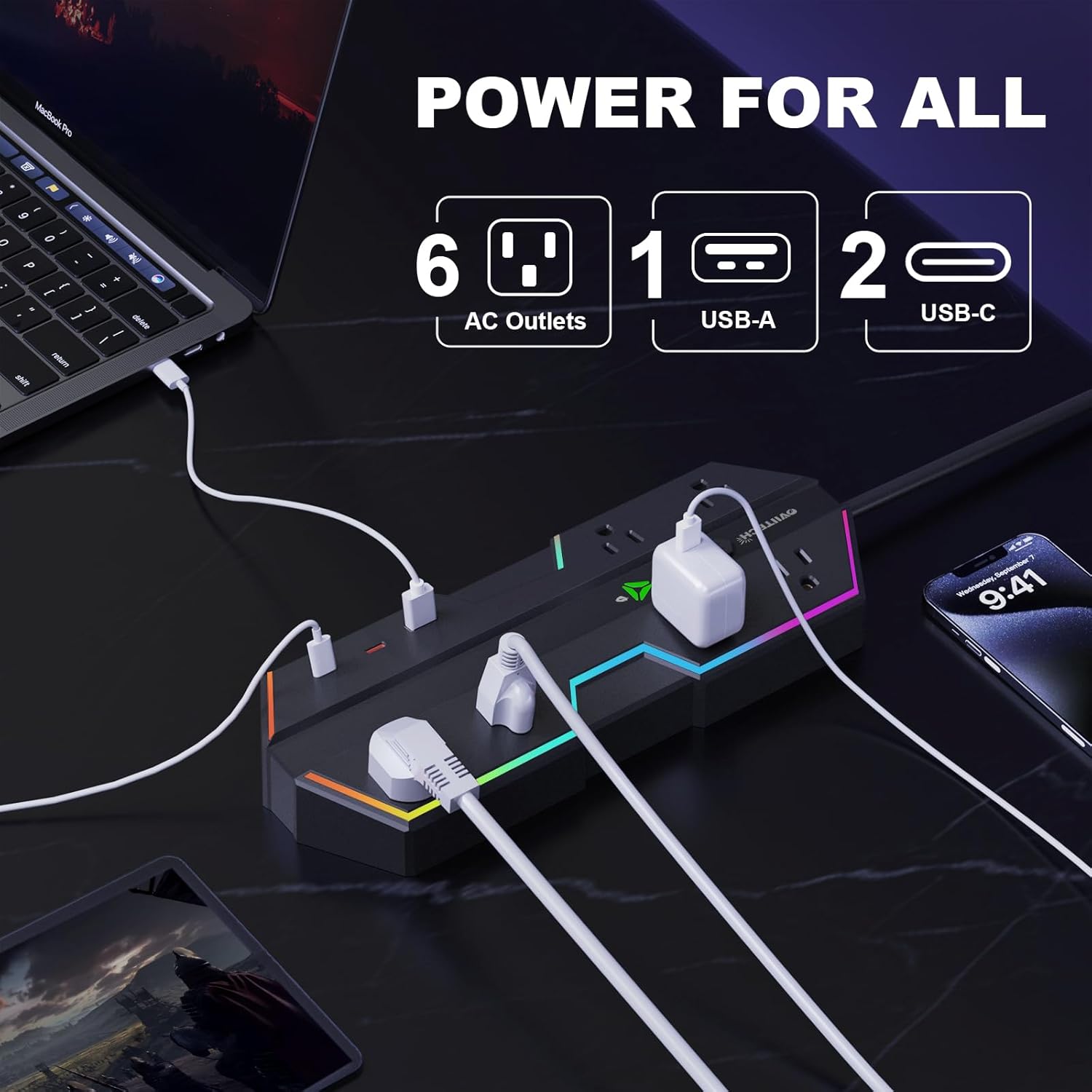
Diagram illustrating the 6 AC outlets, 1 USB-A port, and 2 USB-C ports available on the power strip.
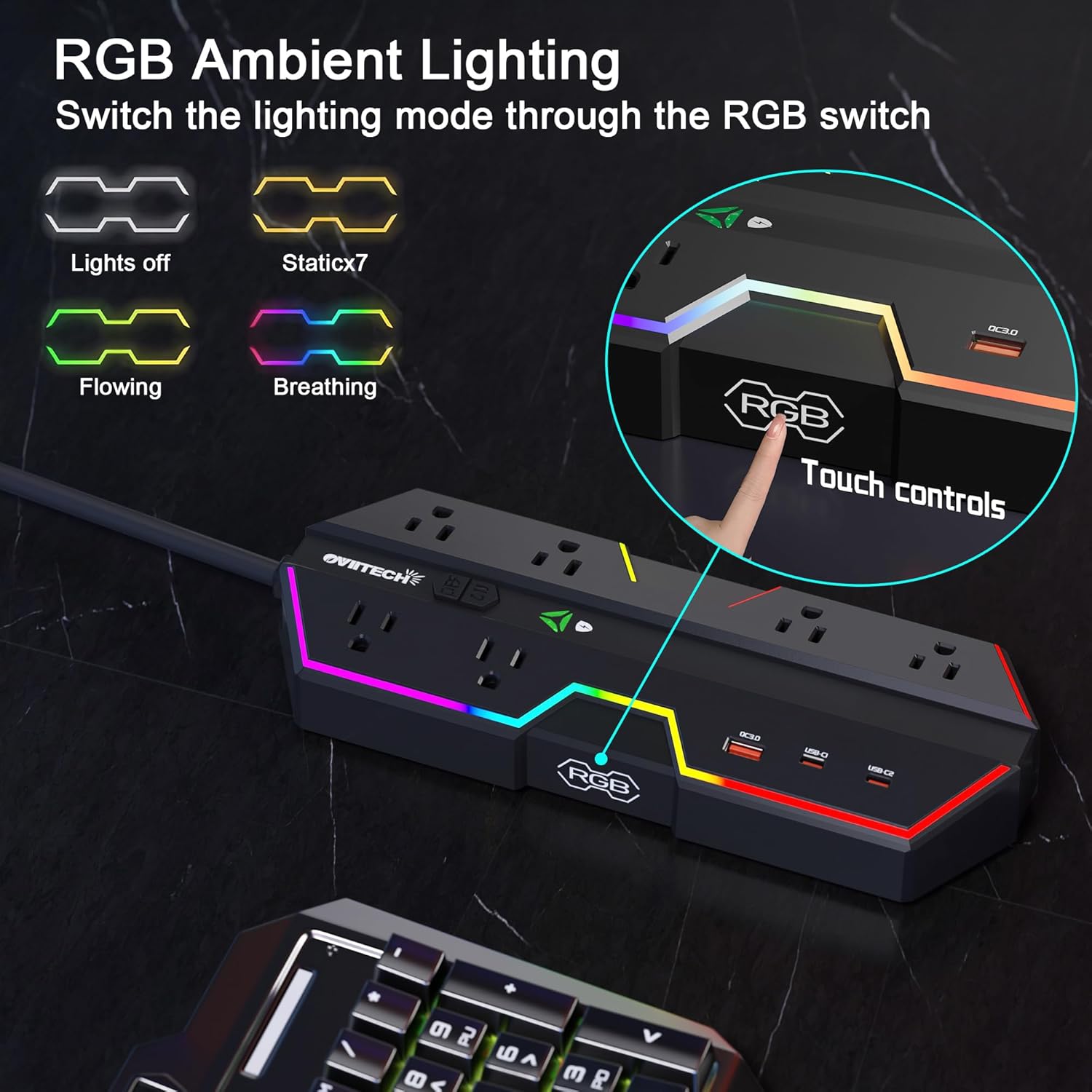
Close-up of the RGB ambient lighting feature and touch controls for switching lighting modes (Lights off, Static, Flowing, Breathing).

Illustration of the power strip's high-angle bending feature, allowing the cable to adjust up to 60 degrees for flexible placement.

Image highlighting the 6-foot extension cord, providing ample reach for various setups.
Setup
- Unpack: Carefully remove the surge protector from its packaging and ensure all components are present and undamaged.
- Connect to Power: Plug the 3-prong power cord into a standard, grounded 125V wall outlet.
- Positioning: Place the surge protector in a stable location. Utilize the high-angle bending feature of the power cord to optimize placement and reduce cable strain, especially in tight spaces.
- Mounting (Optional): The unit features two keyhole slots on the bottom for wall or desk mounting. Use appropriate screws (not included) to secure the unit if desired.
Operating Instructions
- Power On/Off: Use the 'ON/OFF' switch located on the top surface of the unit to control the power supply to all connected devices. Slide the switch to 'ON' to activate and 'OFF' to deactivate.
- Using AC Outlets: Plug your electronic devices directly into the six standard AC outlets. The wide spacing between outlets is designed to accommodate larger power adapters without blocking adjacent ports.
- Using USB Charging Ports: Connect your smartphones, tablets, or other USB-powered devices to the 1 USB-A port or the 2 USB-C ports. The 65W USB Power Delivery feature ensures rapid charging for compatible devices.
- Controlling RGB Lighting: Tap the 'RGB' touch control button (indicated by an RGB icon) to cycle through various ambient lighting modes and colors. Continue tapping to select your preferred lighting effect or to turn the lights off.
Video demonstrating the 6 outlets, RGB lighting, and PD charging features of the oviitech power strip.
Safety Information
- Surge Protection: This unit provides 2100 Joules of surge protection. The indicator light on the unit confirms active surge protection. If this light is off, the unit may have absorbed a significant surge and should be replaced to ensure continued protection.
- Overload Protection: The built-in smart chip automatically identifies the charging power of different devices and provides overcurrent protection to prevent damage from excessive current.
- Electrical Rating: Do not exceed the maximum electrical rating of 125 Volts. Ensure the total power consumption of connected devices does not exceed the unit's capacity.
- Environment: Use the surge protector indoors only. Avoid using in wet or damp environments, or near heat sources.
- Maintenance: Do not disassemble, modify, or attempt to repair the device. Refer all servicing to qualified personnel.
- Children and Pets: Keep the device out of reach of children and pets.

Illustration demonstrating the 2100J surge protection feature, shielding connected devices from electrical spikes.
Maintenance
- Cleaning: Ensure the surge protector is unplugged from the wall outlet before cleaning. Wipe the surface with a dry, soft cloth. Do not use liquid cleaners, aerosols, or abrasive cleaning agents.
- Storage: When not in use for extended periods, unplug the unit and store it in a cool, dry place away from direct sunlight and moisture.
- Inspection: Periodically inspect the power cord and the unit for any signs of damage, such as frayed wires or cracked casing. If damage is found, discontinue use and contact customer support.
Troubleshooting
- No Power to Devices:
- Check if the 'ON/OFF' switch on the surge protector is in the 'ON' position.
- Verify that the surge protector's power cord is securely plugged into a functioning wall outlet.
- If the surge protection indicator light is off, the unit may have absorbed a power surge and needs to be replaced.
- Device Not Charging via USB Ports:
- Ensure your device is compatible with USB-A or USB-C charging.
- Check that the USB cable is securely connected to both the surge protector and your device.
- Some devices may require specific charging protocols; try a different USB port or cable.
- RGB Lights Not Functioning:
- Ensure the surge protector is powered on.
- Tap the 'RGB' touch control button to cycle through the lighting modes. The lights may be set to 'off'.
Specifications
| Feature | Specification |
|---|---|
| Model Number | LTS-DJ08-65 |
| Total Power Outlets | 6 AC Outlets |
| Total USB Ports | 3 (1 USB-A, 2 USB-C) |
| USB Power Delivery | 65W |
| Surge Protection Rating | 2100 Joules |
| Voltage | 125 Volts |
| Extension Cord Length | 6 Feet |
| Color | Black |
| Package Dimensions | 12.4 x 7.32 x 2.13 inches |
| Item Weight | 2.27 pounds |

Image displaying the dimensions of the oviitech 6-Outlet Surge Protector.
Warranty and Support
oviitech is committed to providing high-quality power solutions and stands by the quality of its products. For any questions, concerns, or technical assistance, please contact oviitech customer service.
Optional protection plans are available for purchase to extend coverage beyond the standard warranty. Please refer to your purchase documentation for details on warranty terms and how to access support.