
Introduction
Thank you for choosing the Sportconic Foldable Walking Pad. This manual provides essential information for the safe and effective use, maintenance, and troubleshooting of your new fitness equipment. Please read this manual thoroughly before operation and retain it for future reference.
Setup and Assembly
Your Sportconic Walking Pad is designed for quick and easy setup. Follow these steps to prepare your device for use:
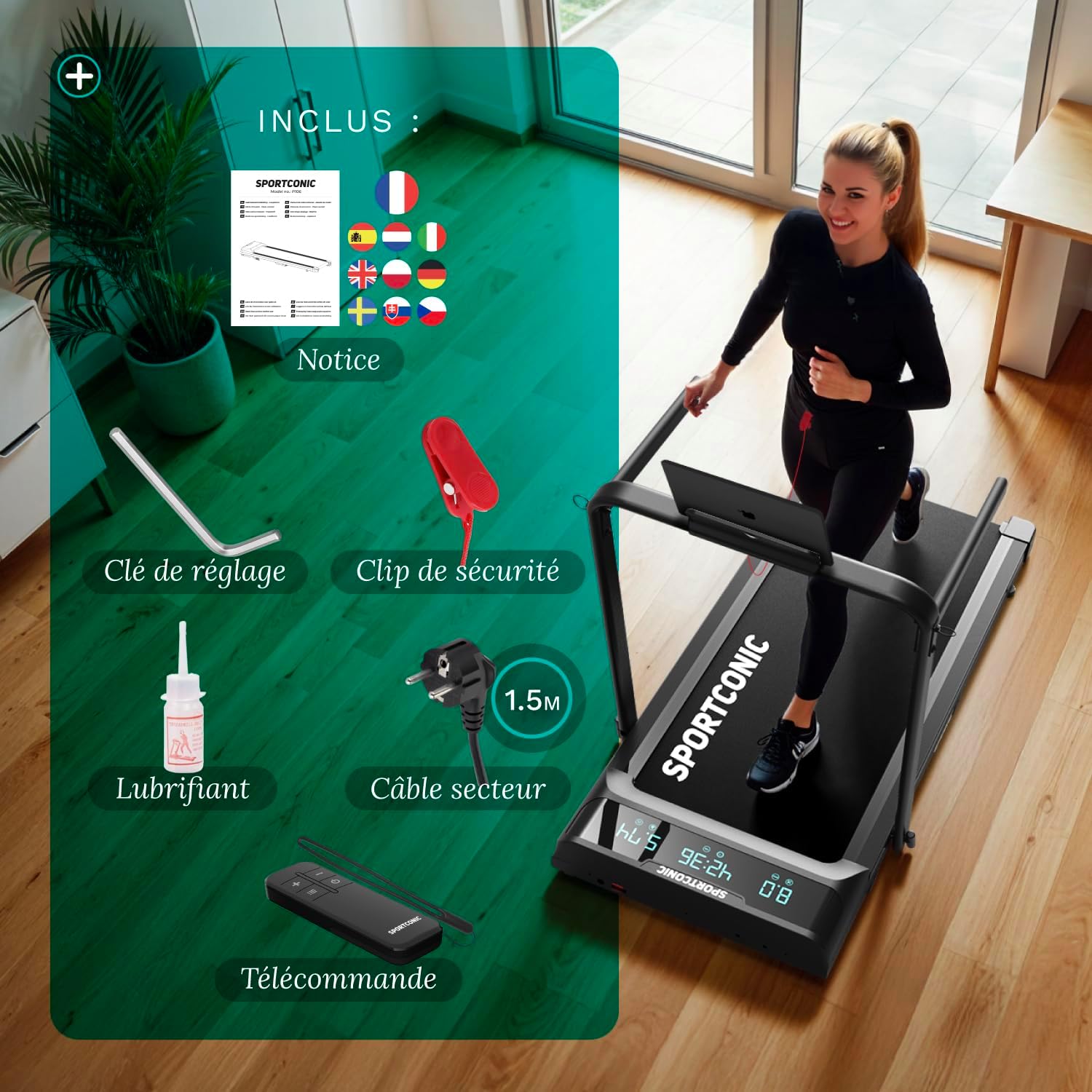
- Unpacking: Carefully remove the walking pad and all components from the packaging. Ensure all parts listed in the 'Included Components' section are present.
- Placement: Choose a flat, stable surface for the walking pad. Ensure there is adequate clear space around the device for safe operation (at least 2 meters behind and 0.6 meters on each side).
- Unfolding the Handrail: Gently lift the handrail until it locks into its upright position. Ensure it is securely fastened.
- Connecting Power: Plug the power cable into the walking pad and then into a grounded electrical outlet.
- Safety Key: Attach the safety key clip to your clothing and place the magnetic end onto the designated area on the console. The walking pad will not operate without the safety key in place.

Operating Instructions
Familiarize yourself with the controls and functions of your Sportconic Walking Pad for an optimal workout experience.
Power On/Off
- To power on, ensure the safety key is in place and press the power button on the remote control or console.
- To power off, press the power button again. The machine will gradually slow down before stopping.
Speed Adjustment
The walking pad offers a speed range of 1 to 12 km/h, suitable for both walking and light running.
- Use the '+' and '-' buttons on the remote control to increase or decrease the speed.
- For quick adjustments, some models may have preset speed buttons.
Remote Control and LED Display
The remote control allows convenient operation, especially when the handrail is folded for under-desk use. The LED display provides real-time workout data.

The LED display shows:
- Time: Duration of your workout.
- Distance: Total distance covered.
- Speed: Current speed in km/h.
- Calories: Estimated calories burned.
Manual Incline
The walking pad features a 6% manual incline to increase workout intensity and calorie burn.

To adjust the incline:
- Ensure the walking pad is off and unplugged.
- Locate the incline adjustment points at the rear of the walking pad.
- Manually adjust the supports to achieve the desired incline level. Refer to the specific instructions in the included manual for detailed steps.
Tablet Holder
The integrated tablet holder allows you to enjoy entertainment or work while exercising.
- Place your tablet securely in the designated slot on the handrail.
- Ensure the tablet is stable before starting your workout.

Maintenance
Regular maintenance ensures the longevity and optimal performance of your Sportconic Walking Pad.
Cleaning
- Wipe down the walking pad with a damp cloth after each use to remove sweat and dust.
- Do not use abrasive cleaners or solvents.
Lubrication
The running belt requires periodic lubrication to reduce friction and extend its lifespan. Use the provided lubricant.
- Frequency: Lubricate every 3-6 months, or after approximately 100 hours of use, depending on usage.
- Procedure: Refer to the detailed instructions in your included manual for the exact lubrication process. Generally, you will lift the edge of the belt and apply lubricant to the center of the deck.
Belt Adjustment
If the running belt slips or drifts to one side, it may need adjustment.
- Use the adjustment wrench provided to tighten or loosen the rear rollers.
- Adjust in small increments (quarter turns) and test the belt after each adjustment until it is centered and taut.
Troubleshooting
This section addresses common issues you might encounter with your Sportconic Walking Pad.
| Problem | Possible Cause | Solution |
|---|---|---|
| Walking pad does not start | Safety key not in place; Power cable not connected; Power switch off; Circuit breaker tripped. | Ensure safety key is correctly placed; Check power cable connection; Turn on power switch; Reset circuit breaker. |
| Belt slips or hesitates | Belt too loose; Insufficient lubrication. | Adjust belt tension (see Maintenance); Lubricate the running deck (see Maintenance). |
| Unusual noise during operation | Loose components; Motor issue; Belt misalignment. | Check all bolts and screws for tightness; If noise persists, contact customer support; Adjust belt alignment (see Maintenance). |
| Remote control not working | Batteries dead; Remote out of range; Interference. | Replace batteries; Ensure you are within range; Remove any potential interference sources. |
If you encounter a problem not listed here or if the suggested solutions do not resolve the issue, please contact Sportconic customer support for assistance.
Specifications
Detailed technical specifications for the Sportconic Foldable Walking Pad (Model P106FA).
| Feature | Detail |
|---|---|
| Model Number | P106FA |
| Speed Range | 1 - 12 km/h |
| Running Surface (L x W) | 109 cm x 40 cm |
| Folded Dimensions (L x W x H) | 109 cm x 40 cm x 13 cm |
| Unfolded Dimensions (L x W x H) | 125 cm x 55 cm x 105 cm |
| Product Weight | 25 kg |
| Maximum User Weight | 110 kg |
| Motor Horsepower | 2 HP |
| Display Type | LED |
| Incline | 6% Manual Incline |
| Special Features | Shock absorption, Integrated wheels, Foldable, Portable |
| Included Components | Safety key, Lubricant, Remote control |

Warranty and Support
Sportconic products are manufactured to high-quality standards. For information regarding your product's warranty, please refer to the warranty card included in your packaging or visit the official Sportconic website.
For technical support, spare parts, or any inquiries not covered in this manual, please contact Sportconic customer service. Contact details can typically be found on the Sportconic website or on your purchase documentation.


