
ATOMSTACK MAKER S40MAX001
ATOMSTACK S40 MAX Laser Engraver and Cutter User Manual
Brand: ATOMSTACK MAKER | Model: S40MAX001
Introduction
The ATOMSTACK S40 MAX is a high-performance laser engraving and cutting machine designed for professional use. It features a powerful 48W optical laser output, enabling efficient processing of various materials. This manual provides essential information for the safe and effective operation, setup, maintenance, and troubleshooting of your ATOMSTACK S40 MAX.
Key features include:
- High-Performance 48W Laser: Capable of cutting 18mm basswood, pine, and tung wood, 9mm MDF boards, and 0.1mm stainless steel sheet in a single pass.
- Dual Mode Operation: Easily switch between 24W and 48W output for fine engraving or powerful cutting.
- Enhanced Motion Structure: Utilizes a linear guide X-axis for improved stability and high-speed operation up to 600 mm/s.
- Integrated Wire Management: Tank chain cabling ensures smooth operation and cable longevity.
- Automatic Air Assist: Comes with the F60 high-current air assist, controllable via Lightburn M7 mode for optimized cutting and engraving quality.
- Expandable Engraving Area: Standard 400 x 800 mm engraving area, suitable for large-format projects.
- Safety Features: Laser protective shield integrated into the laser module, eliminating the need for additional eye protection during operation.
- Offline/App/PC Control: Supports multiple operation modes for flexibility.

Image: The ATOMSTACK S40 MAX laser engraver, showcasing its design and examples of its engraving capabilities on various materials.
Setup Guide
Before operating the ATOMSTACK S40 MAX, ensure all components are present and assembled correctly. Refer to the included product manual for detailed assembly instructions.
1. Unpacking and Component Verification
Carefully unpack all items from the box. Verify that all components listed in the packing list are present and undamaged.
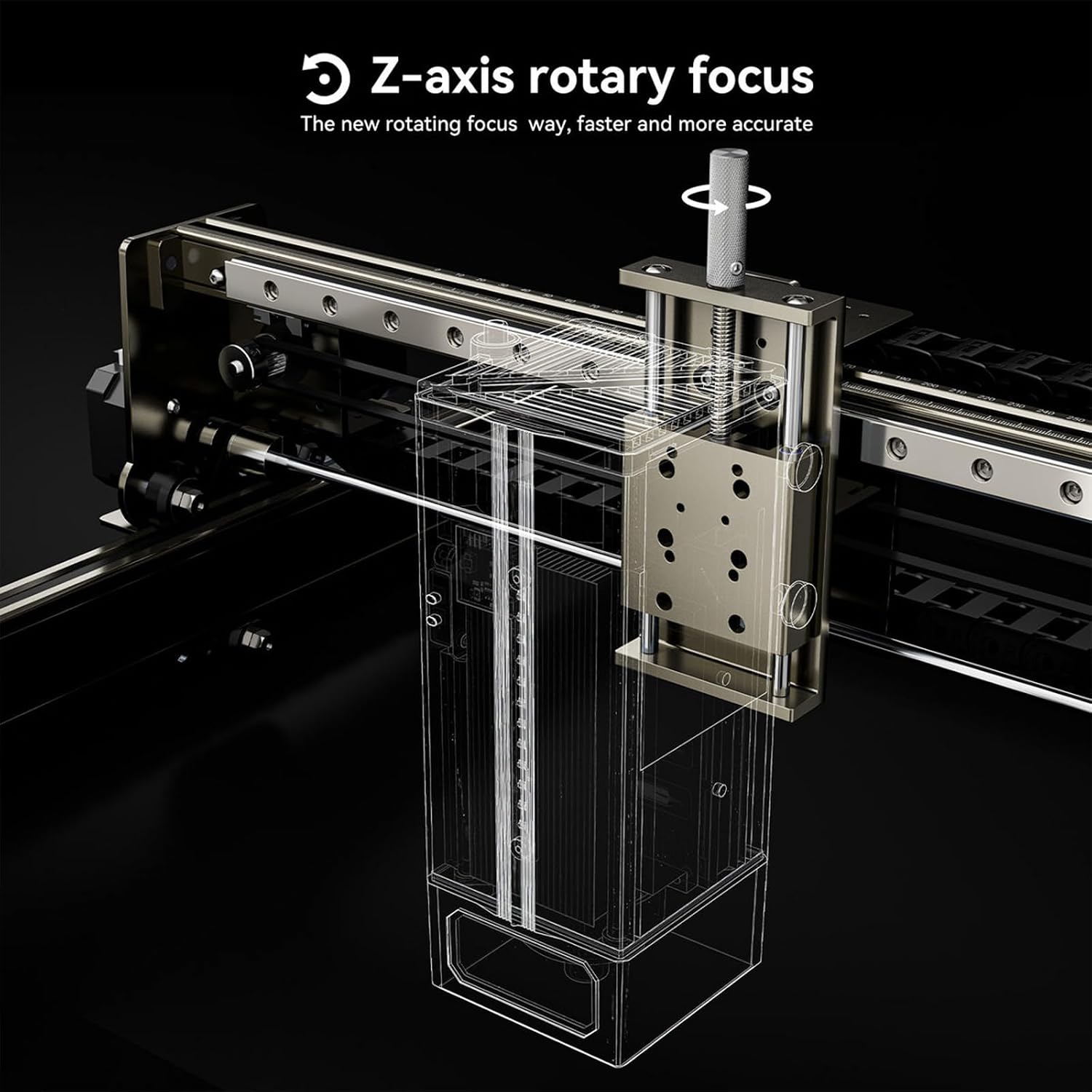
Image: Contents of the ATOMSTACK S40 MAX package, including the main unit, cables, power adapter, safety glasses, and sample materials.
2. Assembly
Follow the step-by-step assembly instructions provided in the physical product manual. Ensure all screws are tightened securely and cables are connected correctly. Pay attention to the linear guide X-axis and tank chain cabling for proper installation.

Image: Detail of the machine's linear guide X-axis, illustrating the enhanced stability and speed capabilities.

Image: The tank chain system for wire management, ensuring a clean and tidy setup and protecting cables.
3. Power Connection
Connect the power adapter to the machine and then to a suitable power outlet (100-240V AC, 50/60Hz). Ensure the power switch is in the OFF position before connecting.
4. Software Installation
Install the recommended software (LaserGRBL, LightBurn) on your computer. Drivers may be required for USB connection. The machine supports Win XP / Win 7 / Win 8 / XP / Win 10 / Win 11 operating systems.
Operating Instructions
1. Powering On and Initial Checks
Turn on the machine using the power button on the control panel. The 3.5-inch large screen controller will activate. Ensure the emergency stop button is disengaged (turned to unlock if pressed).

Image: The machine's control panel, featuring essential buttons for operation and safety, along with the integrated display.
2. Material Preparation and Placement
Place the material to be engraved or cut on the working area. Ensure it is flat and securely positioned. The engraving area is 800 x 400 mm. For larger projects, the machine supports an expanded engraving area.

Image: Visual comparison highlighting the expanded 800x400mm engraving area of the S40 MAX, allowing for larger projects.
3. Focusing the Laser
The ATOMSTACK S40 MAX features a fixed-focus laser, eliminating the need for manual focusing. For precise Z-axis adjustments, utilize the Z-axis rotary focus mechanism.

Image: Diagram showing the Z-axis rotary focus, which allows for fine adjustment of the laser height for different material thicknesses.
4. Software Operation and File Loading
Load your design file (NC, BMP, JPG, PNG, DXF formats supported) into LaserGRBL or LightBurn. Configure the engraving/cutting parameters (power, speed, passes) according to your material and desired outcome.
5. Air Assist Activation
For cutting and enhanced engraving quality, activate the automatic air assist. This can be controlled via the Lightburn M7 mode. The F60 high-current air assist significantly improves cutting performance and reduces charring.

Image: The automatic air assist system in action, demonstrating its integration with the machine and software for improved results.
6. Starting the Operation
Once all settings are configured, initiate the engraving or cutting process from the software. Monitor the operation closely. The laser protective shield on the laser module protects your eyes during operation.
7. Emergency Stop and Shutdown
In case of an emergency, press the red emergency stop button immediately. To completely power off the machine, use the shutdown button.
Maintenance
Regular maintenance ensures the longevity and optimal performance of your ATOMSTACK S40 MAX.
- Lens Cleaning: Periodically clean the laser lens with a soft, lint-free cloth and lens cleaning solution to maintain laser power and precision.
- Rail and Belt Inspection: Check the linear guide rails and belts for dust, debris, or wear. Clean and lubricate the rails as needed.
- Air Assist Nozzle: Ensure the air assist nozzle is clear of debris to maintain effective airflow.
- General Cleaning: Keep the machine and working area clean from dust and material residue.
- Cable Management: Periodically inspect the tank chain and other cables for any signs of wear or damage.
Troubleshooting
This section addresses common issues you might encounter.
1. Machine Not Powering On
- Check if the power cable is securely connected to both the machine and the power outlet.
- Ensure the power switch is in the ON position.
- Verify that the emergency stop button is disengaged (turned to unlock).
2. Laser Not Firing or Weak Output
- Check laser power settings in the software.
- Clean the laser lens.
- Ensure the material is properly focused (adjust Z-axis if necessary).
- Verify the laser module is securely connected.
3. Inaccurate Engraving/Cutting
- Check belt tension and ensure no loose connections on the linear guide.
- Ensure the material is firmly secured and not moving during operation.
- Verify software settings (speed, acceleration).
4. Software Connection Issues
- Ensure USB cable is connected properly.
- Reinstall software drivers if necessary.
- Try a different USB port or cable.
Specifications
| Feature | Detail |
|---|---|
| Product Model | ATOMSTACK S40 MAX |
| Total Machine Power | 210 W |
| Optical Laser Power | 40-48 W |
| Laser Wavelength | 455 ± 5 nm |
| Engraving Accuracy | 0.01 mm |
| Focusing Mode | Fixed-focus laser, no focusing required (Z-axis rotary focus for adjustment) |
| Engraving Size | 800 x 400 mm |
| Engraving Materials | Wood, bamboo, cardboard, plastic, leather, PCB, aluminum oxide, non-reflective metal, coated/painted radioactive, 304 stainless steel, glass, ceramic, cotton, slate |
| Cutting Materials | Cardboard, non-woven fabrics, wood panels, plywood, acrylic (non-transparent), thin plastic panels, sponges, metal sheets (aluminum, stainless steel) |
| Laser Protection | Integrated protective shield on laser module |
| Operating Software | LaserGRBL, LightBurn |
| Supported OS | Win XP / Win 7 / Win 8 / XP / Win 10 / Win 11 |
| Supported File Formats | NC, BMP, JPG, PNG, DXF |
| Data Transfer Method | USB connection |
| Power Supply Input | 100-240 V AC, 50/60 Hz |
| Power Supply Output | 12 V 8.5 A |
| Certifications | CE FCC RoHS FDA PSE |

Image: Visual representation of the machine's cutting capabilities on various materials and thicknesses.
Warranty and Support
For warranty information and technical support, please refer to the official ATOMSTACK MAKER website or contact their customer service directly. Keep your purchase receipt as proof of purchase.
Related documentsS40MAX001

Ask a question about this manual
Ask about setup, troubleshooting, compatibility, parts, safety, or missing instructions. Manuals+ will review the question and use this page’s manual context to help answer it.