
Introduction
The BAOFENG K6 is a high-power tri-band two-way radio designed for reliable communication across various frequency bands including VHF, UHF, FM, and Airband. This manual provides essential information for the proper setup, operation, and maintenance of your device, ensuring optimal performance and longevity.
Package Contents
Verify that all items listed below are included in your package:
- 1 x BAOFENG K6 Walkie-Talkie
- 1 x 2600 mAh Li-Ion Battery
- 1 x Standard Antenna
- 1 x 39 cm High-Gain Antenna
- 1 x Desktop Charger
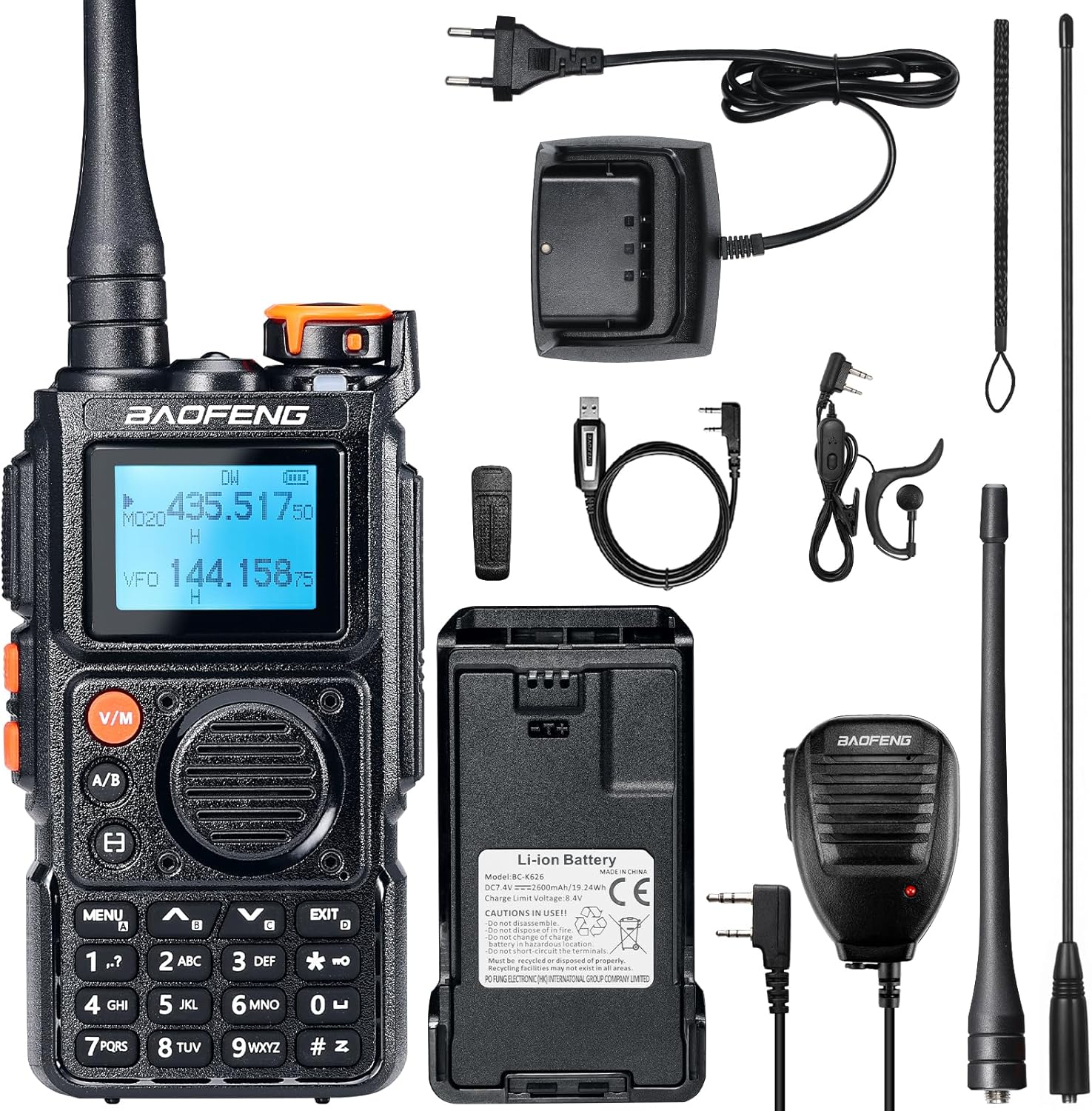
Image: BAOFENG K6 Walkie-Talkie and included accessories.
Product Overview
Familiarize yourself with the main components and controls of your BAOFENG K6 radio:
- Display: LCD screen for frequency, channel, and status information.
- Keypad: Full alphanumeric keypad for direct frequency input and menu navigation.
- Side Buttons: Two programmable side buttons for quick access to user-defined functions.
- Top Knob: Serves as the Power/Volume control and Channel selector.
- PTT Button: Push-to-Talk button, located on the side, for initiating transmission.
- Antenna Port: Connector on top for attaching the antenna.
- Charging Port: USB-C port for direct battery charging.

Image: BAOFENG K6 dimensions and key features.
Setup
- Battery Installation and Charging:
Insert the 2600 mAh Li-Ion battery into the compartment on the back of the radio. Ensure it clicks securely into place. Charge the battery using either the provided desktop charger or a USB-C cable (not included) connected directly to the radio's USB-C port. The charging indicator will illuminate to show charging status.

Image: Two methods for charging the BAOFENG K6 battery.
- Antenna Attachment:
Screw either the standard antenna or the 39 cm high-gain antenna clockwise into the antenna connector on top of the radio until it is hand-tight and secure.

Image: Standard and high-gain antennas for the BAOFENG K6.
- Power On/Off:
Rotate the top knob clockwise to power on the radio. Rotate it counter-clockwise until it clicks to power off the device.
- Initial Frequency Programming:
The radio supports direct frequency input via the alphanumeric keypad. For quick setup, you can utilize the one-key frequency copy function to replicate frequencies from another compatible radio.
Operating Instructions
- Basic Communication (PTT):
Select the desired frequency or channel. Press and hold the PTT button on the side of the radio to transmit. Speak clearly into the microphone. Release the PTT button to receive.
- Channel Selection:
Use the up/down arrow keys or rotate the top knob to navigate through the 999 available memory channels.

Image: BAOFENG K6 displaying 999 memory channels.
- Frequency Input:
Enter frequencies directly using the alphanumeric keypad for precise control.

Image: Full keypad input for frequencies on the BAOFENG K6.
- Monitoring Modes:
The radio offers single-band monitoring, single watch, and dual watch modes. Refer to the on-screen indicators for the active monitoring mode.

Image: BAOFENG K6 monitoring modes.
- FM Radio Listening:
Activate the FM radio function to listen to broadcast FM stations. The anti-interruption feature allows the radio to automatically switch to communication mode if a signal is detected on your programmed frequencies, ensuring you don't miss important transmissions.

Image: FM listening with anti-interruption feature.
Advanced Features
- One-Key Frequency Copy:
Quickly and easily copy frequencies from another radio with a single button press, streamlining setup for multiple devices.

Image: One-key frequency copy in action.
- Customizable Side Keys:
Assign frequently used functions to the two programmable side buttons for personalized convenience and quick access.

Image: Customizable side keys on the BAOFENG K6.
- One-Key Repeater Frequency Reversal:
Easily reverse repeater frequencies with a single action, simplifying operation when working with repeaters.

Image: One-key repeater frequency reversal.
- Power-On Password:
Set a password to secure your device from unauthorized use, enhancing privacy and security.

Image: Power-on password feature.
- Customizable Display:
Personalize the radio's display with predefined logos, custom text, or real-time voltage information to suit your preferences.
Maintenance
- Battery Care: To prolong battery life, avoid overcharging and fully discharging the battery. Store the battery in a cool, dry place when not in use.
- Cleaning: Clean the radio's exterior with a soft, damp cloth. Do not use harsh chemicals, abrasive cleaners, or solvents, as these can damage the device.
- Antenna: Ensure the antenna is securely attached. Avoid bending or stressing the antenna, as this can affect performance and cause damage.
- Storage: When storing the radio for extended periods, remove the battery and store the device in a dry, dust-free environment.
Troubleshooting
| Problem | Possible Cause | Solution |
|---|---|---|
| No Power | Battery discharged or improperly installed. | Check battery charge level and ensure it is correctly installed. Charge the battery if necessary. |
| No Signal / Poor Reception | Antenna loose, incorrect frequency, or out of range. | Verify antenna connection. Check frequency settings and ensure you are within the operational range of the other radio or repeater. |
| Poor Audio Quality | Volume too low/high, microphone/speaker obstructed. | Adjust volume. Check microphone and speaker for any obstructions. Ensure proper speaking distance from the microphone. |
| Radio Not Responding | Temporary software glitch. | Try powering the radio off and then on again. If issues persist, a factory reset may be necessary (consult advanced user guide for specific procedure). |
Specifications
| Feature | Detail |
|---|---|
| Brand | BaoFeng |
| Model Number | K6 |
| Color | Black |
| Number of Channels | 999 |
| Special Feature | Tri-band, Rechargeable |
| Frequency Range | 144–146 MHz (VHF), 430–440 MHz (UHF), FM, Airband, 1.25M, 1M |
| Maximum Range | 10 Kilometers (dependent on terrain and conditions) |
| Water Resistance Level | Not waterproof |
| Battery | 1 x 2600 mAh Li-Ion (included) |
| Power Output | 6W |
Warranty and Support
Warranty: This BAOFENG K6 Walkie-Talkie is covered by an 18-month warranty from the date of purchase. This warranty covers manufacturing defects and material faults under normal use. Please retain your proof of purchase for warranty claims.
Support: For technical assistance, troubleshooting beyond the scope of this manual, or to inquire about warranty claims, please contact your authorized retailer or visit the official BaoFeng website for further support resources. Detailed contact information can typically be found on the product packaging or the retailer's website.


