
Introduction
This manual provides detailed instructions for the installation, operation, and maintenance of the SINOTIMER PID Temperature Controller Kit 25DA. This intelligent temperature control system is designed for precise temperature regulation in various industrial and scientific applications.
The kit includes a PID temperature controller, a 25DA Solid State Relay (SSR), a K-type screw thermocouple, and a heat sink, offering a complete solution for your temperature control needs.
Kit Components
The SINOTIMER PID Temperature Controller Kit 25DA includes the following components:
- PID Temperature Controller: Digital display unit for setting and monitoring temperature.
- SSR-25DA Solid State Relay: For switching high power loads based on controller output.
- K-Type Screw Thermocouple: Temperature sensor with a 2-meter cable.
- Heat Sink: For dissipating heat from the Solid State Relay.

Image: Overview of the PID temperature controller, SSR, K-type thermocouple, and heat sink, showing their respective dimensions.
Setup and Installation
Proper installation is crucial for the safe and effective operation of the temperature controller. Ensure all power is disconnected before proceeding with wiring.
1. PID Controller Dimensions and Mounting

Image: Dimensions of the PID temperature controller, showing 48mm x 48mm front panel and 75mm depth.
The controller has a standard dimensional size of 45mm x 45mm for panel mounting. Ensure adequate space for ventilation and wiring connections.
2. Wiring the PID Controller
Refer to the wiring diagram on the back of the controller for terminal connections. The controller supports K, E, and J type thermocouple inputs and provides both SSR and relay control outputs.

Image: Back panel of the PID temperature controller showing terminal numbers and their functions for power, SSR output, alarm output, and thermocouple input.
- Power Supply (1, 2): Connect AC 100-240V, 50/60Hz.
- SSR Output (3, 9): Connect to the input terminals of the Solid State Relay.
- Alarm Output (7, 8): Connect to an external alarm device (AC220V/DC30V 3A resistive load).
- Thermocouple Input (11, 12): Connect the K-type thermocouple. Ensure correct polarity (+ to 12, - to 11).
3. Wiring the Solid State Relay (SSR)
The SSR-25DA is used to control the heating element. Mount the SSR onto the provided heat sink to prevent overheating. Connect the SSR to the PID controller and the heating load as shown in the diagram.

Image: Diagram illustrating the physical wiring connections between the AC power supply, SSR-25DA, DC power supply (for SSR input), and a heater example. Note the caution regarding leakage current for DC control AC applications.
- SSR Input (3, 4): Connect to the SSR output terminals (3 and 9) of the PID controller. Input voltage: 3-32VDC.
- SSR Load (1, 2): Connect the AC power supply (24-380VAC) and the heating element. Terminal 1 for fire wire, Terminal 2 for zero line.
Caution: For DC control AC applications, if the closed state leakage current is less than 5mA, special scenarios may not be applicable. Please exercise caution.
Operating Instructions
The PID controller features a digital display and several buttons for setting parameters and monitoring the temperature.
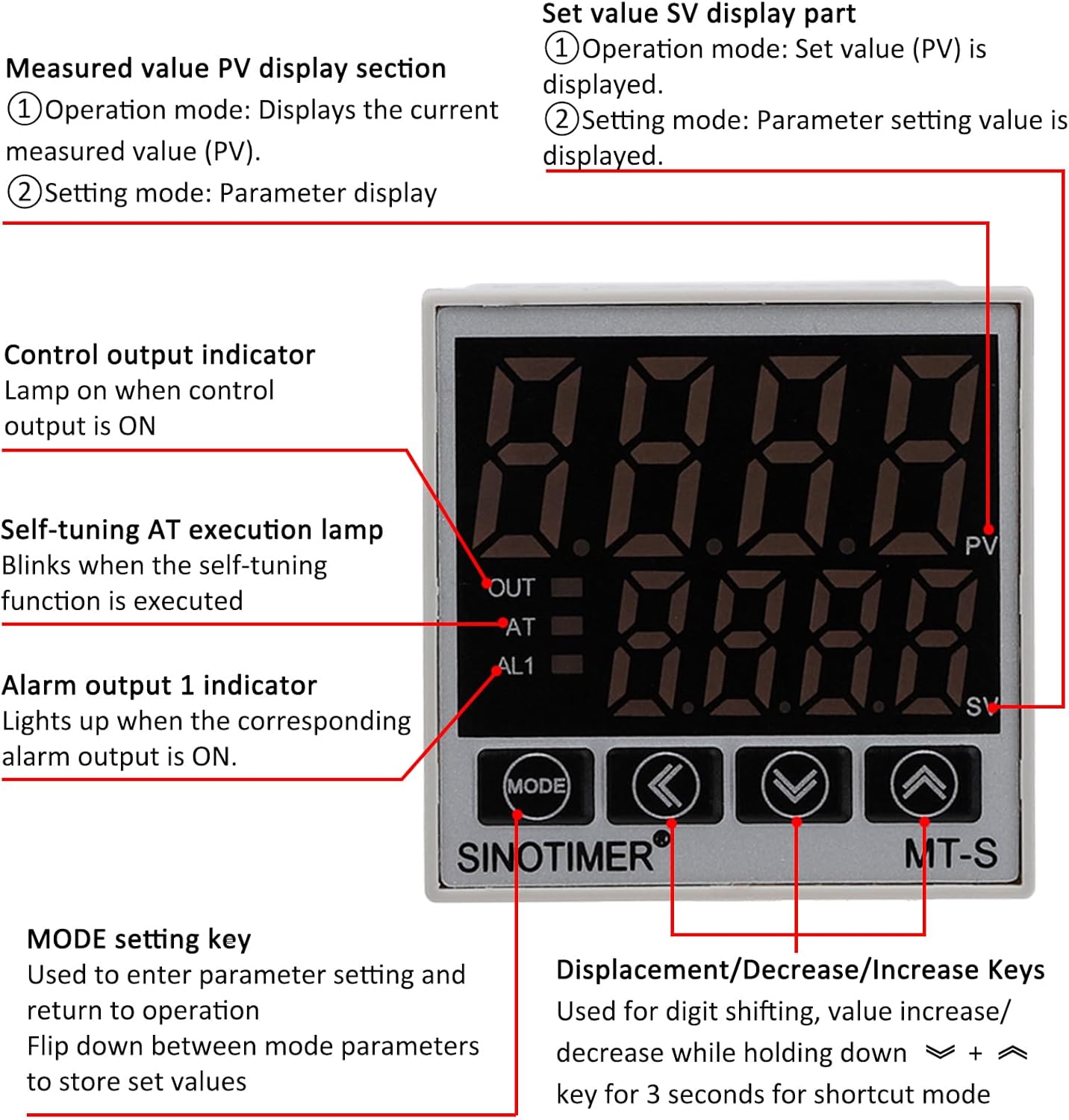
Image: Front panel of the PID temperature controller, detailing the PV (Measured Value) and SV (Setting Value) displays, control indicators (OUT, AT, AL1), and function keys (MODE, Shift, Down, Up).
Display Section
- PV (Measured Value) Display: Shows the current measured temperature.
- SV (Setting Value) Display: Shows the set temperature or parameter setting value.
- OUT Indicator: Lights up when the control output is ON.
- AT Indicator: Blinks when the self-tuning (Auto-Tune) function is active.
- AL1 Indicator: Lights up when the corresponding alarm output is ON.
Control Keys
- MODE Key: Used to enter parameter settings and return to operation. Press to flip down between mode parameters and store set values.
- Shift Key (<): Used for digit shifting during value adjustment.
- Decrease Key (v): Decreases the setting value. Holding for 3 seconds may activate a shortcut mode.
- Increase Key (^): Increases the setting value. Holding for 3 seconds may activate a shortcut mode.
Setting Temperature
- In normal operation mode, the SV display shows the set temperature.
- Use the Decrease (v) and Increase (^) keys to adjust the desired temperature.
- The Shift (<) key can be used to move the cursor to adjust specific digits.
- The controller will automatically save the new set value after a short period of inactivity or by pressing the MODE key.
Parameter Settings and Auto-Tune
To access advanced parameters or initiate the auto-tune function, refer to the detailed programming guide (usually provided separately or accessible via specific key combinations). The AT indicator will blink during auto-tuning.
The controller supports both Celsius (℃) and Fahrenheit (℉) display. This setting can typically be changed within the parameter menu.
Maintenance
The SINOTIMER PID Temperature Controller Kit is designed for reliable operation with minimal maintenance. Follow these guidelines to ensure longevity:
- Cleaning: Keep the controller's display and buttons clean using a soft, dry cloth. Avoid abrasive cleaners or solvents.
- Environment: Ensure the operating environment is within the specified temperature and humidity ranges. Avoid excessive dust, moisture, and corrosive gases.
- Connections: Periodically check all wiring connections for tightness and signs of wear or corrosion. Ensure the heat sink for the SSR is free from obstructions and dust to maintain efficient cooling.
- Thermocouple: Inspect the thermocouple for physical damage or signs of degradation. Replace if necessary to maintain accurate temperature readings.
Troubleshooting
If you encounter issues with your PID Temperature Controller Kit, refer to the following common problems and solutions:
| Problem | Possible Cause | Solution |
|---|---|---|
| Controller does not power on. | No power supply or incorrect wiring. | Check power connections (terminals 1 & 2). Ensure AC 100-240V is supplied. |
| Temperature reading is inaccurate or "HHHH" / "LLLL" displayed. | Thermocouple disconnected, reversed polarity, or faulty. | Verify thermocouple connection (terminals 11 & 12) and polarity. Replace thermocouple if damaged. |
| Heater does not turn on/off. | SSR wiring incorrect, SSR faulty, or controller output issue. | Check SSR input wiring from controller (terminals 3 & 9). Verify SSR load wiring (terminals 1 & 2). Test SSR functionality if possible. Ensure controller output (OUT indicator) is active. |
| Controller not maintaining set temperature. | Incorrect PID parameters or insufficient heating/cooling capacity. | Perform auto-tune (AT function) to optimize PID parameters. Ensure the heating element is adequately sized for the application. |
If the problem persists after attempting these solutions, please contact customer support.
Specifications
- Model: SINOTIMER MT-S (PID Temperature Controller)
- Power Supply: AC 100-240V, 50/60Hz
- Input Types: K, E, J Thermocouple (K-type screw thermocouple included)
- Temperature Range: 0-999℃ / ℉ (Display)
- Control Output: Relay / SSR (25DA SSR included)
- Alarm Output: 1 Alarm Relay Output (AC220V/DC30V 3A Resistive load) NO/NC
- Controller Dimensions: 48mm x 48mm (Front Panel), 75mm (Depth)
- SSR Model: FOTEK SSR-25 DA
- SSR Input Voltage: 3-32VDC
- SSR Load Voltage: 24-380VAC
- Thermocouple Type: K-Type Screw, 2M length
- Material: Flame Retardant ABC material
- Item Weight: Approximately 12.7 ounces (total kit)
- Package Dimensions: 5.28 x 4.21 x 3.11 inches
Warranty and Support
For warranty information and technical support, please refer to the documentation provided with your purchase or contact SINOTIMER customer service directly. Keep your purchase receipt for warranty claims.
Manufacturer: SINOTIMER


