
1. Important Safety Instructions
Please read and understand all safety instructions before operating the SHALL 4V Cordless Electric Scissors. Failure to follow these instructions may result in electric shock, fire, and/or serious injury.
- Keep Work Area Clean and Well Lit: Cluttered or dark areas invite accidents.
- Avoid Dangerous Environments: Do not use power tools in damp or wet locations, or expose them to rain. Keep work area well lit.
- Keep Children Away: All visitors should be kept at a safe distance from the work area.
- Dress Properly: Do not wear loose clothing or jewelry. They can be caught in moving parts. Use rubber gloves and substantial footwear when working outdoors. Wear protective hair covering to contain long hair.
- Use Safety Glasses and Hearing Protection: Always wear safety glasses. Everyday eyeglasses are NOT safety glasses. Also use face or dust mask if cutting operation is dusty.
- Do Not Overreach: Keep proper footing and balance at all times.
- Maintain Tools With Care: Keep cutting tools sharp and clean for better and safer performance. Follow instructions for lubricating and changing accessories.
- Disconnect Tools: Disconnect the tool from the power source before servicing, when changing accessories, or when not in use.
- Avoid Accidental Starting: Ensure the switch is in the OFF position before inserting the battery pack.
- Double Safety Mechanism: The safety lock and the power switch must be pressed simultaneously to activate the blade. Always engage the safety lock when the tool is not in use.
- Protective Guard: The blade guard limits exposure of the blade, preventing accidental contact with fingers or other body parts. Do not remove or tamper with the guard.

Image: The electric scissors feature a safety lock (top left), an integrated LED light for visibility (bottom left), and a protective blade guard (bottom right) to enhance user safety during operation.
2. Product Overview
The SHALL 4V Cordless Electric Scissors are designed for efficient and effortless cutting of various flexible materials. This tool combines power, safety, and ergonomic design for optimal user experience.
Key Features:
- High Efficiency Cutting: A rotation speed of 280 RPM ensures fast and precise cuts, reducing effort compared to manual scissors.
- Enhanced Safety: Features a double safety mechanism (lock and switch) and a protective blade guard.
- Easy Handling: Lightweight at 0.4 kg (0.88 lb) with an ergonomic, non-slip handle for comfortable and precise operation during extended use.
- Advanced Power System: Equipped with a 4V 2000mAh lithium battery, rechargeable via USB-C. Provides 25-30 minutes of intensive use per charge.
- Charge Indicator: LED indicator lights monitor the battery level in real-time.
- Versatile Application: Capable of cutting soft and flexible materials up to 6 mm (1/4 inch) thick, including carpet, PVC, cardboard, leather, and various fabrics.
- Integrated LED Light: Provides clear illumination of the cutting area for improved accuracy.

Image: Overview of the SHALL 4V Electric Scissors, highlighting its 2000mAh built-in battery, 280 RPM cutting speed, and 1/4 inch maximum cutting capacity.

Image: The electric scissors are lightweight at 0.4 kg (0.88 lb) and have compact dimensions for easy handling. The package includes two blades.
3. What's in the Box
Upon unpacking, please ensure all items are present and in good condition:
- 1 x SHALL 4V Cordless Electric Scissors (White & Blue)
- 2 x Rotary Cutting Blades (one pre-installed, one spare)
- 1 x USB-C Charging Cable
- 1 x User Manual
4. Setup
Charging the Battery:
The device is powered by a built-in 4V 2000mAh lithium battery. Before first use, fully charge the battery.
- Locate the USB-C charging port on the handle of the electric scissors.
- Connect the provided USB-C charging cable to the port on the scissors.
- Plug the other end of the USB-C cable into a compatible USB power adapter (not included) or a USB port on a computer.
- The charge indicator lights will show the charging status:
- Red light flashing: Low battery.
- Solid green light: Fully charged.
- A full charge typically takes approximately 2-3 hours. Do not use the scissors while charging.

Image: The electric scissors are charged via a USB-C port. The charge indicator lights display the battery status, with red flashing for low battery and solid green for a full charge. Do not operate while charging.
5. Operating Instructions
Follow these steps for safe and effective operation of your electric scissors:
Activating the Scissors:
- Step 1: Press the ON/OFF switch located on the handle to initiate power.
- Step 2: Simultaneously click and hold the safety lock-off button. This dual action is required to activate the blade.
- Step 3: Once the blade starts rotating, you can release the safety lock-off button. The scissors will continue to operate as long as the ON/OFF switch is pressed.
Cutting Materials:
- Ensure the material to be cut is laid flat and stable.
- Position the rotating blade at the edge of the material.
- Apply gentle, consistent pressure and guide the scissors along your desired cutting line. Avoid forcing the tool.
- The integrated LED light will illuminate the cutting path for better visibility and precision.
- The scissors are suitable for materials up to 6 mm (1/4 inch) thick.
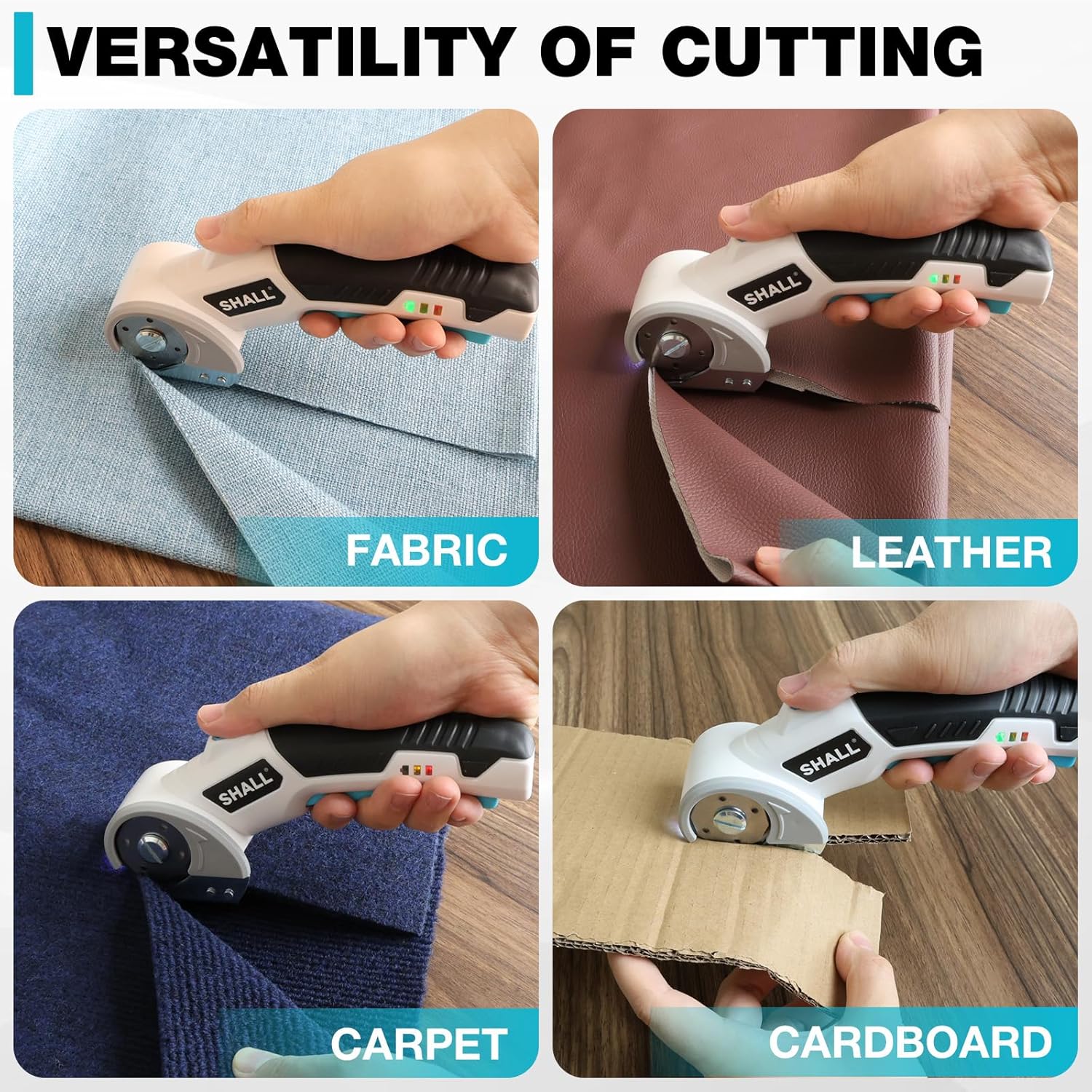
Image: The electric scissors demonstrate versatility by cutting different materials including fabric, leather, carpet, and cardboard with ease.

Image: The electric scissors are capable of effortlessly cutting multiple materials, including fabric (3mm), corrugated cardboard (6mm), leather (6mm), carpet (3mm), and standard cardboard (2mm).
6. Maintenance
Regular maintenance ensures the longevity and optimal performance of your electric scissors.
Cleaning:
- Always ensure the tool is turned off and the safety lock is engaged before cleaning.
- Use a soft, dry cloth to wipe down the exterior of the scissors.
- Carefully remove any material debris from around the blade area using a small brush or compressed air. Do not use solvents or abrasive cleaners.
Blade Care and Replacement:
- Keep the blade clean and free of adhesive residue for best cutting performance.
- The scissors come with a spare blade. When the cutting performance diminishes, it may be time to replace the blade.
- To replace the blade:
- Ensure the tool is off and unplugged.
- Carefully unscrew the retaining screw in the center of the blade.
- Remove the old blade, being cautious of sharp edges.
- Place the new blade onto the spindle, ensuring it sits correctly.
- Secure the new blade with the retaining screw, tightening it firmly but not excessively.

Image: A close-up view of the rotary blade and the integrated LED light, which illuminates the cutting path for precision. Regular cleaning of this area is recommended.
7. Troubleshooting
If you encounter issues with your SHALL 4V Cordless Electric Scissors, refer to the following common problems and solutions:
| Problem | Possible Cause | Solution |
|---|---|---|
| Scissors do not turn on. | Battery is depleted. Safety lock not engaged correctly. | Charge the battery fully. Ensure both the ON/OFF switch and safety lock button are pressed simultaneously. |
| Poor cutting performance. | Blade is dull or dirty. Material is too thick. | Clean the blade or replace it with a new one. Ensure the material thickness does not exceed 6 mm. |
| Battery not charging. | Charging cable or adapter faulty. Loose connection. | Check the USB-C cable and adapter. Ensure connections are secure. Try a different USB power source. |
| Tool stops during operation. | Battery is low. Overload protection activated. | Recharge the battery. Reduce pressure and avoid cutting materials that are too thick or dense. |
If the problem persists after trying these solutions, please contact customer support.
8. Specifications
| Feature | Specification |
|---|---|
| Model Number | SH112026EU |
| Battery Type | Lithium-ion |
| Battery Voltage | 4V |
| Battery Capacity | 2000mAh |
| Charging Port | USB-C |
| No-Load Speed | 280 RPM |
| Max Cutting Thickness | 6 mm (1/4 inch) |
| Product Weight | 0.4 kg (0.88 lb) |
| Blade Material | Stainless Steel |
| Handle Material | Plastic |
| Hand Orientation | Ambidextrous |
| Dimensions (Package) | 23.8 x 11.3 x 7.6 cm |
| GTIN / UPC | 762983171350 |
| Country of Origin | China |
9. Warranty and Support
SHALL products are manufactured to high-quality standards. For information regarding warranty coverage, please refer to the warranty card included with your purchase or visit the official SHALL website. If you require technical assistance or have questions about your product, please contact SHALL customer support through the retailer where the product was purchased or via the contact information provided on the SHALL brand store.
For further assistance, please visit the SHALL Brand Store.