1. Introduction
Thank you for choosing the Nakamichi My Music Hue - Lavender Wireless Earphones. This manual provides essential information for setting up, operating, and maintaining your earphones to ensure optimal performance and longevity. Please read this manual thoroughly before using the product.
Key Features:
- Advanced Bluetooth 5.4: Ensures stable, high-speed connection and improved audio performance.
- Three EQ Modes: Customize your listening experience with Spatial Audio, Dynamic Audio, and Bass Boost modes.
- Superior Sound Quality: Equipped with 10mm drivers and AAC support for clear, high-fidelity audio.
- Clear Hands-Free Calling: Built-in microphones with environmental noise suppression for crisp calls.
- 360° Spatial Game Mode: Provides an immersive gaming experience with enhanced sound reproduction.
- Extended Playback Time: Up to 5 hours on a single charge, and up to 28 hours with the charging case.
- Lightweight & Ergonomic Design: Each earbud weighs only 3.6g, designed for comfortable, long-term wear.
- Versatile Usage: Supports both single and dual earbud modes.
- Intuitive Touch Controls: Easy management of music playback, calls, and modes.
2. Package Contents
Please check that all items are present in the package:
- Nakamichi My Music Hue - Lavender Wireless Earphones (Left and Right)
- Charging Case
- USB Charging Cable
- Ear Tips (S, M, L sizes)
- User Manual (this document)

Image: The Nakamichi My Music Hue - Lavender Wireless Earphones, including both earbuds and their charging case.
3. Setup
3.1 Charging the Earphones and Case
Before first use, fully charge the earphones and the charging case. The earphones provide up to 5 hours of playback on a single charge, and the charging case extends this to a total of 28 hours.
- Place the earphones into the charging case, ensuring they are correctly seated.
- Connect the USB charging cable to the charging port on the case and to a power source (e.g., USB wall adapter, computer USB port).
- The indicator lights on the charging case will show the charging status. Refer to the case's specific light indicators for full charge notification.

Image: Visual representation of the earbud and charging case, highlighting the 5-hour earbud playback and 28-hour total playback with the case.
3.2 Bluetooth Pairing
To connect your earphones to a device:
- Open the charging case. The earphones will automatically enter pairing mode (indicator lights will flash).
- On your device (smartphone, tablet, PC, etc.), enable Bluetooth.
- Search for "My Music Hue - Lavender" in the list of available Bluetooth devices.
- Select it to connect. Once connected, the indicator lights on the earphones will stop flashing.

Image: A diagram illustrating the various devices compatible with Bluetooth 5.4 connectivity, including smartphones, tablets, PCs, and game consoles.
4. Operating Instructions
4.1 Touch Controls
The earphones feature high-sensitivity touch controls for easy operation. Please note that volume control is managed via your connected device.
| Function Category | Action | Control |
|---|---|---|
| Playback Mode | Music Mode | L side x 3 taps |
| 360° Spatial Game Mode | L side x 3 taps | |
| Voice Assistant | R side x 3 taps | |
| Calls | Answer Call | L/R side x 1 tap |
| End Call | L/R side x 1 tap | |
| Reject Call | L/R side x 1 second long press | |
| Music Playback | Play/Pause | L/R side x 1 tap |
| Previous Track | L side x 2 taps | |
| Next Track | R side x 2 taps | |
| EQ Mode | Spatial Audio / Dynamic Audio / Bass Boost | L/R side x 3 seconds long press |

Image: A visual guide to the touch control gestures on the earbuds for various functions.
4.2 EQ Modes
Your earphones offer three distinct EQ modes to enhance your audio experience:
- Spatial Audio: Reproduces sound in 360 degrees, ideal for immersive movies and 3D audio.
- Dynamic Audio: Adjusts the overall balance of sound, providing a clear and natural audio experience across a wide frequency range.
- Bass Boost: Emphasizes powerful low frequencies, perfect for genres like electronic, rock, and hip-hop.
To switch between these modes, long-press either the L or R earbud for 3 seconds.
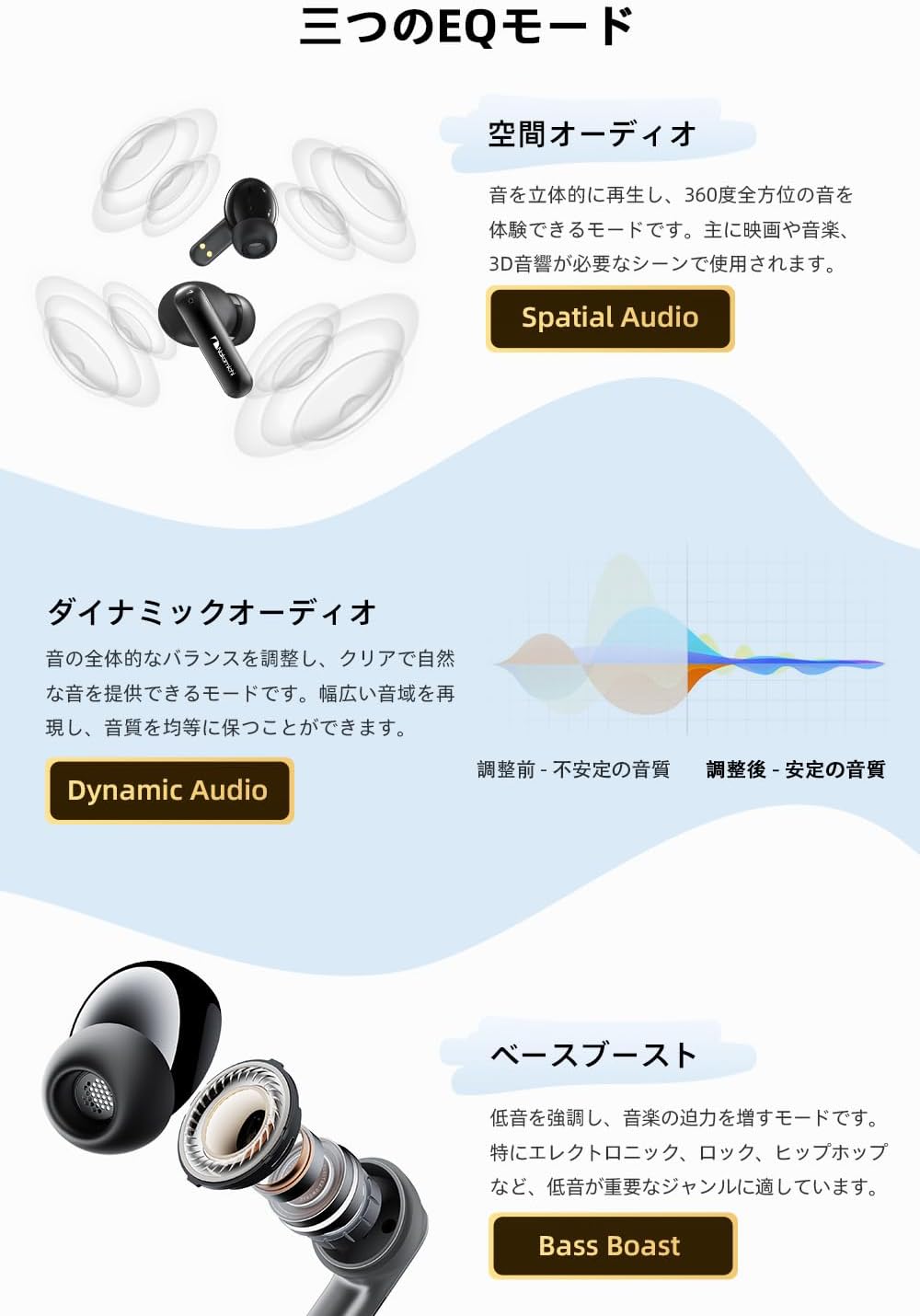
Image: Detailed descriptions and visual representations of Spatial Audio, Dynamic Audio, and Bass Boost EQ modes.
4.3 360° Spatial Game Mode
For an enhanced gaming experience, activate the 360° Spatial Game Mode. This mode significantly improves sound reproduction, allowing you to perceive in-game environmental sounds and effects more realistically, providing a truly immersive experience.
To activate this mode, tap the L earbud 3 times.

Image: Illustration of the earphones being used for gaming, emphasizing the immersive 360° spatial game mode.
4.4 Single/Dual Earbud Use
The earphones support both stereo (dual earbud) and mono (single earbud) playback. You can use one earbud while the other is charging, or share one earbud with a friend to enjoy music or videos together.
5. Maintenance
Proper maintenance ensures the longevity and performance of your earphones.
- Cleaning: Regularly clean the ear tips and the mesh covers of the earbuds with a soft, dry, lint-free cloth. Do not use harsh chemicals or abrasive materials.
- Storage: When not in use, always store the earphones in their charging case to protect them from dust, dirt, and damage.
- Avoid Moisture: Keep the earphones and charging case away from water, humidity, and extreme temperatures.
- Charging: Use only the provided charging cable and a compatible power adapter.
6. Troubleshooting
If you encounter any issues with your earphones, please refer to the following common problems and solutions:
| Problem | Possible Cause | Solution |
|---|---|---|
| Earphones do not turn on. | Low battery. | Place earphones in the charging case and ensure the case is charged. |
| Cannot pair with device. | Earphones not in pairing mode; Bluetooth off on device; interference. | Ensure case is open and earphones are flashing. Turn device Bluetooth off/on. Move closer to device. |
| No sound or intermittent sound. | Earphones not connected; low volume; out of range; dirty ear tips. | Check Bluetooth connection. Adjust volume on device. Move closer to device. Clean ear tips and earbud mesh. |
| Touch controls not responding. | Incorrect gesture; temporary software glitch. | Refer to the touch control table. Place earphones back in case, close, then reopen to reset. |
| Poor call quality. | Environmental noise; weak signal. | Move to a quieter environment. Ensure strong Bluetooth connection. |
7. Specifications
| Feature | Specification |
|---|---|
| Brand | Nakamichi |
| Model Name | My Music Hue - Lavender |
| Connectivity Technology | Wireless |
| Wireless Communication Technology | Bluetooth 5.4 |
| Ear Placement | In-Ear |
| Headphone Style | In-Ear |
| Color | Black |
| Sensitivity | 102 dB |
| Impedance | 32 Ohms |
| Noise Control | None |
| Included Components | Ear tips, Instruction manual |
| Compatible Devices | Game consoles, Tablets, Desktop PCs, Laptops, Mobile phones |
| Control Type | Touch control |
| Product Dimensions | 6 x 5.4 x 3 cm |
| Product Weight | 90 g |
| ASIN | B0DSFD1W98 |
8. Warranty and Support
Your Nakamichi My Music Hue - Lavender Wireless Earphones come with a one-year warranty from the date of purchase.
If you encounter any issues or have questions regarding your product, please contact our customer support. You can typically find contact information through your purchase platform:
- Go to "Your Account" > "Order History" > Select your order > "Contact Seller".
- Alternatively, visit the seller's page and look for a "Contact Seller" button.
We are committed to providing sincere and dedicated support to resolve any concerns you may have.


