1. Important Safety Information
Please read all instructions carefully before operating the appliance. Retain this manual for future reference.
- Ensure the machine is placed upright for at least 6 hours after receiving it before initial operation.
- Always disconnect the power supply before cleaning or performing any maintenance.
- Do not operate the machine with a damaged cord or plug.
- Keep ventilation openings clear of obstructions.
- This appliance is intended for commercial use.
2. Product Overview
The Velieta Commercial Ice Maker Machine VT-LMF360 is designed for high-volume ice production in commercial settings. It features a durable brushed stainless steel exterior and an insulated storage bin.
Key Features:
- High Production Capacity: Up to 400 pounds of ice per 24 hours.
- Large Storage: 350 pounds ice storage bin.
- Fast Ice Making: Produces 156 crystal clear ice cubes per cycle in 9-15 minutes.
- Insulated Storage: Thickened insulation foam layer to slow down ice melting.
- User-Friendly Control Panel: Digital display with touch controls for ice thickness adjustment, reservation, and automatic cleaning.
- Durable Construction: Brushed stainless steel exterior.

Figure 1: Velieta Commercial Ice Maker Machine VT-LMF360 and included accessories.

Figure 2: Illustration of the ice maker's daily production capacity (400 lbs/24h) and storage capacity (350 lbs).

Figure 3: Cross-section view illustrating the thickened cyclopentane insulation foam layer designed to slow ice melting. Note: The ice bin does not feature a freezer function.
3. Setup and Installation
Proper installation is crucial for the optimal performance and longevity of your ice maker. Please follow these steps carefully.
3.1 Unpacking and Initial Placement
- Carefully remove all packaging materials.
- Place the ice maker upright in its intended location. It is essential to allow the unit to stand upright for at least 6 hours before connecting it to power. This allows the refrigerant to settle.
- The ice maker is shipped in two separate boxes (ice machine head and ice storage bucket). These may arrive at different times. Ensure both components are received before proceeding with installation.

Figure 4: The ice maker is shipped in two packages, which may arrive separately. Install after receiving both.
3.2 Removing Protective Film
The machine surface is covered with a metal protective film that must be removed before use. For easier removal, apply hot air from a hairdryer to the film.
- Loosen the top 3 screws with a screwdriver to open the front door.
- Remove all blue tape that fixes the ice harvest panel and ensure the panel rotates flexibly.
- Screw the door back into place.

Figure 5: Illustrated steps for removing the protective film and securing the ice harvest panel.
3.3 Water Connection and Leveling
Connect the water intake and drain lines as shown in the diagram. The unit includes a 10-inch PP cotton filter to purify incoming water.
- Connect the water intake hose to a potable water supply.
- Connect the water outlet and drain hose to a suitable drainage system.
- Adjust the height of the stainless steel feet to ensure the unit is stable and level on an uneven floor.

Figure 6: Diagram illustrating the water intake, water outlet, drain outlet, and adjustable stainless steel feet for installation.
4. Operation
The ice maker features an intuitive control panel for easy operation.
4.1 Control Panel Functions

Figure 7: The digital control panel displaying various functions and indicators.
- Power Button: Turns the machine on or off.
- Cleaning/Setting Button: Press and hold for 5 seconds to initiate the automatic cleaning cycle (approx. 40 minutes). Also used for adjusting settings.
- Ice Thickness Adjustment: Allows you to select thin, medium, or thick ice cubes.

Figure 8: Visual comparison of ice cube thickness options: 8 mins (thin), 11 mins (medium), 15 mins (thick).
- Reservation Function: Schedule ice production for a later time.
- Blue LED Light Control: Turn the internal blue LED light on or off.
- Indicators: Display cooling mode, temperature, ice full, water shortage, and fault mode.
4.2 First Use and Ice Production
- After ensuring the machine has been upright for 6 hours and all protective films are removed, connect the power cord.
- Before making the first batch of ice, press and hold the "Clean /Set" button for 5 seconds to run the cleaning cycle. This cycle takes approximately 40 minutes.
- Once the cleaning cycle is complete, select your desired ice thickness using the control panel.
- The machine will automatically begin producing ice. Ice making will stop automatically when the storage bin is full.
5. Maintenance
Regular maintenance ensures the efficiency and longevity of your ice maker.
- Automatic Cleaning: Utilize the built-in automatic cleaning function regularly by pressing and holding the "Clean /Set" button for 5 seconds.
- Water Filter: The included 10-inch PP cotton filter helps maintain water quality. Replace the filter periodically based on water usage and quality.
- Exterior Cleaning: Wipe the stainless steel exterior with a soft cloth and mild detergent. Avoid abrasive cleaners.
- Interior Cleaning: Periodically clean the ice storage bin and other internal components with a food-grade sanitizer. Ensure all surfaces are thoroughly rinsed and dried before resuming operation.
6. Troubleshooting
Refer to this section for common issues and their solutions.
| Problem | Possible Cause | Solution |
|---|---|---|
| Machine does not turn on. | No power supply. | Check power cord connection and wall outlet. Ensure the power switch is on. |
| No ice production. | Water shortage, initial setup not completed, or cleaning cycle needed. | Check water supply. Ensure the machine has been upright for 6 hours. Run the initial cleaning cycle (press "Clean /Set" for 5 seconds). |
| "Ice Full" alarm. | Ice storage bin is full. | Remove ice from the storage bin. The machine will resume production automatically. |
| "Water Shortage" alarm. | Insufficient water supply. | Check water intake connection and ensure water supply is open. Inspect water filter for clogs. |
| Ice melts quickly. | Ice bin is not a freezer. | The ice bin is insulated to slow melting, but it is not a freezer. Use ice as soon as possible or transfer to a freezer for long-term storage. |
7. Specifications
Detailed technical specifications for the Velieta Commercial Ice Maker Machine VT-LMF360.
| Feature | Specification |
|---|---|
| Model Number | VT-LMF360 |
| Brand | Velieta |
| Product Dimensions (L x W x H) | 23.2" x 26.4" x 61.41" |
| Daily Ice Production | 400 Lbs / 24 Hours |
| Ice Storage Capacity | 350 Pounds |
| Ice Cube Cycle | 156 cubes per 9-15 minutes |
| Wattage | 640 watts |
| Material | Brushed Stainless Steel |
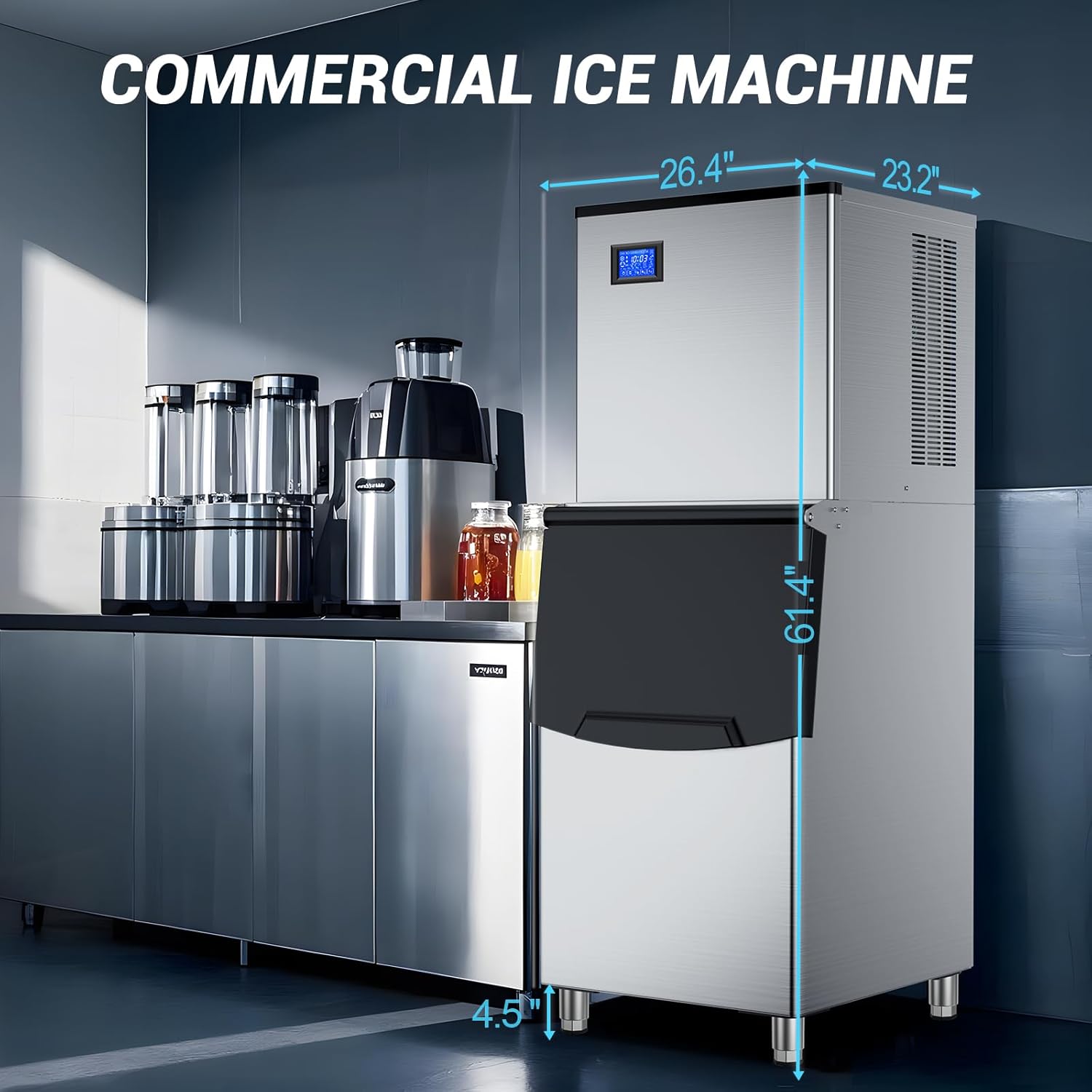
Figure 9: Detailed dimensions of the Velieta Commercial Ice Maker Machine.
8. Warranty and Support
Your Velieta Commercial Ice Maker Machine VT-LMF360 comes with a comprehensive warranty and dedicated customer support.
- 1-Year Warranty: The product is covered by a 1-year warranty from the date of purchase.
- Customer Support: For any questions, assistance, or warranty claims, please contact Velieta customer support.

Figure 10: Velieta Professional Support Service Team contact information. Support Email: support@velieta.com, Support Phone: (213)432-5433.
9. Product Video Overview
Watch this video for a visual overview of the Velieta Commercial Ice Maker Machine's features and operation.
Video 1: Overview of the Velieta Commercial Ice Maker Machine, highlighting its production capacity, storage, and key features.


