
1. Introduction
Thank you for choosing the INNOVAR 40x24 Inch Electric Glass Standing Desk. This manual provides detailed instructions for assembly, operation, and maintenance to ensure safe and efficient use of your new desk. This electric height-adjustable desk features a tempered glass top and an integrated storage drawer, designed for both home and office environments.
2. Safety Information
- Weight Limit: This desk has a maximum weight capacity of 132 pounds (60 kg). Do not exceed this limit to ensure stability and prevent damage or injury.
- Ensure all screws and bolts are securely tightened before use.
- Keep children and pets away from the desk during height adjustment.
- Avoid placing liquids directly on the control panel or near electrical components.
- Do not attempt to disassemble or repair the motor or control system yourself. Contact customer support if issues arise.
- Ensure there is sufficient clearance around the desk during height adjustments to prevent obstructions.
3. Package Contents
Please verify that all components are present before beginning assembly. If any parts are missing or damaged, please contact customer support.
- Tempered Glass Desktop with integrated drawer
- Desk Legs (2)
- Crossbar/Frame components
- Control Panel/Keypad
- Power Cord
- Assembly Hardware (screws, bolts, Allen wrench)
- Instruction Manual
4. Setup and Assembly
Assembly of the INNOVAR Electric Glass Standing Desk is designed to be straightforward. All necessary tools are included.
- Unpack Components: Carefully remove all parts from the packaging and lay them out on a clean, soft surface to prevent scratches.
- Assemble Desk Frame: Attach the desk legs to the crossbar components according to the diagrams provided in the included assembly guide. Ensure all connections are secure.
- Attach Desktop: Carefully place the tempered glass desktop onto the assembled frame. Secure it using the provided screws.
- Install Control Panel: Mount the multi-function intelligent keypad to the underside of the desktop in the designated area.
- Connect Power: Plug the power cord into the control box and then into a standard electrical outlet.
- Initial Test: After assembly, perform a quick test of the height adjustment function to ensure proper operation.
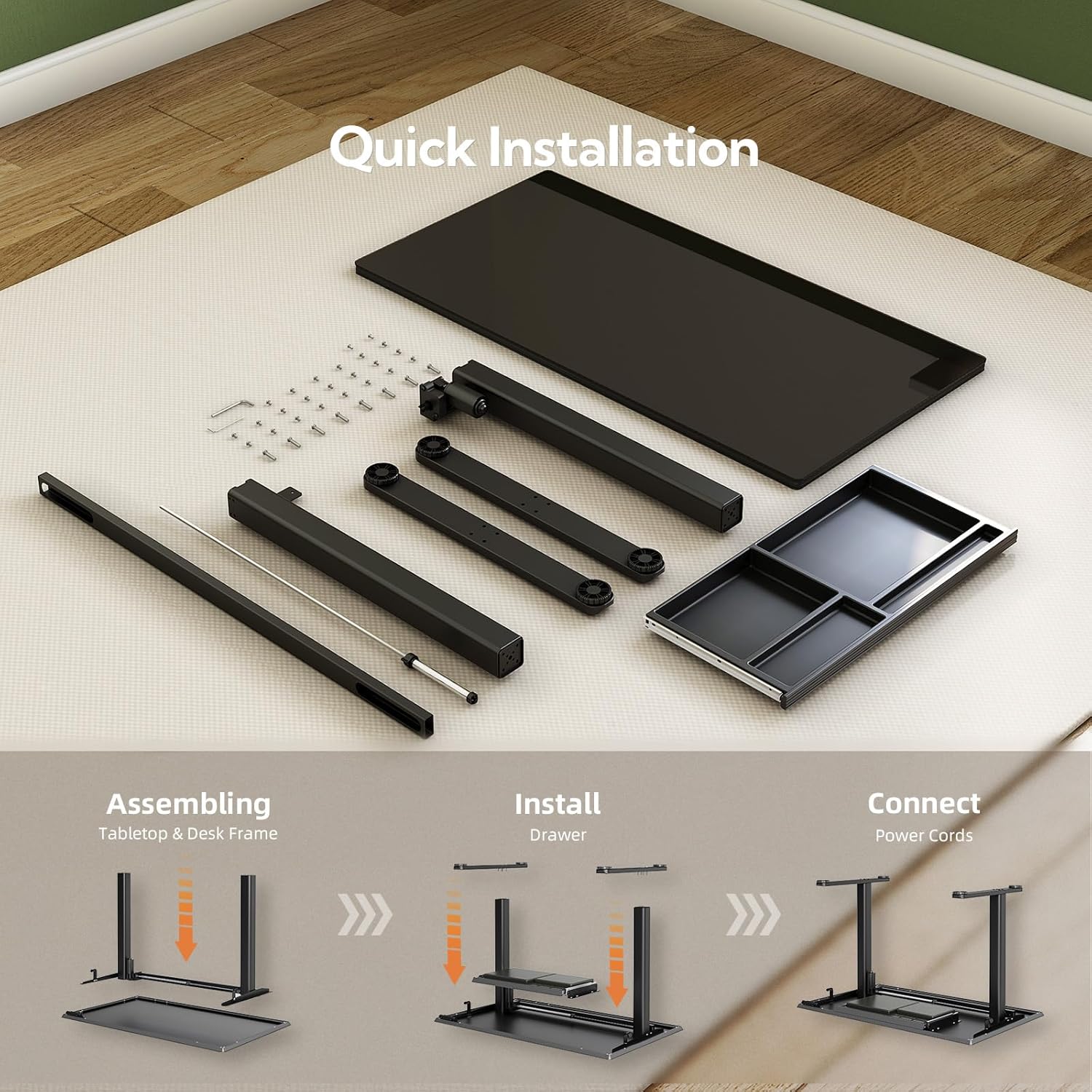
Image: Visual guide showing the three main steps for quick installation: assembling tabletop and desk frame, installing the drawer, and connecting power cords.
5. Operating Instructions
The INNOVAR Electric Glass Standing Desk features an intelligent keypad for easy height adjustment and memory functions.
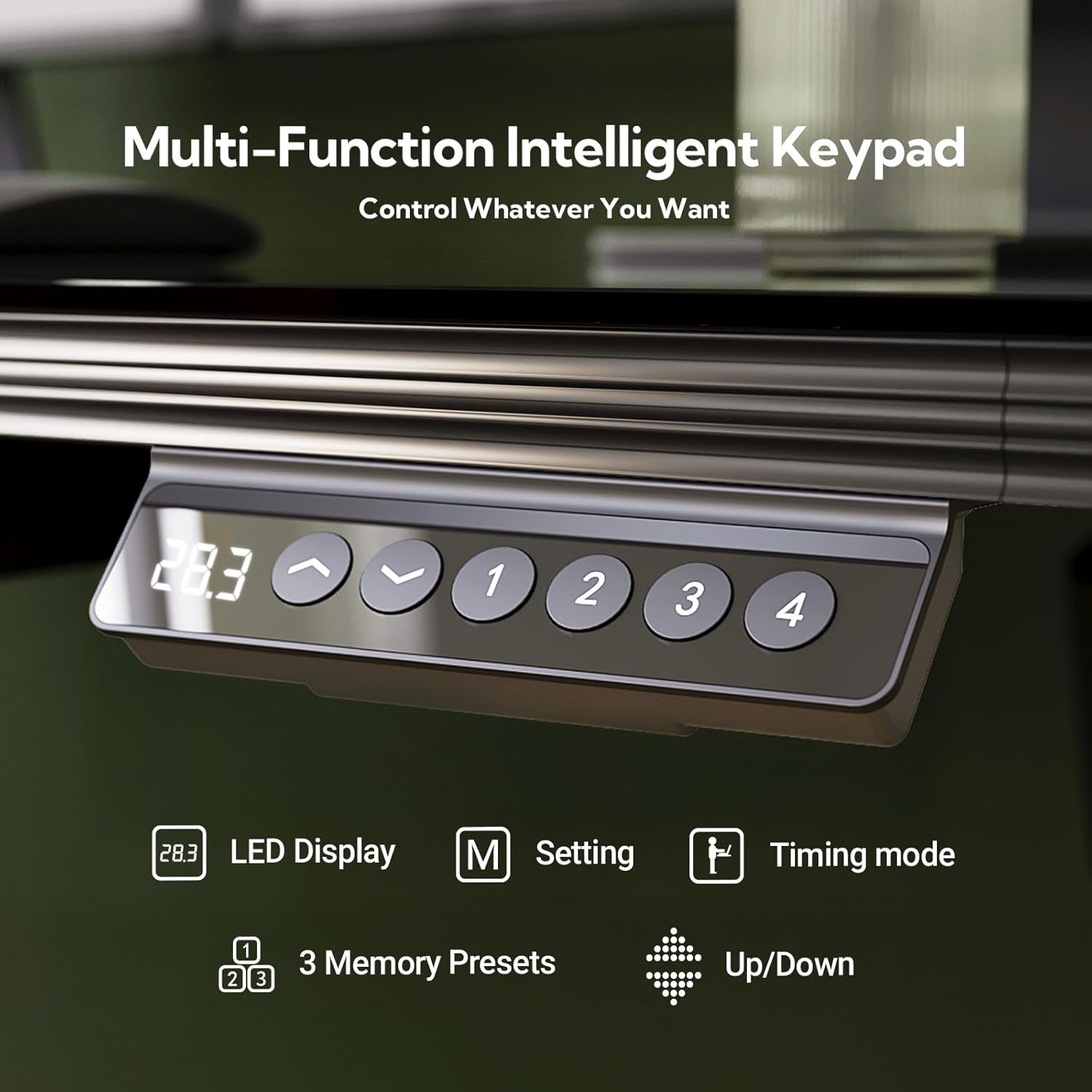
Image: Close-up of the desk's control panel, showing an LED display, up/down arrows, 'M' for setting, 'Timing mode' icon, and four memory preset buttons (1, 2, 3, 4).
5.1. Height Adjustment
- Use the Up (▲) and Down (▼) arrow buttons on the control panel to smoothly adjust the desk height.
- The current height is displayed on the LED Display.
- The desk can be adjusted from a minimum height of 28.3 inches (72 cm) to a maximum height of 46.5 inches (118 cm).

Image: Two INNOVAR standing desks, one at its lowest height and one at its highest height, demonstrating the adjustable range from 28.3 inches to 46.5 inches.
5.2. Memory Presets
The desk allows you to save up to four preferred height settings for quick adjustments.
- Adjust the desk to your desired height using the Up/Down buttons.
- Press the ‘M’ (Setting) button. The LED display will flash.
- Within 3 seconds, press one of the numbered preset buttons (1, 2, 3, or 4) to save the current height to that memory slot.
- To recall a saved height, simply press the corresponding numbered button. The desk will automatically move to the saved position.
5.3. Integrated Storage Drawer
The desk includes a spacious, multi-zone drawer for organizing your workspace.

Image: Top image shows a cat sleeping on the desk, highlighting the elegant waveform drawer design. Bottom image shows the drawer pulled out, revealing four organized zones for storing items like a watch, pen, and small documents.
6. Maintenance
Proper care will extend the life and appearance of your INNOVAR standing desk.
- Cleaning the Glass Top: The tempered glass surface is easy to clean. Use a soft, damp cloth and a mild glass cleaner. Avoid abrasive cleaners or harsh chemicals that could damage the surface.
- Writable Surface: The glass top can be used with dry-erase markers. Always use dry-erase markers and wipe clean with a soft cloth or dry-erase eraser.
- Frame Cleaning: Wipe the alloy steel frame with a soft, dry or slightly damp cloth.
- Regular Checks: Periodically check all screws and bolts to ensure they remain tight. Retighten if necessary.
- Power Cord: Ensure the power cord is not pinched or damaged.

Image: Close-up of the tempered glass desktop with text written on it, illustrating its sturdy, durable, wipe-to-clean, and writable properties.
7. Troubleshooting
If you encounter any issues with your desk, please refer to the following common solutions:
| Problem | Possible Cause | Solution |
|---|---|---|
| Desk does not move | Power cord disconnected; Overload; Motor error | Check power connections; Reduce weight on desk; Unplug for 10 seconds and plug back in to reset. |
| Uneven height adjustment | Obstruction; Unbalanced load | Remove any obstructions; Redistribute weight evenly on the desktop. |
| Memory presets not working | Not saved correctly | Re-save the desired height to the memory button following the operating instructions. |
| Unusual noise during adjustment | Loose components; Obstruction | Check all assembly points for tightness; Ensure no objects are interfering with the lifting mechanism. |
If the problem persists after attempting these solutions, please contact INNOVAR customer support.
8. Specifications
Detailed specifications for your INNOVAR Electric Glass Standing Desk:
- Brand: INNOVAR
- Model: 40x24 Inch Electric Glass Standing Desk
- Product Dimensions (D x W x H): 24"D x 40"W x 28.3"H (61cm D x 101.6cm W x 72cm H)
- Minimum Height: 28.3 Inches (72 cm)
- Maximum Height: 46.5 Inches (118 cm)
- Maximum Weight Recommendation: 132 Pounds (60 kg)
- Top Material Type: Tempered Glass
- Base Material: Alloy Steel
- Color: Black
- Number of Drawers: 1 (Multi-drawer configuration)
- Assembly Required: Yes
- Includes All Assembly Tools: Yes

Image: Diagram showing the dimensions of the INNOVAR standing desk: 23.6 inches deep, 40 inches wide, and adjustable height from 28.3 inches to 46.5 inches. Also indicates a maximum load of 132 lbs.
9. Warranty
This INNOVAR Electric Glass Standing Desk comes with a Limited Warranty. Please refer to the warranty card included in your package or contact customer support for specific terms and conditions regarding coverage and duration.
10. Customer Support
For any questions, assistance, or to report missing/damaged parts, please contact INNOVAR customer support through the retailer where you purchased the product or visit the official INNOVAR website.
Online Support: INNOVAR Store on Amazon