
Introduction
Thank you for choosing the YeeSite 180W 4-in-1 RGBA LED Stage Par Lights. This manual provides essential information for the safe and efficient operation of your new lighting system. Please read it thoroughly before use and retain it for future reference.
Safety Information
- Always connect the unit to a grounded power outlet.
- Ensure the power voltage matches the product's requirements (110 Volts).
- Do not open the housing; there are no user-serviceable parts inside. Refer all servicing to qualified personnel.
- Avoid direct eye exposure to the light source, as it can cause eye damage.
- Keep the unit away from moisture, water, and excessive heat.
- Ensure proper ventilation to prevent overheating. Do not block ventilation openings.
- Use only the provided power cords and accessories.
Package Contents
Verify that all items are present in your package:
- 2 x 18LEDs Par Lights
- 2 x Power Cords
- 2 x Remote Controllers
- 1 x User Manual

Image: Contents of the YeeSite 18LED Par Lights 2-pack, including two par lights, power cords, remote controls, and user manual.
Setup
1. Physical Installation
The YeeSite Par Lights come with adjustable mounting brackets for versatile placement. You can position them on walls, trusses, or floors. Ensure the mounting surface is stable and can support the weight of the lights.
2. Power Connection
Connect the provided power cords to the power input on the back of each par light and then to a standard 110V AC power outlet. The lights are designed for corded electric operation.
3. Initial Power On
Once connected, the lights will power on. Use the onboard controls or the remote control to select your desired operating mode and settings.
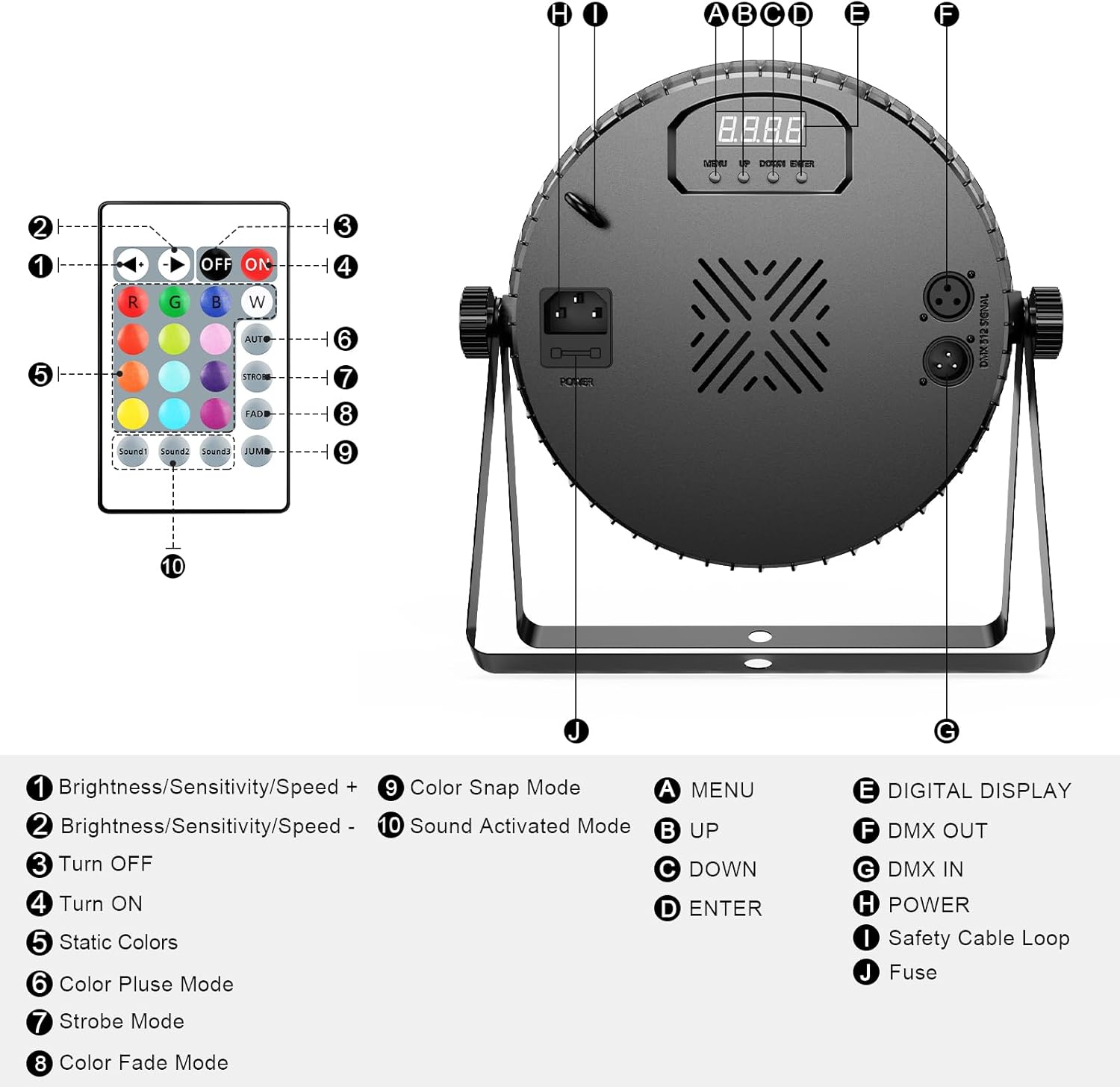
Image: Detailed diagram of the YeeSite 18LED Par Light's back panel, showing DMX input/output, power input, digital display, control buttons (Menu, Up, Down, Enter), and a diagram of the included remote control with its various functions.
Video: Official YeeSite video demonstrating the 18LED RGBA Par Lights, showcasing various color modes and features.
Operating Modes
1. Remote Control Operation
Each par light comes with a remote controller for convenient operation. The remote allows you to:
- Turn lights ON/OFF.
- Select static colors (Red, Green, Blue, Amber, White, Purple, etc.).
- Adjust brightness/sensitivity/speed.
- Choose from various modes: Color Pulse, Strobe, Fade, Color Snap, and Sound-Activated.

Image: A hand holding the remote control for the YeeSite 18LED Par Lights, with various color and mode buttons visible.
2. DMX Control
For professional setups, the lights support 4/8-channel DMX512 control. Connect your DMX controller to the DMX IN port and link multiple lights using the DMX OUT port for synchronized control. Refer to your DMX controller's manual for specific programming instructions.

Image: Multiple YeeSite 18LED Par Lights connected to a DMX controller, demonstrating advanced lighting control for stage effects.
3. Sound-Activated Mode
The built-in microphone allows the lights to react to music beats, creating dynamic lighting effects that sync with the audio. Activate this mode via the remote or onboard controls.
4. Pre-programmed Modes
The lights feature several pre-programmed modes for instant effects, including color changes, fades, and strobes. Cycle through these modes using the remote or control panel.
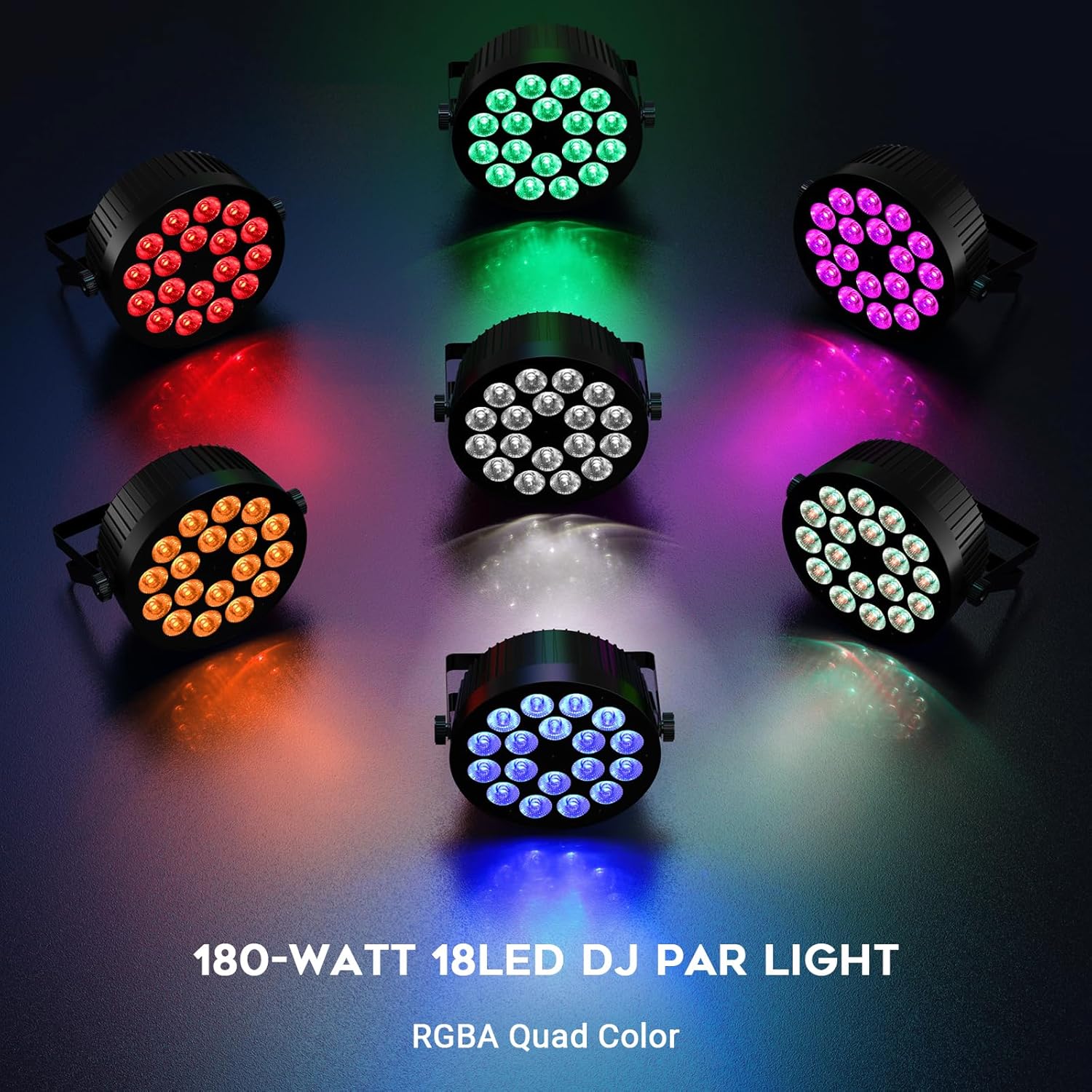
Image: A circular arrangement of YeeSite 18LED Par Lights, each displaying a different RGBA color (Red, Green, Blue, Amber, White, Purple), showcasing the wide color spectrum.
5. Master-Slave Mode
Connect multiple units using DMX cables to operate them in Master-Slave mode. One unit acts as the master, controlling all other connected slave units, ensuring synchronized lighting effects across your setup.
Maintenance
- Cleaning: Regularly clean the lens and housing with a soft, lint-free cloth to maintain optimal light output. Do not use abrasive cleaners.
- Storage: When not in use, store the lights in a cool, dry place, protected from dust and extreme temperatures.
- Inspection: Periodically check power cords and DMX cables for any signs of damage. Replace damaged cables immediately.
Troubleshooting
| Problem | Possible Cause | Solution |
|---|---|---|
| Light does not turn on | No power, faulty cable, unit malfunction | Check power connection and outlet. Test with a different power cord. If issue persists, contact support. |
| Remote control not working | Dead battery, obstruction, remote out of range | Replace remote battery. Ensure clear line of sight to the light's sensor. Move closer to the light. |
| DMX control issues | Incorrect DMX address, faulty cable, incorrect mode | Verify DMX address settings. Check DMX cables for damage. Ensure light is in DMX mode. |
| Lights not synchronized in Master-Slave | Incorrect Master/Slave setting, faulty DMX cable connection | Ensure one unit is set to Master and others to Slave. Check DMX cable connections between units. |
Specifications
| Feature | Detail |
|---|---|
| Brand | YeeSite |
| Model Number | YS-074-18R2RGBA |
| Light Source Type | Light Emitting Diode (LED) |
| Total Power | 180 Watts (18 x 10W LEDs) |
| Color Mixing | 4-in-1 RGBA (Red, Green, Blue, Amber) |
| Voltage | 110 Volts |
| Control Modes | Remote Control, DMX512 (4/8 Channel), Sound-Activated, Auto, Master-Slave |
| Mounting Type | Ceiling Mount, Floor Mount, Wall Mount |
| Material | Plastic |
| Product Dimensions | 8"L x 6"W x 6"H |
| Item Weight | 5.5 pounds (per unit) |
| Beam Angle | 25 Degrees |
Warranty and Support
YeeSite offers a 12-month warranty for these stage par lights. For any product-related inquiries, technical assistance, or warranty claims, please contact YeeSite customer service. They are available 24/7 to ensure your stage light setup is always performance-ready.
You can find contact information on the official YeeSite website or through your purchase platform.

