
Introduction
This manual provides detailed instructions for the assembly, operation, and maintenance of your IKIFLY Twin XL Bed Frame. This bed frame features a hidden storage headboard with integrated LED lights and a charging station, along with under-bed storage drawers. Please read this manual thoroughly before beginning assembly or use to ensure safe and proper operation.
Safety Information
Please observe the following safety precautions to prevent injury or damage to the product:
- Always follow the assembly instructions carefully to prevent instability or collapse.
- Be cautious around sharp edges to avoid injury.
- Do not exceed the maximum weight recommendation of 550 pounds.
- Use the charging station and LED lights with caution to prevent fire hazards.
- Keep the workspace clear during assembly to prevent trips or falls.
Package Contents
Before assembly, ensure all parts are present and undamaged. If any parts are missing or damaged, please contact customer support.
- Headboard components (wooden panels, upholstered panel, LED strip, charging station)
- Bed frame side rails and support beams
- Center support legs
- Wooden slats (20 pieces)
- Storage drawers (wire baskets, fabric fronts, wheels)
- Assembly hardware (screws, bolts, Allen wrenches)
- Installation Manual
Setup and Assembly
Assembly typically requires two people and can take several hours. Follow the steps below and refer to the included 3D installation video for visual guidance.
Official 3D Installation Video for IKIFLY LED Bed Frame with Drawers. This video provides a step-by-step visual guide for assembling your bed frame.
Step 1: Assemble the Headboard Frame
Begin by assembling the wooden components of the headboard. Attach the charging station to the designated slot on the top shelf using the provided screws. Ensure all connections are secure.

Image showing the hidden storage headboard with LED lights and charging station. The charging station includes 2 AC outlets, 1 USB port, and 1 Type-C port.
Step 2: Attach Upholstered Headboard Panel
Secure the upholstered headboard panel to the assembled headboard frame. The panel features a button-tufted design for comfort and aesthetics.

Detail of the button-tufted soft backrest on the headboard, providing a comfortable experience.
Step 3: Assemble Bed Frame Rails and Supports
Connect the side rails and center support beams to the headboard. Install the adjustable center support legs to ensure proper weight distribution and stability.
Step 4: Install Storage Drawers
Assemble the wire baskets for the storage drawers and attach the fabric fronts. The drawers are designed with wheels for easy access and slide under the bed frame.
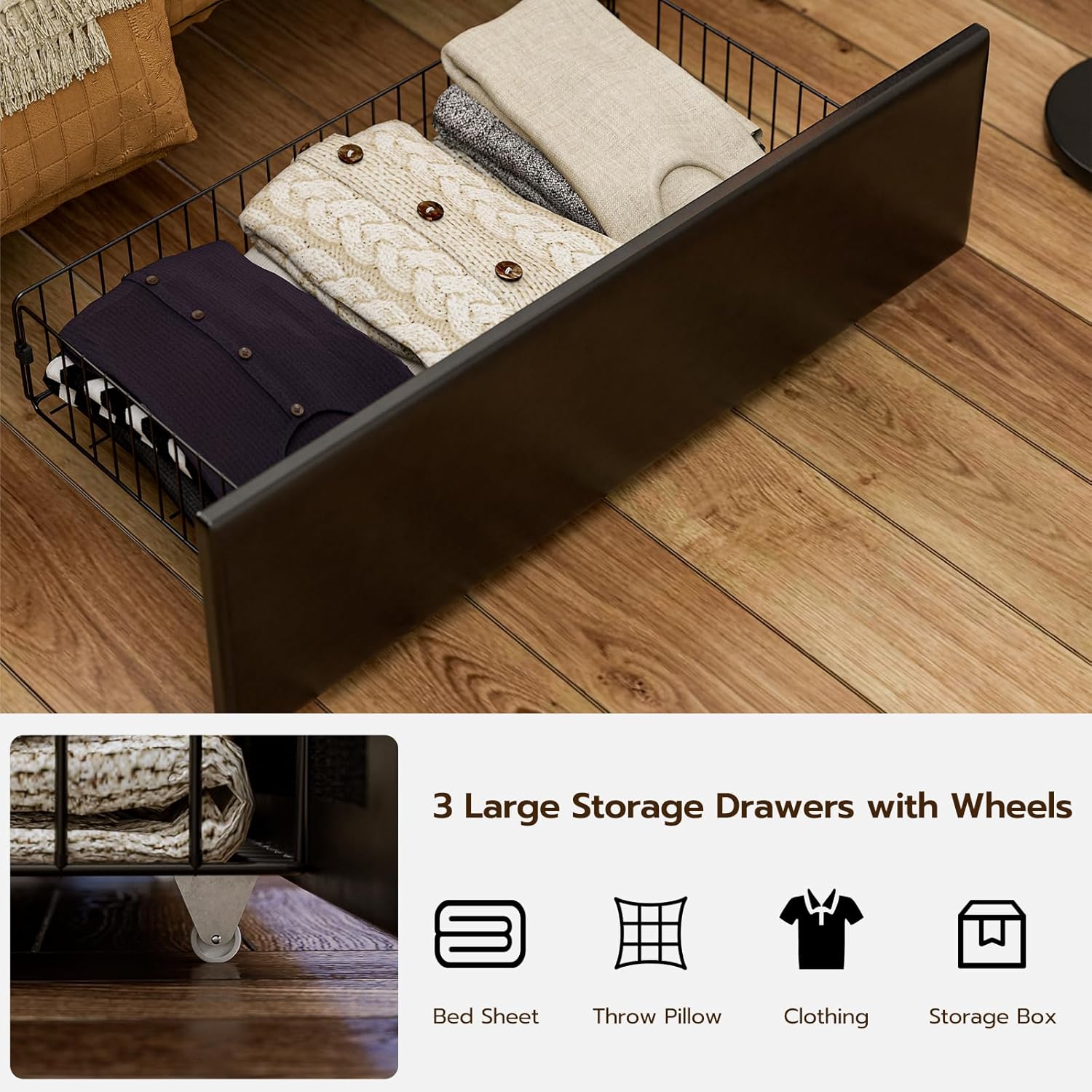
Three large storage drawers with wheels, ideal for organizing bedding, clothing, and other items.
Step 5: Place Wooden Slats
Lay the wooden slats across the bed frame supports. These slats provide a sturdy foundation for your mattress and eliminate the need for a box spring. Ensure they are evenly spaced and secured.
Noise-free wooden slats provide strong support and comfort, combining strength, silence, and reliability.
Operating Instructions
LED Lights Operation
The integrated LED lights in the headboard can be controlled via a remote or a smartphone app. Plug the bed frame into a wall outlet to power the lights.
- Remote Control: Use the provided RF remote controller to turn the lights on/off, change colors (16 options), and select from 4 flashing modes.
- App Control: Download the dedicated app to access over 60,000 DIY color options, sync lights to music, or set timing functions.

The modern LED lights design offers 16 colors and 4 flashing modes, controllable by remote or app.
Charging Station Usage
The headboard features a built-in charging station with 2 AC outlets, 2 USB ports, and 1 Type-C port. Ensure the bed frame is plugged into a wall outlet for the charging station to function.
- Plug your electronic devices directly into the available ports for convenient charging.

The built-in charging station provides easy access to power for your devices.
Storage Features
Your bed frame includes both hidden headboard storage and large under-bed drawers.
- Hidden Headboard Storage: The upholstered panel of the headboard can be lifted to reveal a spacious compartment, ideal for storing small items, books, or personal belongings.
- Under-Bed Drawers: The three large drawers with wheels can be easily pulled out from under the bed for storing clothing, quilts, pillows, and other items.
Overview video of the IKIFLY LED Bed Frame, showcasing the storage headboard and under-bed drawers.
Maintenance
To maintain the quality and longevity of your bed frame, follow these guidelines:
- Cleaning: Wipe upholstered surfaces with a soft, damp cloth. For wooden parts, use a dry cloth or a mild wood cleaner. Avoid harsh chemicals.
- Hardware: Periodically check all screws and bolts to ensure they are tight. Retighten as necessary to maintain stability.
- Drawers: Keep the area under the bed clear to allow the storage drawers to slide smoothly.
Troubleshooting
If you encounter any issues with your bed frame, refer to the following common problems and solutions:
| Problem | Possible Cause | Solution |
|---|---|---|
| LED lights not working | Power cord unplugged, remote battery low, faulty LED strip | Check power connection, replace remote battery, contact support if issue persists. |
| Charging station not working | Bed frame not plugged in, faulty charging unit | Ensure bed frame is plugged into a live outlet. If still not working, contact support. |
| Bed frame is unstable or squeaks | Loose hardware, uneven assembly | Check and tighten all bolts and screws. Ensure the bed frame is on a level surface. |
| Storage drawers do not slide smoothly | Obstruction under the bed, wheels damaged | Clear any obstructions. Inspect drawer wheels for damage. |
Specifications
- Size: Twin XL
- Material: Upholstered Faux Leather + Wood + Metal + LED Lights + Charging Station
- Product Dimensions: 83"L x 40.2"W x 43.6"H
- Compatible Mattress Size: Twin XL, 80" x 39"
- Recommended Mattress Thickness: 10"-12"
- Maximum Weight Recommendation: 550 Pounds
- Item Weight: 97 Pounds
- Special Features: Hidden Storage Headboard, Large Storage Drawers, No Box Spring Needed, Practical Charging Station, Space Saving
- Included Components: Installation Manual, LED Storage Bed Frame, Necessary Accessories

Detailed product dimensions for the Twin XL bed frame.
Warranty and Support
Your IKIFLY Twin XL Bed Frame comes with a 30-day return policy. For any product-related inquiries, missing parts, or warranty claims, please contact IKIFLY customer support through your retailer or the official IKIFLY website. Please have your model number (HU9391-BK) and purchase information ready when contacting support.