
1. Introduction
Thank you for choosing the Coleshome ODF-r24 Desk. This desk is designed to provide a functional and organized workspace for your home office, study, or gaming setup. It features a spacious desktop, six fabric storage drawers, and a sturdy metal frame. This manual provides essential information for safe assembly, operation, and maintenance of your new desk.

Figure 1: Coleshome ODF-r24 Desk in a typical setup.
2. Safety Information
Please read all safety instructions carefully before assembly and use. Keep this manual for future reference.
- Wall Anchoring: To prevent tipping, especially in households with children or pets, ensure your desk is properly secured to the wall using the provided anti-tip kit. This is crucial for stability, particularly when the desk is used as a home office or gaming station with electronic equipment.
- Weight Capacity: Do not exceed the maximum weight capacity of the desktop or drawers. Distribute weight evenly.
- Electrical Safety: If your desk includes an integrated USB socket, ensure it is connected to a suitable power source according to local electrical codes. Do not overload the socket. Keep liquids away from electrical components.
- Assembly: Assemble the desk on a soft, clean surface to prevent scratches. Ensure all screws and fasteners are tightened securely before use. Periodically check and re-tighten fasteners.
- Placement: Place the desk on a level surface. Avoid placing it near heat sources, direct sunlight, or in damp environments.
3. Package Contents
Before beginning assembly, verify that all parts listed below are present and undamaged. If any parts are missing or damaged, please contact customer support.
- Desktop panels
- Metal frame components
- 6 Fabric storage drawers (4 small, 2 large)
- Assembly hardware (screws, bolts, connectors)
- Adjustable foot pads
- Headphone hook
- Integrated USB socket (if applicable to your model)
- Assembly tools (e.g., Allen wrench)
- Anti-tip kit
4. Setup and Assembly
Assembly instructions are provided with the desk to facilitate and speed up the installation process. All necessary assembly tools are included.
4.1 General Assembly Steps
- Unpack all components and lay them out on a clean, soft surface to prevent damage.
- Identify all parts using the provided parts list in the separate assembly guide.
- Follow the step-by-step diagrams in the assembly guide to connect the metal frame components.
- Attach the desktop panels to the assembled frame. Ensure all connections are secure.
- Insert the fabric drawers into their designated compartments.
- Attach the adjustable foot pads to the bottom of the desk legs.
- Install the headphone hook as desired.
- Secure the desk to the wall using the anti-tip kit.
4.2 Reversible Configuration
The desk is designed to be reversible, allowing you to configure the drawer units on either the left or right side to suit your space and preference. Refer to the specific instructions in your assembly guide for details on how to achieve the desired orientation.

Figure 2: Product dimensions and reversible setup options.
5. Operating Instructions
5.1 Using the Storage Drawers
The desk features six fabric storage drawers: four smaller utility drawers and two larger file cabinet drawers. These are designed for organizing various items such as books, documents, laptops, and headphones.

Figure 3: Fabric storage drawers for organization.
5.2 Integrated USB Socket
If your model includes an integrated USB socket, connect the desk's power cable to a wall outlet. You can then use the USB ports to charge compatible electronic devices. Ensure devices are compatible with the power output of the USB ports.
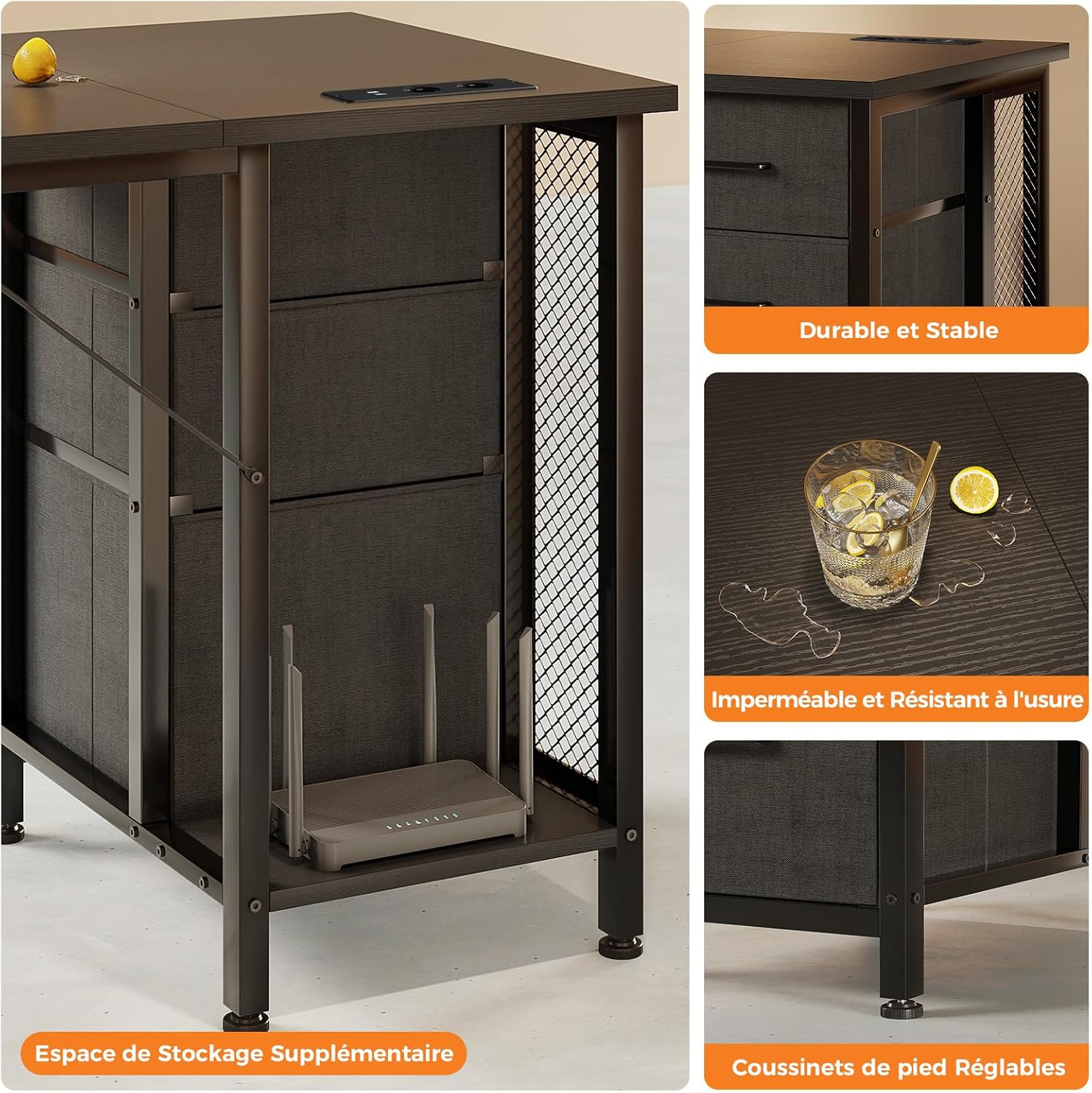
Figure 4: Integrated USB socket for convenient charging.
5.3 Adjustable Foot Pads
The desk is equipped with adjustable foot pads. Rotate these pads to fine-tune the desk's height and ensure stability on uneven floors, preventing wobbling.
6. Maintenance
Proper care will extend the life and appearance of your Coleshome desk.
- Cleaning: The melamine desktop is waterproof and wear-resistant. Wipe surfaces with a soft, damp cloth. Avoid abrasive cleaners or harsh chemicals that could damage the finish. For the metal frame, use a dry or slightly damp cloth.
- Drawer Care: The fabric drawers can be spot cleaned with a mild detergent and damp cloth. Allow to air dry completely.
- Fasteners: Periodically check all screws and bolts to ensure they remain tight. Re-tighten as necessary to maintain stability.
- Spills: Wipe up spills immediately to prevent staining or damage to the desktop.

Figure 5: Desk features highlighting durability and ease of maintenance.
7. Troubleshooting
If you encounter any issues with your desk, please refer to the following common solutions:
- Desk Wobbles:
- Ensure the desk is on a level surface.
- Adjust the foot pads on each leg until the desk is stable.
- Check all assembly screws and bolts and tighten them securely.
- Drawers Not Sliding Smoothly:
- Ensure the fabric drawers are correctly inserted into their compartments.
- Check for any obstructions within the drawer compartments.
- Integrated USB Socket Not Working:
- Verify that the desk's power cable is securely plugged into a functional wall outlet.
- Check if the device you are trying to charge is compatible and the cable is working.
If the problem persists, please contact customer support.
8. Specifications
| Feature | Specification |
|---|---|
| Model Number | ODF-r24 |
| Brand | Coleshome |
| Dimensions (L x W x H) | 160 x 52 x 75.5 cm (63 x 20.5 x 29.7 inches) |
| Weight | 18.9 Kilograms (41.67 lbs) |
| Desktop Material | Melamine |
| Frame Material | Metal |
| Number of Drawers | 6 (4 utility, 2 file cabinets) |
| Special Features | Integrated USB socket, Adjustable foot pads, Headphone hook |
| Assembly Required | Yes |
| Tools Included | Yes |

Figure 6: Desk dimensions for desktop and legroom.
9. Warranty and Support
This Coleshome desk comes with a limited warranty. Please refer to the warranty documentation included with your purchase for specific terms and conditions.
For technical support, missing parts, or warranty claims, please contact Coleshome customer service through your retailer or the contact information provided in your purchase documentation.

