
Product Overview
The Valerion VisionMaster Pro2 is a state-of-the-art triple laser projector designed to deliver an unparalleled cinematic and gaming experience. Featuring 4K UHD resolution, a 15,000:1 ultra-high contrast ratio with Enhanced Black Level (EBL) technology, and 3000 ISO Lumens brightness, it ensures vivid, lifelike colors and deep blacks. Equipped with an OpticFlex Lens System for flexible placement, AI Super Resolution, HDR10+ with Dynamic Tone Mapping, and a powerful Al-SoC MT9618 chipset, the VisionMaster Pro2 offers seamless 4K streaming and lag-free gaming with 4ms input lag and 240Hz refresh rate. Its ultimate smart integration supports Google TV, AirPlay 2, Miracast, Chromecast, and voice control via Alexa, Google Home, or Apple HomeKit.
What's in the Box
- VisionMaster Pro2 Projector
- User Manual
- Remote Control (2 AA batteries included)
Setup Guide
Unpacking and Initial Placement
Carefully remove the VisionMaster Pro2 from its packaging. The projector weighs approximately 15.4 pounds and has dimensions of 7.48 x 8.27 x 10.24 inches. Place the projector on a stable, flat surface. Ensure adequate ventilation around the unit.
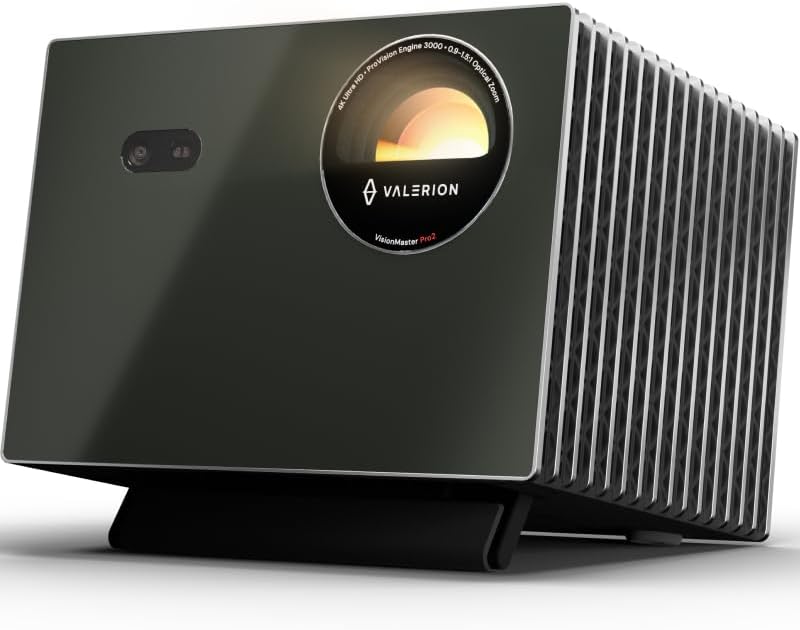
Image: Front view of the Valerion VisionMaster Pro2 projector.
Powering On
Connect the power adapter to the DC 36V port on the projector and plug it into a power outlet. Press the power button on the projector or the remote control to turn on the device. The projector will initiate its startup sequence, including automatic focus and keystone correction.
Connectivity
The VisionMaster Pro2 offers a variety of ports for connecting external devices:
| Port Type | Description |
|---|---|
| DC 36V | Power input |
| S/PDIF | Digital audio output |
| USB 3.0 | High-speed data transfer for external drives |
| USB 2.0 | Standard data transfer |
| HDMI 1, HDMI 2 | Standard HDMI inputs |
| HDMI 3 (eARC) | HDMI input with Enhanced Audio Return Channel support |
| Headphone Jack | 3.5mm audio output |
| LAN | Ethernet port for wired network connection |
For wireless connectivity, the projector supports Wi-Fi 6 and Bluetooth 5.2.
Automatic Adjustments
The VisionMaster Pro2 features OpticFlex Lens System (0.9-1.5 throw ratio) and auto-adjusting capabilities for focus, keystone correction, obstacle avoidance, and screen alignment. These features ensure a clear and perfectly shaped image in various room configurations without manual intervention.

Image: Diagram illustrating the optical zoom capabilities of the VisionMaster Pro2, allowing screen size adjustment without moving the projector.
Video: An overview of the VisionMaster Pro2's features, highlighting its versatility and ease of use in various home settings.
Operating Your VisionMaster Pro2
Picture Quality and Color Mastery
Experience true 4K UHD clarity with a 15,000:1 contrast ratio and Enhanced Black Level (EBL) technology for deep blacks. The projector supports 110% Rec.2020 wide color gamut and ISF-certified calibration for industry-leading color accuracy. AI Super Resolution enhances details, while HDR10+ with Dynamic Tone Mapping optimizes brightness and contrast in real-time.

Image: Visual comparison demonstrating the 15,000:1 contrast ratio of the VisionMaster Pro2 with Enhanced Black Level (EBL) technology, showing superior detail in dark scenes compared to a 1000:1 market average.

Image: Illustration of the projector's RGB Laser technology, 4K UHD resolution, 110% Rec.2020 color gamut, and ISF certification for director-approved color accuracy.
Video: A demonstration of the projector's AI features, including AI Scene, Dark Detail, and Super Resolution, which automatically optimize picture quality in real-time.
Gaming Experience
For gamers, the VisionMaster Pro2 offers an ultra-smooth 4ms input lag and a 240Hz refresh rate, providing a competitive edge. Customize your gameplay with dedicated modes like RPG, FPS, and RCG, and utilize enhanced FPS crosshairs and night vision for improved visibility in dark scenes.

Image: Infographic detailing the projector's gaming capabilities, including 4GB RAM, 4ms lag, 240Hz refresh rate, HDMI 2.1, USB 3.0, and Wi-Fi 6e.
Smart Features and Streaming
The built-in Google TV+ provides instant access to popular streaming platforms like Netflix, YouTube, Amazon Prime Video, and Disney+. Share content effortlessly using AirPlay 2, Miracast, and Chromecast. Control your entertainment hands-free with voice commands via Alexa, Google Home, or Apple HomeKit.

Image: A living room scene showing the projector displaying streaming content, with logos for Google TV, Apple AirPlay 2, Chromecast, and Miracast.

Image: A couple interacting with the projector using voice commands, with logos for Google Home, Apple HomeKit, Apple AirPlay, and Alexa, emphasizing smart home integration.
Video: A short video showcasing the VisionMaster Pro2's performance in an outdoor setting, highlighting its brightness and ease of setup for outdoor viewing experiences.
Maintenance and Care
The VisionMaster Pro2 features a dust-proof design to minimize internal dust accumulation. To maintain optimal performance and longevity, regularly clean the exterior of the projector with a soft, dry cloth. Avoid using abrasive cleaners or solvents. Ensure the projector's vents are clear of obstructions to prevent overheating.
Troubleshooting Common Issues
| Problem | Possible Solution |
|---|---|
| No image projected | Ensure power cable is securely connected and power button is pressed. Check input source selection. |
| Blurry image | Allow auto-focus to complete. If issue persists, try manual focus adjustment. Ensure projection surface is flat. |
| Image is not rectangular | Allow auto-keystone correction to complete. If needed, use manual keystone correction in settings. |
| No sound | Check volume levels on projector and connected device. Ensure audio cables are correctly connected if using external speakers. |
| Wi-Fi/Bluetooth connectivity issues | Ensure projector is within range of your router/device. Restart projector and router. Check network settings. |
Technical Specifications
| Feature | Detail |
|---|---|
| Brand Name | Valerion |
| Item Model Number | VisionMaster Pro2 |
| Display Resolution | 3840 x 2160 (4K UHD) |
| Brightness | 3000 ISO Lumens |
| Contrast Ratio | 15000:1 |
| Optical Zoom | 0.9-1.5 throw ratio |
| Input Lag | 4ms (at 1080p/240Hz) |
| Refresh Rate | Up to 240Hz |
| RAM/ROM | 4GB RAM / 128GB ROM |
| Connectivity Technology | Wi-Fi 6, Bluetooth 5.2 |
| Smart Features | Google TV, AirPlay 2, Miracast, Chromecast, Google Home, Apple HomeKit, Alexa |
| Special Features | IMAX Enhanced, HDR10+, Dynamic Tone Mapping, EBL, Filmmaker Mode, 3D-Ready, Dolby Vision & Atmos, Auto Focus, Auto Obstacle Avoidance, Auto Screen Alignment, Dust-Proof |
| Item Weight | 15.4 pounds |
| Product Dimensions | 7.48 x 8.27 x 10.24 inches |
Warranty and Support
Valerion offers a 30-day price protection guarantee. If the price drops within 30 days of your purchase on Amazon, you can contact Valerion customer support for a refund of the difference. For any product inquiries, technical assistance, or warranty claims, please contact Valerion Customer Support:
- Email: support@valerion.com
- Live Chat: Mon-Fri | 9 AM – 6 PM (EST) on their official website
- Call or WhatsApp: +1 (888) 891-8839 | Mon-Fri | 9 AM – 6 PM (EST)


