1. Safety Information
Please read and understand all instructions before assembly and use. Keep this manual for future reference.
- Ensure all parts are present and undamaged before beginning assembly.
- Do not use power tools for assembly unless specifically instructed, as overtightening may damage components.
- Place the headboard on a flat, stable surface during assembly to prevent scratching or damage.
- Keep small parts away from children to avoid choking hazards.
- Ensure the charging station is properly connected to a power outlet and that cables are not pinched or damaged.
- Do not overload the charging ports.
- Regularly check all fasteners to ensure they remain tight.
- Do not stand or climb on the headboard.
2. Package Contents
Verify that all components are included in your package. If any parts are missing or damaged, please contact ONBRILL customer support.
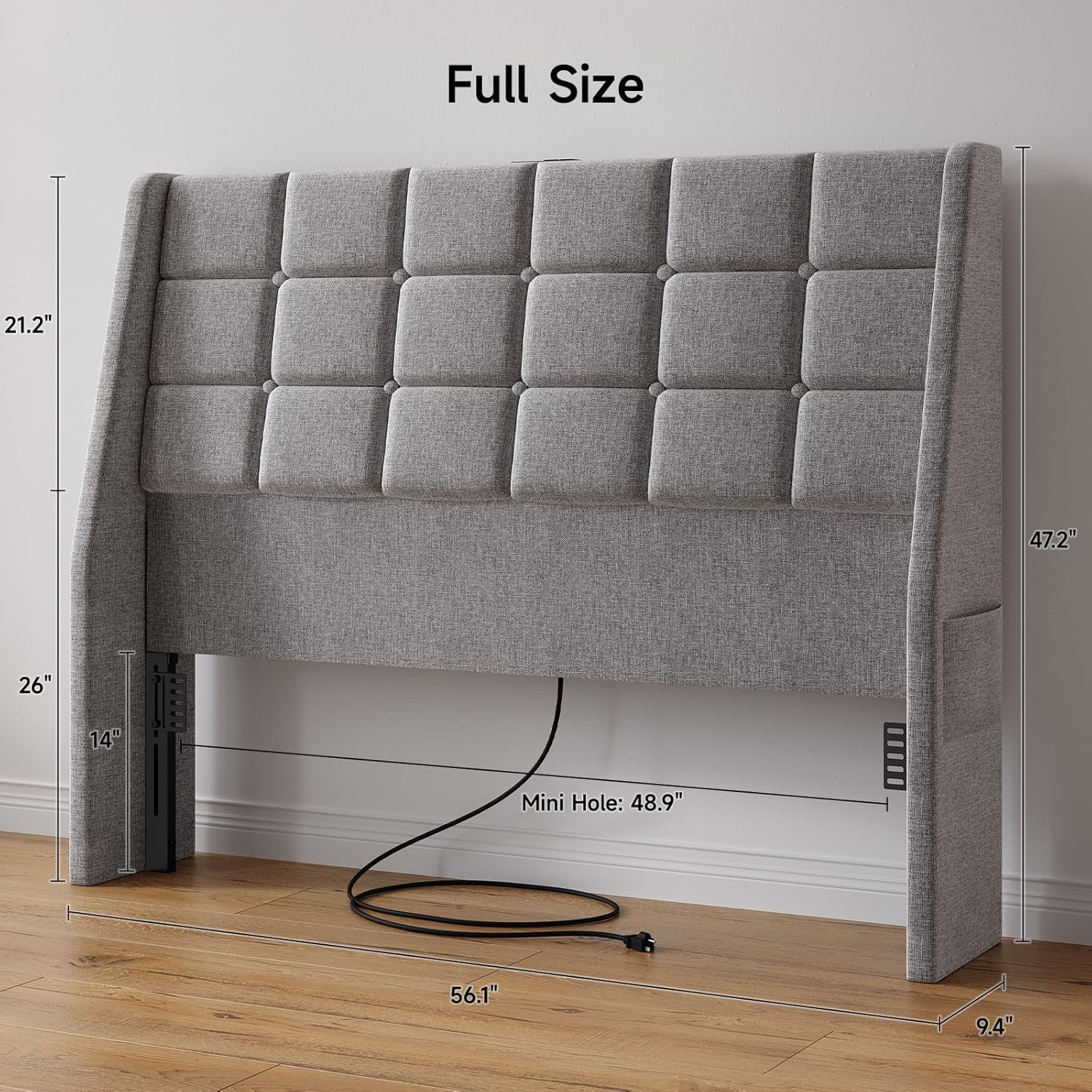
Image 1: Full Size Headboard components and dimensions. This image displays the main upholstered headboard sections, metal support bars, and the hardware kit, along with key measurements for a full-size bed.

Image 2: Bed Frame Adapters. This image shows the metal adapters used to connect the headboard to various bed frames, highlighting their adjustable nature.

Image 3: Charging Station and Power Cord. This image details the integrated power strip with AC outlets, USB, and Type-C ports, along with its power cord.
Refer to the included parts list in your package for a detailed inventory of all components and hardware.
3. Assembly Instructions
Follow these steps carefully to assemble your ONBRILL Ergonomic Upholstered Headboard.
- Unpack Components: Carefully remove all parts from the packaging and lay them out on a clean, soft surface to prevent scratches. Identify all components using the provided parts list.
- Assemble Main Headboard Sections: Connect the upholstered headboard sections according to the diagrams in your instruction manual, ensuring all bolts are securely tightened.
- Attach Support Bars: Secure the metal support bars to the back of the assembled headboard using the designated screws and tools.
- Install Bed Frame Adapters: Attach the adjustable bed frame adapters to the headboard legs. These adapters allow for connection to various bed frame sizes and styles. Adjust the height as needed to align with your bed frame.
- Connect Charging Station: Locate the integrated charging station and its power cord. Ensure it is properly seated and secured within the headboard structure.
- Position and Secure Headboard: Carefully position the assembled headboard against your bed frame. Use the bed frame adapters to securely attach the headboard to your existing bed frame. Tighten all connections.
- Plug In Power: Once the headboard is securely attached, plug the power cord from the charging station into a wall outlet.
Video 1: This video demonstrates the assembly process and highlights the ergonomic design and charging station features of the ONBRILL Upholstered Headboard. It provides a visual guide to help with installation.
4. Operating Instructions
4.1 Ergonomic Design
The headboard features an ergonomic design with a slight tilt (approximately 10 degrees) to provide optimal back support and comfort when sitting up in bed. This design helps reduce fatigue during extended periods of sitting.

Image 4: A person comfortably leaning against the ergonomic headboard, illustrating the 10-degree tilt for enhanced support.
4.2 Charging Station
The integrated charging station is located on the top surface of the headboard, providing convenient access to power for your devices.
- AC Outlets: Two (2) standard 125V/12A plug outlets are available for powering larger devices.
- USB Ports: One (1) 5V 2A USB-A port and one (1) 5V 2A Type-C port are included for charging smartphones, tablets, and other USB-powered devices.
- To use, simply plug your device's charging cable into the appropriate port. Ensure the headboard's main power cord is connected to a live wall outlet.

Image 5: Close-up view of the charging station with devices plugged in, demonstrating its functionality.
4.3 Side Storage Pockets
Each side of the headboard features a storage pocket, ideal for keeping small items such as books, remote controls, or mobile phones within easy reach.

Image 6: Detail of the side storage pocket, showing it holding a book and a phone.
5. Maintenance
Proper care will extend the life and appearance of your headboard.
- Cleaning: For general cleaning, gently vacuum the upholstered fabric using a soft brush attachment. For spills, blot immediately with a clean, dry cloth. For stubborn stains, use a mild fabric cleaner following the product's instructions and test on an inconspicuous area first.
- Frame Care: Wipe metal parts with a soft, damp cloth. Avoid abrasive cleaners.
- Electrical Components: Ensure the charging station and power cord are kept dry and free from dust. Do not attempt to disassemble or repair electrical components yourself.
- Fasteners: Periodically check all screws and bolts and tighten them if necessary to maintain stability.
6. Troubleshooting
If you encounter any issues with your headboard, refer to the following common problems and solutions:
| Problem | Possible Cause | Solution |
|---|---|---|
| Headboard is wobbly. | Loose fasteners or improper connection to bed frame. | Check and tighten all screws and bolts. Ensure the bed frame adapters are securely attached to both the headboard and the bed frame. |
| Charging station not working. | Power cord not plugged in, wall outlet not active, or device cable is faulty. | Verify the headboard's power cord is securely plugged into a working wall outlet. Test the wall outlet with another device. Try a different charging cable for your device. |
| Headboard does not align with bed frame. | Incorrect adapter height adjustment. | Adjust the height of the bed frame adapters to match your bed frame's height. Refer to the assembly instructions for proper adjustment. |
If the problem persists, please contact ONBRILL customer support.
7. Specifications
- Brand: ONBRILL
- Model: HB-102-GR-F
- Size: Full (also available in Queen)
- Color: Gray (also available in Beige)
- Material: Wood, Linen
- Product Dimensions (Full Size): 56.2" (L) x 47.2" (H) x 9.4" (W)
- Item Weight: 36 pounds
- Special Features: Ergonomic design, Charging Station (2 AC outlets, 1 USB-A port, 1 Type-C port), Side Storage Pockets, Adjustable Bed Frame Adapters
- Charging Station Output:
- AC Outlets: 125V/12A
- USB-A Port: 5V 2A
- Type-C Port: 5V 2A
8. Warranty & Support
ONBRILL products are designed for quality and durability. For specific warranty information regarding your headboard, please refer to the warranty card included in your package or visit the official ONBRILL website.
For customer support, assembly assistance, or to report missing/damaged parts, please contact ONBRILL customer service through the contact information provided on your product packaging or the official ONBRILL website.
Please have your model number (HB-102-GR-F) and purchase date ready when contacting support.


