
1. Product Overview
The CPTEA B108 is a versatile 2-in-1 Bluetooth 5.4 audio adapter designed to seamlessly switch between transmitter (TX) and receiver (RX) modes. It enables wireless audio connectivity for a wide range of devices, offering enhanced sound quality and stable connections.
- TX Mode: Connects non-Bluetooth audio sources (e.g., TVs, PCs, gym equipment, airplane entertainment systems) to Bluetooth headphones or speakers.
- RX Mode: Transforms wired audio devices (e.g., home stereos, car audio systems, wired speakers) into Bluetooth-enabled receivers, allowing wireless streaming from smartphones or tablets.
- Bluetooth 5.4: Provides faster pairing, a more stable connection, and low-latency audio transmission for an optimal listening experience.
- Dual Device Pairing: Supports simultaneous connection to two Bluetooth headphones in TX mode or two smartphones in RX mode.
- Long Battery Life: Offers up to 24 hours of continuous use on a single charge, with quick Type-C charging.
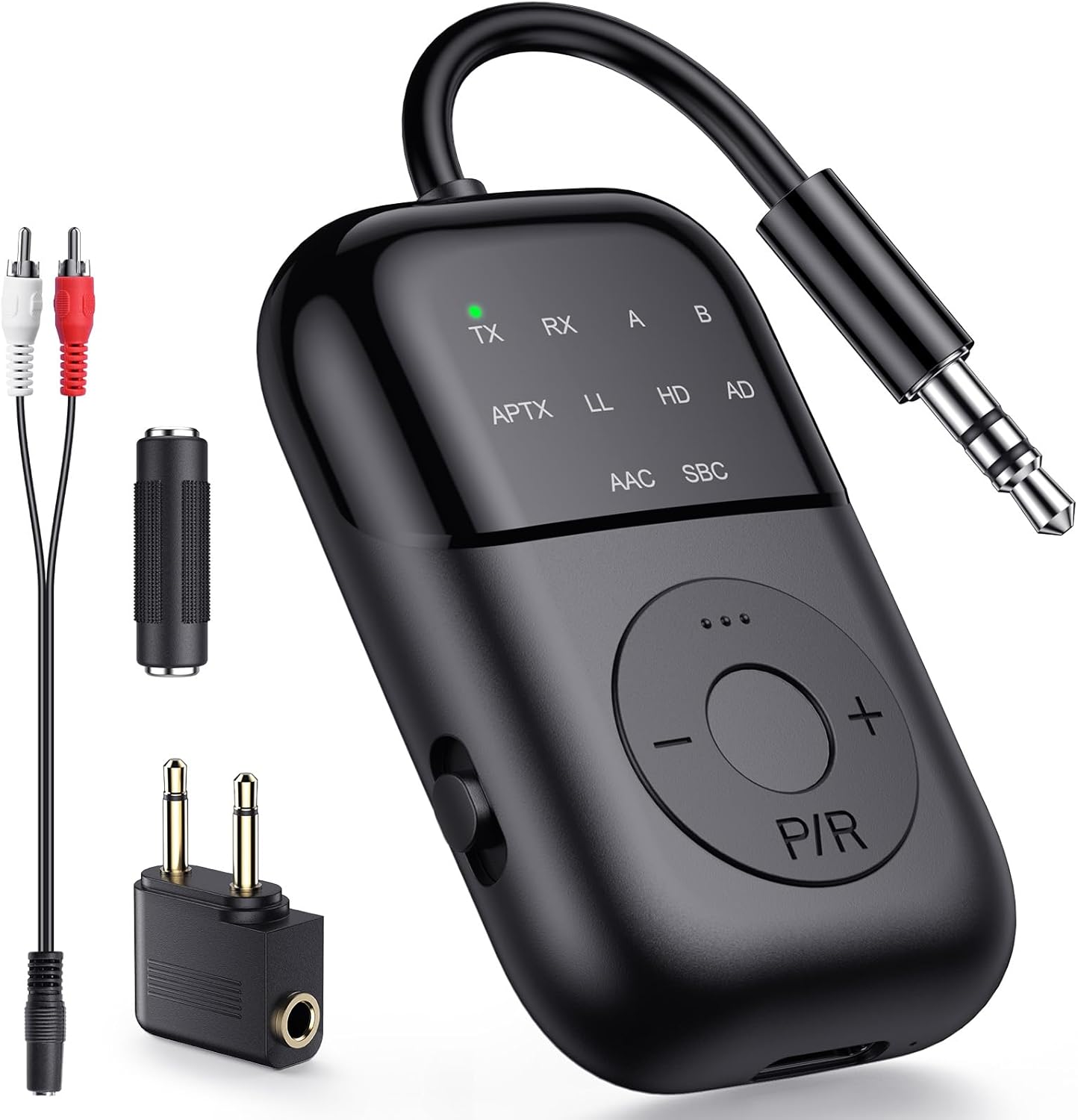
Image 1.1: The CPTEA B108 Bluetooth 2-in-1 Audio Transmitter Receiver and its accessories.
Video 1.2: A quick overview of the CPTEA B108's features and various applications in both Transmitter and Receiver modes.
2. Package Contents
Please verify that all items are present in your package:
- CPTEA B108 Bluetooth 2-in-1 Audio Transmitter Receiver
- 3.5mm Audio Cable
- RCA Audio Cable
- Type-C Charging Cable
- Airplane Audio Adapter
- User Manual

Image 2.1: All items included in the CPTEA B108 product package.
3. Device Layout
Familiarize yourself with the buttons and ports on your B108 device:

Image 3.1: Front view of the B108 device highlighting its controls and indicators.
- TX/RX Switch: Toggles between Transmitter and Receiver modes.
- P/R Button: Power On/Off, Play/Pause, Pairing, and Reset function.
- +/- Buttons: Volume Up/Down, Next/Previous Track.
- LED Indicators: Display current mode (TX/RX), pairing status (flashing), connection status (solid), and audio codec (APTX, LL, HD, AD, AAC, SBC).
- 3.5mm Audio Jack: For connecting to audio sources or output devices.
- Type-C Charging Port: For charging the device.
4. Getting Started
4.1 Charging the Device
Before first use, fully charge your CPTEA B108. Use the included Type-C charging cable to connect the device to a USB power source. The LED indicator will show charging status and turn off when fully charged.
- Charging Time: Approximately 2 hours for a full charge.
- Battery Life: Up to 20 hours in TX mode, up to 15 hours in RX mode.

Image 4.1: Charging the B108 via Type-C cable and its battery performance.
4.2 Power On/Off
- Power On: Press and hold the P/R button for 3 seconds. The LED indicators will light up.
- Power Off: Press and hold the P/R button for 3 seconds. The LED indicators will turn off.
4.3 Mode Selection (TX/RX)
The B108 features a physical switch to easily select between Transmitter (TX) and Receiver (RX) modes.

Image 4.2: The TX/RX mode selection switch on the side of the B108.
- Slide the switch to TX for Transmitter mode.
- Slide the switch to RX for Receiver mode.
5. Operating Modes
5.1 Transmitter (TX) Mode
In TX mode, the B108 transmits audio wirelessly from non-Bluetooth devices to your Bluetooth headphones or speakers.
- Slide the mode switch to TX. The TX LED will flash, indicating pairing mode.
- Connect the B108 to your audio source (e.g., TV, PC, gym equipment, airplane entertainment) using the 3.5mm audio cable or RCA cable.
- Put your Bluetooth headphones or speakers into pairing mode.
- The B108 will automatically search for and connect to nearby Bluetooth audio devices. Once connected, the TX and A (or B for second device) LEDs will stay solid.
- For optimal low-latency audio, use aptX-LL supported headphones.
Video 5.1: Detailed instructions on connecting headphones using the B108 in Transmitter mode.

Image 5.1: Overview of Transmitter (TX) mode applications.

Image 5.2: Using the B108 to stream TV audio wirelessly to headphones.

Image 5.3: The B108 enabling wireless audio for in-flight entertainment.
5.2 Receiver (RX) Mode
In RX mode, the B108 receives audio wirelessly from your Bluetooth-enabled devices (e.g., smartphone, tablet, PC) and outputs it to wired speakers or car stereos.
- Slide the mode switch to RX. The RX LED will flash, indicating pairing mode.
- Connect the B108 to your wired audio system (e.g., car stereo, home speakers) using the 3.5mm audio cable.
- On your smartphone or other Bluetooth device, search for "B108" in the Bluetooth settings and pair.
- Once connected, the RX LED will stay solid. You can now stream audio wirelessly.

Image 5.4: Overview of Receiver (RX) mode applications.

Image 5.5: Using the B108 to enable Bluetooth audio in a car stereo.
5.3 Dual Headphone Pairing (TX Mode)
The B108 can connect to two Bluetooth headphones simultaneously in TX mode, allowing two people to share audio from a single source.
- Ensure the B108 is in TX mode and connected to your audio source.
- Pair the first Bluetooth headphone with the B108. Once connected, turn off the first headphone.
- Pair the second Bluetooth headphone with the B108.
- Turn on the first headphone. The B108 will automatically reconnect to both headphones. The TX, A, and B LEDs will stay solid.

Image 5.6: Connecting two headphones simultaneously to the B108.
6. Troubleshooting
If you encounter issues with your CPTEA B108, please refer to the following common solutions:
- No Sound:
- Ensure the B108 is correctly connected to the audio source/output device.
- Check the audio output settings on your source device (e.g., TV audio output).
- Verify that the B108 is paired and connected to your headphones/speakers.
- Adjust the volume on both the B108 and your connected audio device.
- Audio Delay (Latency):
- For the lowest latency, ensure your headphones or speakers support aptX-LL (Low Latency) codec. The B108 supports aptX-LL.
- Only One Earbud Connected:
- If using true wireless earbuds, ensure both earbuds are connected to each other first before pairing with the B108.
- Resetting the Device:
- To clear all pairing records and reset the B108, hold the P/R button for 8 seconds. All LED lights will flash, indicating a successful reset.
7. Specifications
| Feature | Detail |
|---|---|
| Model Number | B108 |
| Bluetooth Version | 5.4 |
| Connectivity Technology | Bluetooth |
| Operating Modes | Transmitter (TX) and Receiver (RX) |
| Audio Codecs Supported | APTX, LL, HD, AD, AAC, SBC |
| Power Source | Battery Powered (1 A battery included) |
| Battery Life (TX Mode) | Up to 20 hours |
| Battery Life (RX Mode) | Up to 15 hours |
| Charging Port | Type-C |
| Item Weight | 3.2 ounces |
| Package Dimensions | 5.39 x 4.57 x 0.75 inches |
| Special Feature | Low Latency |
8. Safety Information
Please read and follow these safety guidelines to ensure safe operation and prolong the life of your device:
- Battery Handling: Keep the device away from excessive heat and moisture. Do not expose it to temperatures above 140°F (60°C). Dispose of the battery in accordance with local regulations.
- Interference Warning: This device may interfere with other wireless devices. Follow manufacturer's instructions to minimize potential interference.
- Do not disassemble, modify, or attempt to repair the device yourself. Contact customer support for assistance.
- Avoid dropping or subjecting the device to strong impacts.
9. Warranty and Support
The CPTEA B108 comes with a 2-year warranty. For warranty claims, technical support, or any questions regarding your device, please contact CPTEA customer service through the retailer where you purchased the product or visit the official CPTEA website.
Note: Some customer reviews mention a 2-year warranty. Please refer to your product packaging or the manufacturer's official website for the most accurate and up-to-date warranty information.