
1. Product Overview
The meite Flexible Points are high-quality 5/8 inch (15 mm) metal fasteners designed as refills for compatible point drivers. These flexipoints are essential for securing backing materials, glass, photos, and artworks within wooden picture frames. Each box contains 2,000 points, provided in strips of 145 pieces for convenient loading and use.

Image 1.1: meite Flexible Points 5/8 inch (15 mm) product packaging and individual strips.
Key Features:
- Quantity: 2,000 count 5/8" (15 mm) flexible points.
- Strip Configuration: 145 pieces per strip for efficient loading.
- Material: Made from durable metal for reliable performance.
- Design: Features a green glued strip to prevent loosening and strengthen fastening.
- Compatibility: Compatible with HM515, P515, F54, F56, F500-1, F500-2 point drivers.
- Applications: Suitable for securing glass, photos, artworks, and backing materials in wooden frames.
2. Specifications
| Specification | Value |
|---|---|
| Product Dimensions | 2.6 x 2.2 x 0.63 inches |
| Item Model Number | FP515-2000 |
| Item Weight | 11.3 ounces |
| Point Length | 5/8 inch (15 mm) |
| Points Per Strip | 145 Pcs/Strip |
| Total Points | 2,000 Count |
| Manufacturer | meite |
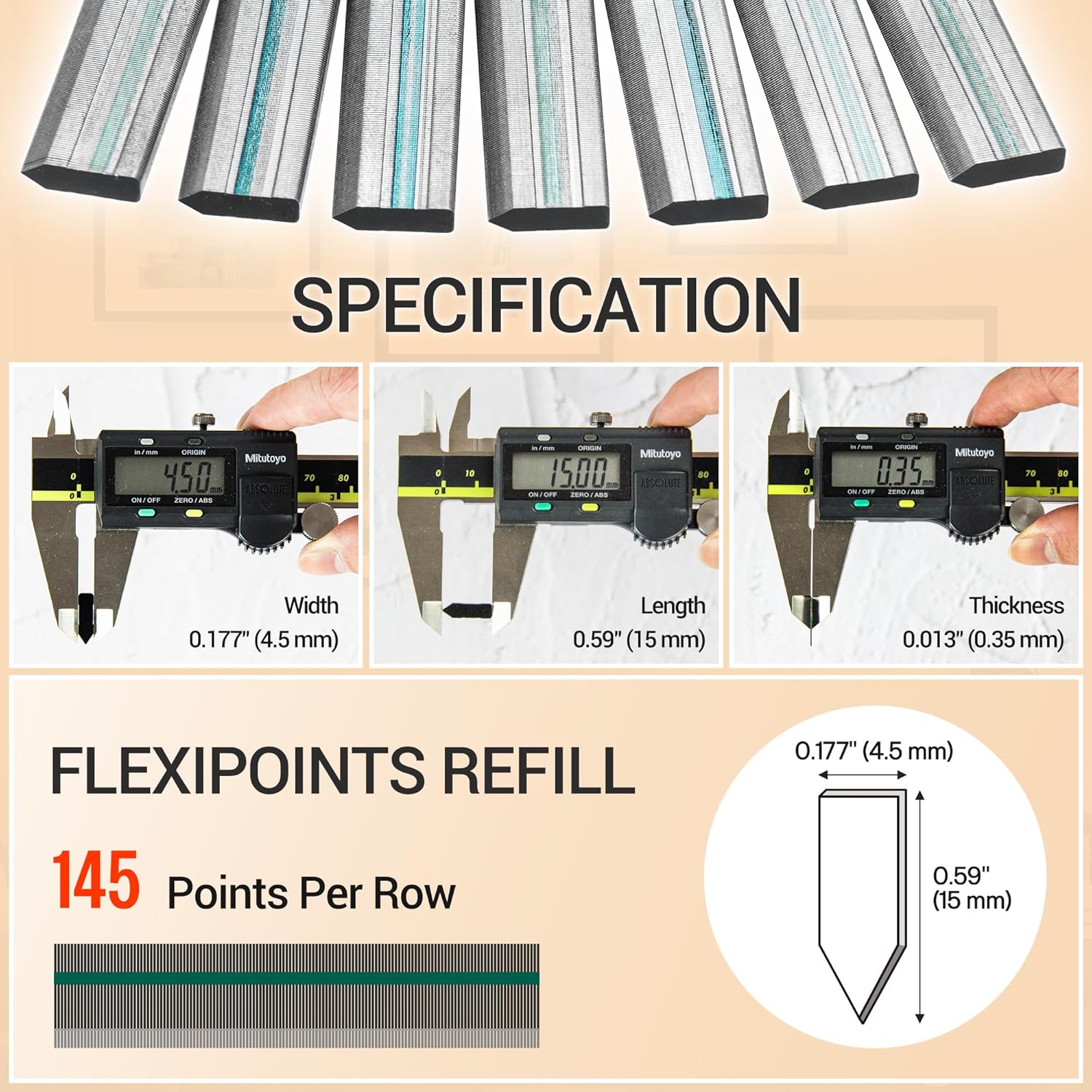
Image 2.1: Detailed specifications and dimensions of the flexible points.
3. Setup and Installation
These flexible points are designed for use with compatible point drivers. Ensure your point driver is clean and in good working condition before loading.
Loading Flexible Points into a Point Driver:
- Open the Magazine: Locate the magazine release button on your point driver (e.g., HM515 model). Press the button to open the magazine.
- Pull Up the Nail Rod: Gently pull up the nail rod to fully open the loading area.
- Place the Nail Strip: Insert a strip of meite flexible points into the magazine. Ensure the nail tips are facing forward, towards the driving mechanism.
- Close the Magazine: Press down the nail rod to close the magazine securely. The points should now be ready for use.
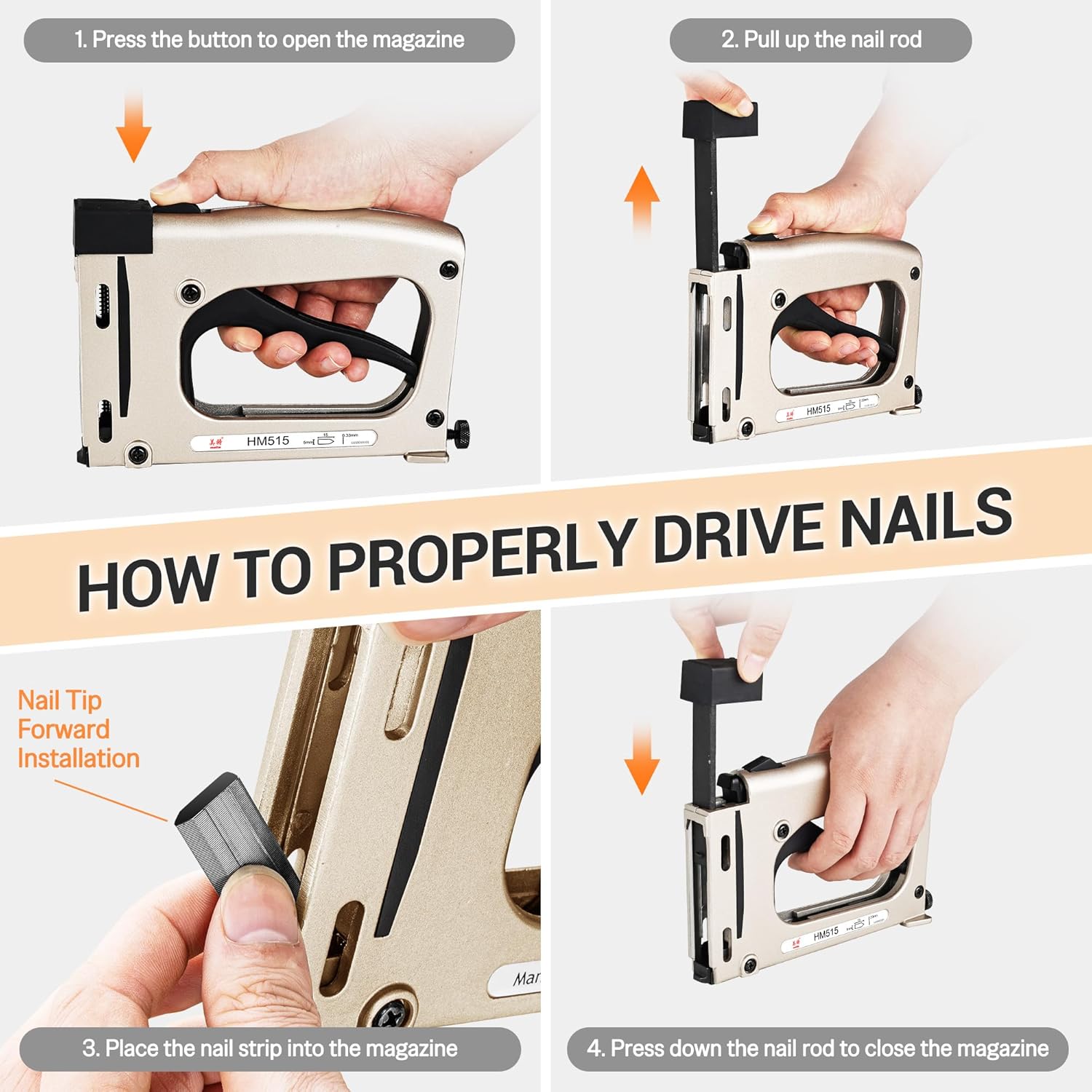
Image 3.1: Visual guide for loading flexible points into a point driver.
Video: meite Point Driver Refill, FlexiPoints for Point Driver
Video 3.1: This video demonstrates the process of loading meite flexible points into a point driver and their application in securing picture frame backing.
4. Operating Instructions
Once the flexible points are loaded, you can use your point driver to secure the contents of your picture frame.
- Prepare the Frame: Ensure your picture frame contains the glass panel, artwork/photo, and backing material, all properly aligned.
- Position the Point Driver: Place the nose of the point driver firmly against the back edge of the frame, over the backing material. Ensure the point driver is perpendicular to the frame surface.
- Drive the Point: Squeeze the trigger or handle of the point driver to drive a flexible point into the frame. Apply firm, even pressure.
- Repeat: Drive points at regular intervals around the perimeter of the frame, typically every 2-4 inches, to ensure the backing is securely held. The flexible nature of these points allows for easy bending to change contents later.

Image 4.1: Using a point driver to secure backing in a picture frame.

Image 4.2: Applications of meite flexible points in various framing projects.
5. Maintenance
Proper storage and handling will ensure the longevity and performance of your meite Flexible Points.
- Storage: Store flexible points in their original packaging in a cool, dry place to prevent corrosion and maintain the integrity of the glued strips.
- Handling: Avoid exposing points to excessive moisture or humidity. Handle strips carefully to prevent them from breaking apart before loading.
6. Troubleshooting
Points Sticking Together or Jamming:
If points are sticking together, driving multiple points at once, or causing the point driver to jam, consider the following:
- Excess Grease: Some batches of metal points may have residual manufacturing grease. This can cause points to stick. If this occurs, gently wipe the strips with a clean, dry cloth before loading to remove excess grease.
- Point Driver Maintenance: Ensure your point driver's magazine and driving mechanism are clean and free of debris. Refer to your point driver's manual for specific cleaning instructions.
- Proper Loading: Double-check that the points are loaded correctly with the tips facing forward and seated properly in the magazine.
7. Safety Information
Always prioritize safety when working with tools and fasteners.
- Eye Protection: Always wear safety glasses to protect your eyes from flying debris.
- Hand Protection: Wear gloves to protect your hands during handling and operation.
- Tool Safety: Follow all safety instructions provided with your point driver. Keep fingers clear of the driving mechanism.
- Work Area: Ensure your work area is well-lit and free of clutter.
- Children and Pets: Keep tools and fasteners out of reach of children and pets.