
1. Introduction
This manual provides essential information for the proper installation, operation, and maintenance of your PACUM KA-300 Linear Scale Encoder. Please read this manual thoroughly before using the device to ensure safe and efficient operation. The KA-300 is a high-precision linear displacement sensor designed for use with lathes, milling machines, and other machine tools requiring accurate position feedback.
2. Product Overview
The PACUM KA-300 Linear Scale Encoder is characterized by its robust construction and high accuracy, making it suitable for various industrial applications. It features a durable die-cast alloy shell, treated for dust and wear resistance, providing effective shielding against environmental factors.

Figure 1: PACUM KA-300 Linear Scale Encoder with its connecting cable.
Key features include:
- High Precision: Designed for accurate displacement measurement with resolutions of 1µm or 5µm.
- Durable Construction: Features a die-cast alloy shell for enhanced protection against dust and wear.
- Fast Response: Provides fast and powerful frequency response for dynamic applications.
- Stable Performance: Independent power supply design ensures high stability and strong anti-jamming capability.
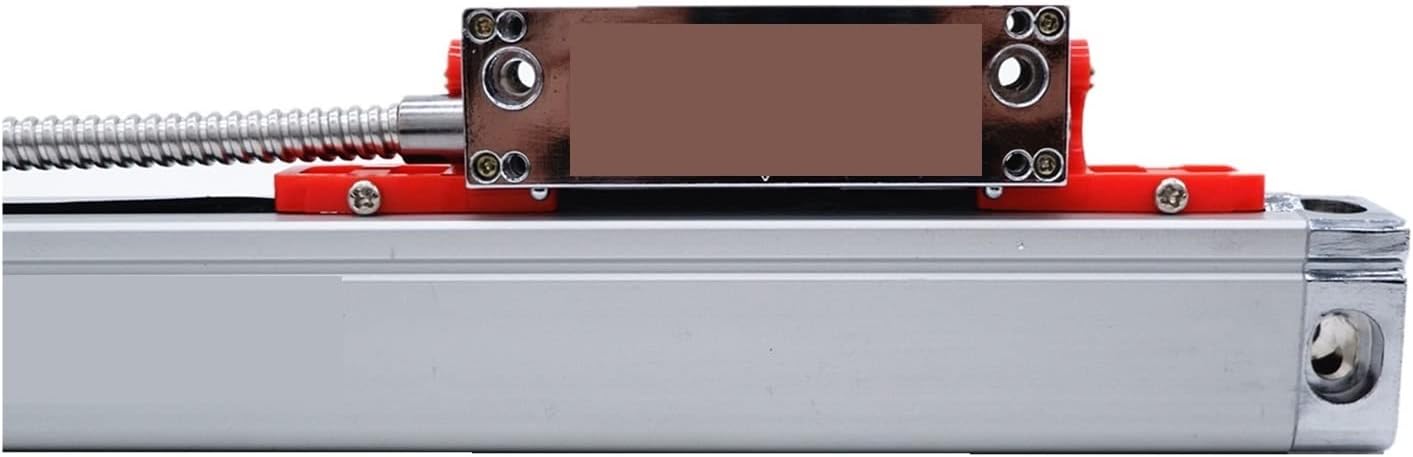
Figure 2: Close-up view of the reading head, showing its robust design.
The KA-300 series is available in various measuring lengths from 70mm to 470mm to suit different machine requirements.
3. Safety Information
Observe the following safety precautions to prevent injury and damage to the device:
- Always disconnect power to the machine tool before installing or servicing the linear scale.
- Ensure proper grounding of all electrical components.
- Avoid exposing the device to excessive moisture, dust, or corrosive substances beyond its IP55 rating.
- Do not attempt to disassemble or modify the linear scale, as this may void the warranty and cause damage.
- Handle the scale carefully to prevent bending or scratching the grating surface.
4. Setup and Installation
4.1 Unpacking and Contents Check
Upon receiving your KA-300 Linear Scale Encoder, carefully unpack the contents and verify that all items are present and undamaged:
- 1x KA-300 Linear Scale
- 1x Scale Cover
- 1x Mounting Bracket Set
- 1x Screw Bag
4.2 Mounting the Linear Scale
The linear scale must be mounted parallel to the axis of motion being measured. Use the provided mounting bracket and screws for secure attachment.

Figure 3: Example of a scale cover or mounting rail component.
- Identify a stable, flat surface on your machine tool for mounting the scale body.
- Position the scale and mark the drilling locations for the mounting holes.
- Drill and tap the holes as necessary.
- Attach the scale body securely using the provided screws. Ensure the scale is straight and parallel to the machine's travel.
- Mount the reading head to the moving part of the machine using the mounting bracket. Ensure the reading head is properly aligned with the scale and maintains the specified gap.
- Install the scale cover to protect the grating from chips, coolant, and other debris.
4.3 Electrical Connection
Connect the 9-pin connector cable from the linear scale to your Digital Readout (DRO) system. Ensure the connection is firm and secure. Refer to your DRO system's manual for specific wiring diagrams and power requirements. The KA-300 operates on +5V±5% power supply.
5. Operating Instructions
Once installed and connected to a compatible DRO system, the KA-300 Linear Scale Encoder provides real-time position feedback. Operation is primarily controlled through the DRO unit.
- Power On: Turn on the power to your DRO system. The display should show numerical readings from the linear scale.
- Zero Setting: Move the machine axis to your desired starting point and press the 'Zero' button on your DRO to set the current position as zero.
- Measurement: As the machine axis moves, the DRO will display the displacement from the set zero point.
- Functionality: Utilize the various functions available on your DRO, such as absolute/incremental modes, diameter/radius display, and other geometric functions, to perform precise machining operations.
6. Maintenance
Regular maintenance ensures the longevity and accuracy of your linear scale.
- Cleaning: Periodically clean the scale body and reading head with a soft, lint-free cloth. If necessary, use a mild, non-abrasive cleaning solution. Ensure no liquid enters the internal components.
- Inspection: Regularly inspect the cable for any signs of wear or damage. Check mounting screws for tightness.
- Protection: Always ensure the scale cover is properly installed to protect the grating from chips, dust, and coolant during machine operation.
- Environmental Conditions: Operate the device within the specified operating temperature range of 0-45°C.
7. Troubleshooting
If you encounter issues with your KA-300 Linear Scale Encoder, refer to the following common problems and solutions:
| Problem | Possible Cause | Solution |
|---|---|---|
| No reading on DRO | Loose cable connection, power issue, damaged scale/reading head | Check cable connections. Verify DRO power. Inspect scale and reading head for visible damage. |
| Inaccurate readings | Misalignment, dirt on grating, damaged grating, incorrect DRO settings | Check alignment of reading head and scale. Clean grating surface. Verify DRO resolution settings. |
| Intermittent readings | Loose connection, electrical interference, damaged cable | Secure all connections. Ensure proper shielding and grounding. Inspect cable for damage. |
If the problem persists after attempting these solutions, contact customer support.
8. Specifications
| Parameter | Value |
|---|---|
| Product Name | KA-300 Linear Scale Encoder |
| Available Measured Lengths | 70, 120, 170, 220, 270, 320, 370, 420, 470mm |
| Cross Section | 25mm x 34mm |
| Accuracy | +/- 3, 5, 10 (at 20°C, 68°F, 1000mm) |
| Max Measuring Speed | 60m/min |
| Protection Level | IP55 |
| Resolution | 1µm / 5µm (0.001mm / 0.005mm) |
| Output Signal | TTL / EIA-422-A |
| Cable Standard Length | 3 meters |
| Bar Pitch | 0.02mm |
| Power Supply | +5V ±5%, 80mA |
| Operating Temperature | 0-45°C (32-113°F) |
| Connector Type | 9 Pins |
9. Warranty and Support
9.1 Warranty Information
Please refer to your purchase documentation for specific warranty terms and conditions. Typically, PACUM products are covered by a limited warranty against manufacturing defects from the date of purchase. Keep your proof of purchase for warranty claims.
9.2 Customer Support
For technical assistance, troubleshooting beyond this manual, or warranty inquiries, please contact your authorized PACUM dealer or visit the official PACUM website for support resources. When contacting support, please have your product model (KA-300) and purchase details ready.