
GeckoMan BUGZILLA2201
GeckoMan Rotating Head Electric Fly Swatter User Manual
Model: BUGZILLA2201
Introduction
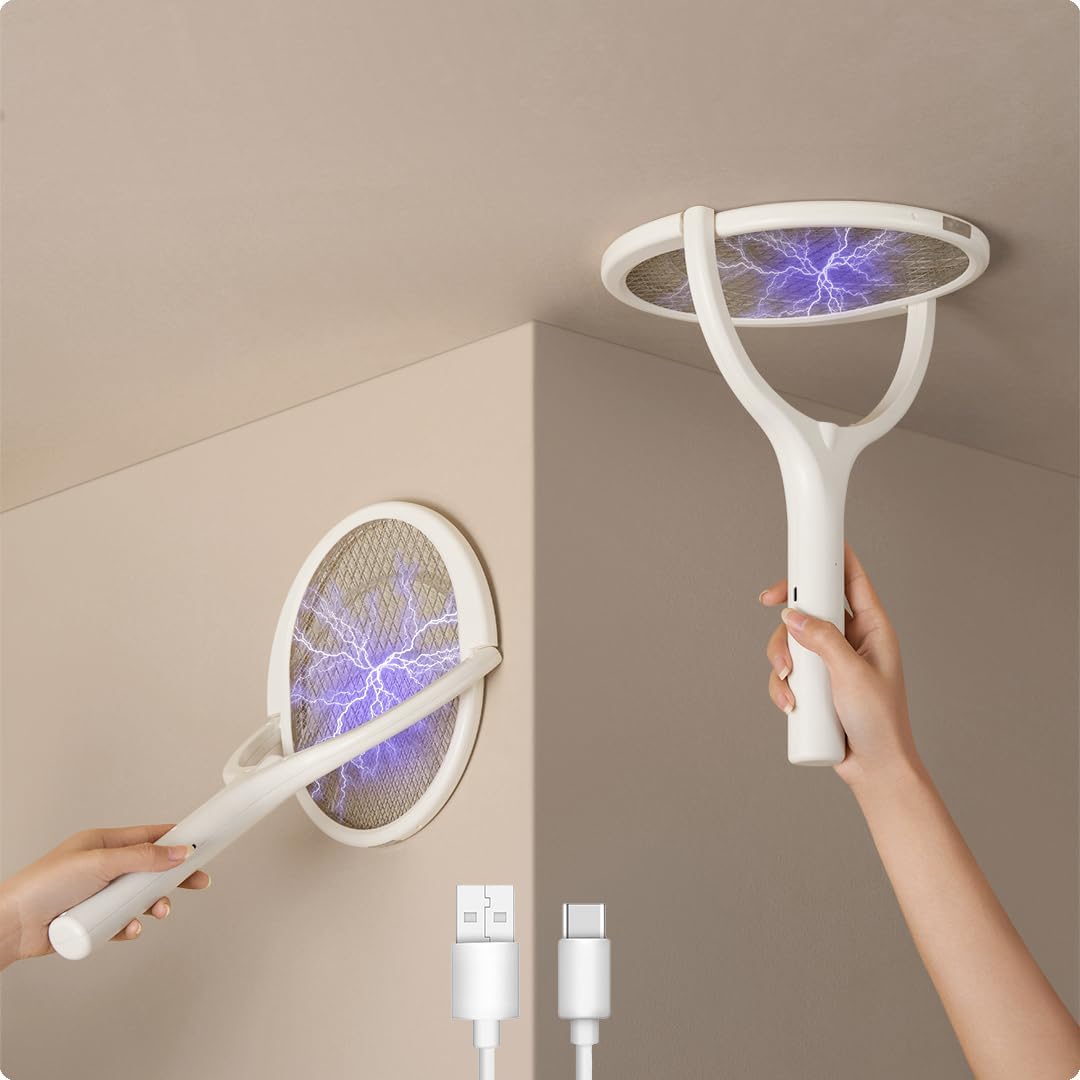
Thank you for choosing the GeckoMan Rotating Head Electric Fly Swatter. This device is designed for efficient and safe elimination of various flying and crawling insects. Please read this manual thoroughly before use to ensure proper operation and maintenance.
Important Safety Information
- Keep out of reach of children and pets.
- Do not touch the electrified mesh with bare hands or conductive objects when the device is active.
- Do not use near flammable gases or liquids.
- Do not immerse the device in water or other liquids.
- Avoid using in wet environments.
- Do not attempt to modify or repair the device. Contact customer support for assistance.
- Ensure the device is fully charged before first use.
- Unplug the device when not in use or during cleaning.
Package Contents
Verify that all items are present in your package:
- GeckoMan Rotating Head Electric Fly Swatter (1 unit)
- USB Type-C Charging Cable (1 unit)
- Stand Base (1 unit)
- Wall Mount Bracket (1 unit)
- User Manual (this document)

Product Features
- Patented Rotating Head Design: The swatter head can rotate to capture insects on various surfaces like walls and ceilings, or be locked for traditional swinging.
- 3-Layer Safety Protection: Designed with a triple-layer mesh to prevent accidental contact with the electrified inner grid.
- Efficient Rechargeable Battery: Equipped with a 1200mAh Lithium-ion battery, rechargeable via USB Type-C. Features an overcharge protection chip.
- Powerful Insect Elimination: Delivers a 3500V electric shock to effectively eliminate flies, mosquitoes, fruit flies, gnats, wasps, spiders, hornets, and other small insects.
- Multiple Usage Options: Can be used handheld for active swatting, placed on its stand for passive bug attraction, or wall-mounted as a stationary bug zapper.
Setup
Initial Charging
Before first use, fully charge the electric fly swatter. Refer to the "Charging Instructions" section for details.
Assembling the Stand Base (Optional)
- Locate the stand base and the bottom of the swatter handle.
- Insert the handle into the designated slot on the stand base until it is securely seated.
- Place the assembled unit on a flat, stable surface.
Wall Mounting (Optional)
- Choose a suitable location on a wall, away from moisture and flammable materials.
- Use screws (not included) to securely attach the wall mount bracket to the wall. Alternatively, use strong adhesive if the bracket supports it.
- Hang the electric fly swatter onto the mounted bracket.
Operating Instructions
Power On/Off and Mode Selection
The device typically has a power switch and an activation button. Consult the physical product for exact button locations.
- Off Mode: The device is powered off and safe to handle.
- Manual Swatting Mode: Slide the power switch to the intermediate position. Press and hold the activation button on the handle to electrify the mesh. Release the button to deactivate.
- Auto Zap Mode (Continuous Operation): Slide the power switch to the top position. The mesh will remain electrified, and an LED light (often UV) may activate to attract insects. This mode is suitable for use with the stand or wall mount.
Using the Rotating Head

The swatter head can be adjusted to different angles for versatile use:
- For Surfaces (Walls/Ceilings): Gently rotate the swatter head until it is flat against the desired surface. Activate the electric mesh and slowly move the swatter towards the insect.
- For Swinging (Flying Insects): Lock the swatter head in the traditional racket position. Activate the electric mesh and swing the swatter towards flying insects.

Using Auto Zap Mode

When in Auto Zap Mode, the device will continuously electrify its mesh. This mode is ideal for passive insect control. Place the swatter on its stand or wall mount in an area where insects are present. The integrated light (if applicable) will attract insects to the electrified grid.
Charging Instructions

- Ensure the swatter is turned OFF before charging.
- Connect the USB Type-C cable to the charging port on the swatter handle.
- Connect the other end of the USB cable to a standard USB power adapter (not included) or a computer USB port.
- A charging indicator light will illuminate (color may vary) to show that the device is charging.
- The 1200mAh Lithium-ion battery typically takes approximately 4 hours to fully charge. The overcharge protection chip will stop charging once the battery is full.
- Unplug the swatter once charging is complete.
Maintenance
Cleaning
- Always ensure the device is turned OFF and unplugged before cleaning.
- Use a soft, dry brush or cloth to gently remove dead insects from the mesh.
- Do not use water or cleaning solutions directly on the mesh or electrical components.
- For stubborn debris, a dry toothbrush can be used carefully.
Storage
- Store the swatter in a cool, dry place away from direct sunlight and moisture.
- If storing for an extended period, charge the battery every 3 months to maintain its lifespan.
Troubleshooting
| Problem | Possible Cause | Solution |
|---|---|---|
| Swatter not zapping/no power. | Battery is low or depleted. | Charge the swatter fully using the USB Type-C cable. |
| Swatter not zapping. | Power switch is in "Off" position or activation button not pressed (in manual mode). | Ensure the power switch is in the correct operating mode and the activation button is pressed (if applicable). |
| Weak zap or ineffective. | Mesh is dirty with insect residue. | Clean the mesh thoroughly as per maintenance instructions. |
| Charging indicator not lighting up. | Cable or power adapter issue; swatter already fully charged. | Try a different USB Type-C cable or power adapter. If the battery is full, the light may not illuminate. |
Specifications
- Model: BUGZILLA2201
- Brand: GeckoMan
- Color: White
- Dimensions (L x W x H): 17.5" x 9.5" x 1.2" (44.5 cm x 24 cm x 3 cm)
- Weight: 0.75 kg (1.65 lbs)
- Battery: 1200mAh Lithium-ion (included)
- Charging Port: USB Type-C
- Output Voltage: 3500V (for electric shock)
- Safety Features: 3-layer mesh, overcharge protection
Warranty and Support
GeckoMan is committed to providing quality products and customer satisfaction. For any questions, concerns, or support needs regarding your Electric Fly Swatter, please contact our customer service team.
- Email Support: support@geckoman.net
- Manufacturer: GeckoMan LLC, Sheridan, WY 82801, USA
- Manufacture Part Number: BUGZILLA2201
Please retain your proof of purchase for warranty claims. Specific warranty duration and terms may vary; refer to your purchase documentation or contact support for details.
Related documentsBUGZILLA2201


Ask a question about this manual
Ask about setup, troubleshooting, compatibility, parts, safety, or missing instructions. Manuals+ will review the question and use this page’s manual context to help answer it.