
1. Introduction
This manual provides detailed instructions for the installation, operation, and maintenance of your ZLPOWER 3000W Pure Sine Wave Inverter Charger, model LW3000-12V-E. This device is designed to convert 12V DC power to 120V AC pure sine wave output, suitable for sensitive electronics and high-demand appliances. It features a 9000W surge capacity for 20 seconds, an LCD display for real-time monitoring, and advanced battery management capabilities, making it ideal for off-grid systems in homes, RVs, campers, and boats.
2. Safety Instructions
Please read and understand all safety instructions before installing or operating the inverter charger. Failure to follow these instructions may result in electric shock, fire, serious injury, or death.
- Electrical Safety: Ensure all wiring is performed by a qualified electrician and complies with local electrical codes. Disconnect all power sources before making any electrical connections.
- Ventilation: Install the inverter in a well-ventilated area to prevent overheating. Do not block ventilation openings.
- Environment: Avoid installing the unit in direct sunlight, near heat sources, or in areas with excessive moisture, dust, or corrosive fumes.
- Battery Safety: Batteries can produce explosive gases. Ensure adequate ventilation when working with batteries. Wear eye protection and protective clothing. Do not short-circuit battery terminals.
- Grounding: The inverter must be properly grounded. Connect the grounding terminal to an appropriate earth ground.
- Overload Protection: Do not exceed the rated output power of the inverter. Overloading can damage the unit and connected appliances.
3. Product Overview
The ZLPOWER LW3000-12V-E inverter charger is a robust solution for various power needs. It integrates an inverter, battery charger, and automatic transfer switch into a single compact unit.
3.1 Key Features
- 3000W continuous pure sine wave output, 9000W peak surge.
- 12V DC input to 120V AC output.
- Real-time LCD display for voltage, load, and battery status.
- Adjustable charging current (0-100%) with 5-step progressive charging.
- Supports 7 battery types: Lithium Ion, LiFePO4, AGM, Sealed Lead Acid, Open Lead Acid, GEL, FLD.
- Battery priority selector and Automatic Generator Start (AGS) function.
- Comprehensive protection: overload, over-temperature, low battery, overcharge.
- 50Hz/60Hz frequency switching.
3.2 Components and Display
The inverter features a clear LCD display and various connection points for DC input, AC output, and grounding.

This image displays the main unit of the ZLPOWER 3000W Pure Sine Wave Inverter Charger. The front panel features the LCD screen, which provides real-time operational data, and the AC output receptacles. The robust red casing indicates its durable construction.

This image highlights the LCD screen of the inverter, showing various operational modes and parameters such as input/output voltage, frequency, load percentage, and battery status. The display is crucial for monitoring the system's performance.
3.3 Battery Compatibility
The inverter charger is compatible with a wide range of 12V battery types, ensuring flexibility for various off-grid setups.
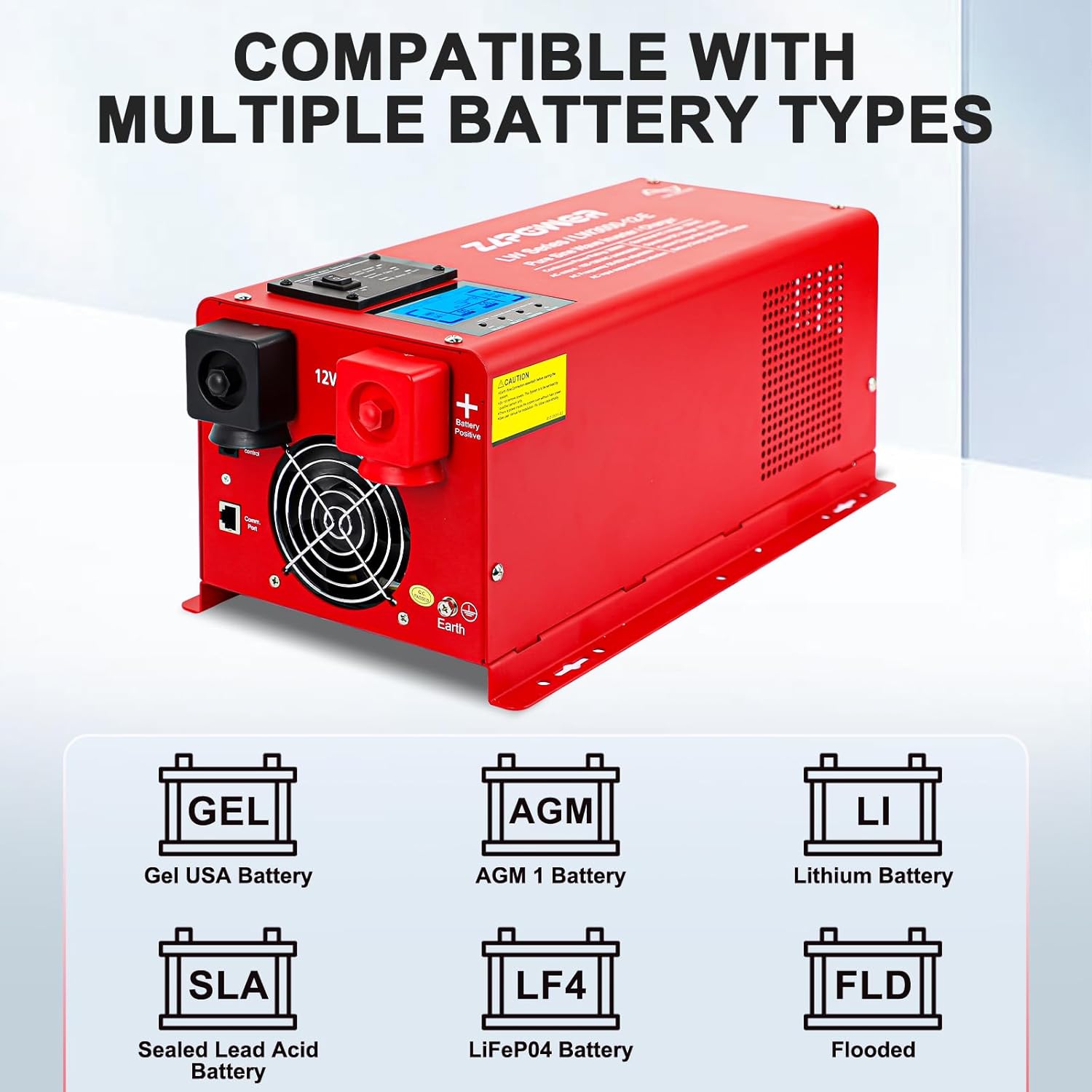
This image illustrates the various battery types compatible with the ZLPOWER inverter, including GEL, AGM, Lithium, Sealed Lead Acid (SLA), LiFePO4 (LF4), and Flooded (FLD) batteries. This broad compatibility allows for diverse energy storage solutions.
4. Setup and Installation
Proper installation is critical for the safe and efficient operation of your inverter charger. Refer to the following guidelines and diagrams.
4.1 Mounting the Inverter
Choose a dry, cool, and well-ventilated location. Ensure there is sufficient clearance around the unit for airflow. The inverter can be mounted vertically or horizontally.

This image provides the physical dimensions of the ZLPOWER inverter, showing its length (18.11 inches), width (7.48 inches), and height (8.66 inches). These measurements are essential for planning the installation space.
4.2 Wiring Connections
Follow the wiring diagram carefully. All connections must be secure and properly insulated.
- Grounding: Connect the inverter's grounding terminal to a reliable earth ground.
- Battery Connection: Connect the 12V DC battery bank to the inverter's DC input terminals. Ensure correct polarity (positive to positive, negative to negative). Use appropriately sized cables to minimize voltage drop.
- AC Input (Utility/Generator): Connect the AC input from your utility grid or generator to the inverter's AC input terminals.
- AC Output (Loads): Connect your AC loads (appliances) to the inverter's AC output terminals.

This diagram illustrates a typical setup for the ZLPOWER LW Series Hybrid Inverter, showing connections to solar panels (via an MPPT solar controller), a 48V battery bank (note: product is 12V, diagram is generic), AC input from utility or generator, and AC output to various household appliances. This provides a visual guide for system integration.

This image collage shows various real-world installation examples of the ZLPOWER inverter in different settings, including a mobile setup in an RV or camper, and a fixed installation with multiple batteries. These examples demonstrate practical mounting and wiring configurations.
5. Operating Instructions
Once installed, the inverter charger is ready for operation. Familiarize yourself with its functions and display.
5.1 Powering On/Off
To power on the inverter, ensure all connections are secure, then switch the main power button to the 'ON' position. The LCD display will illuminate, showing system status. To power off, switch the main power button to 'OFF'.
5.2 LCD Display Navigation
The LCD display provides real-time information. Use the navigation buttons (if present, typically indicated by arrows or 'Enter') to cycle through different screens showing:
- Input/Output Voltage and Frequency
- Load Percentage
- Battery Voltage and Charge Status
- Operational Mode (Line Mode, Battery Mode, Power Save Mode)
- Fault Codes (if any)
5.3 Setting Battery Type and Charging Current
The inverter allows you to select the battery type and adjust the charging current to optimize battery life and charging efficiency. Refer to the manual's specific section for detailed steps on accessing these settings via the LCD panel.
- Battery Type Selection: Choose from the 7 supported battery types (GEL, AGM, LI, SLA, LF4, FLD) to match your connected battery bank.
- Charging Current Adjustment: Set the charging current between 0-100% (up to 35A/70A depending on model variant) based on your battery's specifications and desired charging speed.
5.4 Frequency Switching (50Hz/60Hz)
The inverter supports both 50Hz and 60Hz output frequencies. This setting can typically be adjusted via a switch or through the LCD menu to match regional power standards.
6. Maintenance
Regular maintenance ensures the longevity and optimal performance of your ZLPOWER inverter charger.
- Cleaning: Periodically clean the exterior of the inverter with a dry, soft cloth. Ensure ventilation openings are free from dust and debris. Do not use liquid cleaners.
- Connection Checks: Annually inspect all electrical connections (DC input, AC input, AC output, grounding) for tightness and corrosion. Tighten any loose connections.
- Battery Inspection: Regularly check your battery bank for signs of damage, corrosion, or swelling. Ensure battery terminals are clean and secure.
- Environment: Confirm the installation environment remains within recommended temperature and humidity ranges.
7. Troubleshooting
This section provides solutions to common issues you might encounter. For problems not listed here, contact technical support.
| Problem | Possible Cause | Solution |
|---|---|---|
| Inverter not turning on | No DC input power; Loose battery connections; Blown fuse/breaker. | Check battery voltage; Secure all DC connections; Inspect and replace fuses/reset breakers. |
| No AC output | Overload; Over-temperature; Low battery voltage; AC output breaker tripped. | Reduce load; Allow unit to cool; Charge battery; Reset AC output breaker. |
| Overload alarm/shutdown | Connected load exceeds inverter's capacity. | Reduce the total load connected to the inverter. Ensure surge capacity is not continuously exceeded. |
| Over-temperature alarm | Insufficient ventilation; High ambient temperature; Blocked fan. | Ensure adequate airflow around the unit; Move to a cooler location; Clean fan and vents. |
| Low battery alarm | Battery voltage is too low. | Recharge the battery bank. Check battery health. |
| Charging issues | Incorrect battery type setting; Faulty battery; AC input issue. | Verify battery type setting; Test battery; Check AC input power. |
8. Specifications
Detailed technical specifications for the ZLPOWER 3000W Pure Sine Wave Inverter Charger (Model LW3000-12V-E).

This image presents a comprehensive table of technical specifications for various ZLPOWER inverter models, including the LW3000-12V-E. It details power ratings, AC input/output parameters, solar charger specifications, transfer efficiency, and indicators, providing essential data for system design and operation.
| Parameter | Value |
|---|---|
| Model Name | LW3000-12V-E |
| Wattage (Continuous) | 3000 Watts |
| Surge Wattage (20s) | 9000 Watts |
| DC Input Voltage | 12V DC |
| AC Output Voltage | 120V AC |
| AC Output Waveform | Pure Sine Wave |
| Frequency | 50Hz/60Hz (Switchable) |
| Product Dimensions | 18.1 x 7.48 x 8.7 inches |
| Item Weight | 59.8 pounds |
| Max Charging Current | 35A/70A (Adjustable) |
| Power Source | Battery Powered |
| Recommended Uses | Boat, Home, Office, Truck, Vehicle |
9. Warranty and Support
ZLPOWER stands behind its products with comprehensive warranty and technical support.
- Warranty: The ZLPOWER 3000W Pure Sine Wave Inverter Charger comes with a 24-month warranty guarantee from the date of purchase.
- Technical Support: Lifetime technical support is provided. For any installation, usage, or troubleshooting assistance, please contact ZLPOWER customer service.