1. Introduction
This HOMCOM 4-in-1 Multi-Game Table provides versatile entertainment, combining foosball, billiards, table tennis, and table hockey into a single compact unit. Designed for users aged 6 and above, its robust MDF construction ensures stability and durability. This manual will guide you through the assembly, operation, and maintenance of your multi-game table, ensuring a safe and enjoyable experience.

Image 1.1: HOMCOM 4-in-1 Multi-Game Table in foosball mode with other game options shown in an inset.
2. Safety Information
Please read and understand all safety instructions before assembling and using the product. Failure to follow these instructions may result in injury or damage to the product.
- Age Recommendation: This product is suitable for users aged 6 years and older. Adult supervision is recommended for young children.
- Choking Hazard: The product contains small parts (e.g., balls, chalk). Keep these away from children under 3 years of age.
- Stability: Ensure the table is placed on a flat, level surface to prevent tipping. Do not climb, sit, or stand on the table.
- Assembly: Assemble the table according to the instructions. Ensure all fasteners are securely tightened before use.
- Accessory Use: Use only the accessories provided with the table. Do not use damaged accessories.
- Maintenance: Regularly inspect the table for loose or damaged parts. Do not use the table if any parts are damaged.
3. Package Contents
Verify that all components listed below are present in your package. If any items are missing or damaged, please contact customer support.
- 1 x HOMCOM 4-in-1 Multi-Game Table Frame
- 1 x Foosball Game Top
- 1 x Table Hockey Game Top
- 1 x Table Tennis Game Top (with net)
- 2 x Foosball Balls
- 6 x Steel Rods (for foosball)
- 2 x Foosball Goals
- 18 x Foosball Players
- 2 x Score Markers
- 1 x Ping Pong Ball
- 2 x Ping Pong Rackets
- 2 x Billiard Cues
- 1 x Chalk
- 1 x Billiard Triangle
- 16 x Billiard Balls
- Assembly Hardware (screws, bolts, etc.)

Image 3.1: Exploded view of the multi-game table components.
4. Setup and Assembly
The HOMCOM 4-in-1 Multi-Game Table requires assembly. Please follow these general steps, referring to the included assembly diagram for detailed instructions. It is recommended to have two adults for assembly.
- Unpack: Carefully unpack all components from the box and lay them out on a clean, soft surface to prevent scratches. Verify all parts against the package contents list.
- Assemble Frame: Begin by assembling the main table frame. Attach the leg supports and crossbars using the provided hardware. Ensure all connections are finger-tight at this stage.
- Secure Frame: Once the frame is assembled, place it upright and securely tighten all screws and bolts with the appropriate tools. Do not overtighten.
- Install Billiard Surface: The billiard table is the base game surface. Carefully place it onto the assembled frame, ensuring it sits flush and is secured if necessary.
- Prepare Game Tops: The foosball, table hockey, and table tennis surfaces are designed to be placed on top of the main table for quick conversion. No additional assembly is typically required for these tops, beyond attaching specific game elements like foosball rods and players.
- Final Check: Before first use, double-check all connections for tightness and ensure the table is stable.
5. Operating Instructions
This multi-game table allows for easy conversion between four different games. To switch games, carefully lift off the current game surface and replace it with the desired one. Always ensure the game top is securely seated before playing.

Image 5.1: Overview of the 4-in-1 game modes.
5.1 Foosball
To play foosball, place the foosball game top onto the main table frame. Insert the steel rods with players and handles into their designated slots. Use the score markers to keep track of points. The objective is to use the players to kick the ball into the opponent's goal.

Image 5.2: Foosball game mode and accessories.
5.2 Billiards (Pool)
The billiard table is the base layer. Arrange the 16 billiard balls in a triangle using the billiard triangle. Use the cues and chalk to hit the cue ball and pocket the other balls according to standard billiard rules.
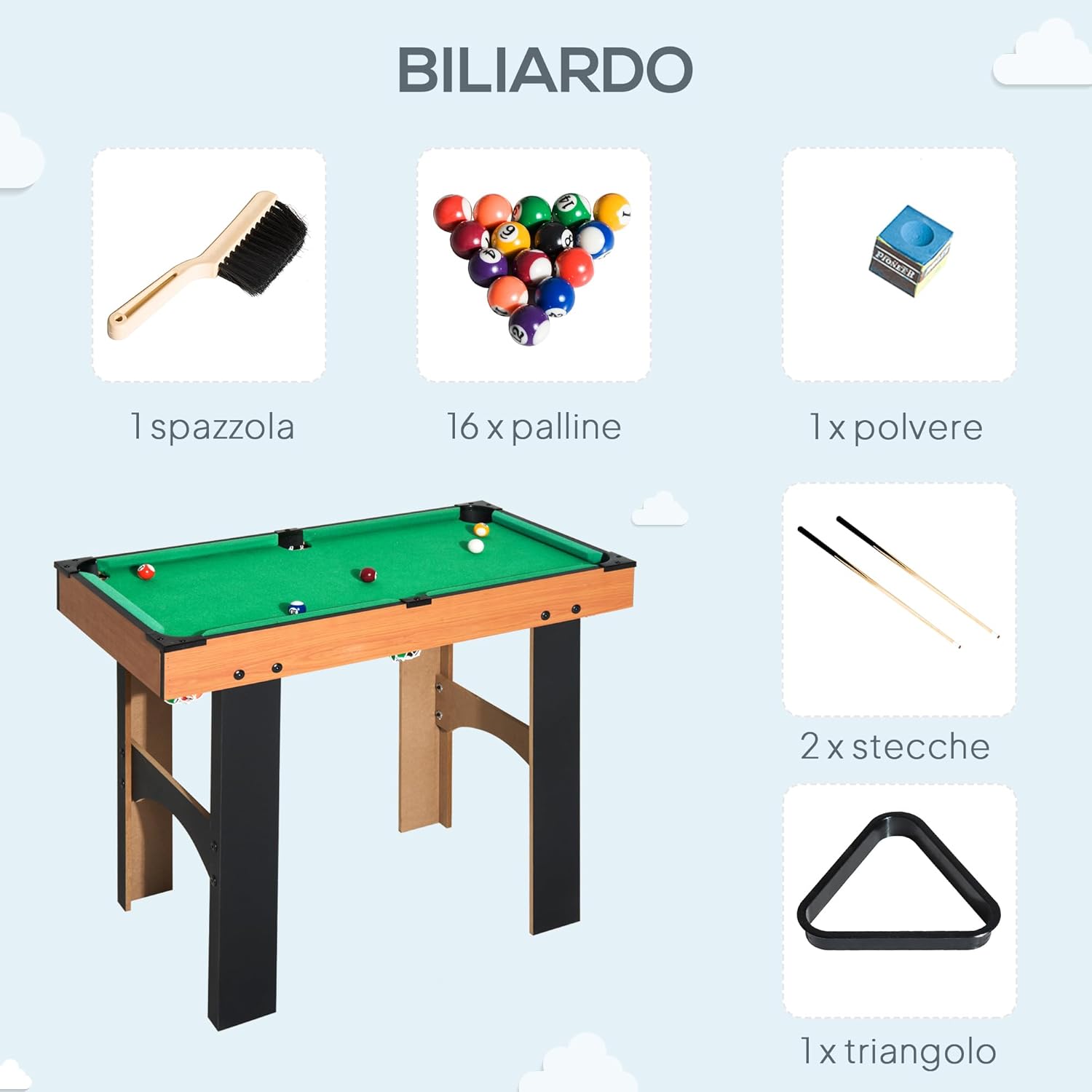
Image 5.3: Billiards game mode and accessories.
5.3 Table Hockey
Place the table hockey game top onto the main table. Use the provided pucks and pushers to play. The goal is to hit the puck into your opponent's goal.

Image 5.4: Table Hockey game mode and accessories.
5.4 Table Tennis (Ping Pong)
Place the table tennis game top onto the main table. Set up the net in the center. Use the ping pong rackets and ball to play, hitting the ball over the net to your opponent's side.

Image 5.5: Table Tennis game mode and accessories.
6. Maintenance
Regular maintenance ensures the longevity and optimal performance of your multi-game table.
- Cleaning: Wipe down all surfaces with a soft, damp cloth. Avoid abrasive cleaners, solvents, or harsh chemicals, as these can damage the finish.
- Storage: Store all game accessories in a dry, safe place when not in use to prevent loss or damage. Game tops should be stored flat to prevent warping.
- Inspection: Periodically check all screws, bolts, and connections to ensure they are tight and secure. Retighten if necessary.
- Surface Care: For the billiard felt, use a soft brush to remove dust and debris. For other game surfaces, ensure they are clean and dry before storage.
7. Troubleshooting
If you encounter any issues with your HOMCOM 4-in-1 Multi-Game Table, refer to the following common solutions.
- Wobbly Table: Ensure all leg bolts and crossbar connections are securely tightened. Verify the table is on a level surface. Adjust leg levelers if present.
- Game Surface Not Fitting Correctly: Check that the correct game surface is being used for the desired game and that it is aligned properly on the main table frame. Ensure no debris is obstructing the fit.
- Missing or Damaged Parts: If any parts are missing or damaged upon unboxing, please contact HOMCOM customer support for assistance. Do not attempt to use the product with damaged parts.
- Difficulty with Rod Movement (Foosball): Ensure the foosball rods are clean and free of debris. A small amount of silicone lubricant can be applied to the rod bearings if movement is stiff.
8. Specifications
| Feature | Specification |
|---|---|
| Model Number | A70-019V01MX |
| Dimensions (L x W x H) | 92 cm x 78 cm x 80 cm |
| Weight | 14 kg |
| Material | Engineered Wood (MDF) |
| Color | Natural Wood, Black |
| Recommended Age | 6+ years |
| Games Included | Foosball, Billiards, Table Hockey, Table Tennis |

Image 8.1: Table dimensions.
9. Warranty and Support
For warranty information or technical support regarding your HOMCOM 4-in-1 Multi-Game Table, please refer to your purchase documentation or contact HOMCOM customer service directly. Keep your proof of purchase, such as your receipt or order confirmation, for any warranty claims or inquiries.
You can typically find contact information for HOMCOM customer support on their official website or through the retailer where you purchased the product.


