1. Introduction
Thank you for choosing the MOREFINE M9 Mini PC. This compact desktop computer is designed for efficiency and versatility, featuring an Intel N150 processor, ample memory and storage, and comprehensive connectivity options. This manual provides essential information for setting up, operating, maintaining, and troubleshooting your device to ensure optimal performance.
2. Package Contents
Please check the box for the following items. If any item is missing or damaged, please contact your retailer or MOREFINE support.
- MOREFINE M9 Mini PC
- Power Adapter
- HDMI Cable
- VESA Mount (optional, may vary by package)
- User Manual (this document)
3. Product Overview
The MOREFINE M9 Mini PC offers a compact design with robust features for various computing needs.
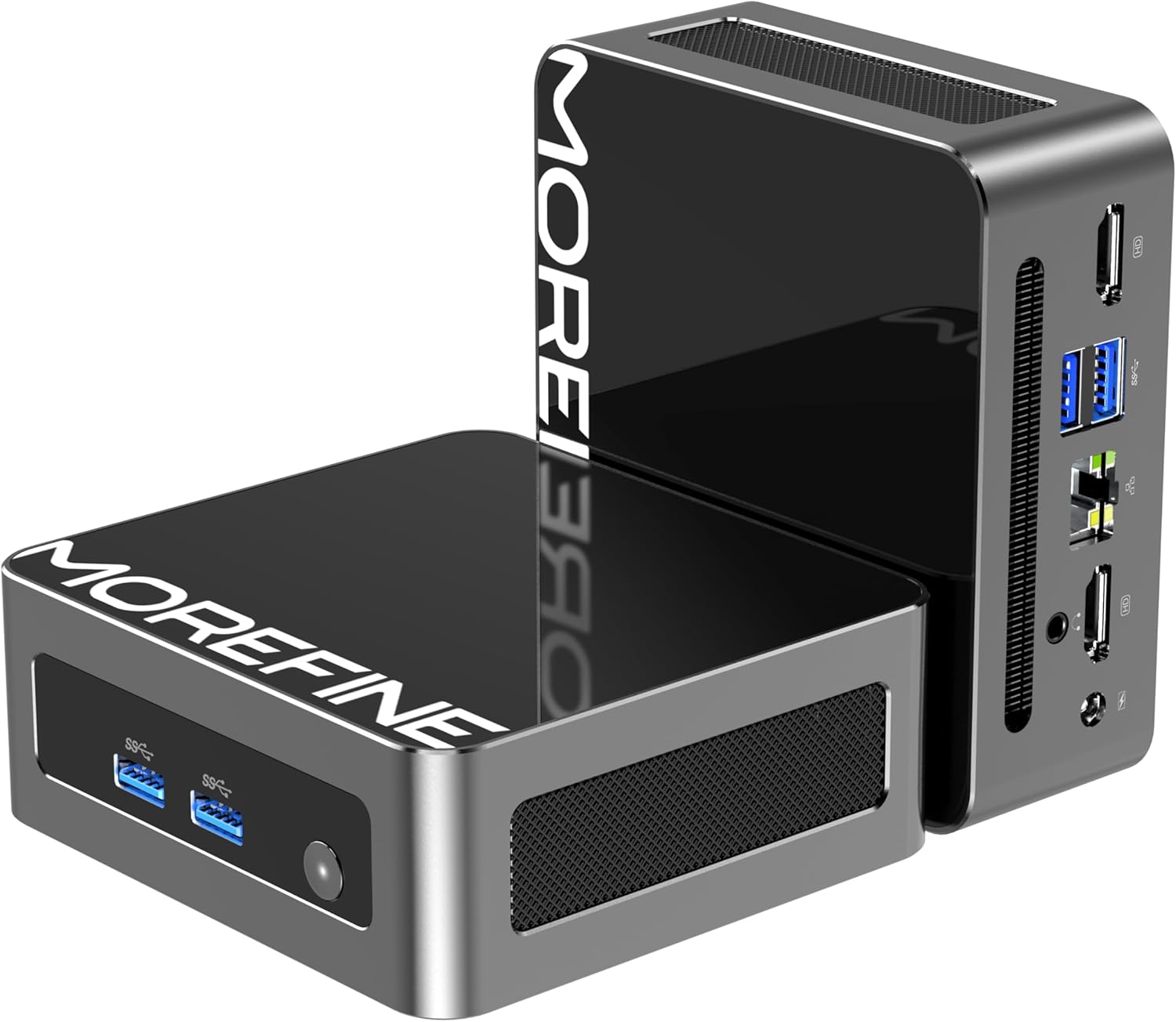
Image: The MOREFINE M9 Mini PC, showcasing its compact form factor and various ports on the front and rear panels.
Key Features:
- Processor: Intel Twin Lake N150 (4 Cores, up to 3.6GHz)
- Memory: 16GB DDR4 3200MHz RAM (expandable up to 32GB)
- Storage: 512GB M.2 PCIe 3.0 NVMe SSD (expandable with an additional M.2 SATA slot)
- Graphics: Intel UHD Graphics with dual HDMI 2.1 4K@60Hz output
- Connectivity: WiFi 6 (802.11ax), Bluetooth 5.2, 2.5G RJ45 Ethernet
- Ports: 4x USB 3.2, 2x HDMI 2.1, 1x 2.5G RJ45, 1x 3.5mm Audio Jack, DC Power Input
- Cooling: High-performance silent fan (below 35dB)

Image: Diagram highlighting key features including the Twin Lake N150 processor, dual 4K output, space-saving design, ultra-quiet fan, DDR4 RAM, and WiFi+Bluetooth connectivity.
Port Layout:
Familiarize yourself with the available ports for connecting peripherals.

Image: The MOREFINE M9 Mini PC showing its various ports, including USB 3.2, HDMI, 2.5G Ethernet, and audio jack.
4. Setup Instructions
Follow these steps for the initial setup of your MOREFINE M9 Mini PC.
- Connect Peripherals: Connect your monitor(s) to the HDMI ports. Connect your keyboard and mouse to the USB 3.2 ports.
- Network Connection: For a wired connection, connect an Ethernet cable to the 2.5G RJ45 port. For wireless, the device supports WiFi 6.
- Power Connection: Connect the power adapter to the DC power input port on the mini PC, then plug the adapter into a power outlet.
- Power On: Press the power button located on the front of the mini PC. The power indicator light will illuminate.
- Initial Windows Setup: Follow the on-screen instructions to complete the Windows operating system setup. This typically involves selecting language, region, and creating a user account.
Placement Options:
The compact design allows for flexible placement, including laying flat on a desk or mounting behind a monitor using a VESA mount (if included).
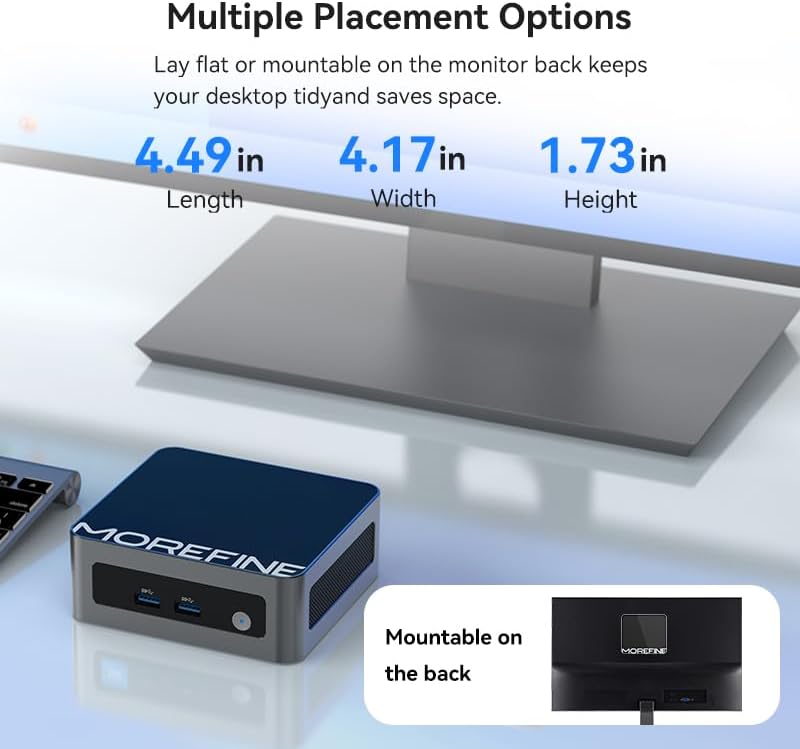
Image: The MOREFINE M9 Mini PC shown in various placement configurations, including on a desk and mounted behind a monitor, illustrating its space-saving design.
5. Operating Instructions
Basic Operation:
- Power On/Off: Press the power button to turn the device on. To turn off, use the Windows shutdown option or press and hold the power button for 5 seconds.
- Restart: Use the Windows restart option.
- Sleep Mode: Use the Windows sleep option or briefly press the power button.
Dual Display Setup:
The MOREFINE M9 supports dual 4K display output via its two HDMI 2.1 ports, enhancing multitasking capabilities.
- Connect two monitors to the HDMI ports on the mini PC.
- Once Windows loads, right-click on the desktop and select 'Display settings'.
- Configure your display preferences (e.g., extend, duplicate) as needed.

Image: The MOREFINE M9 Mini PC connected to two monitors, demonstrating its dual 4K display capability for enhanced productivity.
Storage Expansion:
The mini PC features two M.2 slots for storage expansion, supporting up to 4TB.
- One M.2 2280 slot for NVMe PCIe 3.0 SSDs.
- One M.2 2242 slot for SATA 3 SSDs.
To install or upgrade storage, consult a qualified technician or refer to detailed instructions available on the MOREFINE support website. Ensure the device is powered off and disconnected from power before opening the chassis.

Image: Internal view of the MOREFINE M9 Mini PC, highlighting the DDR4 RAM slots and the M.2 2280 NVMe and M.2 2242 SATA SSD expansion slots.
6. Maintenance
Proper maintenance ensures the longevity and optimal performance of your mini PC.
- Cleaning: Regularly clean the exterior with a soft, dry cloth. Use compressed air to gently clear dust from ventilation grilles. Ensure the device is powered off before cleaning.
- Software Updates: Keep your operating system and drivers updated. Windows Update will handle most OS updates. For specific driver updates, check the MOREFINE support website.
- Environmental Conditions: Operate the mini PC in a well-ventilated area, away from direct sunlight, excessive heat, humidity, and dust. Avoid blocking the ventilation openings.
- Power Management: Use the provided power adapter. Avoid frequent power interruptions.
7. Troubleshooting
If you encounter issues, refer to the following common troubleshooting steps.
- No Power:
- Ensure the power adapter is securely connected to both the mini PC and a working power outlet.
- Test the power outlet with another device.
- No Display:
- Verify that the HDMI cable is securely connected to both the mini PC and the monitor.
- Ensure the monitor is powered on and set to the correct input source (HDMI 1, HDMI 2, etc.).
- Try a different HDMI cable or monitor if possible.
- No Internet Connection:
- For wired connections, check the Ethernet cable and router status.
- For wireless connections, ensure Wi-Fi is enabled in Windows settings and you are connected to the correct network with the correct password.
- Restart your router/modem.
- Accessing BIOS/UEFI Setup:
- To enter BIOS setup during boot, repeatedly press the Del key immediately after powering on the device.
- Alternatively, from Windows, navigate to Settings > System > Recovery > Advanced Startup and choose to restart into UEFI Firmware Settings.
8. Specifications
Detailed technical specifications for the MOREFINE M9 Mini PC.
| Feature | Specification |
|---|---|
| Brand | MOREFINE |
| Model Number | M9-N150 |
| Processor | Intel Twin Lake N150 (4 Cores, 3.6 GHz Max Frequency) |
| RAM | 16 GB DDR4 3200 MHz SODIMM (Expandable to 32GB) |
| Storage | 512 GB M.2 PCIe 3.0 NVMe SSD (Supports additional M.2 SATA SSD up to 4TB) |
| Graphics Coprocessor | Intel UHD Graphics |
| Max Screen Resolution | 3840x2160 Pixels (4K) |
| Operating System | Windows 10 Pro |
| Wireless Connectivity | WiFi 6 (802.11ax), Bluetooth 5.2 |
| Ethernet | 2.5G RJ45 |
| USB Ports | 4x USB 3.2 |
| Video Output | 2x HDMI 2.1 |
| Audio Output | 1x 3.5mm Audio Jack |
| Item Weight | 1.43 pounds |
| Package Dimensions | 5.71 x 5.63 x 4.13 inches |
9. Warranty and Support
MOREFINE products are designed for reliability and performance. For warranty information, please refer to the documentation included with your purchase or visit the official MOREFINE website. Typically, a standard manufacturer's warranty covers defects in materials and workmanship.
For technical support, troubleshooting assistance, or warranty claims, please contact MOREFINE customer service through their official website or the contact information provided with your product. Please have your model number (M9-N150) and purchase details ready when contacting support.
Return Policy: This product typically includes a 30-day return policy from the date of purchase, subject to the retailer's terms and conditions.
10. Additional Resources
For the latest drivers, firmware updates, and frequently asked questions, please visit the official MOREFINE support page:


