
Introduction
This manual provides detailed instructions for the assembly, operation, and maintenance of your EnHomee Queen Bed Frame. This bed frame features a 4-tier storage headboard, 4 under-bed storage drawers, an integrated charging station, and app-adjustable RGB LED lighting. Please read this manual thoroughly before beginning assembly or use to ensure proper function and safety.
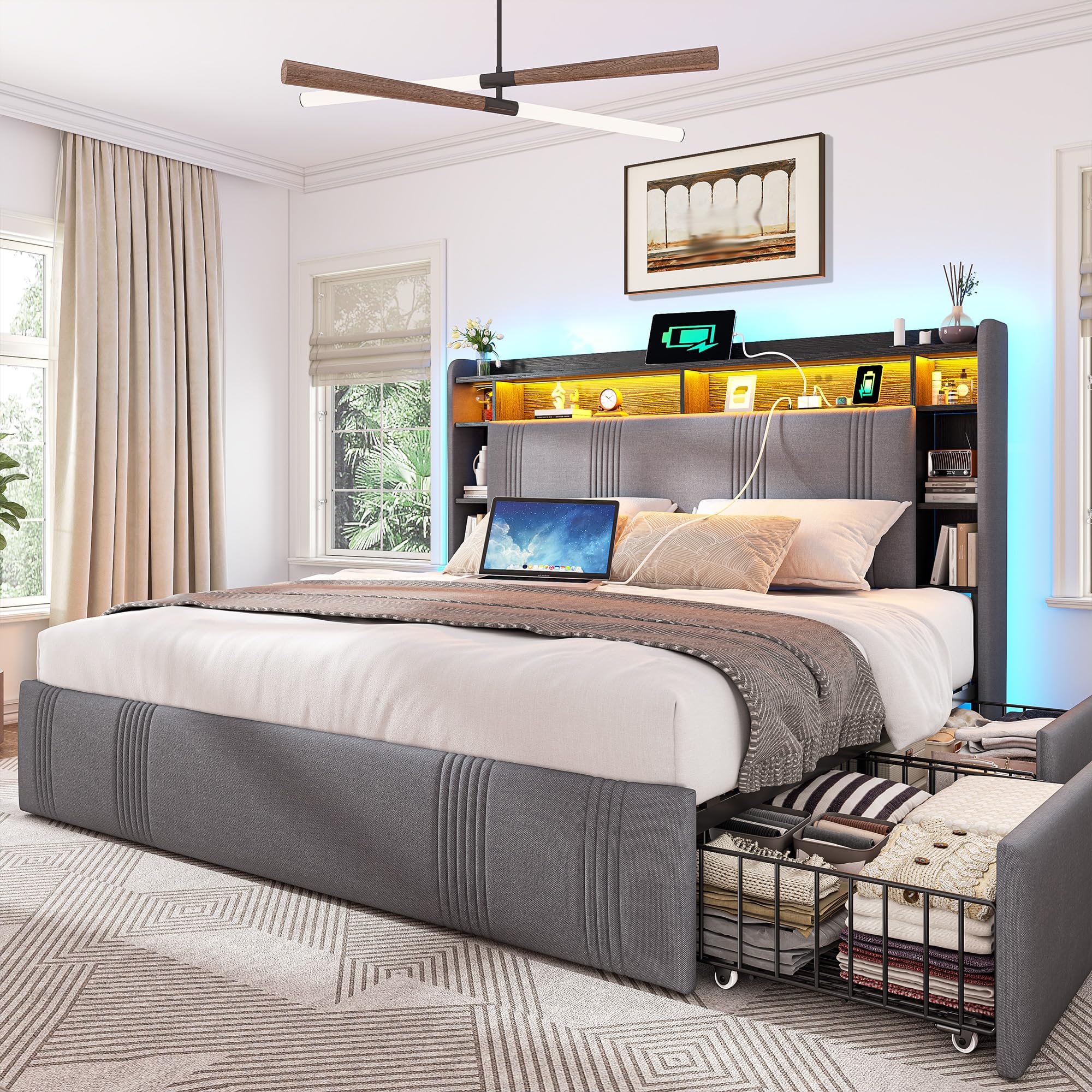
Image: The EnHomee Queen Bed Frame in grey, showcasing its headboard with shelves, LED lighting, and under-bed storage drawers.
Safety Information
WARNING: Failure to follow these safety instructions may result in injury or damage to the product.
- Do not load more than 1200 pounds on the bed frame.
- Be cautious around sharp edges during assembly and use.
- Follow assembly instructions carefully to prevent instability.
- Keep lockable wheels on the drawers away from children and pets to prevent accidental movement or injury.
- Ensure all electrical connections for the charging station and LED lights are secure and comply with local electrical codes.
Package Contents
Verify that all components are present before beginning assembly. If any parts are missing or damaged, please contact customer support.
- Headboard
- Bed Frame Components (Metal and Wooden parts)
- 4 Storage Drawers
- LED Strip Light
- Installation Manual
- Hardware Pack (screws, brackets, tools)

Image: A detailed diagram illustrating the dimensions of the Queen bed frame and its individual components, including the headboard, frame, and a storage drawer.
Specifications
| Feature | Detail |
|---|---|
| Size | Queen (U.S. Standard) |
| Product Dimensions (L x W x H) | 87.8" x 62.2" x 48" |
| Material | Metal, Wooden, Linen (Headboard) |
| Color | Grey |
| Maximum Weight Recommendation | 1200 pounds |
| Special Features | Charging Station (2 AC outlets, 1 USB-A, 1 Type-C), LED Lighting, 4 Storage Drawers, Upholstered Headboard, No Box Spring Needed |
| Recommended Mattress Thickness | 8-12 inches |
| Item Weight | 120 pounds |
Setup and Assembly
Assembly is required for this bed frame. All parts are pre-labeled, and a detailed illustrated manual with matching tags is included to guide you through the process. No specialized tools or extra hands are typically required for assembly.
General Assembly Steps:
- Unpack and Identify Parts: Carefully unpack all components and lay them out. Match each part to the corresponding label in the instruction manual.
- Assemble the Headboard: Follow the manual to connect the headboard sections, including the shelves and the charging station unit.
- Construct the Bed Frame: Assemble the side rails and footboard, ensuring all connections are secure.
- Install Slats: Place and secure the wooden slats across the bed frame to create the mattress support.
- Insert Storage Drawers: Slide the four storage drawers into their designated positions under the bed frame. Ensure the lockable wheels are functional.
- Connect LED Lights: Attach the LED strip light to the headboard and connect it to the power source as instructed.
For a visual guide, please refer to the official assembly video:
Video: A comprehensive assembly guide for the EnHomee Bed Frame with Charging Station and 4 Storage Drawers, demonstrating step-by-step installation.
A short video demonstrating the headboard shelf and charging station installation:
Video: A brief overview of installing the headboard shelf and integrating the charging station into the EnHomee bed frame.
Operating Instructions
LED Lighting System:
The integrated RGB LED lighting system can be controlled via a dedicated app or remote control. Refer to the separate LED light instruction sheet for specific pairing and operation details.
- Power On/Off: Use the remote or app to turn the lights on or off.
- Color Adjustment: Select from a wide range of colors to match your preference.
- Brightness Control: Adjust the light intensity for reading or ambient lighting.
- Mode Selection: Choose from various dynamic lighting modes.

Image: The bed frame's headboard with its integrated LED lights turned on, casting a soft glow on the items placed on the shelves.
Integrated Charging Station:
The headboard includes a convenient charging station with 2 AC outlets, 1 USB-A port, and 1 Type-C port.
- Power Connection: Ensure the bed frame's power cord is securely plugged into a wall outlet.
- Device Charging: Plug your devices directly into the available AC outlets or USB ports for charging.

Image: A close-up view of the integrated charging station on the headboard, showing the 2 AC outlets, 1 USB-A, and 1 Type-C port.
Storage Drawers:
The four under-bed storage drawers are equipped with lockable wheels for easy access and stability.
- Accessing Drawers: Unlock the wheels and gently pull the drawers out from under the bed.
- Securing Drawers: Push the drawers back into place and lock the wheels to prevent unwanted movement.

Image: The under-bed storage drawers of the EnHomee bed frame, partially pulled out to display their capacity and the lockable wheels for easy maneuverability.
Watch this video for a demonstration of the LED lights and charging station:
Video: A short video highlighting the features of the upholstered bed frame, including the LED light functionality and the integrated charging station.
Maintenance and Care
To ensure the longevity and appearance of your EnHomee bed frame, follow these simple care instructions:
- Dust Regularly: Use a soft, dry cloth to dust the headboard shelves and frame surfaces.
- Clean Upholstery: For the linen upholstered parts, use a lint roller to remove dust and debris. For spills, gently blot with a clean, damp cloth and mild soap, then air dry. Avoid harsh chemicals.
- Check Connections: Periodically inspect all screws and connections to ensure they remain tight. Retighten if necessary.
- Electrical Components: Keep the charging station and LED lights free from dust. Do not expose electrical components to liquids.
Troubleshooting
If you encounter any issues with your bed frame, refer to the following common problems and solutions:
| Problem | Possible Cause | Solution |
|---|---|---|
| Bed frame is squeaking | Loose connections or uneven assembly. | Check all bolts and screws, and tighten them securely. Ensure the frame is assembled on a level surface. |
| LED lights are not working | Power connection issue, remote/app not paired, or damaged LED strip. | Verify the power cord is plugged in. Check the LED strip connection to the power adapter. Re-pair the remote/app according to the LED light manual. If still not working, contact support. |
| Charging station is not providing power | Bed frame not plugged in, or internal wiring issue. | Ensure the bed frame's main power cord is securely plugged into a functional wall outlet. Test with another device. If the issue persists, contact customer support. |
| Storage drawers are difficult to open/close | Wheels are locked, obstruction, or uneven floor. | Ensure the wheels are unlocked. Check for any items obstructing the drawer's path. Verify the bed frame is on a level surface. |
Warranty and Support
Return Policy:
This product is eligible for a 30-day return policy from the date of purchase. Please refer to your retailer's specific return guidelines for detailed information.
Customer Support:
For any questions, missing parts, or assistance with assembly and troubleshooting, please contact EnHomee-Direct customer support. You can typically find contact information on the packaging or through the retailer's website where you purchased the product.
You may also visit the EnHomee Store on Amazon for more information and support resources.

