
1. Introduction
This manual provides essential information for the safe and efficient operation of your IKT Bottom Load Water Dispenser. This appliance delivers hot, cold, and room temperature water, features a convenient bottom-loading design, UV self-cleaning, and a child safety lock for hot water. Please read these instructions thoroughly before use and retain for future reference.
2. Important Safety Information
WARNING: To reduce the risk of fire, electric shock, or injury, always follow basic safety precautions.
- Ensure the dispenser is placed on a level, stable surface, away from direct sunlight and heat sources.
- Do not operate the dispenser with a damaged cord or plug. If the cord is damaged, it must be replaced by the manufacturer or a qualified service agent.
- Always unplug the dispenser before cleaning or performing any maintenance.
- Keep children away from the hot water dispenser. The child safety lock feature should always be engaged when not in use.
- Do not immerse the dispenser, cord, or plug in water or other liquids.
- Use only 3 or 5-gallon water bottles with this dispenser.
- Ensure proper ventilation around the unit.
3. Product Overview
The IKT Bottom Load Water Dispenser is designed for convenience and ease of use, providing instant access to water at your desired temperature.
3.1 Key Features
- Three Temperature Settings: Dispenses hot, cold, and room temperature water.
- UV Self-Cleaning: Utilizes UV light to maintain water and tank cleanliness, reducing biofilm and contaminants. This feature operates continuously when the machine is plugged in.
- Bottom Loading Design: Eliminates the need for heavy lifting, accommodating 3 or 5-gallon water bottles within a concealed cabinet.
- Empty Bottle Alert: An indicator light notifies you when the water bottle needs replacement.
- Child Safety Lock: A dedicated lock on the hot water dispenser prevents accidental dispensing and scalding.
- Durable Construction: Features a stylish stainless steel design.
3.2 Components
Familiarize yourself with the main parts of your water dispenser:
- Control Panel: Located at the top, with buttons and LED indicators for various functions.
- Water Spouts: Three spouts for hot, room temperature, and cold water.
- Drip Tray: Removable tray below the spouts to catch spills.
- Bottom Loading Cabinet: Houses the water bottle.
- Power Switches: Located at the rear for hot and cold water functions.

Figure 3.1: Front view of the IKT Bottom Load Water Dispenser.
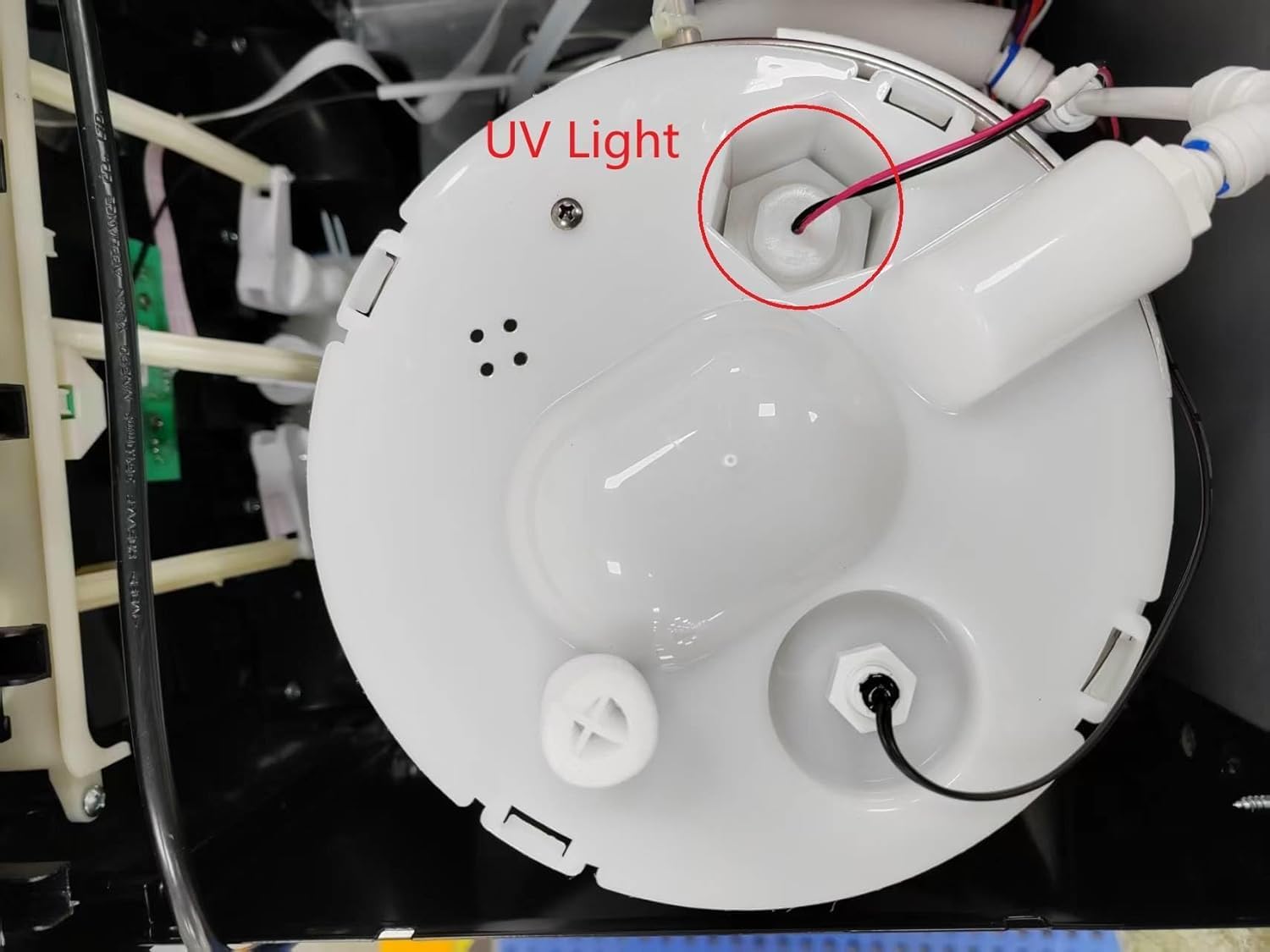
Figure 3.2: Control panel with child safety lock and LED indicators.

Figure 3.3: Detailed view of water spouts, drip tray, and bottom door.

Figure 3.4: Dimensions and bottom loading capacity for 3-5 gallon bottles.
4. Setup Instructions
- Unpack and Place: Carefully remove the dispenser from its packaging. Place it on a hard, level surface at least 4 inches away from a wall to allow for proper ventilation.
- Load Water Bottle: Open the bottom cabinet door. Insert the water probe into a new 3 or 5-gallon water bottle. Slide the bottle into the cabinet and close the door.
- Initial Priming: Before plugging in, place a cup under each water spout (hot, room, cold) and press the dispensing button until water flows continuously from each. This removes air from the system.
- Connect Power: Plug the dispenser into a grounded electrical outlet.
- Activate Heating/Cooling: Locate the hot and cold water switches on the back of the unit. Turn them ON. The corresponding indicator lights on the front panel will illuminate.
Video 4.1: Demonstrates loading a 5-gallon water bottle into the bottom compartment and dispensing water from the unit.
Video 4.2: Illustrates the bottom loading process for a water bottle, showing how the probe is inserted and the bottle is placed into the dispenser's cabinet.
5. Operating Instructions
5.1 Dispensing Water
To dispense water, place a cup under the desired spout and press the corresponding button on the control panel.
- Cold Water: Press the blue button. The cold water indicator light will be blue.
- Room Temperature Water: Press the yellow button.
- Hot Water: To dispense hot water, first slide the child safety lock (red button) to the left, then press it down while simultaneously pressing the hot water dispensing button. The hot water indicator light will be red.

Figure 5.1: Tri-temperature dispensing options: Hot, Room, and Cold water.
Video 5.1: Shows the operation of the water dispenser, including dispensing hot, cold, and room temperature water, and demonstrating the child safety lock.
5.2 LED Indicators
- Red Light (Hot Water): Indicates the hot water function is active or heating.
- Yellow Light (Empty Bottle): Illuminates when the water bottle is empty and needs replacement.
- Blue Light (Cold Water): Indicates the cold water function is active or chilling.

Figure 5.2: Bright LED display showing status indicators.
6. Maintenance
6.1 UV Self-Cleaning
The IKT water dispenser features an automatic UV self-cleaning function. The UV light operates continuously when the unit is plugged in, ensuring the water and tanks remain free from biofilm and other natural contaminants. No manual activation is required for this feature.

Figure 6.1: UV-infused cleaning process for water purification.

Figure 6.2: Close-up of the UV light in the cold water reservoir.
6.2 Drip Tray Cleaning
The drip tray is removable for easy cleaning. Regularly remove and clean the tray to prevent water overflow and maintain hygiene.
- Gently lift the drip tray upwards and pull it outwards to remove.
- Wash the drip tray with mild soap and water.
- Rinse thoroughly and dry completely before reinserting.
7. Troubleshooting
| Problem | Possible Cause | Solution |
|---|---|---|
| No water dispensing | Water bottle empty; dispenser not plugged in; water pump issue. | Replace water bottle; check power connection; contact support. |
| Water not hot/cold enough | Hot/cold switch OFF; insufficient time for heating/cooling. | Ensure hot/cold switches are ON; allow 15-30 minutes for temperature stabilization. |
| Hot water child lock not working | Incorrect operation. | Ensure you slide the red button left and press down simultaneously with the dispense button. |
| Empty bottle alert is on, but bottle is full | Sensor malfunction or bottle not seated correctly. | Re-seat the water bottle; if issue persists, contact support. |
8. Specifications
- Brand: IKT
- Model: Bottom Load Water Dispenser
- Color: Stainless Steel
- Product Dimensions: 35.56 x 30.99 x 103.63 cm (14.0 x 12.2 x 40.8 inches)
- Capacity: 5 Gallons (compatible with 3-5 gallon bottles)
- Material: Stainless Steel
- Item Weight: 17.7 kg (39 lbs)
- Installation Type: Freestanding
- Access Location: Bottom
- Power Source: Corded Electric
9. Warranty and Support
For detailed warranty information, please refer to the warranty card included with your product packaging or contact IKT customer support directly. Keep your purchase receipt as proof of purchase for warranty claims.
If you encounter any issues not covered in the troubleshooting section, please contact IKT customer service for assistance. Contact information can typically be found on the product packaging or the official IKT website.