
1. Introduction
Thank you for choosing the ODK L-Shaped Corner Desk. This desk is designed to provide a versatile and efficient workspace, featuring a reversible L-shape configuration, four fabric drawers for storage, integrated power outlets, and USB charging ports. This manual provides essential information for the safe assembly, operation, and maintenance of your new desk. Please read these instructions carefully before beginning assembly and retain them for future reference.
2. Safety Information
- Ensure all parts are present and undamaged before assembly. Do not proceed with assembly if any parts are missing or damaged.
- Assemble the desk on a soft, clean surface to prevent scratches.
- Always use the provided hardware. Using incorrect hardware may compromise the desk's stability.
- Do not overtighten screws during assembly, as this may damage the material.
- Keep small parts and packaging materials away from children and pets to prevent choking hazards.
- Place the desk on a level and stable surface to prevent tipping.
- Do not overload the desk or drawers beyond their stated weight capacity.
- When using the integrated power outlets and USB ports, ensure that connected devices do not exceed the specified electrical ratings.
- Avoid exposing the desk to excessive moisture or direct sunlight for prolonged periods.
3. Package Contents
Before assembly, verify that all components listed below are present in your package. If any parts are missing or damaged, please contact customer support.
- Desk Panels (L-shaped main top, side panel)
- Metal Frame Components (legs, support bars)
- 4 x Fabric Drawers
- Integrated Power Strip with 2 AC Outlets and 2 USB Ports
- CPU Stand
- 2 x Headphone Hooks
- Hardware Kit (screws, bolts, Allen wrench)
- Assembly Instructions Manual
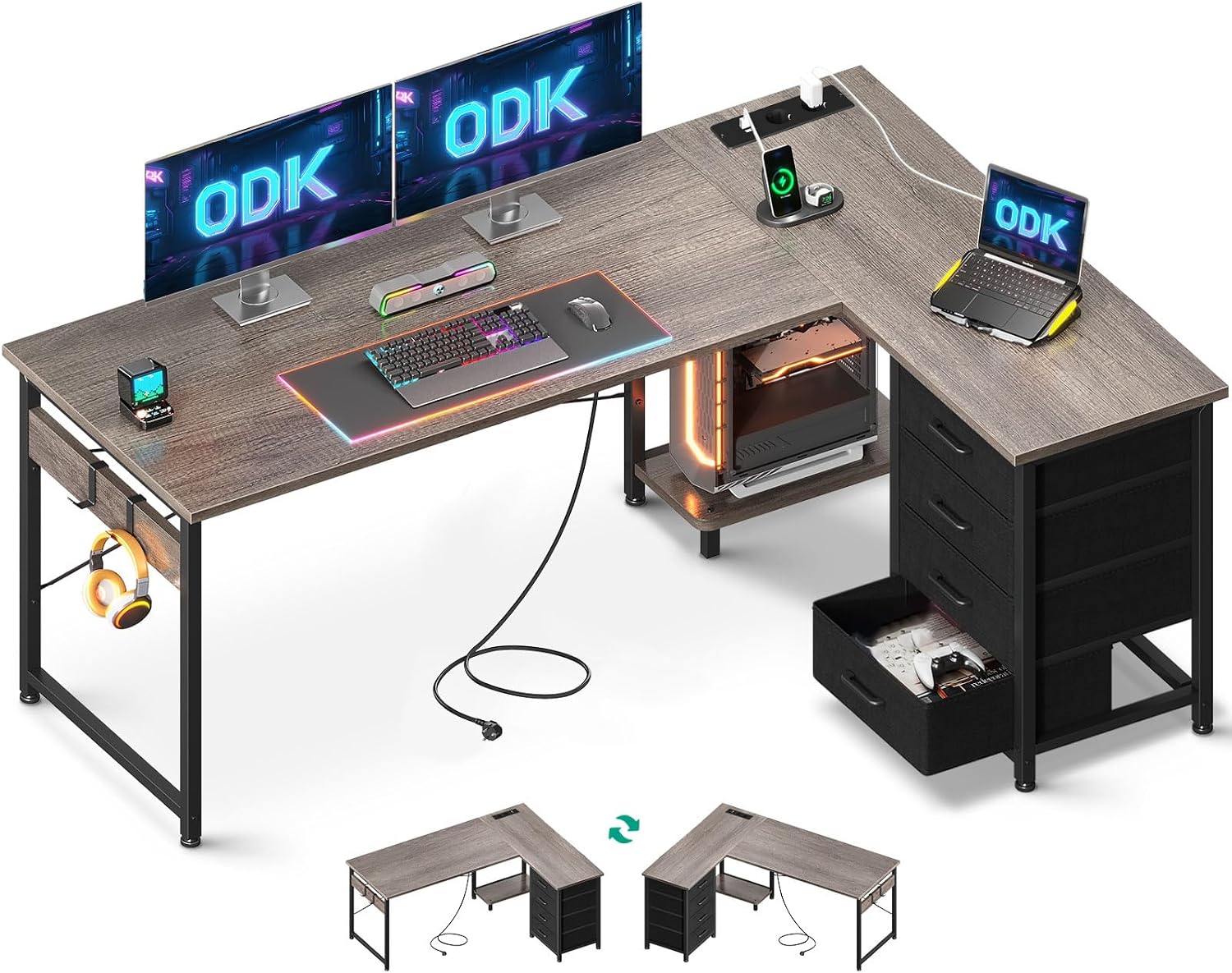
Image 1: Overview of the ODK L-Shaped Corner Desk, showcasing its design, integrated power strip, fabric drawers, and headphone hooks. The image also illustrates the reversible configuration options at the bottom.
4. Setup and Assembly
Follow these steps carefully to assemble your ODK L-Shaped Corner Desk. It is recommended to have two people for easier assembly.
4.1. Prepare Your Workspace
- Clear a spacious area for assembly.
- Lay out all components and hardware, comparing them with the package contents list.
- Have a Phillips head screwdriver and the provided Allen wrench ready.
4.2. Assemble the Metal Frame
Connect the metal legs and support bars according to the diagram in your separate graphical instructions. Ensure all connections are secure but do not fully tighten screws until all frame parts are in place.
4.3. Attach Desk Panels
Carefully place the main L-shaped desk panels onto the assembled metal frame. Secure them using the provided screws. Pay attention to the orientation for your desired reversible configuration (left or right L-shape).

Image 2: This diagram illustrates the overall dimensions of the desk (155cm x 110cm x 76cm) and highlights the reversible design, allowing the storage unit to be placed on either the left or right side of the L-shape. It also shows the dimensions of the fabric drawers and the integrated power strip.
4.4. Install Fabric Drawers and CPU Stand
Insert the four fabric drawers into their designated slots within the storage unit. Place the CPU stand on the lower shelf as shown in the graphical instructions.

Image 3: A detailed view of the four large-capacity fabric drawers, demonstrating their storage potential for office supplies and documents. The image also highlights the smooth gliding mechanism of the drawers.
4.5. Install the Integrated Power Strip and Headphone Hooks
Carefully insert the integrated power strip into the pre-cut opening on the desk surface. Secure it if necessary. Attach the two headphone hooks to the side of the desk frame as desired.

Image 4: This image provides a close-up of the built-in power strip, featuring two AC power outlets (220-250V/15A) and two USB charging ports (5V/2.1A). It shows devices actively charging, illustrating the convenience of this feature.
4.6. Final Tightening and Adjustment
Once all components are assembled, go back and fully tighten all screws. Adjust the leveling feet at the bottom of the desk legs to ensure the desk is stable and level on your floor.
5. Operating Instructions
5.1. Using the Integrated Power Outlets and USB Ports
- Plug the desk's power cord into a wall outlet.
- Connect your electronic devices (laptops, monitors, lamps) to the AC outlets.
- Connect your mobile devices (smartphones, tablets) to the USB charging ports using appropriate cables.
- Note: Do not exceed the maximum electrical load for the power strip (220-250V/15A for AC, 5V/2.1A for USB).
5.2. Utilizing the Fabric Drawers and Hooks
- The four fabric drawers provide convenient storage for documents, stationery, and other office supplies.
- Use the integrated hooks to hang headphones, bags, or other accessories, keeping your workspace tidy.
5.3. Reversible Configuration
The desk's L-shaped section with drawers can be assembled on either the left or right side, allowing you to adapt the desk to your room layout and personal preference. This flexibility is determined during the initial assembly process (refer to Section 4.3).
6. Maintenance
- Cleaning: Wipe the desk surfaces with a soft, damp cloth. Avoid harsh chemicals or abrasive cleaners that could damage the finish. For fabric drawers, spot clean with a mild detergent if necessary.
- Hardware Check: Periodically check all screws and bolts to ensure they remain tight. Retighten if necessary to maintain stability.
- Avoid Overloading: Do not place excessively heavy items on the desk or in the drawers to prevent damage or instability.
- Cable Management: Regularly inspect power cords for any signs of wear or damage. Keep cables tidy to prevent tripping hazards and ensure proper ventilation.
7. Troubleshooting
| Problem | Possible Cause | Solution |
|---|---|---|
| Desk is wobbly or unstable. | Screws are loose; desk is on an uneven surface. | Tighten all assembly screws. Adjust the leveling feet on the bottom of the legs. |
| Power outlets/USB ports are not working. | Desk power cord not plugged in; power strip not fully seated; circuit breaker tripped. | Ensure the desk's power cord is securely plugged into a functional wall outlet. Check if the power strip is correctly installed. Check your home's circuit breaker. |
| Fabric drawers are difficult to open/close. | Drawers are overloaded; items are obstructing movement; drawer not inserted correctly. | Reduce the load in the drawers. Ensure no items are blocking the drawer path. Re-insert the drawer correctly. |
| Desk surface is scratched or damaged. | Improper handling during assembly or use; sharp objects. | Use a desk mat to protect the surface. For minor scratches, touch-up pens may be available from furniture stores. |
8. Specifications
| Brand | ODK |
| Model | B0DS58NVKT |
| Desk Design | L-Shaped Computer Desk |
| Dimensions (L x W x H) | 155 cm x 110 cm x 76 cm (61" x 43.3" x 29.9") |
| Color | Grey Oak |
| Top Material Type | Engineered Wood (Laminated Finish) |
| Base Material | Iron |
| Special Features | 4 Fabric Drawers, 2 Headphone Hooks, Integrated Power Outlets (2 AC, 2 USB), Reversible Design, CPU Stand |
| AC Outlet Rating | 220-250V/15A |
| USB Port Rating | 5V/2.1A |
9. Warranty and Support
ODK provides a limited warranty for this product against defects in materials and workmanship. For specific warranty details, claims, or technical assistance, please refer to the warranty card included in your package or contact ODK customer support directly. Our customer service team is available to assist you with any questions or concerns regarding your desk.
Customer Support: Please visit the official ODK website or refer to your purchase documentation for contact information.


