
1. Introduction
This manual provides essential information for the proper installation, operation, and maintenance of your lvifloae Electric Wheelchair Joystick. Please read this manual thoroughly before using the product to ensure safe and efficient operation. This joystick is designed as a replacement control rocker for electric wheelchairs and mobility scooters, compatible with both brushed and brushless motor drive systems.
2. Safety Information
- Always ensure the wheelchair is powered off before attempting any installation or maintenance.
- Consult a qualified technician for installation if you are unsure about any steps.
- Do not expose the joystick to excessive moisture or extreme temperatures.
- Regularly inspect the joystick for any signs of damage or wear. Replace immediately if damage is found.
- Ensure all connections are secure before operating the wheelchair.
3. Product Overview
The lvifloae Electric Wheelchair Joystick provides precise 360-degree control for electric wheelchairs and mobility scooters. It is designed for durability and ease of use, offering stable and accurate control for users.

Image 3.1: The lvifloae Electric Wheelchair Joystick. This image shows the main component of the product, highlighting its compact design and the protective rubber boot around the control stick.

Image 3.2: Illustration of the 360-degree rotation capability. This image visually represents the joystick's ability to move in any direction, providing flexible control.
4. Specifications
| Item Type | Electric Wheelchair Joystick |
| Working Voltage | DC5V |
| Static Reset Voltage | 2.5V |
| Control Direction | X Y Axes |
| Working Temperature | -25℃ to +60℃ (-13°F to +140°F) |
| Storage Temperature | -45℃ to +80℃ (-49°F to +176°F) |
| Application | Brushed motor or brushless motor drive, high accuracy game control, etc. |
| Model Number | lvifloaegufikbvz0q |
| Package Dimensions | 4.72 x 4.72 x 2.36 inches |
| Item Weight | 2.65 ounces |
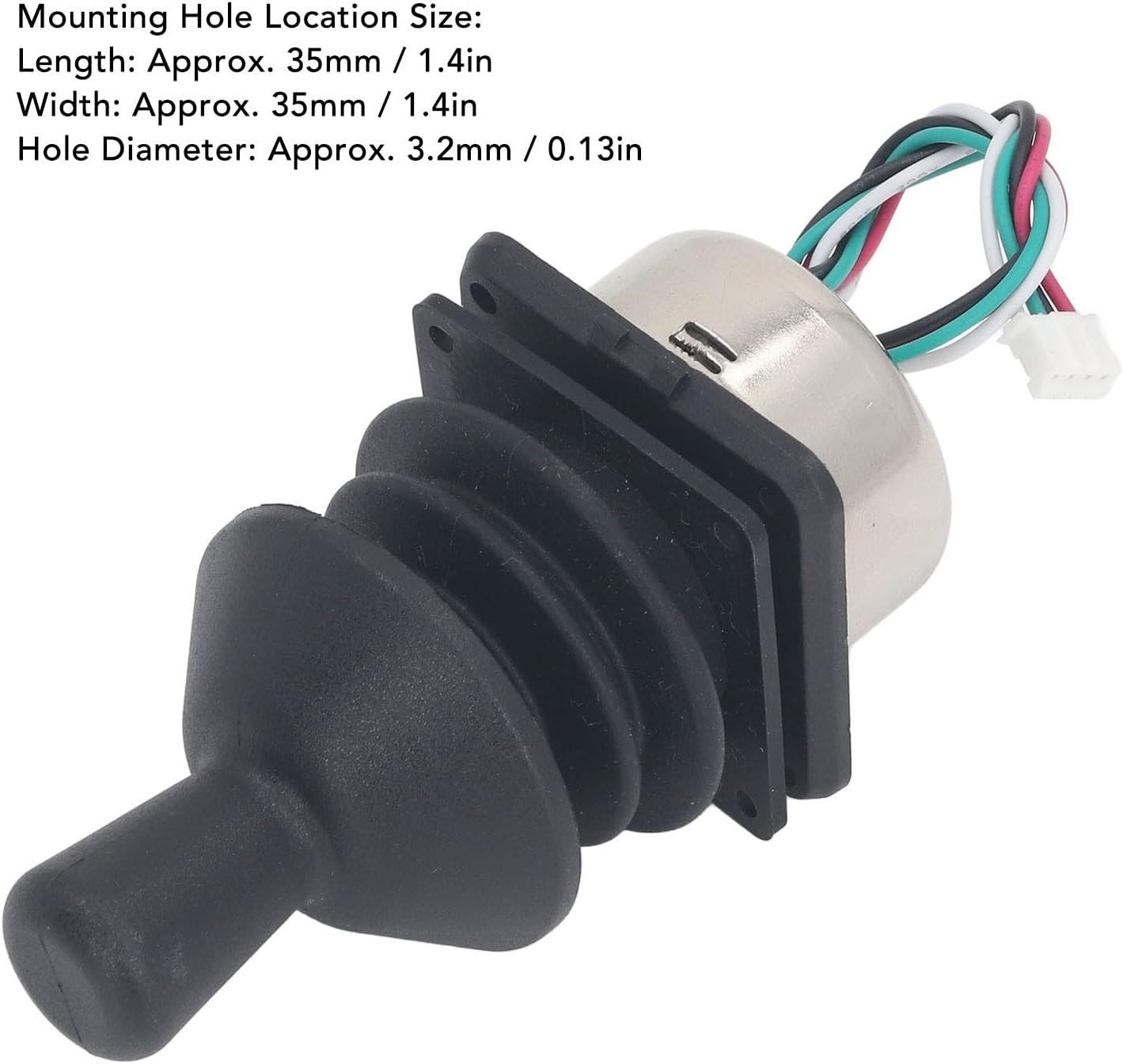
Image 4.1: Mounting hole location size. This image provides specific measurements for the joystick's mounting holes, including length, width, and hole diameter, crucial for installation.
5. Setup and Installation
The lvifloae Electric Wheelchair Joystick is designed for straightforward installation. Follow these steps carefully:
- Preparation: Ensure the electric wheelchair or mobility scooter is turned off and disconnected from any power source.
- Remove Old Joystick (if applicable): Carefully disconnect the wiring and unmount the existing joystick from its housing. Note the wiring configuration for reference.
- Mounting: Position the new lvifloae joystick in the desired mounting location. Use appropriate fasteners (not included) to secure it firmly. Refer to Image 4.1 for mounting hole dimensions.
- Wiring: Connect the joystick's wires to the wheelchair's control system. The joystick features a standard connector. Ensure correct polarity and secure connections. This joystick supports both brushed and brushless motor drive systems.
- Testing: Once installed, power on the wheelchair and perform a low-speed test in a safe, open area to verify proper function and responsiveness of the joystick.

Image 5.1: Rear view of the joystick showing wiring. This image illustrates the wiring connections at the back of the joystick, which are essential for proper installation into the wheelchair's control system.
6. Operating Instructions
The lvifloae Electric Wheelchair Joystick offers intuitive and flexible control for your mobility device.
- Power On: Turn on your electric wheelchair's main power switch.
- Directional Control: Gently push the joystick in the desired direction of movement (forward, backward, left, right). The 360-degree rotation allows for smooth and precise maneuvering.
- Speed Control: The speed of the wheelchair is typically controlled by how far you push the joystick. A slight push results in slower movement, while a fuller push increases speed. Refer to your wheelchair's main controller manual for specific speed settings and adjustments.
- Stopping: Release the joystick to its neutral (center) position to stop the wheelchair. The wheelchair should come to a smooth stop.

Image 6.1: Hands demonstrating joystick operation. This image shows a user's hand on the joystick, illustrating the natural and ergonomic way to control the device.

Image 6.2: Example of an intelligent universal controller. While this image shows a complete wheelchair controller, it provides context for where the joystick integrates and how other functions like battery level, speed display, and horn button might be part of the overall control system.
7. Maintenance
Proper maintenance ensures the longevity and reliable performance of your joystick.
- Cleaning: Use a soft, damp cloth to wipe the joystick's surface. Avoid using abrasive cleaners or solvents that could damage the material.
- Inspection: Periodically check the joystick for any loose connections, frayed wires, or physical damage. Ensure the rubber boot around the joystick is intact to prevent dust and moisture ingress.
- Storage: When not in use for extended periods, store the wheelchair and joystick in a dry, temperate environment.
8. Troubleshooting
If you encounter issues with your joystick, refer to the following common problems and solutions:
- Joystick unresponsive:
- Check if the wheelchair's main power is on.
- Verify all wiring connections are secure and correctly installed.
- Ensure the joystick is properly seated in its mounting.
- Erratic movement:
- Power cycle the wheelchair (turn off, wait 10 seconds, then turn on).
- Inspect for any physical obstructions around the joystick.
- Check for loose wiring connections.
- Joystick feels stiff or loose:
- Ensure no debris is lodged around the joystick base.
- If the joystick feels excessively loose, it may indicate internal wear or damage, requiring replacement.
If problems persist after attempting these solutions, contact customer support or a qualified technician.
9. Warranty and Support
For warranty information, please refer to the terms and conditions provided at the time of purchase or contact your retailer. For technical support or further assistance, please reach out to lvifloae customer service through the contact information provided with your product or on the official lvifloae website.