
LEKATO EP-01
Contents
LEKATO Amp Studio Guitar Effect Pedal Instruction Manual
Model: EP-01
1. Introduction
The LEKATO Amp Studio Guitar Effect Pedal (Model EP-01) is a versatile amplifier simulator designed for electric guitars. It offers a wide range of amp tones, from pristine clean to rich overdrive and distortion, suitable for various musical styles. Engineered with a pure analog signal path and premium buffered hardware bypass, it ensures zero digital tone coloration, preserving your instrument's natural voice. Its intuitive controls and dual power options make it a flexible tool for practice, studio recording, or live performance.

Figure 1: LEKATO Amp Studio Guitar Effect Pedal (Model EP-01)
2. Key Features
- Versatile Amp Tones: Offers distortion, overdrive, and clean tones inspired by iconic amp models, suitable for various genres.
- Pure Analog Signal Path: Features premium buffered hardware bypass switching to maintain the amp's natural voice and an unprocessed dry signal for no digital tone coloration.
- Dual Power Options: Can be powered via USB-C (5V1A+) or a standard 9V DC (center-negative) input, providing flexibility for different setups. A power bank is recommended for portable use.
- 32-Bit DSP Power: Ensures high-quality sound processing while preserving signal integrity.
- Intuitive Controls: Equipped with dedicated knobs for Gain, Level, Bass, MID, and Treble for easy and precise tone sculpting.
- Compact and Durable Design: Housed in an aluminum alloy shell, making it lightweight, portable, and robust for various environments.
3. Setup Guide
3.1 Powering the Pedal
The LEKATO Amp Studio pedal offers two convenient ways to power the unit:
- 9V DC Input: Use a standard 9V DC power adapter with a center-negative polarity. Ensure the current output is at least 300mA.
- USB-C 5V Input: Connect a USB-C cable to a 5V1A+ power adapter or a power bank. Using a power bank is recommended for optimal tone and portability.
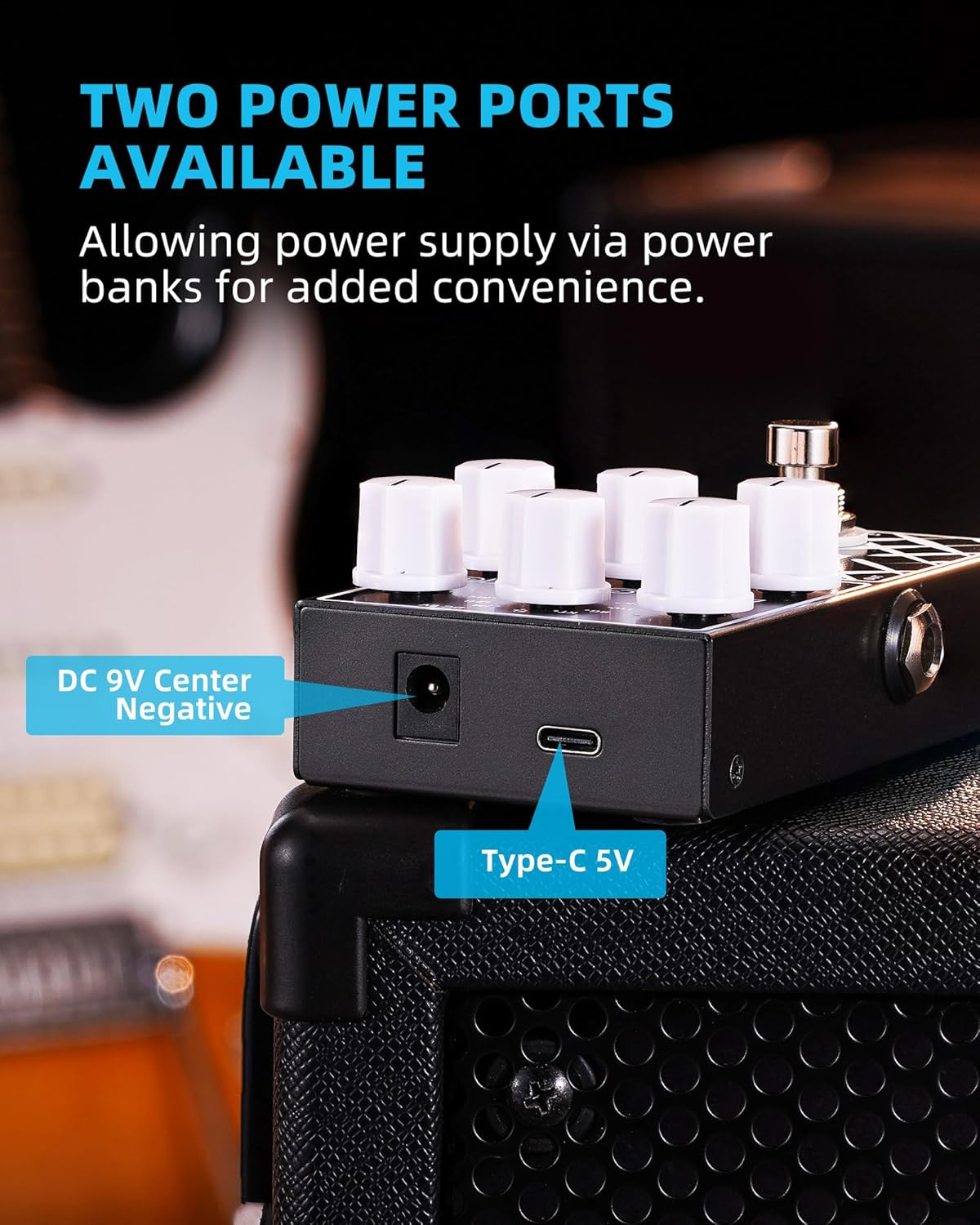
Figure 2: Dual Power Options (DC 9V and Type-C 5V)
3.2 Connecting the Pedal
Proper connection ensures optimal performance and tone shaping. Follow these instructions for typical setups:
- Connecting to an Amplifier's FX Loop Return:
Connect your guitar to the pedal's Input. Connect the pedal's Output to the FX LOOP RETURN of your guitar amplifier. This setup allows the PREAMP PEDAL to replace the amp's preamp, maximizing the product's tone shaping ability.
- Connecting to an Audio Interface, Headphone, Monitor, or Mixer:
Connect your guitar to the pedal's Input. Connect the pedal's Output to your audio interface, headphones, monitor, or mixer. For a fuller and more natural timbre, a "CAB SIM" effector should be connected in front of the speaker/headphone to get a plump and natural timbre.
Important Tip:
It is not recommended to connect the pedal's output directly to the INPUT connector of a guitar amp. This can lead to undesirable effects due to overlapping with the amp's built-in preamp.

Figure 3: Connection Instructions
4. Operating the Pedal
4.1 Controls Overview
The LEKATO Amp Studio pedal features intuitive controls for precise tone shaping:
- GAIN Knob: Adjusts the amount of gain, controlling the level of distortion or overdrive.
- LEVEL Knob: Controls the overall output volume of the effect.
- BASS Knob: Adjusts the low-frequency response of the tone.
- MID Knob: Adjusts the mid-range frequency response of the tone.
- TREBLE Knob: Adjusts the high-frequency response of the tone.
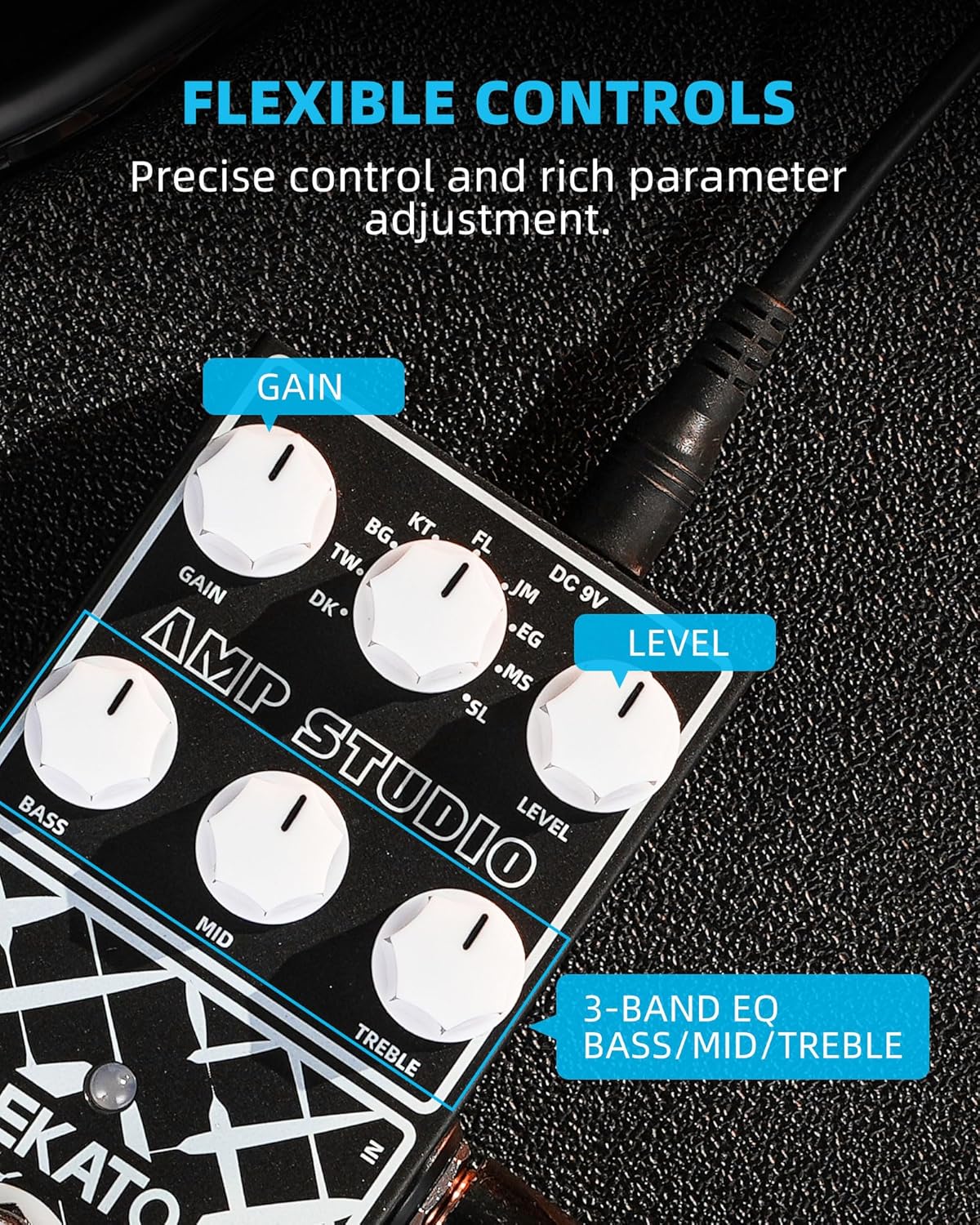
Figure 4: Flexible Controls for Tone Adjustment
4.2 Preamp Models
The pedal features 9 distinct preamp models, each offering a unique tonal characteristic suitable for various musical styles. These models are designed to emulate classic amplifier sounds:
| GEAR | AMP MODEL | TONE TYPE |
|---|---|---|
| 1 | Based on F---der® Dark DLX Deluxe | Clean |
| 2 | Based on F---der® Tweed Deluxe | Clean |
| 3 | Based on B-gn-r® XTC BlueM | Overdrive |
| 4 | Based on B-d C-t® Hot Cat 30 | Overdrive |
| 5 | Based on Br-wn Eye Fl-gman I | Overdrive |
| 6 | Based on M-rsh-ll® JCM800 UK 800 | Distortion |
| 7 | Based on E-GL® Powerball II E645/2 | Distortion |
| 8 | Based on M-s- / Bo-gi-® Dual Rectifier | Distortion |
| 9 | Based on S-ld-n® SLO100 Lead Overdrive | Distortion |
Figure 5: 9 Preamp Models and Tone Types
Note: All product names belong to their owners and are only used in this product and manual as a reference to tone types.
4.3 True Bypass Functionality
The LEKATO Amp Studio pedal features true bypass circuitry. This means that when the pedal is disengaged (bypassed), your guitar's signal passes directly through the pedal without any electronic interference or coloration from the pedal's internal components. This preserves the integrity and purity of your original signal.

Figure 6: True Bypass Footswitch
4.4 Official Product Video
Watch the official product video for a demonstration of the LEKATO Amp Studio Guitar Effect Pedal's features and sound capabilities.
Video 1: Official demonstration of the LEKATO Amp Simulator Guitar Effect Pedal, showcasing its various preamp models and sound versatility.
5. Maintenance
- Cleaning: Use a soft, dry cloth to clean the pedal's surface. Avoid using abrasive cleaners or solvents, as they may damage the finish.
- Storage: Store the pedal in a cool, dry place away from direct sunlight and extreme temperatures. If storing for extended periods, disconnect all cables and power sources.
- Handling: Handle the pedal with care. Avoid dropping it or subjecting it to strong impacts, which could damage internal components.
- Power Supply: Always use the recommended power supply (9V DC center-negative or 5V USB-C) to prevent damage to the unit.
6. Troubleshooting
| Problem | Solution |
|---|---|
| No power/LED not lighting up |
|
| No sound output |
|
| Unwanted noise or hum |
|
| Effect is too weak or too strong |
|
7. Specifications
| Feature | Detail |
|---|---|
| Brand | LEKATO |
| Model Number | EP-01 |
| Color | Black Amp Simulator |
| Item Weight | 9.3 ounces (265 Grams) |
| Product Dimensions | 4.3"L x 2.3"W x 1.6"H (4.3 x 2.3 x 1.6 inches) |
| Country of Origin | China |
| Hardware Interface | 1/4-inch Audio |
| Signal Format | Analog, Digital |
| Power Source | Corded Electric |
| Voltage | 9 Volts (DC) |
8. Warranty and Support
For warranty information, technical support, or any inquiries regarding your LEKATO Amp Studio Guitar Effect Pedal, please refer to the official LEKATO website or contact their customer service directly. Keep your purchase receipt as proof of purchase for warranty claims.
Visit the official LEKATO Store: LEKATO Store on Amazon
Documents and downloads
Ask a question about this manual
Ask about setup, troubleshooting, compatibility, parts, safety, or missing instructions. Manuals+ will review the question and use this page’s manual context to help answer it.