
1. Introduction
Thank you for choosing the BOMGE WTU-08A UHF Wireless Instrument Microphone System. This system provides stable and clear audio transmission for various instruments, including saxophones, trumpets, clarinets, and cellos. Designed for ease of use, it features plug-and-play functionality and a robust wireless range. Please read this manual carefully to ensure proper setup, operation, and maintenance of your device.
Important Note: This system is not compatible with Macbook, laptop, PC, or mobile devices.
2. Product Components
The BOMGE WTU-08A system includes the following main components:
- UHF Wireless Receiver
- UHF Wireless Microphone (Transmitter with integrated microphone)
- Power Adapter (for charging)
Below is a detailed diagram of the microphone and receiver components:
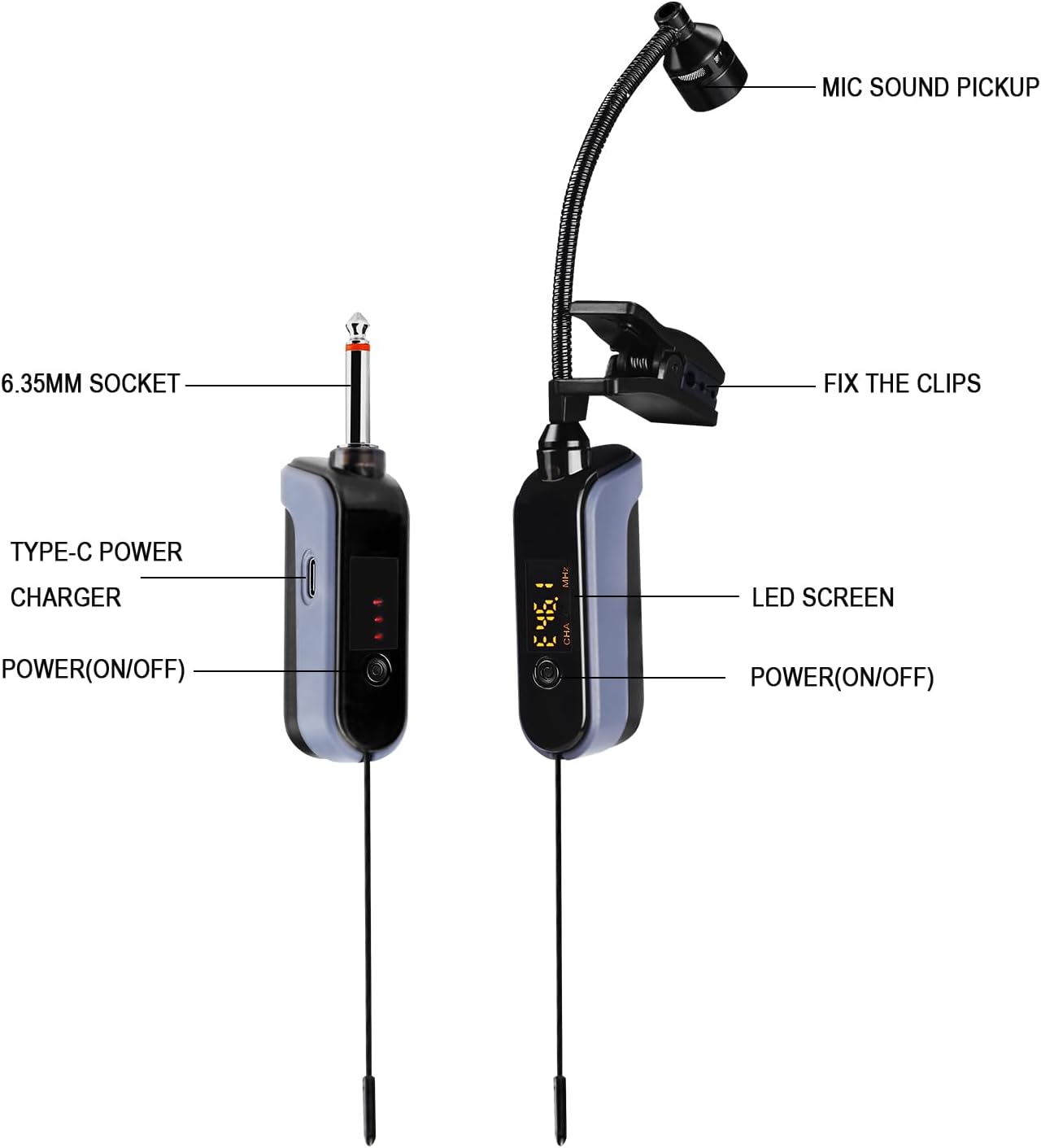
Image Description: This image displays a detailed diagram of the BOMGE WTU-08A wireless microphone system. On the left is the receiver unit, featuring a 6.35mm socket, a Type-C power charging port, and a power (on/off) button. On the right is the microphone unit, which includes the mic sound pickup, a 360-degree adjustable microphone rod, clips for attachment, an LED screen displaying frequency and battery power, and a power (on/off) button.
The microphone features a 360-degree adjustable rod for optimal positioning:

Image Description: This image illustrates the 360-degree adjustable microphone rod. It shows a hand adjusting the flexible gooseneck of the microphone, highlighting its ability to be positioned at any angle without dead spots. Insets demonstrate the flexibility of the rod and the secure clips used for attachment.
3. Setup Instructions
- Charge the Devices: Ensure both the receiver and the microphone (transmitter) are fully charged. The built-in 1000 mAh rechargeable lithium-ion battery provides 8-10 hours of operation after a 2-hour charge. A red light indicates charging, and it turns off when fully charged.
- Attach the Microphone: Securely clip the microphone unit onto your instrument (e.g., saxophone, trumpet) or collar using the integrated shock-proof clip. Adjust the 360-degree flexible rod to position the microphone head optimally for sound capture.
- Connect the Receiver: Plug the 6.35mm jack of the receiver into the input port of your audio equipment (e.g., PA system, amplifier, audio mixer).
- Power On: Turn on both the receiver and the microphone unit by pressing their respective power buttons. The devices will automatically pair. The LED screen on the microphone will display the frequency and battery level.
- Volume Adjustment: Adjust the volume on your audio equipment as needed.

Image Description: This image shows the BOMGE WTU-08A wireless microphone system being charged. Both the receiver and the microphone unit are connected via USB-C cables, with a laptop keyboard visible in the background. The image highlights the "BUILT-IN 1000MAH" battery capacity.

Image Description: This image demonstrates the "INTELLIGENT AUTOMATIC BINDING" feature. A hand is shown plugging the receiver unit into an audio device, which is connected to a saxophone with the microphone unit attached. The image visually represents the plug-and-play nature of the system.
4. Operating Instructions
- Wireless Transmission: The system utilizes UHF wireless technology, providing a stable signal transmission distance of up to 160 feet in open areas.
- High-Sensitivity Pickup: The built-in condenser microphone is designed to capture the instrument's sound clearly and realistically.
- Multiple Units: Up to 10 sets of BOMGE WTU-08A systems can be used simultaneously without interference, making it suitable for band performances or multi-instrument setups.
- Compatibility: This wireless microphone is compatible with voice amplifiers, speaker systems, and audio mixers. It is suitable for various brass instruments such as trumpets, horns, trombones, and other wind instruments.

Image Description: This image illustrates the "UHF STABLE TRANSMISSION" capability. It shows the microphone unit attached to a saxophone, transmitting wirelessly to a receiver connected to an audio system. Visual cues indicate a transmission range of up to 160 feet, emphasizing freedom of movement.

Image Description: This image demonstrates that "MULTIPLE GROUPS CAN BE USED AT THE SAME TIME." It shows one active microphone and receiver pair, alongside a grid of nine additional inactive pairs, visually representing the ability to use up to 10 sets simultaneously.
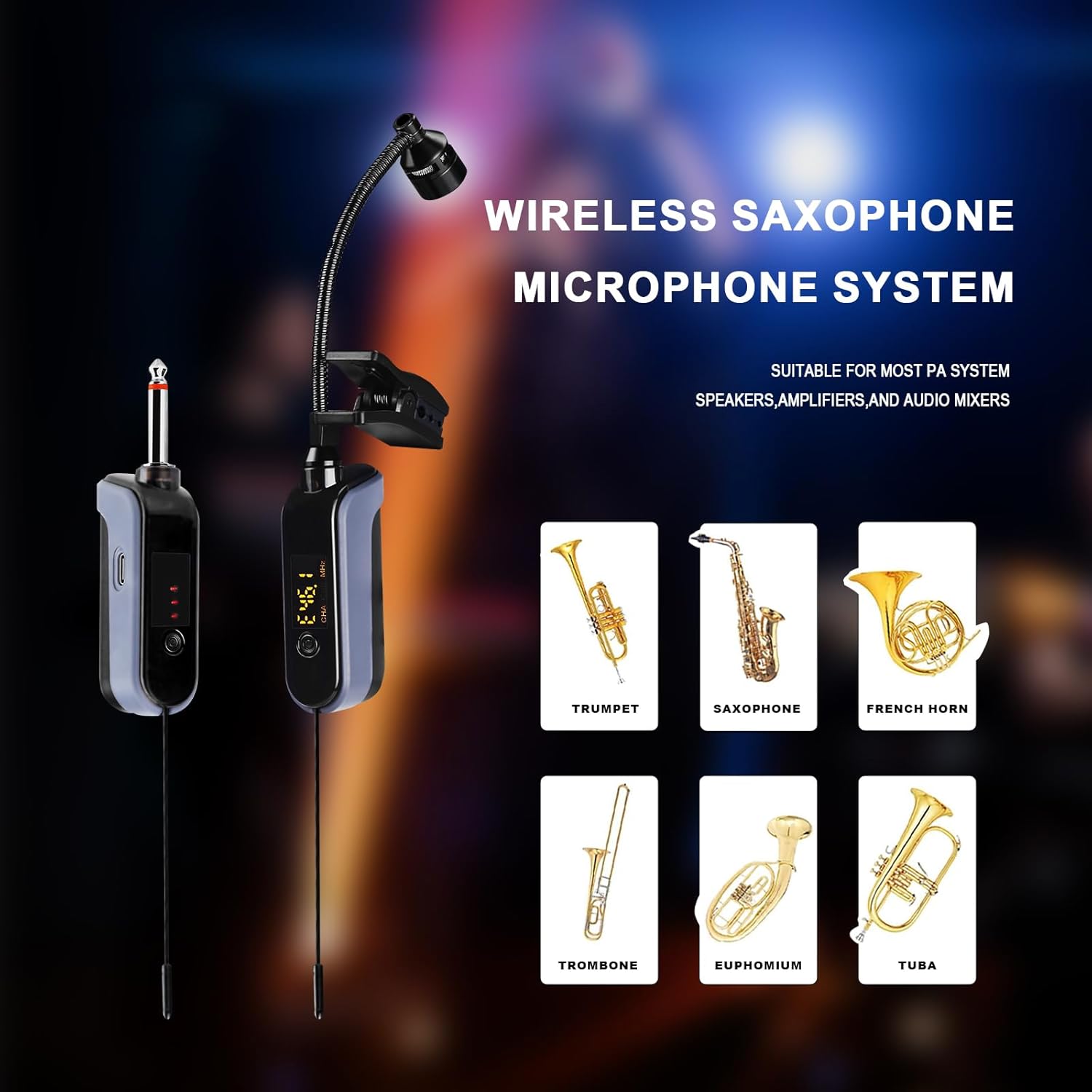
Image Description: This image highlights the "WIRELESS SAXOPHONE MICROPHONE SYSTEM" and its broad compatibility. It shows the microphone system alongside illustrations of various instruments including a trumpet, saxophone, French horn, trombone, euphonium, and tuba, indicating its suitability for most PA systems, speakers, amplifiers, and audio mixers.
5. Maintenance
- Cleaning: Use a soft, dry cloth to clean the microphone and receiver. Avoid using liquid cleaners or solvents.
- Storage: Store the system in a cool, dry place away from direct sunlight and extreme temperatures when not in use.
- Battery Care: Recharge the built-in batteries regularly, even if the device is not used frequently, to maintain battery health. Avoid fully discharging the battery for extended periods.
- Handling: Handle the microphone and receiver with care to prevent damage from drops or impacts.
6. Troubleshooting
| Problem | Possible Cause | Solution |
|---|---|---|
| No sound output |
|
|
| Interference or poor signal |
|
|
| Short battery life |
|
|
7. Specifications
| Feature | Detail |
|---|---|
| Model | WTU-08A |
| Connectivity Technology | UHF Wireless |
| Transmission Range | Up to 160 feet (open area) |
| Battery Type | Built-in 1000 mAh Rechargeable Lithium-Ion |
| Charging Time | Approx. 2 hours |
| Operating Time | Approx. 8-10 hours |
| Connector Type | 6.35 mm Jack |
| Microphone Type | Condenser, High-sensitivity |
| Adjustable Rod | 360-degree rotatable silicone shock-proof clip |
| Simultaneous Use | Up to 10 sets |
| Dimensions (Product) | 1.18 x 1.57 x 6.69 inches |
| Weight (Item) | 14.1 ounces |
| Material | Plastic |
| Included Components | 1x UHF wireless receiver, 1x UHF microphone wireless, 1x Power adapter |
8. Warranty and Support
BOMGE products are designed for reliability and performance. For warranty information and technical support, please refer to the official BOMGE website or contact your retailer. Keep your purchase receipt as proof of purchase for any warranty claims.
For further assistance, please visit the BOMGE Store on Amazon.

