
1. Introduction
The Santa Fe UltraMD33 is an advanced in-wall dehumidifier designed to efficiently control moisture in residential and multi-family environments. Its unobtrusive design allows for on-wall or recess installation, integrating seamlessly into your living space. This manual provides essential information for the proper setup, operation, and maintenance of your UltraMD33 dehumidifier.
The unit operates independently of your HVAC system, offering energy-efficient moisture removal and featuring quiet operation, an auto-restart function, and a digital humidistat for precise control.
2. Key Features
- In-Wall/On-Wall Design: First true in-wall dehumidifier, designed for direct drainage into a hub-drain or plumbing line for a hands-off system.
- Energy Efficient: Runs independent of the HVAC system, removing up to 33 pints of water per day.
- Coverage: Sized for areas up to 1,200 square feet, ideal for multi-family applications.
- Digital RH Control: Features a digital relative humidity control located behind a tamper-proof cover for precise moisture management.
- Flexible Power Options: Can be hardwired into existing electrical systems or directly plugged into a 110V outlet using the provided cord.
- Automatic Operation: Designed for continuous, hands-off operation with direct drainage.
- Included Accessories: Comes with a 10-foot drain hose and a washable filter.
- Versatile Application: Suitable for basements, crawl spaces, garages, home theaters, workshops, exercise rooms, new homes, and commercial spaces.
3. Safety Information
Please read and understand all safety instructions before operating the Santa Fe UltraMD33 dehumidifier. Failure to comply with these instructions may result in electric shock, fire, property damage, or personal injury.
- Always ensure the unit is properly grounded.
- Do not operate the unit with a damaged power cord or plug.
- Do not block air inlets or outlets.
- Keep children and pets away from the unit during operation.
- Disconnect power before performing any maintenance or service.
- Only use the unit for its intended purpose as a dehumidifier.
WARNING: California Proposition 65
This product can expose you to chemicals including lead, which is known to the State of California to cause cancer and birth defects or other reproductive harm. For more information go to www.P65Warnings.ca.gov.
4. Components and Parts
Familiarize yourself with the main components of your Santa Fe UltraMD33 dehumidifier.

Figure 4.1: Front view of the UltraMD33 Dehumidifier. This image displays the sleek, white exterior designed for discreet installation, featuring a removable front panel for access to controls and filters.
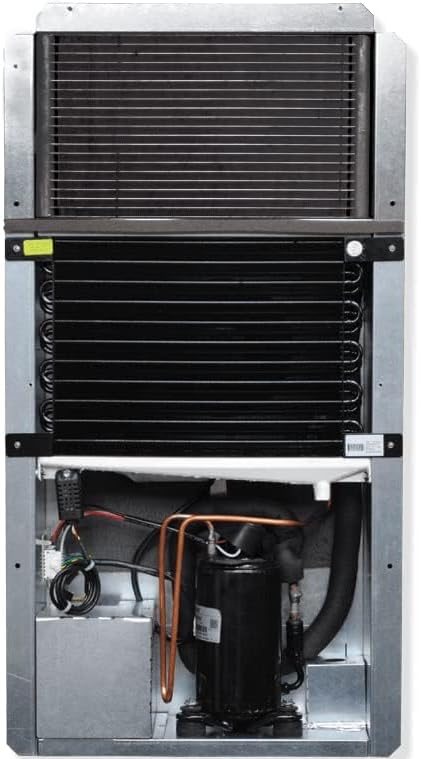
Figure 4.2: Internal components of the UltraMD33 Dehumidifier. This view reveals the evaporator and condenser coils, the compressor, and the electrical wiring, which are the core elements responsible for moisture removal.
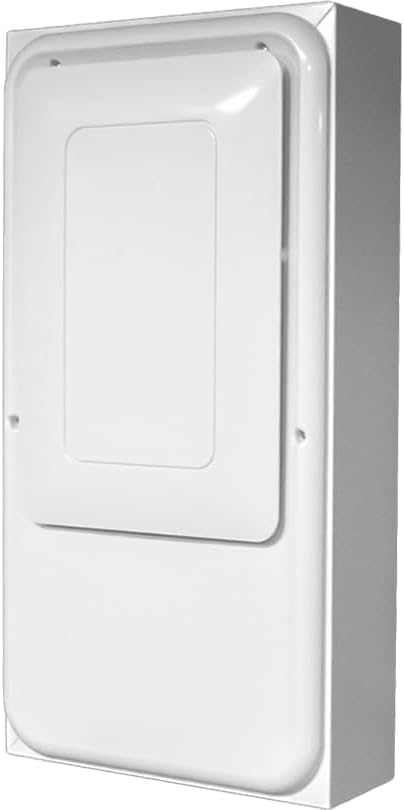
Figure 4.3: Side profile of the UltraMD33 Dehumidifier. This image highlights the unit's narrow depth, which facilitates its in-wall or on-wall mounting for a low-profile appearance.
5. Setup and Installation
The UltraMD33 is designed for flexible installation, either mounted directly on a wall or recessed within a wall cavity. Professional installation is recommended for recessed applications.
5.1 Mounting Options
- On-Wall Mounting: Secure the unit directly to a wall using appropriate fasteners. Ensure the wall structure can support the unit's weight (58 lbs).
- Recessed In-Wall Mounting: Requires cutting an opening in the wall and securing the unit within the cavity. Consult the detailed installation guide for precise dimensions and structural requirements.
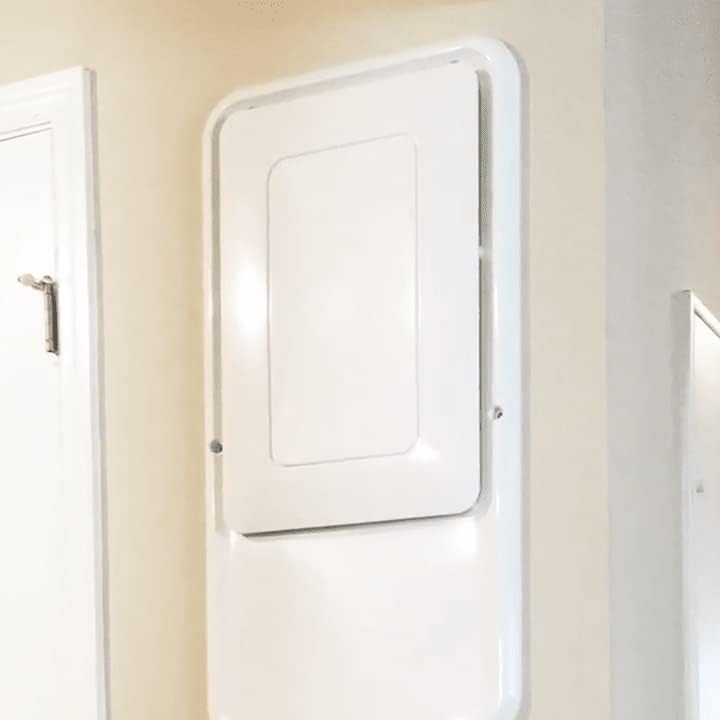
Figure 5.1: UltraMD33 Dehumidifier installed in a wall. This image demonstrates how the unit can be recessed into a wall, providing a clean, integrated look that minimizes its visual impact in a room.
5.2 Drainage Connection
The UltraMD33 is designed for continuous drainage. Connect the provided 10-foot drain hose to the unit's drain port and route it to a suitable hub-drain or plumbing line. Ensure the hose has a continuous downward slope to prevent water accumulation.
5.3 Electrical Connection
The unit offers two electrical connection methods:
- Plug-in: Use the provided power cord to plug the unit into a standard 110V electrical outlet.
- Hardwired: For permanent installations, the unit can be hardwired into your existing electrical system by a qualified electrician.
Always ensure the power supply matches the unit's requirements (110V) and that all electrical connections comply with local codes.
6. Operating Instructions
The Santa Fe UltraMD33 operates automatically to maintain desired humidity levels.
6.1 Setting Desired Humidity (RH)
The digital RH control is located behind the tamper-proof access panel on the front of the unit. To adjust the desired humidity level:
- Carefully remove the access panel.
- Use the controls on the digital humidistat to set your desired relative humidity percentage. A typical comfortable range is between 45% and 55% RH.
- Replace the access panel securely.
The unit will automatically turn on when the ambient humidity rises above your set point and turn off once the humidity drops below it.
6.2 Auto-Restart Feature
The UltraMD33 is equipped with an auto-restart feature. In the event of a power outage, the unit will automatically resume operation with the previously set humidity level once power is restored.
7. Maintenance
Regular maintenance ensures optimal performance and longevity of your dehumidifier.
7.1 Filter Cleaning
The UltraMD33 includes a washable filter that should be cleaned regularly, typically every 3-6 months, or more frequently depending on air quality.
- Disconnect power to the unit before accessing the filter.
- Locate and remove the washable filter from its housing (refer to the detailed installation guide for exact location).
- Wash the filter with warm, soapy water. Rinse thoroughly.
- Allow the filter to air dry completely before reinserting it into the unit. Do not use a dryer or heat gun.
- Reconnect power to the unit.
7.2 General Cleaning
Wipe the exterior of the unit with a soft, damp cloth as needed. Do not use abrasive cleaners or solvents.
8. Troubleshooting
This section addresses common issues you might encounter with your UltraMD33 dehumidifier. For more complex problems, contact customer support.
| Problem | Possible Cause | Solution |
|---|---|---|
| Unit does not turn on. | No power supply; Power cord not fully plugged in; Circuit breaker tripped. | Check power connection; Ensure outlet is functional; Reset circuit breaker. |
| Unit is running but not removing moisture. | Humidity setting too high; Air filter clogged; Room temperature too low. | Lower the RH setting; Clean or replace air filter; Ensure room temperature is above 60°F (15°C). |
| Unit is noisy. | Unit not level; Obstruction in fan; Loose components. | Ensure unit is level; Check for and remove any obstructions; Contact support if noise persists. |
| Water is not draining. | Drain hose kinked or blocked; Drain hose not sloped correctly. | Inspect drain hose for kinks or blockages; Ensure continuous downward slope to drain. |
9. Technical Specifications
| Specification | Detail |
|---|---|
| Brand | Santa Fe |
| Model Name | Santa Fe UltraMD33 |
| Item Model Number | 4044610 |
| ASIN | B0DS2VPWL3 |
| UPC | 810017961702 |
| Dehumidification Capacity | 33 Pints per Day |
| Floor Area Coverage | Up to 1200 Square Feet |
| Product Dimensions (D x W x H) | 5.75"D x 14.18"W x 30"H |
| Item Weight | 58 Pounds |
| Color | White |
| Operation Mode | Automatic |
| Special Feature | Automatic Restart |
| Recommended Uses | Residential |
| Included Components | Manual, 10-foot drain hose, washable filter |
10. Warranty and Support
For product support, warranty information, or to inquire about protection plans, please refer to the manufacturer's official website or contact their customer service directly.
10.1 Protection Plans
Extended protection plans may be available for your Santa Fe UltraMD33 dehumidifier. These plans offer additional coverage beyond the standard manufacturer's warranty. Examples include:
- 3-Year Protection Plan
- 4-Year Protection Plan
- Complete Protect (monthly plan covering multiple eligible purchases)
Details regarding coverage, terms, and pricing for these plans can be found where the product was purchased or by contacting the plan provider.
10.2 Customer Support
For assistance with installation, operation, troubleshooting, or parts, please contact Santa Fe customer support. You can typically find contact information on the manufacturer's official website or through the retailer where you purchased the product.
Note: Always have your model number (4044610) and serial number ready when contacting support.


