
1. Introduction
This manual provides instructions for the proper setup, operation, and maintenance of your Happybuy 110 LBS Refrigerant Scale. This high-precision digital scale is designed for accurate weighing of refrigerants during HVAC charging and recovery processes. It features a wired remote control for convenient operation and a robust design for durability.

Figure 1.1: The Happybuy Refrigerant Scale highlighting its 110 LBS maximum capacity, 2g accuracy, 0.05% resolution, and KG/OZ/LBS unit conversion capabilities.
2. Safety Information
Please read and understand all safety instructions before operating the scale. Failure to do so may result in injury or damage to the product.
- The scale is certified with FCC and CE marks, ensuring compliance with quality and safety standards.
- Always place the scale on a flat, stable, and level surface to ensure accurate readings and prevent tipping.
- The scale is equipped with non-slip rubber pads to provide a secure platform and minimize the risk of items sliding.
- An overload warning, indicated by "FULL" on the display, will appear if the weight exceeds the maximum capacity. Do not exceed the 110 lbs (50 kg) capacity to prevent sensor damage.
- Keep the scale away from extreme temperatures, moisture, and direct sunlight.

Figure 2.1: The scale's safety design, including FCC and CE certifications, and the durable storage case.
3. What's in the Box
Verify that all components are present upon unpacking:
- 1 x Refrigerant Scale Platform
- 1 x Wired Remote Control
- 1 x 9V Dry Battery
- 1 x Protective Carrying Case
- 1 x User Manual (this document)
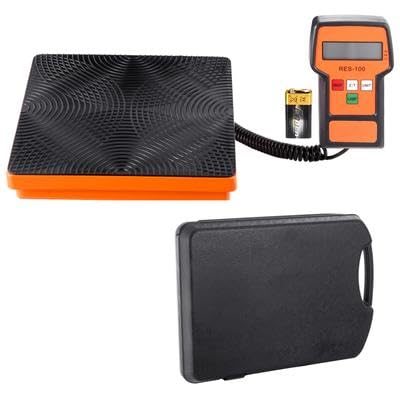
Figure 3.1: The complete package including the scale platform, wired remote, 9V battery, and carrying case.
4. Setup
4.1 Battery Installation
- Locate the battery compartment on the back of the wired remote control.
- Open the battery compartment cover.
- Insert the included 9V dry battery, ensuring correct polarity (+/-).
- Close the battery compartment cover securely.

Figure 4.1: The wired remote control, showing the display, control buttons, and the 9V battery for power.
4.2 Scale Placement
- Choose a flat, stable, and level surface for the scale platform. Uneven surfaces can affect measurement accuracy.
- Ensure the anti-slip rubber surface of the scale is clean and free of debris.
- Connect the wired remote control to the scale platform.
- The remote control features a 120° adjustable stand, allowing you to position the LCD display for optimal viewing without holding it.
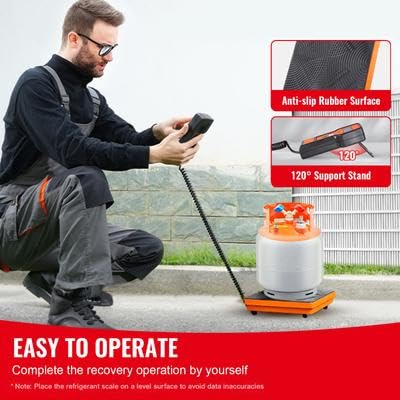
Figure 4.2: Proper setup of the refrigerant scale on a level surface, demonstrating the anti-slip rubber surface and the adjustable stand on the remote control.
5. Operating Instructions
The remote control features a 4-button interface for easy operation:
- ON/OFF: Press to power the scale on or off.
- ZERO (Z/T): Press to zero the display or tare the current weight. This is essential before placing a refrigerant tank to measure only the added or removed refrigerant.
- UNIT: Press to cycle through the available measurement units: Kilograms (KG), Pounds (LB), and Ounces (OZ).
- LAMP (Backlight): Press to turn the LCD display backlight on or off for improved visibility in various lighting conditions.
5.1 Automatic Functions
- Auto Shut-off: The scale will automatically power off after 10 minutes of inactivity to conserve battery life.
- Backlight Auto Off: The backlight will automatically turn off after 3 minutes of inactivity.

Figure 5.1: Illustration of the automatic shut-off (10 minutes) and backlight off (3 minutes) features designed to extend battery life.
6. Maintenance and Storage
6.1 Battery Care
- For prolonged periods of non-use, remove the 9V battery from the remote control to prevent potential leakage and damage to the device.
- Replace the battery when the display indicates low power or becomes dim.
6.2 Cleaning
- Wipe the scale platform and remote control with a soft, damp cloth.
- Do not use abrasive cleaners or immerse the unit in water.
6.3 Storage
- Store the scale and its components in the included waterproof and dustproof plastic carrying case.
- Ensure the robust buckle design of the case is securely fastened to prevent accidental opening during transport.
- Store in a cool, dry place away from direct sunlight and extreme temperatures.
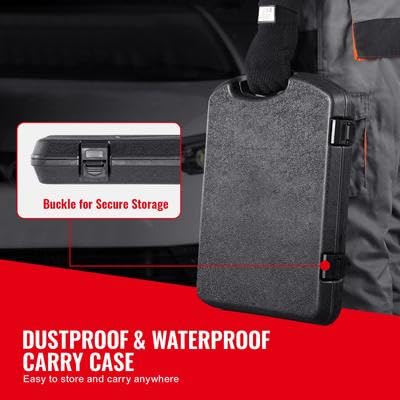
Figure 6.1: The secure buckle mechanism of the dustproof and waterproof carrying case, ensuring safe storage and transport.
7. Troubleshooting
| Problem | Possible Cause | Solution |
|---|---|---|
| Scale does not turn on. | Battery is dead or incorrectly installed. | Check battery polarity. Replace with a new 9V battery. |
| Inaccurate readings. | Scale is on an uneven surface; not zeroed; overloaded. | Place scale on a flat, level surface. Press ZERO before weighing. Ensure weight does not exceed 110 lbs. |
| Display shows "FULL". | Weight on the scale exceeds its maximum capacity. | Remove excess weight immediately to prevent sensor damage. The maximum capacity is 110 lbs (50 kg). |
| Display is dim or flickering. | Low battery. | Replace the 9V battery. |
8. Specifications
| Feature | Specification |
|---|---|
| Weighing Capacity | 50 kg / 110 lbs |
| Accuracy | 2 g |
| Resolution | 0.05% |
| Product Dimensions (Scale) | 425 x 310 x 66 mm / 16.7 x 12.2 x 2.6 inches |
| Net Weight | 3.25 kg / 7.2 lbs |
| Voltage | DC 9V (1 x 9V dry battery) |
| Remote Control | Wired, 4-button control with backlit LCD |
| Model Number | LX-36575A |
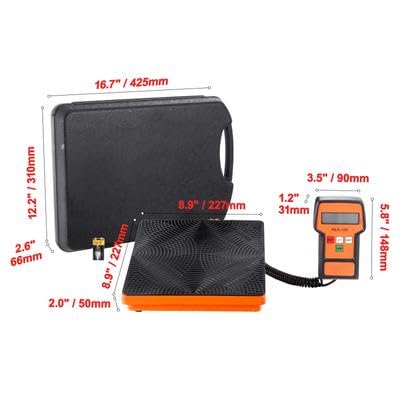
Figure 8.1: Detailed dimensions of the scale platform, remote control, and carrying case.