
1. Introduction
This manual provides detailed instructions for the installation, operation, and maintenance of your CHSTEK 8581A Android 13 Car Radio Multimedia Navigation System. This unit is designed for specific Porsche models, including the Cayman, Boxster, 911, 987, and 997 from 2004-2013. Please read this manual thoroughly before installation and use to ensure proper functionality and safety.
2. Safety Information
- Professional Installation Recommended: Due to the complexity of car electrical systems, professional installation is highly recommended to prevent damage to the unit or your vehicle.
- Power Supply: Ensure the unit is connected to a 12V DC power supply with negative grounding.
- Avoid Distractions: Do not operate the unit in a way that distracts you from driving. Always prioritize road safety.
- Temperature: Avoid exposing the unit to extreme temperatures or direct sunlight for prolonged periods.
- Moisture: Keep the unit dry. Exposure to moisture can cause malfunction or damage.
3. Package Contents
Verify that all items are present in the package:
- CHSTEK 8581A Car Radio Unit
- External Microphone
- GPS Antenna
- Power Cable Harness
- USB Cables
- User Manual (this document)

Figure 3.1: The CHSTEK 8581A car radio unit and its primary accessories, including the external microphone, highlighting key features like 2GB RAM + 32GB storage, 8-core 1.6GHz processor, DSP*36EQ, CarPlay, Android Auto, and Android 13 operating system.
4. Installation
The CHSTEK 8581A is designed for a plug-and-play installation in compatible Porsche models. However, specific vehicle configurations may require additional components or professional assistance.
4.1 Compatibility Check
- This unit is compatible with Porsche Cayman 911 981 997 Boxster models from 2004-2013.
- BOSE Audio System: If your vehicle is equipped with an original BOSE or Harman Kardon audio system, a separate fiber optic box is required for sound output. Please contact customer support for details on obtaining this component.
- Steering Wheel Controls: Some high-grade versions of the car, such as certain Cayman 2010-2012 models, may not fully support the steering wheel control keys.
4.2 Installation Steps (General)
- Disconnect Battery: Before beginning, disconnect the vehicle's negative battery terminal to prevent electrical shorts.
- Remove Original Radio: Carefully remove the existing car radio unit from the dashboard. Refer to your vehicle's service manual for specific instructions.
- Connect Wiring: Connect the provided power harness, GPS antenna, and any other necessary cables to the CHSTEK 8581A unit. Ensure all connections are secure.
- Install Microphone: Route and install the external microphone in a suitable location for clear voice pickup.
- Test Functionality: Before fully reassembling the dashboard, reconnect the battery and perform a basic test of the unit's functions (power, audio, touch screen).
- Secure Unit: Mount the CHSTEK 8581A unit securely into the dashboard opening.
- Reassemble Dashboard: Reinstall any removed trim panels and components.
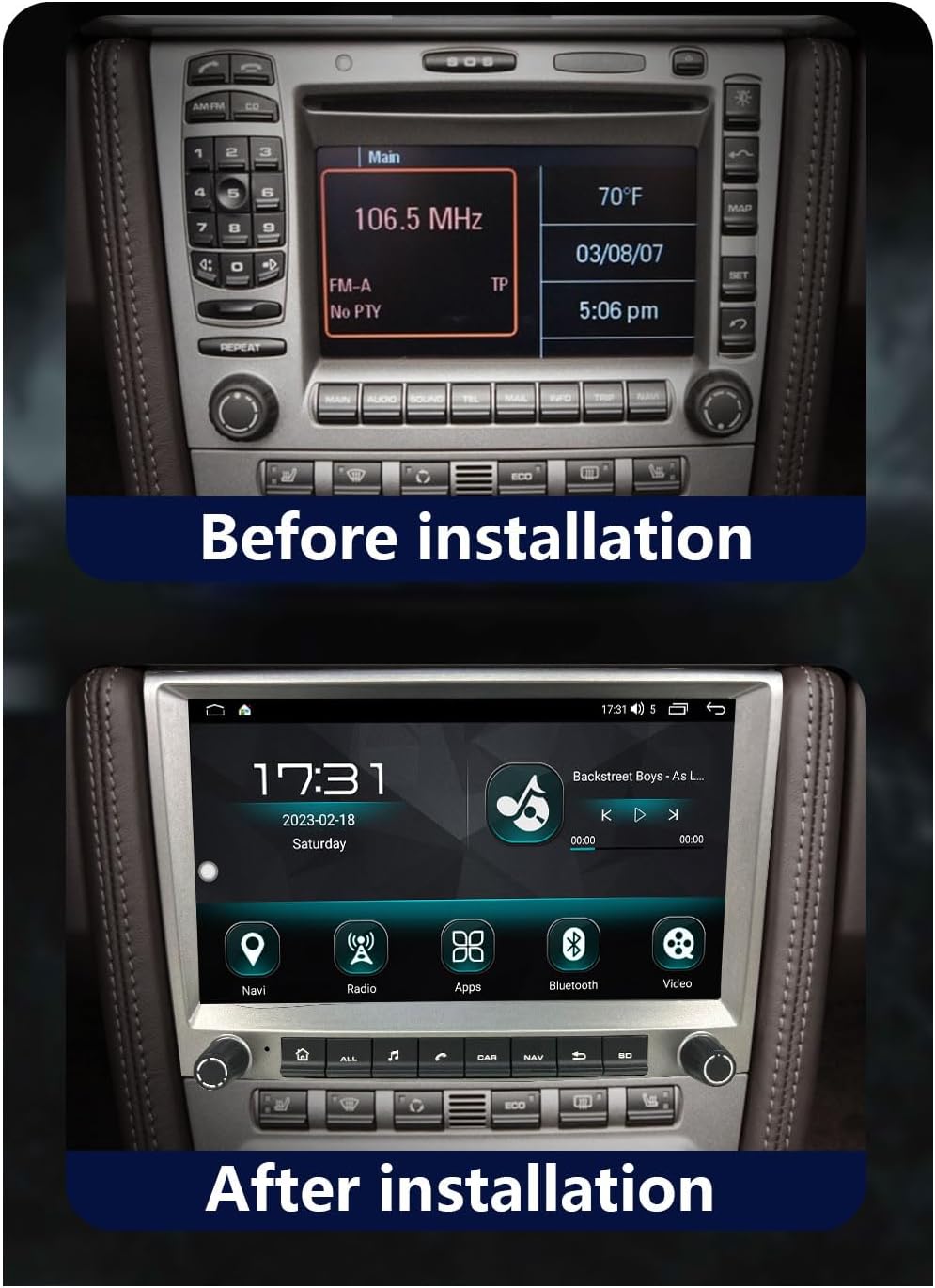
Figure 4.1: Example of a Porsche dashboard with the original radio unit prior to the CHSTEK 8581A installation.

Figure 4.2: Example of a Porsche dashboard after the CHSTEK 8581A unit has been successfully installed, showing the integrated display.
4.3 4G SIM Card Functionality (Americas)
If you are located in the Americas (e.g., United States, Canada, Mexico, Brazil) and require 4G SIM card network functionality, please inform customer service at the time of purchase or installation. Specific hardware configurations may be necessary to ensure 4G network compatibility in these regions.
5. Operating Instructions
This section details the primary functions and features of your CHSTEK 8581A car radio.
5.1 Power On/Off and Basic Navigation
- Power On: The unit will typically power on automatically when the vehicle's ignition is turned on.
- Power Off: The unit will power off when the vehicle's ignition is turned off.
- Touch Screen: Navigate through menus and applications by touching the icons and controls on the 8-inch 1280x720P HD touch screen.
- Physical Buttons/Knobs: Use the physical buttons and rotary knobs for quick access to common functions like volume, home, navigation, and radio.
5.2 Wireless CarPlay and Wired Android Auto
The unit supports both wireless Apple CarPlay and wired Android Auto, allowing seamless integration with your smartphone.
5.2.1 Wireless CarPlay (for iPhone users)
- Ensure Bluetooth and Wi-Fi are enabled on your iPhone.
- On the car radio, navigate to the CarPlay application.
- Follow the on-screen prompts to pair your iPhone via Bluetooth.
- Once paired, CarPlay will launch automatically, displaying a simplified version of your iPhone's interface on the car radio screen.
- Use Siri voice control for hands-free operation of navigation, calls, messages, and music.
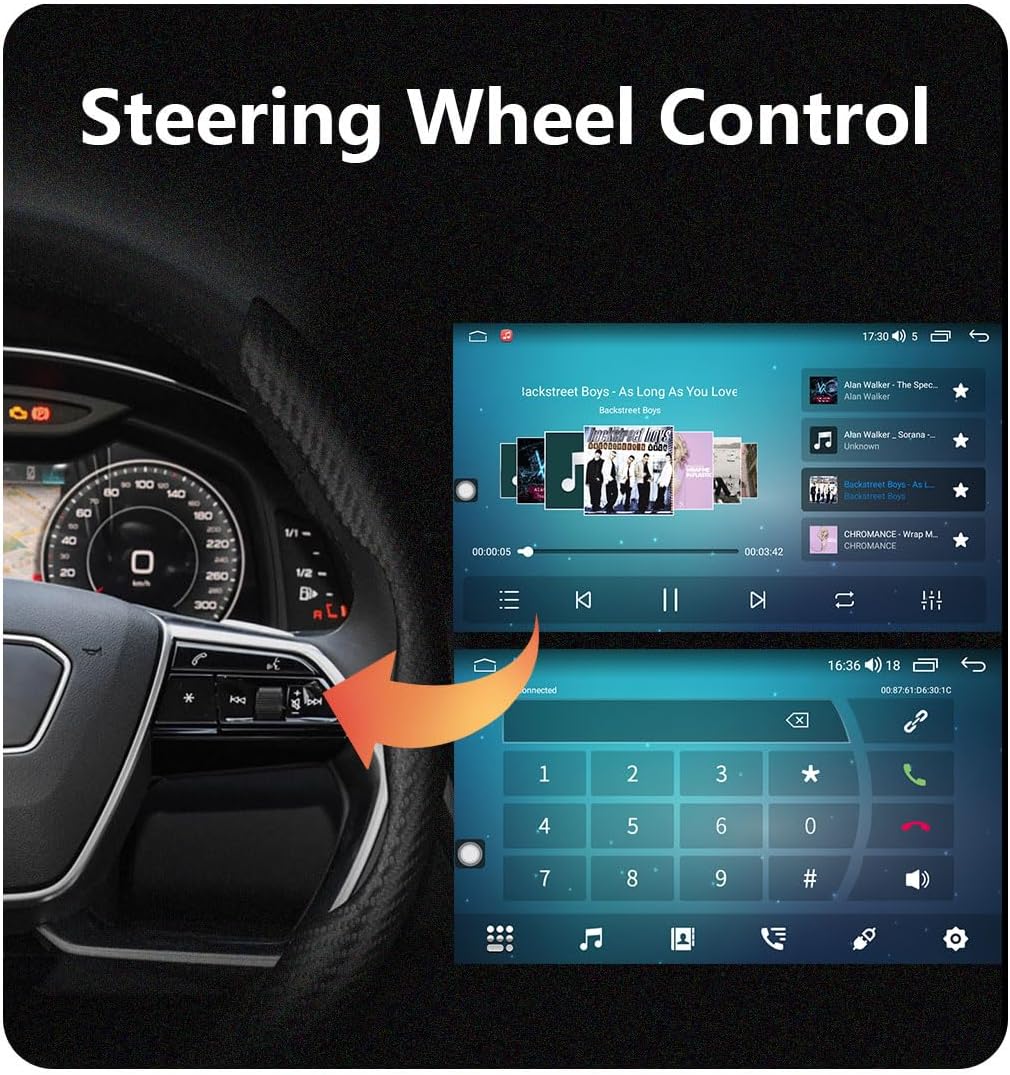
Figure 5.1: The wireless Apple CarPlay interface displayed on the car radio screen, showing common applications and Siri voice control functionality.
5.2.2 Wired Android Auto (for Android users)
- Ensure Android Auto is installed on your Android phone.
- Connect your Android phone to the car radio using a USB cable.
- On the car radio, navigate to the Android Auto application.
- Follow any on-screen prompts on both your phone and the car radio to establish the connection.
- Android Auto will mirror essential features like GPS mapping, music playback, and communication.

Figure 5.2: The wired Android Auto interface displayed on the car radio screen, demonstrating connectivity with an Android smartphone.
5.3 GPS Navigation
The unit features built-in GPS navigation with support for both online and offline maps.
- Online Navigation: Connect to Wi-Fi or 4G (if enabled) to access real-time traffic conditions and up-to-date map data.
- Offline Navigation: Download desired map regions for navigation without an internet connection. This is useful in areas with poor network coverage.
- Accurate Positioning: The system uses accurate satellite positioning to prevent getting lost and provide precise directions.
5.4 Bluetooth Functionality
Connect your smartphone via Bluetooth for hands-free calling and audio streaming.
- Hands-Free Calling: Pair your phone to make and receive calls directly through the car radio. The external microphone ensures clear communication.
- Bluetooth Music: Stream audio from your phone to the car's speakers.
- Phonebook Sync: Download your phone's contacts to the unit for easy access.
5.5 FM Radio
Access local radio stations with the built-in FM tuner.
- Frequency Range: FM 87.50-108.0 MHz.
- Preset Stations: Save up to 18 of your favorite stations for quick access.
- EQ Function: Utilize the equalizer to customize audio output for an optimal listening experience.
5.6 UI Desktop Themes & Split Screen
Personalize your user experience and enhance multitasking.
- Multiple UI Themes: Choose from various built-in desktop themes to refresh the look and feel of your interface.
- Split Screen Function: Run two applications simultaneously on the screen, such as navigation and music playback, for improved convenience.

Figure 5.3: A visual representation of various user interface (UI) desktop themes and integrated features available on the CHSTEK 8581A system, including navigation, radio, apps, Bluetooth, and DSP equalizer settings.
5.7 Steering Wheel Control
Integrate with your vehicle's steering wheel controls for safe and convenient operation.
- Functionality: Control volume, track skipping, answer/end calls, and other functions directly from your steering wheel.
- Compatibility Note: As mentioned in the installation section, some high-grade Porsche models (e.g., Cayman 2010-2012) may have limited or no support for steering wheel controls.
Figure 5.4: Illustration of how the car radio integrates with existing steering wheel controls for convenient operation while driving.
6. Maintenance
Proper maintenance ensures the longevity and optimal performance of your car radio.
- Cleaning the Screen: Use a soft, lint-free cloth to gently wipe the touch screen. For stubborn smudges, slightly dampen the cloth with water or a screen-safe cleaner. Avoid abrasive materials or harsh chemicals.
- Software Updates: Periodically check for available software updates to ensure the unit has the latest features and bug fixes. Updates can typically be performed via Wi-Fi.
- Avoid Liquids: Do not spill liquids on the unit. If accidental spillage occurs, power off the unit immediately and allow it to dry completely before use.
- Temperature Control: While the unit is designed for automotive environments, extreme heat or cold can affect performance. Park in shaded areas when possible during hot weather.
7. Troubleshooting
This section addresses common issues you might encounter with your CHSTEK 8581A unit.
| Problem | Possible Cause | Solution |
|---|---|---|
| No sound from the unit. | Vehicle has BOSE/Harman Kardon audio system without fiber optic box. Incorrect wiring. | Install a fiber optic box (if applicable). Check all audio wiring connections. |
| Steering wheel controls do not work. | Vehicle incompatibility (e.g., certain Cayman 2010-2012 models). Incorrect wiring. | Verify vehicle compatibility. Check steering wheel control wiring. |
| 4G network not working in Americas. | Unit not configured for Americas 4G bands. | Contact customer service to ensure your unit has the correct hardware for Americas 4G SIM card functionality. |
| Android Auto not connecting with Samsung phone. | Known compatibility issue with some Samsung devices. | Ensure Android Auto app is updated. Try different USB cables. If issue persists, contact support. |
| Touch screen unresponsive or inaccurate. | Software glitch. Physical damage. | Restart the unit. If problem persists, contact customer support. |
If you encounter issues not listed here or require further assistance, please contact CHSTEK customer support.
8. Specifications
Key technical specifications for the CHSTEK 8581A Car Radio.
| Feature | Specification |
|---|---|
| Model Number | 8581A |
| Operating System | Android 13 |
| Display | 8-inch 1280*720P HD Touch Screen |
| RAM + Storage | 2GB RAM + 32GB Internal Storage |
| Processor | 8 Core 1.6GHz |
| Connectivity | Bluetooth, USB, Wi-Fi, 4G (optional) |
| Special Features | Built-In Bluetooth, Touchscreen, Wireless CarPlay, Wired Android Auto, GPS Navigation, Split Screen, Multiple UI Themes, DSP Equalizer |
| Audio Output Mode | Stereo |
| Surround Sound Channel Configuration | 2.0 |
| Item Weight | 4.41 pounds |
| Package Dimensions | 7.87 x 7.87 x 7.87 inches |
9. Warranty and Support
For warranty information, technical support, or service inquiries, please refer to the warranty card included with your product or contact CHSTEK customer service directly. Ensure you have your product model number (8581A) and purchase details available when contacting support.


