
1. Introduction
Thank you for choosing the ENGFYADSY D88 AI OWS Language Translator Earbuds. These earbuds are designed to provide seamless real-time translation, high-quality music playback, and clear phone call capabilities. With support for 144 languages and broad compatibility across various operating systems, your D88 earbuds are an ideal companion for travel, business, and learning.

This image displays the ENGFYADSY D88 AI OWS Language Translator Earbuds in skin color, along with their matching charging case. The case features a digital display showing battery levels.
2. Safety Information
Please read all safety instructions carefully before using the product to ensure safe and proper operation. Keep this manual for future reference.
- Do not expose the earbuds or charging case to extreme temperatures, direct sunlight, or high humidity.
- Avoid dropping, impacting, or disassembling the device. Unauthorized repairs may void your warranty.
- Keep the device away from water and other liquids. If it gets wet, dry it thoroughly before use.
- Use only the provided charging cable or a certified equivalent.
- Prolonged listening at high volume levels may cause hearing damage. Adjust volume to a safe level.
3. Package Contents
Ensure all items are present in the package:
- ENGFYADSY D88 AI OWS Language Translator Earbuds (Left and Right)
- Charging Case
- USB Charging Cable
- User Manual (this document)
4. Product Overview
The D88 earbuds feature an Open-Wearable Stereo (OWS) design for comfort and situational awareness, combined with advanced AI translation technology.
Key Features:
- Real-Time Translation: Supports 144 languages with up to 99% accuracy and 0.2-second response time.
- 3-in-1 Functionality: Seamlessly switch between translation, music playback, and phone calls.
- Wide Compatibility: Connects to Android, iOS, and Windows devices via Bluetooth.
- Long Playtime: Up to 4 hours of use per charge, with a high-efficiency charging case providing extended battery life.
- One-Step Pairing: Automatic connection upon removal from the charging case.
- Touch Control: Intuitive touch sensors for easy operation.
- Open-Wearable Design: Comfortable and secure fit for extended use.

An overview image showcasing the D88 OWS AI Translation Earbuds in both skin and black colors, along with their respective charging cases, highlighting their support for 144 languages.

A detailed graphic illustrating key features such as 60 hours of total playtime (with charging case), a lightweight and snug fit, Crystal-Clear AAC Sound Quality, Advanced AirConduction Technology, and an LED digital display for real-time electricity consumption monitoring.
5. Setup
5.1 Charging the Earbuds and Case
Before first use, fully charge the earbuds and the charging case. Connect the provided USB charging cable to the charging port on the case and a power source. The LED display on the case will indicate the charging status.
5.2 App Installation and Device Binding
To utilize the full translation features, you need to download and bind the dedicated AI application.
- Download the App: Scan the QR code provided in the physical user manual or search for the 'AI Cool' app on your device's app store (compatible with Android and iOS).
- Login/Register: Open the app and follow the on-screen instructions to create an account or log in.
- Device Binding:
- Ensure Bluetooth is enabled on your smartphone.
- Take both earbuds out of the charging case. They will automatically enter pairing mode.
- In the app, navigate to 'My Devices' or 'Binding Device'.
- Select the earbuds (e.g., 'Earphones' or 'TWS') from the list of available Bluetooth devices.
- Confirm the binding within the app. You may be prompted to scan a QR code on the physical user manual for binding.

This multi-panel image provides a step-by-step visual guide for setting up the earbuds, including scanning a QR code for app download, logging into the app, and binding the device via Bluetooth pairing.
5.3 Bluetooth Pairing (General)
For basic audio functions (music, calls) without the translation app:
- Open the charging case and remove both earbuds. They will automatically power on and enter pairing mode.
- Enable Bluetooth on your device (smartphone, tablet, laptop).
- Search for new devices and select 'D88' or a similar name from the list.
- Once connected, you will hear a confirmation tone.

This image demonstrates the earbuds' broad compatibility, showing the charging case and earbuds alongside a smartphone, tablet, and laptop, indicating seamless Bluetooth connectivity with Windows, iOS, and Android devices.
6. Operating Instructions
6.1 Basic Functions (Music & Calls)
Once paired, the earbuds can be used for audio playback and phone calls.
- Play/Pause: Single tap on either earbud.
- Next Track: Double tap on the right earbud.
- Previous Track: Double tap on the left earbud.
- Answer/End Call: Single tap on either earbud.
- Reject Call: Press and hold either earbud for 2 seconds.
- Activate Voice Assistant: Triple tap on either earbud.

A woman is shown wearing one of the earbuds, emphasizing its versatile 'Three-in-one' functionality: real-time translation, music playback, and phone call capabilities.
6.2 Translation Features
The D88 earbuds offer various translation modes through the dedicated AI application:

A graphic showing a globe surrounded by various national flags, illustrating the earbuds' capability to support translation in over 144 languages.

This image highlights the earbuds' translation performance, showing 'Hello' translated into several languages (Ciao, Hola, Hola!, Bonjour, Hallo, 你好, 안녕하세요) with text indicating 98% accuracy and a 0.2-second response time for simultaneous translation.
- Silent Mode: Displays translation results on your phone screen without audio output.
- Earphone Mode: You wear the earbuds, and the translation audio is played through your headset. Speak into your phone's microphone.
- Speaker Mode: Press and hold the earbud to speak, release to end. The translated audio is played through your phone's speaker.
- Two Earphone Mode: Each person wears an earbud. One person speaks, and the translated audio is played through the other person's earbud.
Refer to the in-app guide for detailed instructions on selecting languages and using specific translation modes.
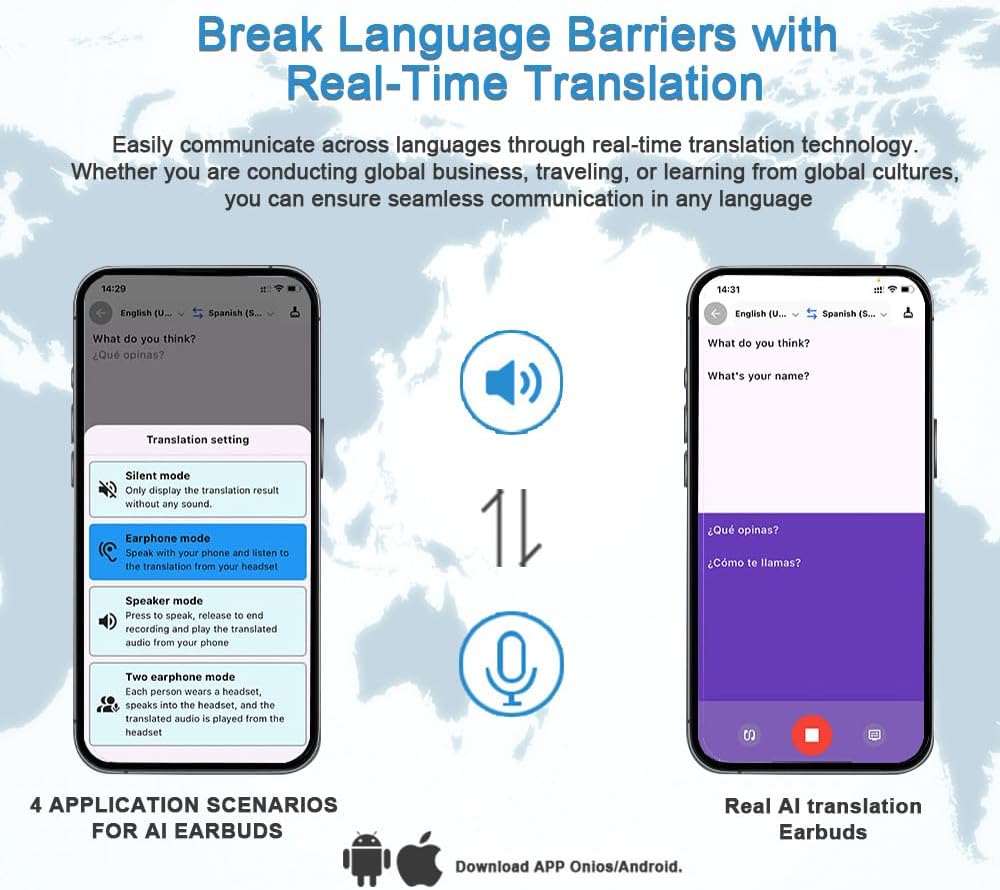
A visual representation of the smartphone application interface, detailing four application scenarios for the AI earbuds: Silent mode, Earphone mode, Speaker mode, and Two earphone mode, along with a 'Real AI translation Earbuds' screen.
7. Maintenance
Proper maintenance ensures the longevity and performance of your earbuds.
- Cleaning: Use a soft, dry, lint-free cloth to clean the earbuds and charging case. Do not use abrasive cleaners or solvents.
- Storage: When not in use, store the earbuds in their charging case to protect them and keep them charged. Store in a cool, dry place.
- Battery Care: Avoid fully discharging the battery frequently. Charge the device regularly, even if not in use, to maintain battery health.
8. Troubleshooting
If you encounter issues, try the following solutions:
- Earbuds not pairing:
- Ensure both earbuds are charged.
- Place earbuds back in the case, close, then reopen and remove them to re-enter pairing mode.
- Turn off and on your device's Bluetooth.
- Forget the device in your Bluetooth settings and try pairing again.
- No sound:
- Check the volume level on both your earbuds and connected device.
- Ensure earbuds are properly connected to your device.
- Re-pair the earbuds.
- Translation not working:
- Ensure the AI app is installed, updated, and running.
- Verify the earbuds are correctly bound within the app.
- Check your internet connection, as translation often requires online processing.
- Ensure correct source and target languages are selected in the app.
- Poor call quality:
- Ensure earbuds are clean and not obstructed.
- Move closer to your connected device to avoid interference.
- Check network signal strength on your phone.
9. Specifications
| Feature | Specification |
|---|---|
| Model Name | D88 |
| Connectivity Technology | Wireless (Bluetooth) |
| Bluetooth Version | 5.0 |
| Supported Languages | 144 |
| Battery Life (Earbuds) | Up to 4 hours |
| Control Method | App, Touch |
| Frequency Range | 20Hz - 20,000Hz |
| Audio Driver Type | Dynamic Driver |
| Ear Placement | In Ear (Open-Wearable Stereo) |
| Compatible Devices | Cellphones, Laptops, Desktops (Android, iOS, Windows) |
| Item Weight (Earbuds) | Approximately 0.01 Kilograms (0.352 ounces for package) |
| Manufacturer | ENGFYADSY |
10. Warranty and Support
ENGFYADSY provides customer-focused support for your D88 AI OWS Language Translator Earbuds. If you have any questions about the product after delivery, please reach out to us by message. We commit to responding with a solution within 24 hours.
For warranty information, please refer to the specific terms provided at the time of purchase or contact our customer support team.