
Product Overview
The 10L0L Golf Cart Fan is a portable, rechargeable fan designed for various outdoor applications, including golf carts, strollers, and tents. It features a 10000mAh battery, a flexible tripod mount, 360° rotation, and an integrated LED light.

Image: The 10L0L Golf Cart Fan, featuring its flexible tripod mount and fan head.
Package Contents
- 1 x 10L0L Golf Cart Fan
- 1 x USB-C Charging Cable
- 1 x User Manual

Image: The fan, USB-C charging cable, and user manual, illustrating the product's compact size and included accessories.
Setup
1. Charging the Fan
Before first use, fully charge the fan. Connect the provided USB-C cable to the fan's charging port and plug the other end into a compatible USB power adapter (not included). The 10000mAh battery provides extended operation.

Image: A detailed view of the fan's control panel, highlighting the 10000mAh battery capacity and USB charging ports.
2. Attaching the Fan
The flexible tripod mount allows for versatile attachment. Wrap the flexible legs around a golf cart frame, stroller handle, or tent pole. Ensure the fan is securely clamped to prevent movement during use. The installation is tool-free and takes approximately 1 second.

Image: The fan securely attached to a golf cart frame, demonstrating its airflow and positioning.

Image: The fan mounted on a golf cart, showcasing its ability to rotate 360 degrees for optimal airflow direction.
Operating Instructions
1. Power On/Off and Speed Adjustment
- Press the power button to turn the fan on.
- Press the power button repeatedly to cycle through the 3 fan speeds (low, medium, high).
- Press and hold the power button to turn the fan off.
2. LED Light Function
- Press the light button to turn the LED light on.
- Press the light button again to switch between the 2 brightness levels (50% and 100% warm-white light).
- Press the light button a third time to turn the LED light off.

Image: A golf cart at night, demonstrating the fan's LED light providing illumination for night use.
3. 360° Rotation
The fan head can be manually rotated 360 degrees horizontally and vertically to direct airflow precisely where needed.
4. Timed Shutdown
The fan features a timed shutdown function to conserve battery power. Press the timer button to set automatic shutdown for 1, 3, or 5 hours.
5. Power Bank Functionality
The fan includes a 5V 2A USB output port, allowing it to function as a power bank to charge other devices.
Video: An official product video demonstrating the features and operation of the 10L0L Golf Cart Fan, including its flexible mount and various settings.
Maintenance
Cleaning the Fan
The front grille of the fan is detachable for easy cleaning. Gently twist and remove the front cover to access the fan blades. Use a soft, dry cloth to wipe away dust. Ensure the fan is completely dry before reattaching the grille and using it again.
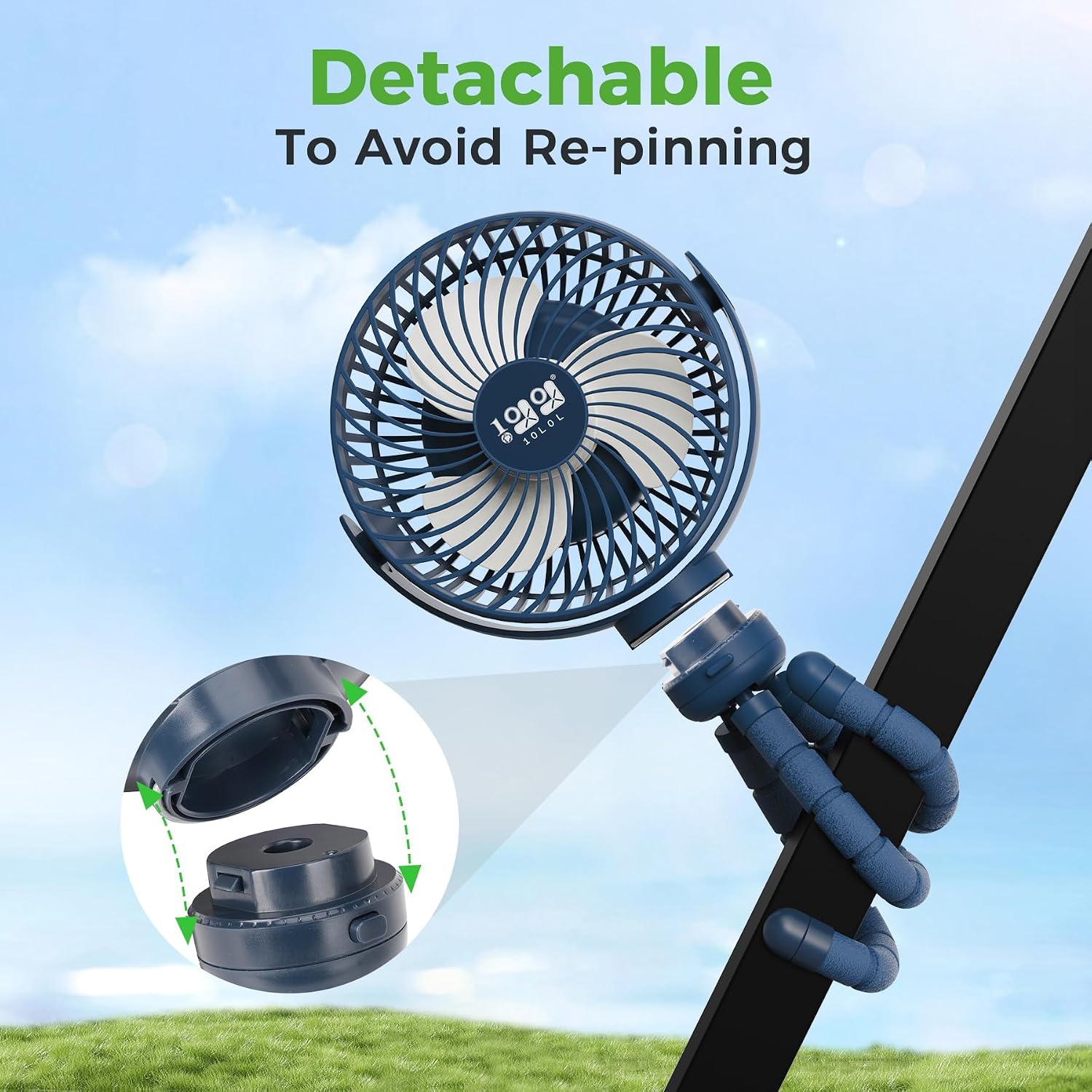
Image: A visual guide demonstrating the detachable front grille feature for convenient cleaning and maintenance.
Troubleshooting
- Fan not turning on: Ensure the fan is fully charged. Connect it to a power source using the USB-C cable.
- Weak airflow: Check the fan speed setting and ensure the front grille is clean and free of obstructions.
- LED light not working: Ensure the fan has sufficient battery charge. Press the light button to cycle through settings.
- Fan not holding charge: If the fan's battery life significantly decreases, contact customer support.
Specifications
| Brand | 10L0L |
| Model Number | 10L0L-EF-001 |
| Color | Blue |
| Power Source | Battery Powered |
| Battery Capacity | 10000mAh |
| Mounting Type | Clip-on/Clamp Mount (Flexible Tripod) |
| Material | Plastic (Durable ABS shell) |
| Number of Speeds | 3 |
| Noise Level | Less than 25 Decibels |
| Wattage | 1.25 watts |
| Speed | Up to 3200 RPM |
| Indoor/Outdoor Usage | Outdoor |
| Control Method | Push Button |
| LED Light | 2-level warm-white |
Warranty
This product comes with a 1-Year Warranty from the date of purchase. This warranty covers manufacturing defects and material flaws under normal use. It does not cover damage caused by misuse, accidents, unauthorized modifications, or normal wear and tear. Please retain your proof of purchase for warranty claims.
Support
For technical assistance, warranty claims, or any questions regarding your 10L0L Golf Cart Fan, please contact 10L0L customer support through the retailer's platform or visit the official 10L0L website for contact information.