
Introduction
Thank you for choosing Yoolax Smart Top Down Bottom Up Cellular Shades. These motorized honeycomb blinds offer advanced control over light and privacy, integrating seamlessly with smart home systems like Alexa and Google. This manual provides detailed instructions for installation, operation, maintenance, and troubleshooting to ensure optimal performance and longevity of your shades.
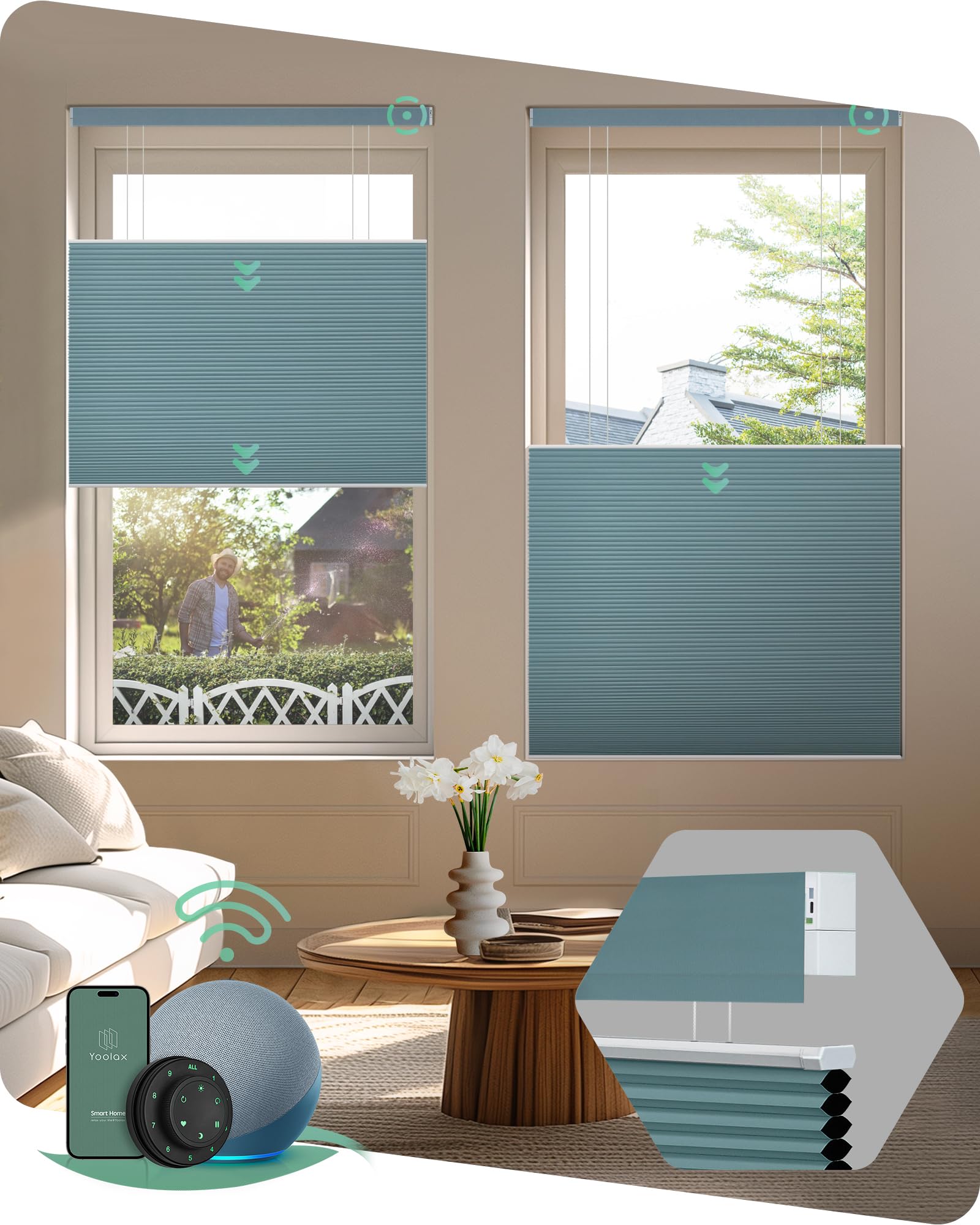
Yoolax Smart Top Down Bottom Up Cellular Shades in a modern living room setting.
Key Features:
- Smart TDBU Design: Dual motors allow precise control of both middle and bottom sections for optimal light and privacy.
- Blackout Honeycomb Construction: 100% blackout fabric with an aluminum-reflective inner layer for thermal insulation, sound absorption, and UV protection.
- Zigbee Smart Motor: Direct compatibility with select Alexa devices (Echo Plus 2nd Gen, Echo Show 2nd Gen, Echo Studio, Echo Show 10, Echo 4th Gen, Echo Show 8 3rd Gen, Echo Hub) without a smart bridge.
- Long-lasting Battery: Built-in rechargeable battery motor provides 4-6 months of use on a full charge. Solar panel charging option available.
- Versatile Remote Control: Yoolax Lightwirl Remote and 16-Channel Remote offer group control, individual control, and adjustable opening percentages.
Setup and Installation
Proper installation is crucial for the functionality and appearance of your Yoolax shades. Please follow these steps carefully.
1. Install the Battery
Before mounting, ensure the battery is correctly installed in the valance.
Official Yoolax video demonstrating how to install the battery and mount the cellular shades.
2. Measure Your Window
Accurate measurements are essential for a perfect fit. Refer to the diagram below for inside and outside mount measurements.

Detailed instructions for measuring window dimensions for both inside and outside mounting options.
3. Mounting the Shades (Inside Mount)
For inside mount, the shades fit within the window frame. Ensure your window depth is at least 1.78 inches.
- Mark punch positions for the mounting brackets.
- Drill holes and install the mounting brackets securely.
- Install the blind by pushing it into the brackets until it clicks into place.
4. Mounting the Shades (Outside Mount)
For outside mount, the shades are installed on the wall or window trim outside the window frame.
- Mark punch positions for the mounting brackets, ensuring they are level.
- Drill holes and install the mounting brackets securely.
- Install the blind by hooking it onto the brackets and securing it.
Operating Instructions
Your Yoolax Smart Cellular Shades offer multiple ways to control light and privacy.
1. Smart Top Down Bottom Up (TDBU) Functionality
The dual motor system allows independent control of the top and bottom sections of the shade. This enables you to lower the top, raise the bottom, or position the shade anywhere in between to manage light and privacy effectively.
Official Yoolax video showcasing the Top Down Bottom Up functionality of the smart cellular shades.
2. Voice Control with Alexa
If you have a compatible Alexa device (Echo Plus 2nd Gen, Echo Show 2nd Gen, Echo Studio, Echo Show 10, Echo 4th Gen, Echo Show 8 3rd Gen, Echo Hub), you can control your shades directly with voice commands. No additional smart bridge is required for these models.

A woman using voice control to operate her Yoolax cellular shades via an Alexa device.
3. Remote Control
Use the provided Yoolax Lightwirl Remote or a 16-Channel Remote to control your shades. These remotes allow for individual shade control, group control, and setting preferred opening percentages.

The Yoolax Lightwirl Remote provides convenient control for multiple shades.
4. App Control
For advanced control and scheduling, download the Yoolax Home App. This app allows you to manage your shades from your smartphone, set timers, and integrate with other smart home routines. A smart bridge may be needed for certain app functionalities or non-compatible Alexa devices.
Official Yoolax video demonstrating smart features and app control for cellular shades.
Maintenance
To keep your Yoolax cellular shades in optimal condition, follow these simple maintenance guidelines:
- Cleaning: Spot clean only. Use a soft, damp cloth with mild soap and water for any stains. Do not immerse the shades in water or use harsh chemicals.
- Dusting: Regularly dust the shades with a soft brush or vacuum with a brush attachment on a low setting.
- Battery Charging: Recharge the built-in battery motor every 4-6 months, or as needed. Consider purchasing a solar panel charger for continuous charging.
Troubleshooting
If you encounter any issues with your Yoolax Smart Cellular Shades, refer to the following common solutions:
- Shades Not Responding: Check if the battery is charged. Ensure the remote control has fresh batteries and is paired correctly. Verify the smart motor is powered on.
- Voice Control Issues: Confirm your Alexa device is compatible and connected to the internet. Ensure the shades are properly linked to your Alexa account.
- Uneven Movement: Recalibrate the shade's upper and lower limits according to the programming instructions provided with your remote or in the app.
- Noise During Operation: A slight motor hum is normal. If the noise is excessive, ensure the shades are installed correctly and not rubbing against the window frame.
For further assistance, please contact Yoolax customer support.
Specifications
| Feature | Detail |
|---|---|
| Brand | Yoolax |
| Model Number | GR-09 |
| Material | Blackout |
| Color | Blackout Blue |
| Product Dimensions | 118"L x 118"W |
| Opacity | Blackout |
| Operation Mode | Automatic |
| Control Type | Voice, App & Remote Control |
| Mounting Type | Inside Mount, Outside Mount |
| Included Components | Cellular Shades, Motor, Installation Accessories, Standard Charging Cable, Instruction Book, Remote (Optional) |
| Recommended Uses | Indoor (Bedroom, Dining Room, Home Office, Kids Room, Living Room) |
| Product Care Instructions | Spot Clean Only |
Warranty and Support
Yoolax is committed to providing smart, energy-efficient, and sustainable window treatments. We offer long-term technical support for your convenience. If you receive damaged components, please take photos and contact us within 30 days for a free replacement.
For any questions or support, please visit the Yoolax Store on Amazon or contact our customer service team.


