
ODSD BX88
ODSD Cordless Electric Lunch Box User Manual
Model: BX88
Product Overview
The ODSD Cordless Electric Lunch Box is designed to provide warm meals on the go. Featuring a 16000mAh rechargeable battery and a 20W fast charging adapter, it offers convenience for various settings such as the office, travel, or camping. This lunch box also functions as a power bank for charging other devices. It includes smart scheduled heating, adjustable temperature settings, and a keep-warm mode. The removable stainless steel container and lid are dishwasher safe, ensuring easy cleaning. A hidden handle and an insulated carry bag enhance portability and heat retention.
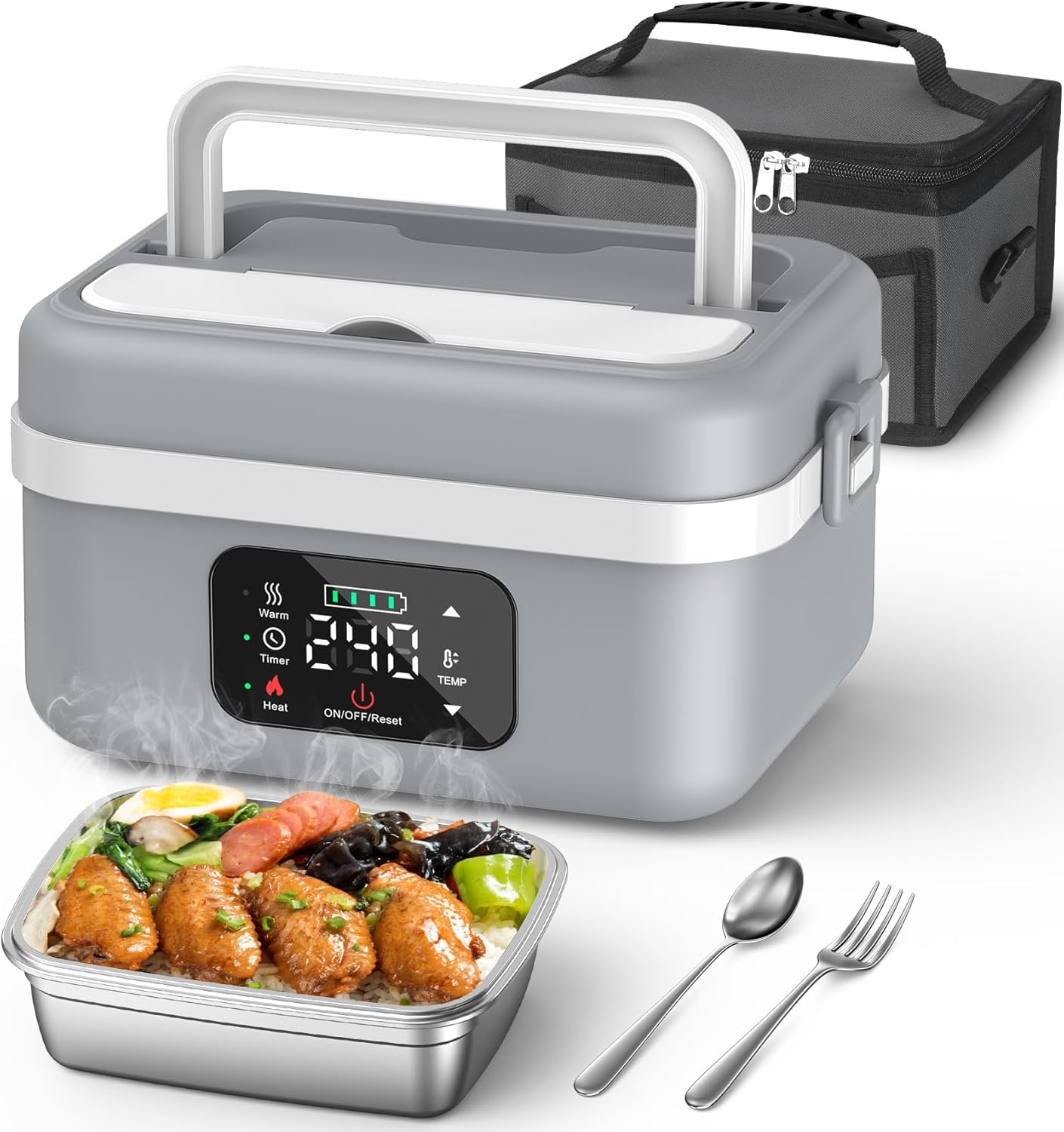
Image: The ODSD Cordless Electric Lunch Box in grey/white, showcasing its main unit, removable stainless steel food container, a fork, a spoon, and an insulated carry bag. Steam is visible from the open container, indicating its heating function.
Included Components
- 1x ODSD Cordless Electric Lunch Box (Model: BX88)
- 1x Stainless Steel Food Container (34oz/1L capacity)
- 1x Insulated Carry Bag
- 1x Charging Cable (1.2m)
- 1x Power Adapter (20W fast charging)
- 1x Fork
- 1x Spoon
- 1x Instruction Manual (this document)

Image: A flat lay of all components included in the ODSD Cordless Electric Lunch Box package, neatly arranged on a wooden surface. This includes the main lunch box unit, the insulated carry bag, charging cable, power adapter, fork, spoon, stainless steel container, and the instruction manual.
Setup
- Initial Charging: Before first use, fully charge the lunch box using the provided 20W fast charging adapter and charging cable. A full charge takes approximately 3.5 hours. The battery indicator on the display will show charging progress.
- Prepare Food Container: Ensure the stainless steel food container is clean and dry before placing food inside.
- Place Food Container: Carefully place the filled stainless steel food container into the main unit of the lunch box.
- Secure Lid: Close the main unit's lid securely. Ensure the leak-proof strip is properly seated to maintain an airtight seal and prevent spills.

Image: The ODSD lunch box connected to a power outlet via its Type-C charging port, illustrating its fast charging capability. An inset image shows the lunch box also charging a smartphone, highlighting its power bank function.
Operating Instructions
Basic Heating
- Prepare Food: Place your cooked food into the stainless steel container.
- Close Lid: Press the cover tightly and ensure the steam valve is closed.
- Set Heating Time and Temperature:
- Press the "Heat" button to activate heating.
- Use the up/down arrows to adjust the desired temperature (194/185/176/167/158/149℉).
- Use the up/down arrows to adjust the heating time (20/30/40/50/60 minutes).
- The product interface will switch to working mode within 10 seconds after setting.
- Enjoy: Once heating is complete, the lunch box will automatically switch to keep warm mode. Your hot meal is ready.
Smart Scheduled Heating (Delay Function)
This feature allows you to set a delay for automatic heating, ensuring your meal is ready exactly when you need it.
- Press "Delay" Button: Press the "Delay" button on the control panel.
- Adjust Delay Timer: Use the up/down arrows to set the desired delay time, ranging from 30 to 240 minutes.
- Set Temperature: Choose your preferred temperature (194/185/176/167/158/149℉) using the temperature adjustment buttons.
- Confirmation: After setting, the product interface will switch to working mode within 10 seconds, and heating will commence after the set delay.
Power Bank Function
The lunch box can also serve as a power bank to charge your phone or other devices.
- Locate the Type-C port on the lunch box.
- Connect your device's charging cable to this port.
- The lunch box will begin charging your device.

Image: A visual guide illustrating the four steps to heat food: 1. Put food in the container. 2. Press the cover tightly and close the steam valve. 3. Set the heating time and temperature. 4. Enjoy the healthy hot meal.
Maintenance and Care
- Main Unit Cleaning: It is recommended not to clean the main unit with water directly. If it gets dirty, wipe the outside with a damp cloth or wet wipe.
- Stainless Steel Container: The stainless steel lunch box can be removed and cleaned separately. It is dishwasher safe for convenience.
- Utensils: The included fork and spoon can be washed with regular dish soap and water.
- Storage: Store the lunch box in a cool, dry place when not in use.
- Avoid Abrasives: Do not use steel wool or abrasive brushes on the stainless steel container as this may damage the surface. A foam brush is recommended for cleaning.

Image: A hand washing the removable 304 food-grade stainless steel container under running water in a sink. The image also shows a red cross over a steel brush, indicating it should not be used, and a green checkmark over a foam brush, recommending its use for cleaning.
Troubleshooting
| Problem | Possible Cause | Solution |
|---|---|---|
| Lunch box not heating. | Low battery; Not powered on; Incorrect settings. | Ensure the lunch box is fully charged. Press the ON/OFF/Reset button. Verify temperature and time settings. |
| Food not heating evenly. | Food quantity too large; Container not properly seated. | Reduce food quantity if excessive. Ensure the stainless steel container is correctly placed inside the main unit. |
| Leakage from lunch box. | Lid not sealed properly; Steam valve open. | Ensure the lid is pressed down firmly and the leak-proof strip is correctly aligned. Close the steam valve before heating. |
| Device not charging when connected to power bank function. | Lunch box battery low; Incorrect cable. | Charge the lunch box fully. Ensure you are using a compatible charging cable for your device. |
Specifications
- Model: BX88
- Color: Grey/White
- Material: Plastic, Stainless Steel (304 Food Grade)
- Capacity: 1 Liter (34oz)
- Battery: 16000mAh Lithium Ion (included)
- Charging Power: 20W Fast Charging
- Heating Power: 60W
- Adjustable Temperatures: 194℉/90℃, 185℉/85℃, 176℉/80℃, 167℉/75℃, 158℉/70℃, 149℉/65℃
- Adjustable Heating Times: 20, 30, 40, 50, 60 minutes
- Delay Heating Timer: 30 to 240 minutes
- Product Dimensions: 8.2 x 6.1 x 4.8 inches
- Item Weight: 1.51 Kilograms (3.32 pounds)
- Special Features: Heated, Lightweight, Charging function (Power Bank), Intelligent Keep Warm, Timed Heating, Leak Resistant, Hidden Handle.
- Recommended Uses: Office, Travel, Picnic, Car, Outdoors, Truck.
Warranty and Support
For warranty information or product support, please refer to the contact details provided on the product packaging or visit the official ODSD website. Keep your purchase receipt for warranty claims.
Manufacturer: ODSD
Ask a question about this manual
Ask about setup, troubleshooting, compatibility, parts, safety, or missing instructions. Manuals+ will review the question and use this page’s manual context to help answer it.