
1. Introduction
This manual provides instructions for the installation, operation, and maintenance of your iPower 12 Inch Wall Mounted Shutter Exhaust Fan with Speed Controller. This fan is designed to circulate air, refresh indoor environments, and assist in temperature regulation in various settings such as warehouses, barns, garages, greenhouses, and attics.
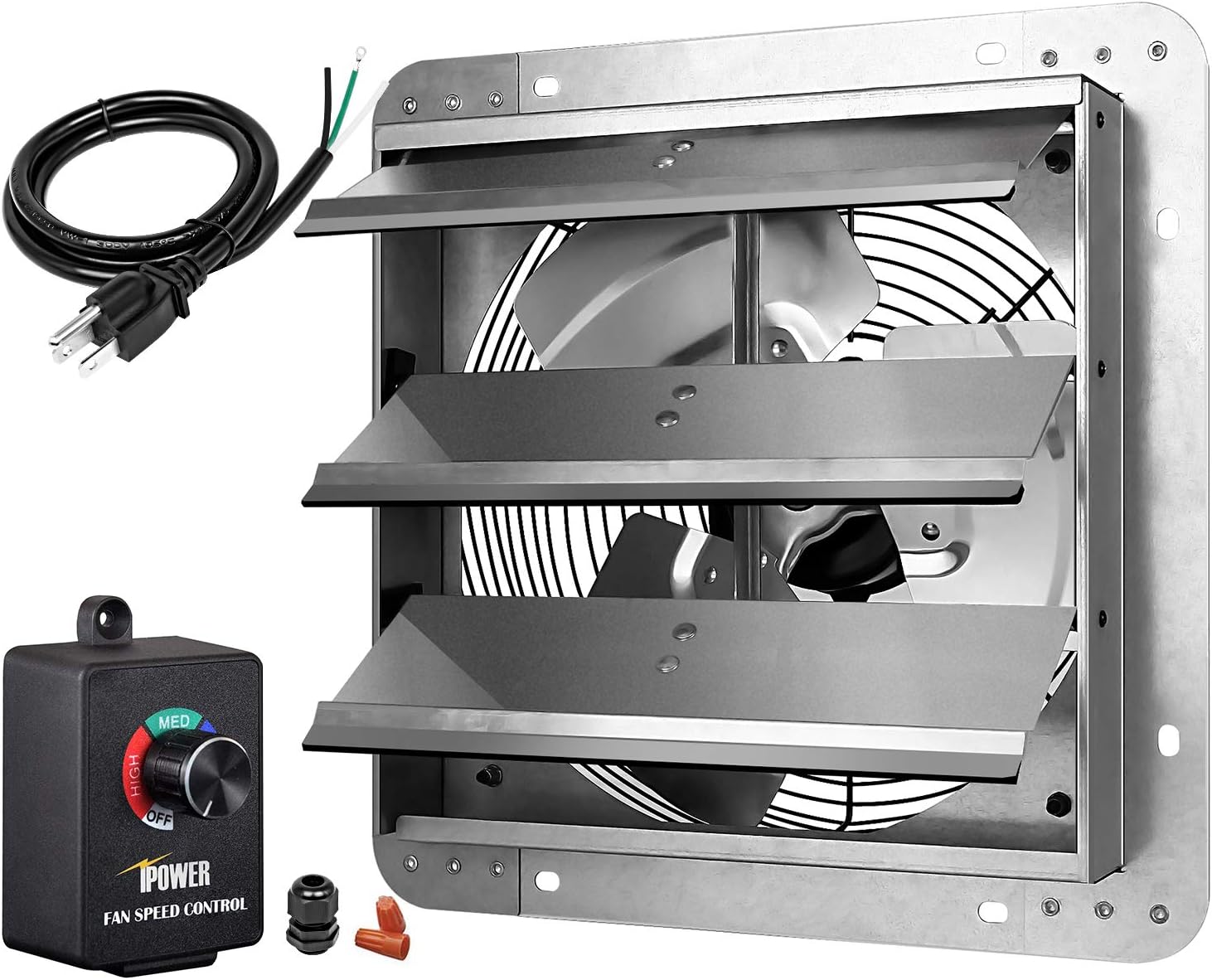
Image 1.1: The iPower 12 Inch Wall Mounted Shutter Exhaust Fan, including the fan unit, speed controller, and power cord.
2. Safety Information
Please read and understand all safety instructions before installing or operating this product. Failure to follow these instructions may result in electric shock, fire, or serious injury.
- Always disconnect power before servicing or cleaning the fan.
- Ensure the fan is securely mounted to a stable surface to prevent vibration or falling.
- Do not operate the fan with damaged wiring or a frayed power cord.
- Keep hands, clothing, and other objects away from moving fan blades.
- This fan is designed for indoor use. Do not expose to water or excessive moisture.
- Ensure proper grounding for electrical connections.
3. Setup and Installation
The iPower exhaust fan is delivered mostly assembled. Follow these steps for proper installation:
- Choose a Location: Select a suitable wall location for mounting the fan. Ensure the wall can support the fan's weight and that there is adequate space for airflow.
- Mount the Fan Frame: Securely mount the fan frame to the wall using appropriate tools and fasteners (not included). Ensure the fan is level and stable.
- Connect the Power Cord: Connect the provided power cord to the fan's electrical terminals. Ensure all connections are tight and secure.
- Install the Speed Controller: Mount the speed controller in a convenient location. Connect the fan's power cord to the speed controller, and then plug the speed controller's cord into a standard 120V AC outlet.

Image 3.1: The exhaust fan mounted on a wall, showing the power cable connected to the fan and the speed controller plugged into an outlet.

Image 3.2: An exploded view diagram illustrating the fan's components, including the safety grill, automatic shutters, bearing type motor, and the new upgraded aluminum material for corrosion resistance.
4. Operating Instructions
The iPower exhaust fan features a 3-speed controller for adjustable airflow.
- Power On/Off: Turn the knob on the speed controller to the 'OFF' position to power off the fan. Rotate the knob clockwise to turn the fan on and select a speed setting.
- Adjusting Speed: The speed controller allows adjustment from 50% to 100% of the fan's maximum speed. Settings include LOW, MED (Medium), and HIGH.
- Important Note: To prevent damage to the fan motor, the controller does not adjust below 50% speed. Operating the fan below this range may risk burning out the motor.
- Automatic Shutters: When the fan is running, the automatic shutters will open to allow airflow. When the fan is turned off, the shutters will close automatically due to gravity, providing protection against insects and dust.

Image 4.1: Close-up of the iPower fan speed controller, indicating the adjustable range from 50% to 100% and warning against operating below 50%.

Image 4.2: A visual comparison showing the fan's shutters open when powered on for smooth airflow, and 100% closed when powered off to block mosquitoes and dust.

Image 4.3: An illustration demonstrating the fan's ability to circulate air, providing low noise and effective ventilation with its 3 variable speed settings.
5. Maintenance
Regular maintenance ensures optimal performance and extends the lifespan of your exhaust fan.
- Cleaning: Periodically clean the fan blades and shutters to remove dust and debris. Ensure the fan is disconnected from power before cleaning. Use a soft cloth and mild detergent if necessary.
- Inspection: Regularly inspect the power cord for any signs of damage or wear. Check the mounting hardware to ensure the fan remains securely attached to the wall.
- Corrosion Resistance: The fan features corrosion-resistant aluminum louvers and blades, reducing the need for specific rust prevention measures. However, avoid exposing the fan to harsh chemicals or extreme corrosive environments.
6. Troubleshooting
If you encounter issues with your iPower exhaust fan, refer to the following troubleshooting guide:
| Problem | Possible Cause | Solution |
|---|---|---|
| Fan does not turn on | No power supply, loose connection, faulty speed controller | Check power outlet, ensure all connections are secure, test speed controller. |
| Fan motor hums but blades do not spin | Obstruction in blades, motor issue, speed controller set too low | Disconnect power and check for obstructions. Ensure speed controller is set above 50%. If problem persists, contact support. |
| Excessive noise during operation | Loose mounting, debris in fan blades, motor wear | Check mounting for tightness. Disconnect power and clean blades. Note that some noise at lower speeds may be characteristic. |
| Shutters do not open or close properly | Obstruction, debris in shutter mechanism, fan not running | Disconnect power and clear any obstructions from the shutters. Ensure the fan is powered on for shutters to open. |
7. Specifications
Detailed technical specifications for the iPower 12 Inch Wall Mounted Shutter Exhaust Fan:
| Feature | Specification |
|---|---|
| Fan Size | 12 Inch |
| Air Flow Capacity | 940 CFM (Cubic Feet Per Minute) |
| Rotating Speed | 1600 RPM |
| Voltage | 120V |
| Frequency | 60HZ |
| Wattage | 60W |
| Noise Level | 50 Decibels |
| Blade Material | Aluminum |
| Frame Material | Steel |
| Product Dimensions (D x W x H) | 7.2"D x 14.96"W x 14.96"H |
| Speed Controller | 120V, 3A, 350W, 3-speed (50%-100% adjustable) |
| Model Number | HIFANXEXHAUST12CTB |
| UPC | 198401044768 |
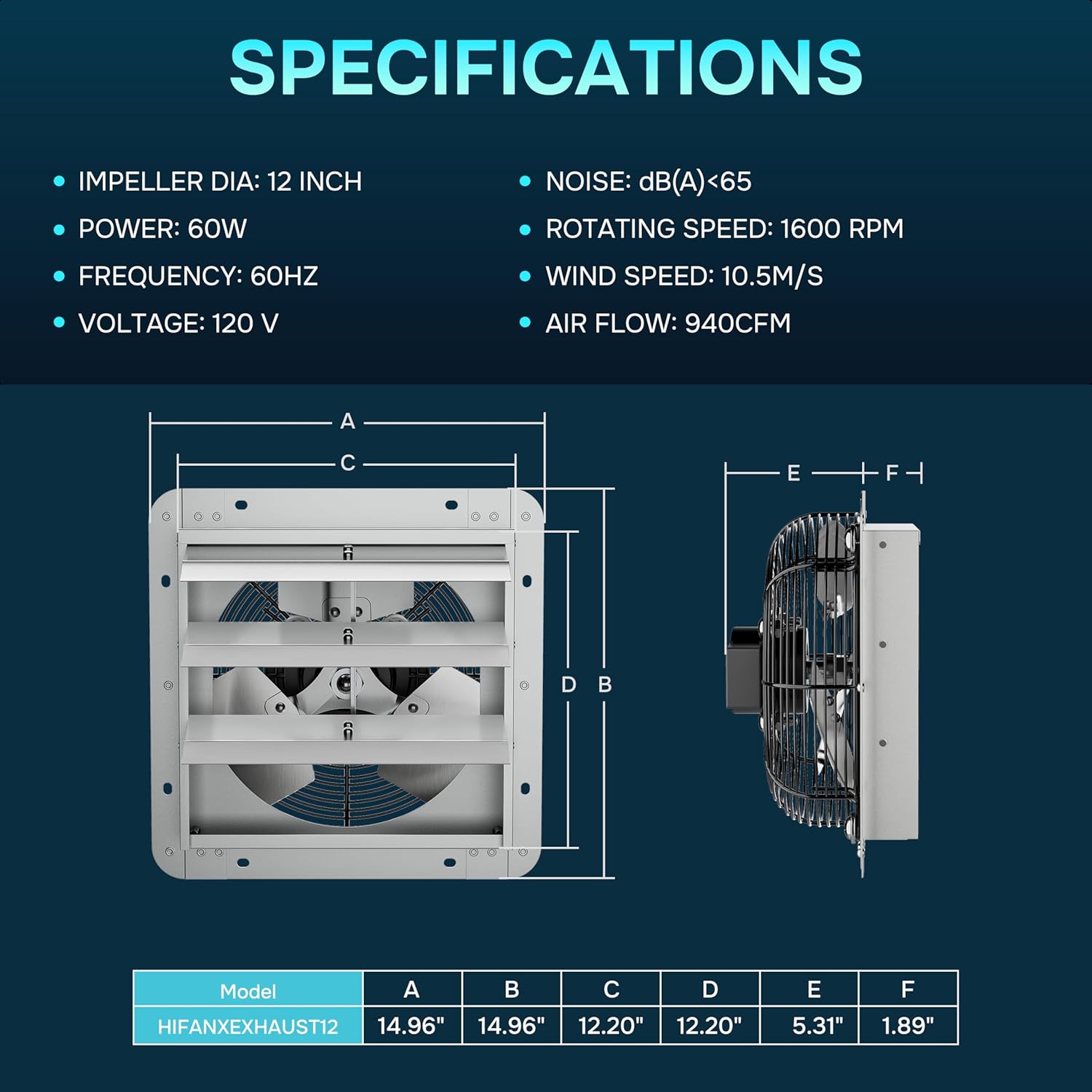
Image 7.1: A diagram detailing the fan's specifications including impeller diameter, power, frequency, voltage, noise level, rotating speed, wind speed, and air flow, along with a dimensional drawing.
8. Warranty and Support
Limited Warranty: iPower products are manufactured to high-quality standards. For specific warranty details regarding your iPower 12 Inch Wall Mounted Shutter Exhaust Fan, please refer to the warranty card included with your purchase or visit the official iPower website.
Customer Support: If you have any questions, require technical assistance, or need to report an issue, please contact iPower customer support. Contact information can typically be found on the product packaging or the official iPower website.