
Introduction
This manual provides essential information for the setup, operation, and maintenance of your VINEGO R36S Handheld Game Console. Please read this guide thoroughly to ensure proper use and to maximize your gaming experience.
Product Overview

Image: The VINEGO R36S Handheld Game Console in its orange gift set packaging, showcasing the console's overall design and included accessories.
Key Features
- Extensive Game Library: Access up to 21,000 pre-installed classic games across 20 vintage console emulators, including NES, PS1, and more. Available with 64GB or 128GB storage options.
- High-Quality Display: Features a vibrant 3.5-inch HD IPS display with 640x480 resolution for clear visuals and enhanced color accuracy.
- Precise Controls: Equipped with dual joysticks, L/R bumpers, and responsive buttons for accurate gameplay.
- Portable Design: Compact and lightweight (17.4cm x 8.4cm x 3.5cm), making it suitable for on-the-go gaming. Includes a protective case.
- Long Battery Life: Powered by a 3200mAh battery, offering approximately 5-8 hours of playtime.
- Multi-language Support: Supports English, French, German, Spanish, Portuguese, Korean, and Simplified Chinese.
Visual Aids

Image: Close-up of the R36S console's 3.5-inch IPS HD screen, highlighting its 640x480 pixel resolution while displaying a racing game.

Image: Rear view of the R36S console, emphasizing its 3200mAh battery capacity and the L1/L2/R1/R2 shoulder buttons, indicating 7-8 hours of playtime.

Image: An internal diagram of the R36S console, focusing on the RK3326 professional gaming chip, capable of running 2D and some 3D games.

Image: Close-up of the R36S console's dual joysticks and main control buttons, illustrating the ergonomic design for flexible manipulation.

Image: The R36S console screen showcasing support for over 21,000 classic games across multiple emulators like PSP, PS1, NDS, GBA, and more.

Image: Visual representation of the R36S console's compact size, showing it easily fitting into a pocket and a bag, emphasizing its 'Easy to Carry' feature.
What's in the Box
- VINEGO R36S Handheld Game Console
- TF Card (pre-installed with games)
- Charging Cable
- User Manual
- Protective Case
- Christmas Card & Bag (for gift set variants)
Setup
- Initial Charge: Before first use, fully charge the console using the provided charging cable. The charging port is typically a USB-C port.
- TF Card: The console comes with a TF card pre-installed, containing the operating system and game library. Ensure it is securely inserted.
- Power On: Press and hold the Power ON/OFF button located on the side of the device to turn on the console.
Operating Instructions
Basic Controls
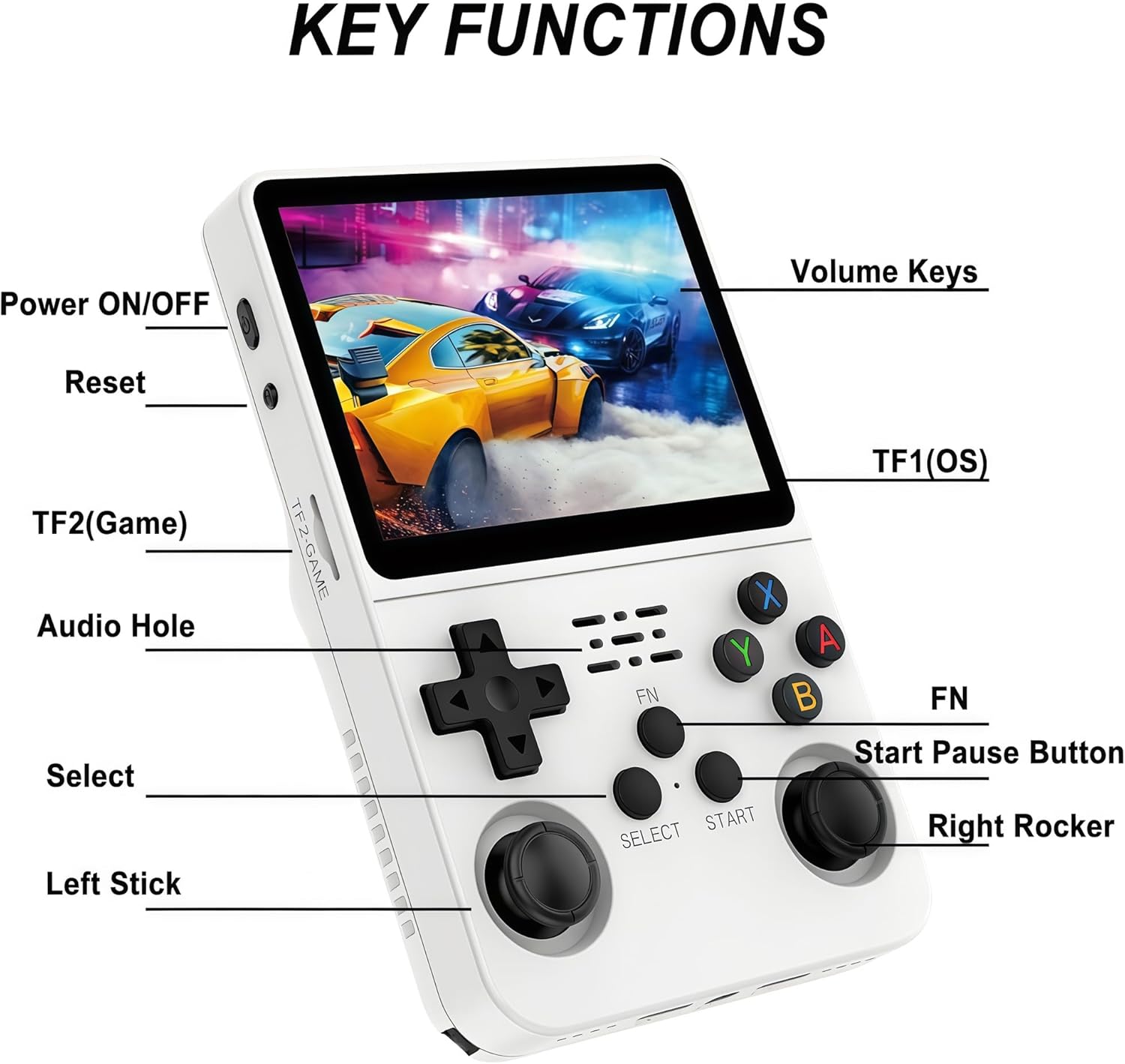
Image: Detailed diagram illustrating the layout and function of each button and port on the R36S Handheld Game Console, including Power ON/OFF, Reset, Volume Keys, TF1(OS) slot, TF2(Game) slot, Audio Hole, Select, Start/Pause Button, Left Stick, and Right Rocker.
- Power ON/OFF: Located on the top left side. Press and hold to power on or off.
- Volume Keys: Located on the top right side. Use to adjust audio output.
- D-Pad: Directional pad for menu navigation and in-game movement.
- A/B/X/Y Buttons: Action buttons for gameplay and menu selections.
- Select Button: Used for various in-game functions or menu selections.
- Start/Pause Button: Used to start games, pause gameplay, or confirm selections.
- Left/Right Joysticks: Analog sticks for precise movement in supported games.
- L1/L2/R1/R2 Buttons: Shoulder buttons located on the back for additional in-game actions.
- Reset Button: Small button on the side to restart the console if needed.
- Audio Hole: 3.5mm jack for connecting headphones.
- TF1 (OS) / TF2 (Game) Slots: Slots for the operating system and game storage TF cards.
Game Navigation and Selection
The R36S console organizes games by emulator. Use the D-Pad or Left Joystick to navigate through the list of available emulators. Press the 'A' button to enter an emulator's game library. Within a game library, scroll through the titles and press 'A' to launch a game.
Video Description: This video provides a quick overview of the VINEGO R36S Handheld Game Console. It displays the console in different colors (blue, green, yellow, white, black, purple) and demonstrates the physical buttons and ports. The video also shows the console's interface, navigating through various game emulators and launching a game, illustrating the device's functionality and design.
Saving and Loading Game Progress
To save your game progress, typically during gameplay, press the 'Select' and 'Start' buttons simultaneously to access the in-game menu. From this menu, you can usually find options to 'Save State' or 'Load State'. Select an empty slot to save your current progress. To resume from a saved point, access the same menu and select 'Load State' from the desired slot.
Maintenance
- Cleaning: Use a soft, dry cloth to clean the console's exterior. Avoid using liquid cleaners or abrasive materials.
- Storage: Store the console in a cool, dry place, away from direct sunlight and extreme temperatures. Use the provided protective case when not in use or during travel.
- Battery Care: To prolong battery life, avoid fully discharging the battery frequently. Charge the console regularly, even if not in use for extended periods.
Troubleshooting
- Console does not power on:
- Ensure the console is fully charged. Connect it to a power source and wait a few minutes before attempting to power on again. If the issue persists, try pressing the 'Reset' button with a thin object.
- Games are lagging or performing poorly:
- Some games, especially those from more demanding systems like PSP, may experience occasional performance issues. Ensure the TF card is properly seated. Restarting the console may also resolve temporary slowdowns.
- Game progress is not saving:
- Verify that you are using the correct save state function (usually Select + Start to access the menu). Ensure there is sufficient space on the TF card, although this is rarely an issue with pre-configured systems.
- Sound issues (e.g., crackling, no sound):
- Check the volume settings on the console. If using headphones, ensure they are properly plugged into the audio jack. Some games may have minor audio artifacts due to emulation.
Specifications
| Feature | Detail |
|---|---|
| Screen Size | 3.5 Inches |
| Screen Resolution | 640x480 HD IPS |
| Battery Type | 1 Lithium Ion battery (included) |
| Battery Capacity | 3200mAh |
| Battery Average Life | 5 Hours |
| Memory Storage Capacity | 128 GB (as per product variant) |
| Item Dimensions (L x W x H) | 4.41" x 1.77" x 5.98" (17.4cm x 8.4cm x 3.5cm) |
| Material Type | Plastic |
| Supported Languages | English, French, German, Spanish, Portuguese, Korean, Simplified Chinese |
| Model Number | pinsdiscou-1 |
| UPC | 747165503310 |
Safety Information
WARNING:
- All packaging materials (tape, labels, plastic sheets, binding wires) and small internal machine accessories are choking risks. Keep away from children under 3 years of age.
- Use only with adult supervision.
- Do not expose the device to extreme temperatures, direct sunlight, or moisture.
- Do not attempt to disassemble or modify the console, as this may void the warranty and cause damage.
Warranty and Support
For warranty information and customer support, please refer to the documentation included with your purchase or contact the seller directly. Protection plans may be available for purchase separately.