1. Introduction
This user manual provides essential information for the safe and efficient operation of your JVC 43-inch AI Vision Series QLED Google TV, model LT-43NQ7165C. Please read this manual thoroughly before using the television and retain it for future reference.
Package Contents
Verify that all items listed below are included in your package. If any items are missing or damaged, contact JVC customer support.
- JVC 43-inch AI Vision Series QLED Google TV Unit
- Remote Control
- AAA Batteries (x2) for Remote Control
- Base Stand (x2)
- Stand Screws (x4)
- Power Cord
- Wall Mount (Included as per specifications)

2. Safety Information
Always adhere to the following safety precautions to prevent electric shock, fire, or injury, and to ensure the longevity of your television.
- Power Source: Connect the TV only to an AC power source within the specified voltage range (140 Volts).
- Ventilation: Ensure adequate ventilation around the TV. Do not block ventilation openings.
- Water and Moisture: Do not expose the TV to rain or moisture. Do not place objects filled with liquids, such as vases, on the TV.
- Heat Sources: Keep the TV away from heat sources like radiators, heat registers, stoves, or other appliances that produce heat.
- Cleaning: Unplug the TV before cleaning. Use a soft, dry cloth. Do not use liquid cleaners or aerosol cleaners.
- Placement: Place the TV on a stable, level surface. If wall-mounting, ensure the wall mount is securely installed by qualified personnel.
- Children: Supervise children to prevent them from climbing on the TV or stand.
- Servicing: Do not attempt to service this product yourself. Refer all servicing to qualified service personnel.
3. Setup
3.1 Unpacking
Carefully remove the television and all accessories from the packaging. It is recommended to retain the original packaging for future transport or servicing needs.
3.2 Installing the Base Stand (Table Top)
If you plan to place the TV on a table or cabinet, follow these steps to attach the base stands:
- Place the TV screen-down on a soft, flat surface (e.g., a blanket or foam) to prevent damage.
- Align each base stand with the corresponding slots on the bottom of the TV.
- Secure each stand using the provided stand screws (x4). Ensure they are tightened firmly.

3.3 Wall Mount Installation
The JVC LT-43NQ7165C TV supports wall mounting. A wall mount is included in the package. For safe installation, it is highly recommended to have the TV wall-mounted by a qualified professional. Refer to the wall mount's instructions for specific details.
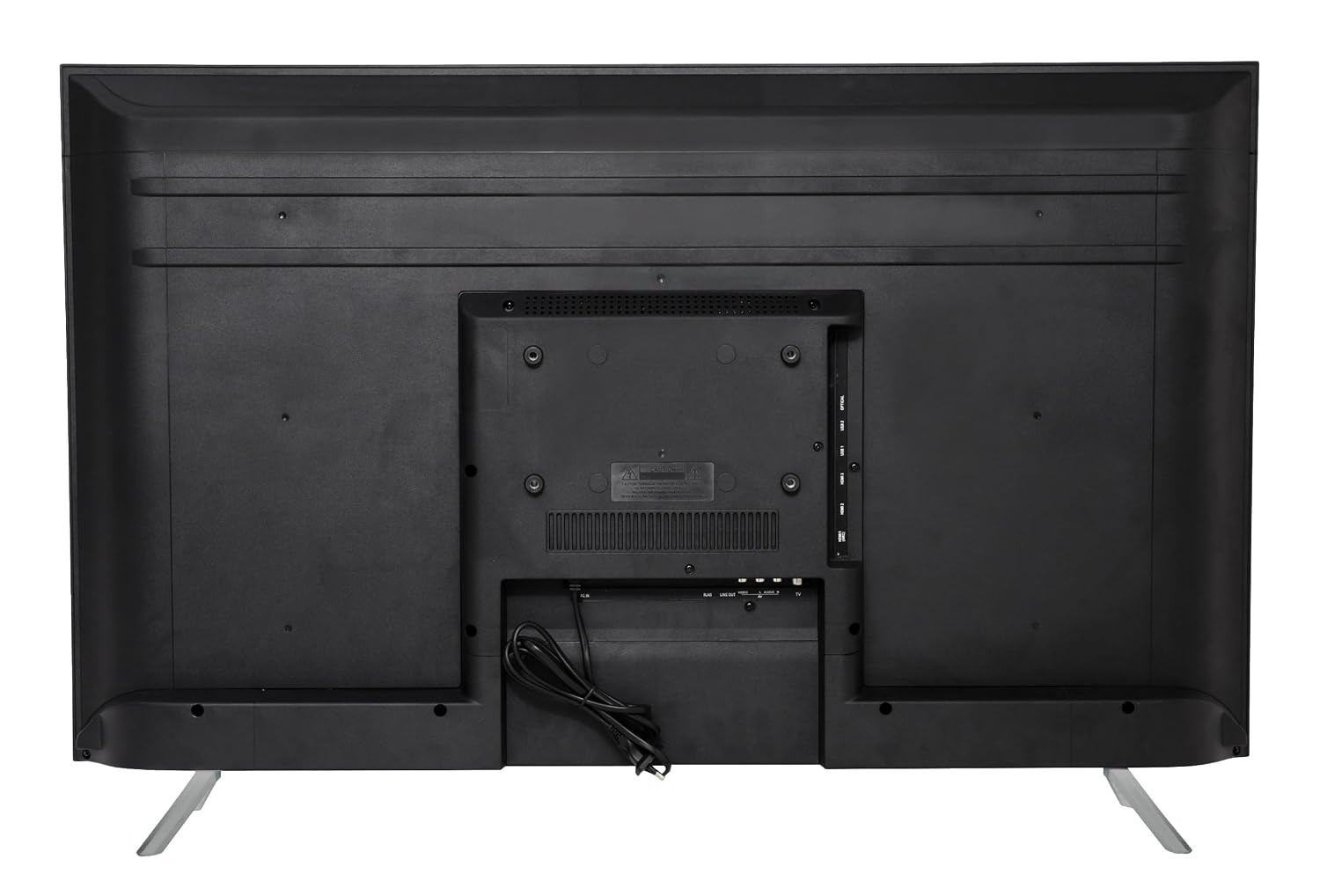
3.4 Connecting Peripherals
Connect your external devices to the TV using the appropriate ports. Ensure the TV is unplugged before making any connections.
- HDMI Ports (x3): Connect gaming consoles, set-top boxes, Blu-ray players, or other HDMI-enabled devices. This TV supports ALLM (Auto Low Latency Mode) and eARC (Enhanced Audio Return Channel) on specific HDMI ports.
- USB Ports (x2): Connect USB storage devices for media playback or other USB accessories.
- Optical Audio Output: For connecting to external sound systems or soundbars.
- Ethernet Port: For a wired internet connection.
- Power Input: Connect the power cord to the TV and then to a wall outlet.

3.5 Initial Power On and First-Time Setup
- After connecting all necessary cables, plug the power cord into a wall outlet.
- Press the Power button on the remote control or the TV to turn it on.
- Follow the on-screen instructions to complete the initial setup, which typically includes:
- Language selection.
- Connecting to a Wi-Fi network (Dual Band Wi-Fi 2.4GHz/5GHz supported).
- Signing in with your Google account to access Google TV features and apps.
- Scanning for channels (if using an antenna).
4. Operating the Television
4.1 Remote Control Overview
The provided remote control allows you to navigate the TV's features. Insert the two AAA batteries into the remote control, ensuring correct polarity.
Key remote control functions include:
- Power Button: Turns the TV on or off.
- Navigation Pad (Up/Down/Left/Right/OK): Navigates menus and confirms selections.
- Back Button: Returns to the previous screen.
- Home Button: Accesses the Google TV home screen.
- Volume Up/Down: Adjusts the audio volume.
- Channel Up/Down: Changes TV channels (if applicable).
- Google Assistant Button: Activates voice commands for Google Assistant.
- Dedicated App Buttons: Quick access to Netflix, Prime Video, YouTube, and Google Play.
4.2 Basic TV Functions
- Power On/Off: Press the power button on the remote.
- Input Source: Use the input button (often labeled with an arrow in a box or "Source") to switch between HDMI, USB, and other inputs.
- Volume Control: Use the Volume Up/Down buttons.
4.3 Smart TV Features (Google TV)
Your JVC TV runs on Google TV, providing access to a vast array of content and smart functionalities.
- Google TV Interface: The home screen organizes movies, shows, and live TV from all your apps and subscriptions.
- Supported Apps: Access popular streaming services like Netflix, Prime Video, YouTube, Zee5, Disney+ Hotstar, Sony Liv, MX Player, JioCinema, Apple TV, and Voot. The TV supports over 10,000 apps and games from the Google Play Store.
- Google Assistant: Use voice commands via the remote control to search for content, control smart home devices, get answers, and more.
- Screen Mirroring (Chromecast Built-in): Cast content from your compatible smartphone, tablet, or computer directly to the TV screen.
- Connectivity: The TV features Dual Band Wi-Fi (2.4GHz/5GHz) for wireless internet and Bluetooth 5.0 for connecting wireless accessories like headphones or game controllers.


4.4 Display Settings
Your JVC TV features a QLED display with 4K Ultra HD resolution (3840 x 2160 pixels) and supports HDR (High Dynamic Range) and HLG (Hybrid Log-Gamma) for enhanced picture quality.
- Picture Modes: Adjust settings like brightness, contrast, color, and sharpness. Select from predefined picture modes (e.g., Standard, Vivid, Movie, Game) or customize your own.
- HDR: When HDR content is detected, the TV automatically optimizes settings for a wider color gamut and improved contrast.
- AI Vision Series: The TV incorporates AI processing (Realtek Processor) to upscale content and optimize picture quality.


4.5 Audio Settings
The TV features 60 Watts of audio output and supports advanced audio technologies for an immersive sound experience.
- Dolby Atmos: Provides multi-dimensional sound that moves around you.
- Dolby Digital Plus: Delivers high-quality surround sound.
- DTS-TruSurround: Enhances virtual surround sound.
- Sound Modes: Select from various sound modes (e.g., Standard, Music, Movie, Speech) or adjust equalizer settings to suit your preferences.

5. Maintenance
5.1 Cleaning the TV
- Always unplug the TV from the power outlet before cleaning.
- Screen: Gently wipe the screen with a soft, lint-free cloth. For stubborn marks, lightly dampen the cloth with water or a specialized screen cleaner (ensure it's safe for QLED screens) and wipe carefully. Do not spray liquid directly onto the screen.
- Cabinet: Use a soft, dry cloth to wipe the TV cabinet and stand. Avoid using abrasive cleaners, waxes, or solvents as they can damage the finish.
5.2 Care and Storage
- Avoid placing heavy objects on the TV.
- Do not expose the TV to direct sunlight or extreme temperatures.
- If storing the TV for an extended period, it is recommended to use the original packaging to protect it from dust and physical damage.
6. Troubleshooting
This section addresses common issues you might encounter. If the problem persists, contact JVC customer support.
No Power
- Ensure the power cord is securely plugged into both the TV and a working wall outlet.
- Check if the wall outlet is functioning by plugging in another device.
- Try pressing the power button on the TV itself, not just the remote.
No Picture, But Sound is Present
- Verify that the correct input source is selected (e.g., HDMI 1, HDMI 2).
- Check the cable connections between the TV and the external device. Try re-seating the cables.
- Test with a different HDMI cable or device if possible.
No Sound, But Picture is Present
- Increase the volume using the remote control.
- Check if the TV is muted. Press the Mute button on the remote.
- If using external audio equipment, ensure it is properly connected and powered on, and the TV's audio output settings are correct.
Remote Control Not Working
- Replace the batteries with new AAA batteries, ensuring correct polarity.
- Ensure there are no obstructions between the remote and the TV's IR sensor.
- Point the remote directly at the TV.
Wi-Fi Connection Issues
- Ensure your Wi-Fi router is powered on and functioning correctly.
- Restart your router and the TV.
- Check the Wi-Fi settings on the TV to ensure the correct network is selected and the password is entered accurately.
- Move the TV closer to the router or consider a wired Ethernet connection.
7. Specifications
Detailed technical specifications for the JVC 43-inch AI Vision Series QLED Google TV (LT-43NQ7165C).
| Feature | Specification |
|---|---|
| Model | LT-43NQ7165C |
| Screen Size | 43 inches (109 cm) |
| Display Technology | QLED |
| Resolution | 4K Ultra HD (3840 x 2160 Pixels) |
| Refresh Rate | 60 Hz |
| Operating System | Google TV |
| RAM | 2 GB |
| Storage | 16 GB |
| Connectivity | Dual Band Wi-Fi (2.4GHz/5GHz), Bluetooth 5.0, 3 HDMI ports (ALLM, eARC), 2 USB ports, Optical, Ethernet |
| Audio Output | 60 Watts |
| Audio Technologies | Dolby Digital Plus, Dolby Atmos, DTS-TruSurround |
| Special Features | HDR, HLG, Google Assistant, Screen Mirroring (Chromecast Built-in), AI Vision Series (Realtek Processor) |
| Viewing Angle | 178 Degrees |
| Product Dimensions (D x W x H) | 10 x 97 x 55 cm |
| Item Weight | 6.3 kg |
| Power Source | AC |
| Voltage | 140 Volts |
| Model Year | 2025 |

8. Warranty and Support
Warranty Information
Your JVC LT-43NQ7165C television comes with a 1-year warranty on the product and 6 months on remote accessories from the date of purchase. The warranty can be availed using the invoice.
Warranty Exclusions:
- Light bleeding and dot issues: Mura issues occurring on a certain Grey scale—as per the Mura Inspection standard, this is considered acceptable.
- As per ND (Neutral Density) Filter 2% guideline, this is not considered a panel defect.
- Damage caused by improper installation, accident, misuse, abuse, neglect, or unauthorized modification.
- Damage caused by power surges or lightning.
- Normal wear and tear.
Customer Support
For technical assistance, warranty claims, or service requests, please contact JVC customer support. Refer to the official JVC website or your purchase documentation for the most current contact information.
When contacting support, please have your TV model number (LT-43NQ7165C) and purchase invoice readily available.


