
Introduction
Thank you for choosing the Fit Foundry Cordless Joint Relief Wrap. This device is designed to provide targeted heat and vibration therapy for various joints, including the knee, shoulder, and elbow. Its cordless design and customizable settings offer convenience and effective relief for muscle tension and discomfort. Please read this manual thoroughly before use to ensure safe and optimal operation.
Safety Information
Caution: This product generates heat and electrical power. To prevent burns, do not leave the heating pad unattended while in use. Keep the heating pad away from flammable materials. Do not use the heating pad if the cord is damaged. Discontinue use if the heating pad becomes hot to the touch. Keep the heating pad out of reach of children and pets. Consult a physician before use if you have any medical conditions or are pregnant. Always follow the instructions provided in the user manual.
Indications: This product is intended for temporary relief of joint pain, muscle tension, and stiffness.
Legal Disclaimer: Statements regarding dietary supplements have not been evaluated by the FDA and are not intended to diagnose, treat, cure, or prevent any disease or health condition.
Package Contents
- 1 x Fit Foundry Cordless Joint Relief Wrap
- 1 x Extension Strap
- 1 x Type-C USB Charging Cable
- 1 x User Manual
Setup
- Initial Charge: Before first use, fully charge the device using the provided Type-C USB charging cable. Connect the cable to the charging port on the wrap and plug the other end into a compatible USB power source. The indicator lights on the control panel will show charging status.
- Attaching the Wrap: The wrap features adjustable straps for a personalized fit. For larger areas or a more secure fit, attach the included extension strap.
- Placement: Position the wrap directly over the desired joint (knee, shoulder, elbow, thigh, calf, arm, or leg). Ensure the control panel is accessible for easy operation.
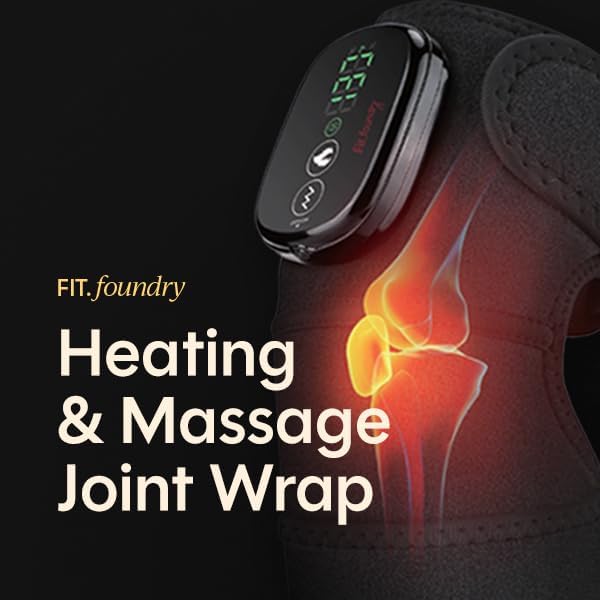
Image: The Fit Foundry Joint Relief Wrap securely fastened around a knee, with the digital control panel visible on the front.
Operating Instructions
- Power On/Off: Press and hold the power button on the control panel to turn the device on or off.
- Heat Settings: The wrap offers 4 heat settings. Press the heat button to cycle through the available temperature levels. Start with the lowest setting and adjust as needed for comfort.
- Vibration Modes: Choose from 3 vibration modes by pressing the vibration button. Select the mode that provides the most comfortable massage.
- Custom Combinations: Combine any of the 4 heat settings with any of the 3 vibration modes for a total of 12 customizable therapy combinations.
- Auto Shut-off: The device features an automatic shut-off function for safety and energy conservation. Refer to the product specifications for the exact duration.

Image: A detailed view of the wrap's control panel, highlighting the heat and vibration selection buttons and the digital temperature display.
Application Areas
The versatile design of the Fit Foundry Joint Relief Wrap allows it to be used on various body parts for targeted relief:
- Knee: Wrap around the knee for relief from discomfort or stiffness.
- Shoulder: Secure the wrap around the shoulder area for soothing therapy.
- Elbow: Apply to the elbow for focused heat and vibration.
- Thighs, Calves, Arms, Legs: The extension strap allows for use on larger muscle groups or limbs.

Image: A person wearing the Fit Foundry Joint Relief Wrap on their shoulder, demonstrating its adaptability for upper body use.

Image: A person wearing the Fit Foundry Joint Relief Wrap on their elbow, illustrating its use for elbow support and therapy.
Charging
The Fit Foundry Joint Relief Wrap is powered by a rechargeable battery. Use the provided Type-C USB charging cable to charge the device. A full charge provides up to 3 hours of continuous use. The control panel will indicate the battery level. For optimal battery life, avoid completely draining the battery before recharging.
Maintenance
- Cleaning: Disconnect the device from any power source before cleaning. Wipe the surface of the wrap with a soft, damp cloth. Do not submerge the device in water or use harsh chemicals.
- Storage: Store the wrap in a cool, dry place away from direct sunlight and extreme temperatures. Ensure the wrap is completely dry before storing.
Troubleshooting
- Device Not Turning On: Ensure the device is fully charged. If the battery is low, connect it to the charger.
- No Heat/Vibration: Check that the device is powered on and the desired heat/vibration mode is selected. Ensure the charging cable is disconnected if operating wirelessly.
- Inconsistent Performance: If you experience any unusual behavior, power off the device, wait a few moments, and then power it back on.
- Persistent Issues: If troubleshooting steps do not resolve the issue, please contact Fit Foundry customer support for assistance.
Specifications
| Product Dimensions | 32.2 x 9.4 x 1.2 inches |
| Item Weight | 9.92 ounces |
| Material | Neoprene |
| Color | Black |
| Heat Levels | 4 (113°F, 122°F, 131°F, 140°F) |
| Vibration Modes | 3 |
| Charging Type | Type-C USB |
| Battery Life | Up to 3 hours (depending on settings) |
Product Overview Video
Video: An official product video from Fit Foundry demonstrating the features and usage of the Joint Relief Wrap.
Warranty and Support
For warranty information, technical support, or any questions regarding your Fit Foundry Cordless Joint Relief Wrap, please refer to the contact information provided on the product packaging or visit the official Fit Foundry website. Keep your purchase receipt for warranty claims.