
JadeAudio JM21
JadeAudio/FiiO JM21 Android 13 Hi-Res Music Player User Manual
Model: JM21
Introduction
The JadeAudio/FiiO JM21 is a portable Hi-Res music player designed to deliver exceptional audio quality. Featuring the powerful Snapdragon 680 processor and a customized Android 13 operating system, it offers a smooth user experience for both local music playback and streaming services. This manual provides essential information for setting up, operating, and maintaining your JM21 player.
What's in the Box
Upon unboxing your JM21, please verify that all the following items are included:
- JM21 Music Player
- PET film screen protector (pre-applied)
- Transparent case
- USB cable
- Quick start guide
- Warranty card

Figure 1: JM21 product and accessories as listed in the parts list.
Product Overview and Features
High-Performance Processor
The JM21 is equipped with the Qualcomm Snapdragon 680 processor, built on a 6nm advanced process. This 8-core Kryo 265 architecture operates at up to 2.4GHz, ensuring smooth and efficient performance for all your audio needs.
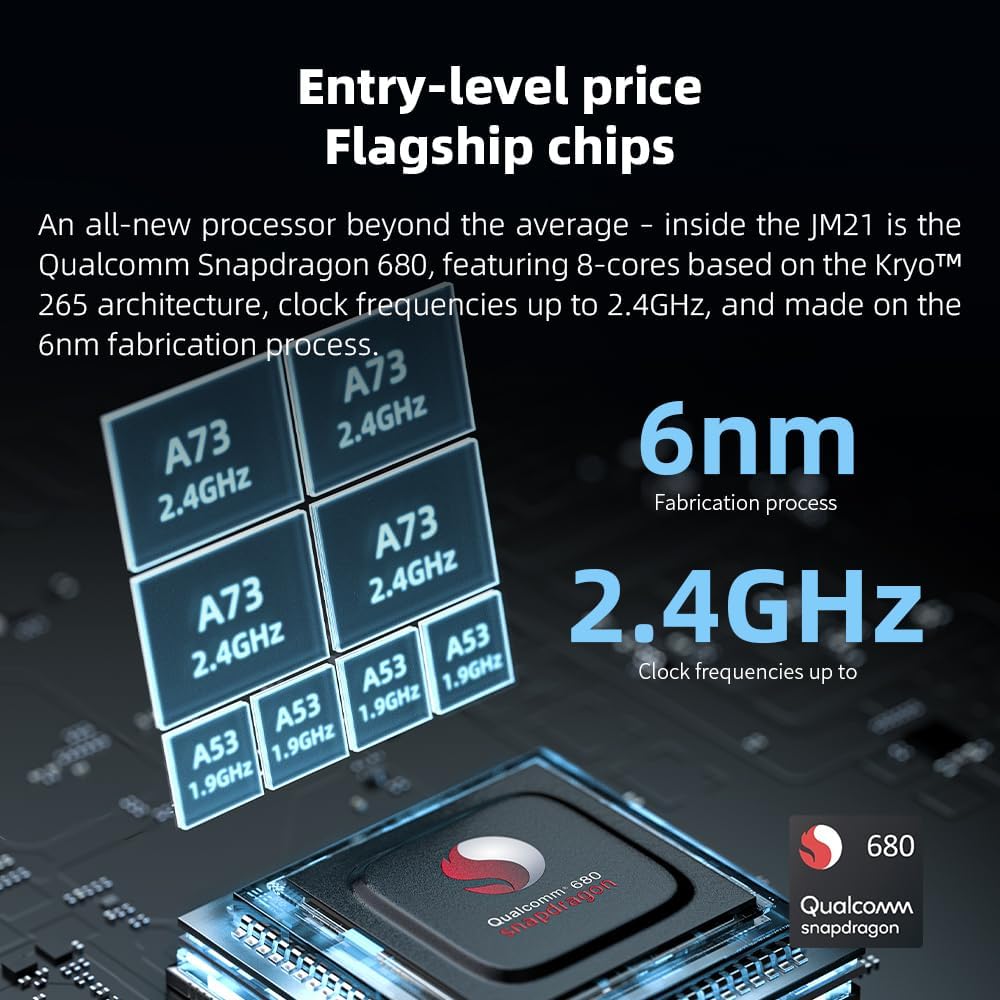
Figure 2: Illustration of the Snapdragon 680 processor and its specifications.
Custom Android 13 System
Running on a deeply customized Android 13 open-source system, the JM21 provides an intuitive and seamless user experience. This allows for easy installation of various streaming applications such as Spotify and Apple Music, alongside other desired apps.

Figure 3: The JM21's custom Android 13 operating system interface.
Dual Flagship DACs and Powerful Output
The JM21 features a fully balanced audio architecture with two Cirrus Logic CS43198 DACs and two high-performance SGM8262 operational amplifiers. This design delivers a balanced output power of up to 700mW + 700mW, providing robust drive for a wide range of headphones, including large over-ear models.

Figure 4: The JM21's audio output capabilities with connected headphones.

Figure 5: Internal architecture highlighting the dual DACs and balanced design.
Digital Audio Purification System (DAPS)
The self-developed DAPS, combined with a fifth-generation FPGA and custom dual femtosecond crystal oscillators, ensures that both local playback and external USB DAC output maintain the original audio sampling rate, guaranteeing lossless audio quality.

Figure 6: Detailed diagram of the JM21's Digital Audio Purification System.
Compact Design and Long Battery Life
Weighing only 156g and with a thickness of 13mm, the JM21 offers a comfortable one-handed grip. It provides an impressive 12.5 hours of battery life for extended listening sessions.

Figure 7: The JM21's compact dimensions and extended battery performance.
Asynchronous USB DAC Functionality
The JM21 can function as an asynchronous USB DAC, supporting sampling rates up to 384kHz/32bit when connected to a MacOS or Windows computer. This feature enhances your computer's audio output quality.

Figure 8: JM21 operating as an external USB DAC.
Setup
Initial Charging
Before first use, fully charge the JM21 using the provided USB-C cable and a compatible USB power adapter (not included). The device includes one 9V battery.
Powering On/Off
To power on, press and hold the power button located on the side of the device until the screen illuminates. To power off, press and hold the power button and select "Power off" from the on-screen options.
Inserting a Micro SD Card
The JM21 supports expandable memory up to 2TB via a Micro SD card. Locate the Micro SD card slot on the device, insert the card gently until it clicks into place. Ensure the card is inserted correctly to avoid damage.
Connecting to Wi-Fi
Navigate to the Settings menu on the JM21. Select "Network & internet" and then "Wi-Fi". Turn on Wi-Fi, select your desired network, and enter the password if prompted. This enables streaming services and app downloads.
Connecting Bluetooth Devices
From the Settings menu, go to "Connected devices" and then "Bluetooth". Turn on Bluetooth. The JM21 will scan for available devices. Select your Bluetooth headphones or speaker from the list to pair. The JM21 supports two-way Bluetooth 5.0, including LDAC for high-quality audio transmission and reception.
Operating Instructions
Basic Navigation
The JM21 features a 4.7-inch touch screen for intuitive navigation. Swipe, tap, and pinch to interact with the interface, similar to a smartphone. Physical buttons on the side control power, volume, and playback.
Music Playback
Use the pre-installed FiiO Music app for local file playback. For streaming, download your preferred apps (e.g., Spotify, Apple Music) from the Google Play Store or FiiO's app store. The device supports various audio formats for a high-fidelity listening experience.
Volume and Playback Controls
Dedicated physical buttons on the side of the JM21 allow for easy control of volume (up/down) and music playback (play/pause, next track, previous track) without needing to access the touchscreen.
USB DAC Mode
Connect the JM21 to your computer using the USB-C cable. On the JM21, select "USB DAC" mode when prompted. Your computer should recognize the JM21 as an external audio device, allowing it to process audio from your computer with enhanced quality. Note: This mode is primarily for audio development and may have slightly higher latency, making it less ideal for video playback.
Maintenance
Cleaning
Wipe the device with a soft, dry, lint-free cloth. Avoid using abrasive cleaners, solvents, or aerosol sprays directly on the device. For the screen, use a screen-specific cleaning solution if necessary, applied to the cloth, not directly to the screen.
Battery Care
To maximize battery lifespan, avoid fully discharging the battery frequently. Charge the device regularly. If storing the device for an extended period, charge it to approximately 50% and power it off. Recharge every few months to prevent deep discharge.
Software Updates
Periodically check for software updates through the device's settings. Updates can improve performance, add new features, and resolve bugs. Ensure the device is sufficiently charged before initiating any software update.
Troubleshooting
If you encounter issues with your JM21, please refer to the following common solutions:
- Device Not Powering On: Ensure the battery is charged. Connect the device to a power source and try again. If unresponsive, perform a forced restart by holding the power button for an extended period (e.g., 10-15 seconds).
- No Sound Output: Check volume levels on the device and connected headphones/speakers. Ensure headphones are properly plugged in or Bluetooth devices are correctly paired. Verify that the correct output mode is selected if using USB DAC.
- App Crashes/Freezes: Close and reopen the problematic application. If the issue persists, clear the app's cache and data in Android settings, or uninstall and reinstall the app.
- Wi-Fi/Bluetooth Connectivity Issues: Toggle Wi-Fi or Bluetooth off and on. Restart the JM21 and your router/Bluetooth device. Ensure you are within range of the network/device.
- Overheating: While the JM21 is designed for efficient operation, prolonged use with high output or demanding applications may cause warmth. Ensure adequate ventilation and avoid covering the device during use. If overheating becomes excessive, reduce usage or power off the device to allow it to cool down.
- Physical Buttons Unresponsive (with case): Some users have reported that the transparent case can interfere with button presses. Ensure the case is properly aligned, or consider removing it if physical button responsiveness is critical.
For further assistance, please consult the official JadeAudio/FiiO support resources.
Specifications
| Brand | JadeAudio |
| Model Name | JM21 |
| Operating System | Custom Android 13 |
| Processor | Qualcomm Snapdragon 680 (8-core Kryo 265, up to 2.4GHz, 6nm) |
| DACs | Dual Cirrus Logic CS43198 |
| Output Power | Up to 700mW + 700mW (Balanced) |
| Memory Storage Capacity | 32 GB (expandable up to 2TB via Micro SD) |
| Screen Size | 4.7 Inches |
| Connectivity Technology | Bluetooth 5.0 (two-way, LDAC support), Wi-Fi |
| USB DAC Support | Up to 384kHz/32bit |
| Battery Life | Approx. 12.5 hours |
| Item Weight | 156g (5.5 ounces) |
| Dimensions | 13mm thickness |
| Color | Sky Blue |
| Manufacturer | JadeAudio |
Warranty and Support
The JadeAudio JM21 comes with a warranty card included in the packaging. Please refer to this card for specific warranty terms and conditions. For technical support, product inquiries, or warranty claims, please contact JadeAudio customer service through their official website or the contact information provided on the warranty card.
For the latest firmware updates and frequently asked questions, visit the official JadeAudio/FiiO support page. Keeping your device's software updated ensures optimal performance and access to the newest features.
Related documentsJM21

Ask a question about this manual
Ask about setup, troubleshooting, compatibility, parts, safety, or missing instructions. Manuals+ will review the question and use this page’s manual context to help answer it.