
Introduction
Thank you for purchasing the Gabba Goods Coors Light Can Shape Bluetooth Speaker. This portable wireless speaker combines a unique design with versatile audio playback options, including Bluetooth 5.0, AUX, USB, and TF card support. Please read this manual carefully to ensure proper use and optimal performance of your speaker.
Product Overview

Image: The Gabba Goods Coors Light Can Shape Bluetooth Speaker, showcasing its iconic design.
The speaker is designed for portability and ease of use, featuring multiple input options and intuitive controls. Its compact size makes it suitable for various indoor and outdoor settings.
Controls and Ports
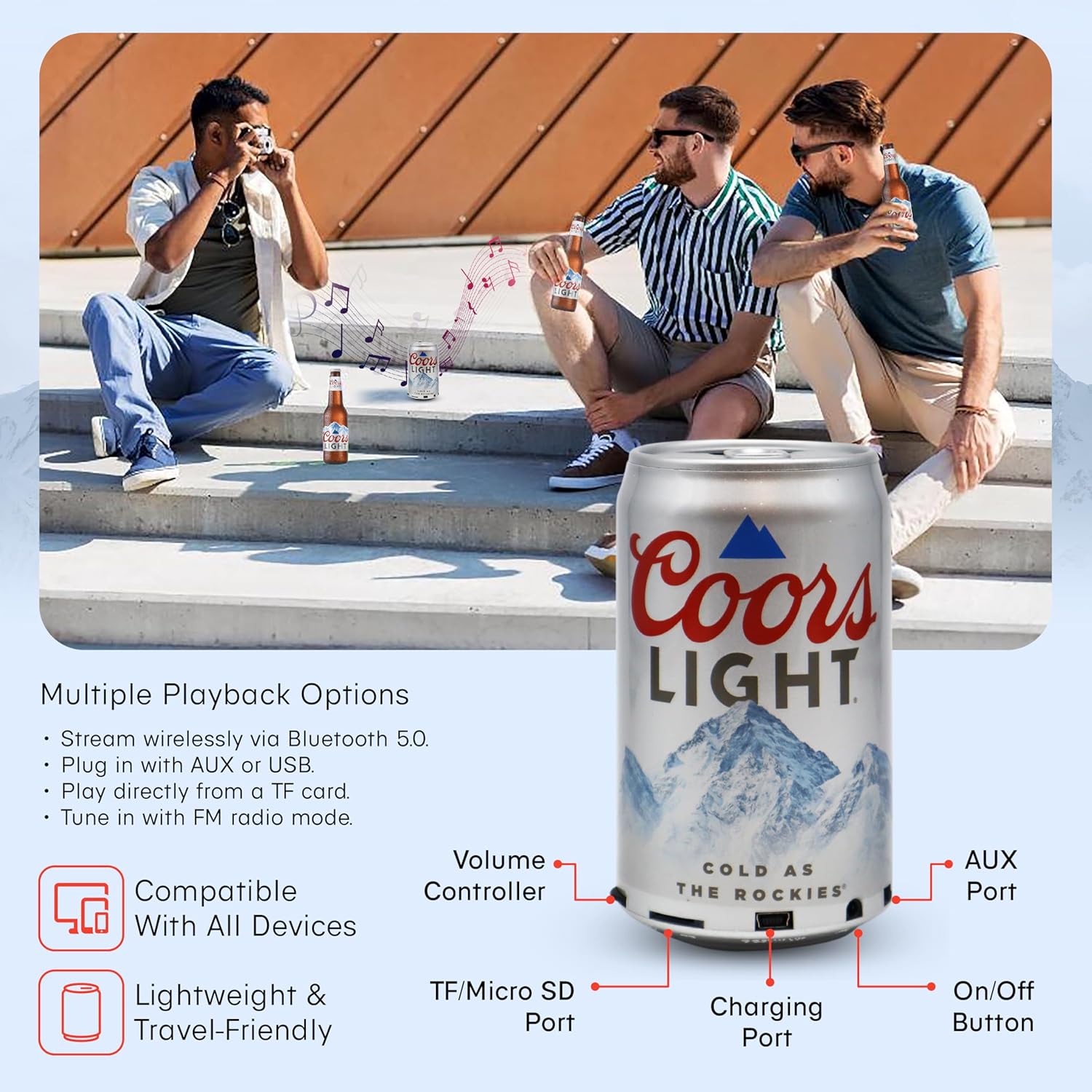
Image: Close-up view of the speaker's base, highlighting the volume controller, TF/Micro SD port, charging port, On/Off button, and AUX port.
- On/Off Button: Powers the speaker on or off.
- Volume Controller: Adjusts the playback volume.
- Charging Port: Connect the provided power cable for charging.
- AUX Port: For wired audio connection using a 3.5mm audio cable.
- USB Slot: For playing audio from a USB flash drive.
- TF Slot (Micro SD): For playing audio from a TF/Micro SD card.
What's in the Box
- Gabba Goods Coors Light Can Shape Bluetooth Speaker
- Power Cable (for charging)
Setup
1. Charging the Speaker
Before first use, fully charge the speaker. Connect the provided power cable to the charging port on the speaker and the other end to a USB power source (e.g., computer USB port, USB wall adapter). The charging indicator light will illuminate during charging and turn off when fully charged. A full charge provides approximately 6 hours of playtime.
2. Powering On/Off
Press and hold the On/Off Button located on the speaker's base to power the device on or off. A sound prompt will indicate the power status.
3. Bluetooth Pairing
- Ensure the speaker is powered on and in Bluetooth mode. A blue indicator light will flash, indicating it is ready for pairing.
- On your Bluetooth-enabled device (smartphone, tablet, laptop), go to the Bluetooth settings.
- Search for available devices and select "CL-BCS-CLC" or a similar name.
- Once paired, the speaker will emit a confirmation sound, and the blue indicator light will stop flashing and remain solid.
- You can now play audio wirelessly from your device.
4. Connecting via AUX
To connect a device without Bluetooth, use a 3.5mm audio cable (not included). Plug one end into the speaker's AUX Port and the other end into your device's headphone jack. The speaker will automatically switch to AUX mode.
5. Using USB/TF Card
Insert a USB flash drive into the USB Slot or a TF/Micro SD card into the TF Slot. The speaker will automatically detect the storage device and begin playing compatible audio files. Ensure audio files are in a supported format (e.g., MP3).
6. FM Radio Mode
To activate FM radio mode, press the Mode button (if available, or cycle through modes using the power button if it doubles as a mode button). The speaker will scan for available FM stations. Use the volume controls to adjust the station or volume.
Operation
- Volume Control: Rotate the Volume Controller to increase or decrease the audio output.
- Mode Switching: Short press the On/Off Button (or a dedicated Mode button if present) to cycle through available modes: Bluetooth, AUX, USB, TF Card, and FM Radio.
- Play/Pause: In Bluetooth, USB, or TF card mode, a short press of the On/Off Button (or a dedicated Play/Pause button) may pause or resume playback.
- Next/Previous Track: These controls are typically integrated with the volume controller or separate buttons. Refer to the specific button functions on your device.
Maintenance
- Cleaning: Wipe the speaker with a soft, dry cloth. Do not use abrasive cleaners or solvents.
- Storage: Store the speaker in a cool, dry place away from direct sunlight and extreme temperatures.
- Battery Care: To prolong battery life, avoid fully discharging the speaker frequently. Charge it regularly, even if not in use for extended periods.
- Water Resistance: This speaker is NOT waterproof. Avoid exposure to water or moisture.
Troubleshooting
| Problem | Solution |
|---|---|
| Speaker does not power on. | Ensure the battery is charged. Connect the speaker to a power source using the charging cable. |
| Cannot pair via Bluetooth. | Make sure the speaker is in Bluetooth pairing mode (flashing blue light). Ensure your device's Bluetooth is enabled and within 30ft range. Forget previous pairings on your device and try again. |
| No sound or low volume. | Check the volume level on both the speaker and your connected device. Ensure the correct input mode (Bluetooth, AUX, USB, TF) is selected. |
| USB/TF card not playing. | Ensure the audio files are in a compatible format (e.g., MP3). Check if the card/drive is inserted correctly and not corrupted. |
| Poor FM radio reception. | Move the speaker to a different location. Some environments may have weaker signals. |
Specifications
| Feature | Detail |
|---|---|
| Brand | Gabba Goods |
| Model Number | CL-BCS-CLC |
| Connectivity Technology | Bluetooth |
| Bluetooth Version | 5.0 |
| Wireless Range | Up to 30 feet |
| Audio Output Mode | Stereo |
| Speaker Maximum Output Power | 100 watts |
| Input Voltage | 5 volts |
| Speaker Size | 2.75 inches |
| Item Dimensions (D x W x H) | 2.75"D x 2.75"W x 6.5"H |
| Power Source | Corded Electric (for charging) |
| Battery | 1 AA battery required (included) |
| Playtime | Up to 6 hours (approximate) |
| Material | Plastic |
| Is Waterproof | False |
| Control Method | Touch |
Official Product Video
Video: An official product demonstration of the Coors Light Beer Wireless Speaker Accessory by Coca-Cola Tech. This video provides a visual overview of the speaker's design and features.
Warranty and Support
This Gabba Goods speaker comes with a 1 Year Manufacturer Limited Warranty. For warranty claims or technical support, please contact Gabba Goods customer service. Refer to the product packaging or the official Gabba Goods website for the most current contact information.