
1. Introduction
Thank you for choosing the Miady Mini MagSafe-Compatible Portable Charger. This compact and powerful device is designed to provide convenient wireless and wired charging for your compatible devices, ensuring you stay powered throughout your day. Please read this manual carefully to ensure safe and optimal use of your charger.
2. Package Contents
- 1 x Miady Mini MagSafe-Compatible Portable Charger (Black)
- 1 x USB-C Charging Cable
- 1 x Instruction Manual
3. Product Overview
The Miady Mini Portable Charger is engineered for portability and efficiency. Its ultra-light and slim design makes it an ideal companion for travel and daily use. Key features include:
- Ultra-Light & Slim Design: At just 0.55 inches thick and weighing 0.24 lbs, it's designed for easy portability.
- Strong Magnetic Hold: Equipped with a powerful magnetic charging pad for secure attachment to MagSafe-compatible phones.
- Indicator Lights: Five LED lights display battery charge level and wireless charging status.
- USB-C Input/Output: Versatile USB-C port for both charging the power bank and providing up to 12W output to devices.
- 5000mAh Capacity: Provides reliable backup power for your devices.
Product Dimensions and Weight:
- Product Dimensions: 3.54 x 2.36 x 0.55 inches
- Item Weight: 3 ounces
- Battery Capacity: 5000 Milliamp Hours

Image: The Miady Mini Portable Charger shown next to a credit card, highlighting its compact size and slim profile. Dimensions are 3.54 x 2.36 x 0.55 inches.
4. Setup and Charging the Power Bank
Before using your Miady portable charger for the first time, it is recommended to fully charge it.
- Connect the provided USB-C charging cable to the USB-C port on the power bank.
- Connect the other end of the USB-C cable to a compatible 5V 2.0A USB wall adapter (not included).
- The indicator lights on the power bank will illuminate to show the charging progress. All five white lights will be solid when fully charged.
- A full charge typically takes approximately 4 hours.

Image: The portable charger connected via its USB-C port to a wall adapter for recharging.
5. Operating Instructions
Wireless Charging (MagSafe-Compatible)
This charger supports 5W wireless charging for MagSafe-compatible devices.
- Ensure your phone is MagSafe-compatible (iPhone 12 series and newer) or has a magnetic case.
- Align the Miady portable charger with the back of your phone. The powerful magnets will securely attach the power bank to your device.
- Wireless charging will activate automatically. A blue indicator light on the power bank signifies active wireless charging.
- To stop charging, simply detach the power bank from your phone.
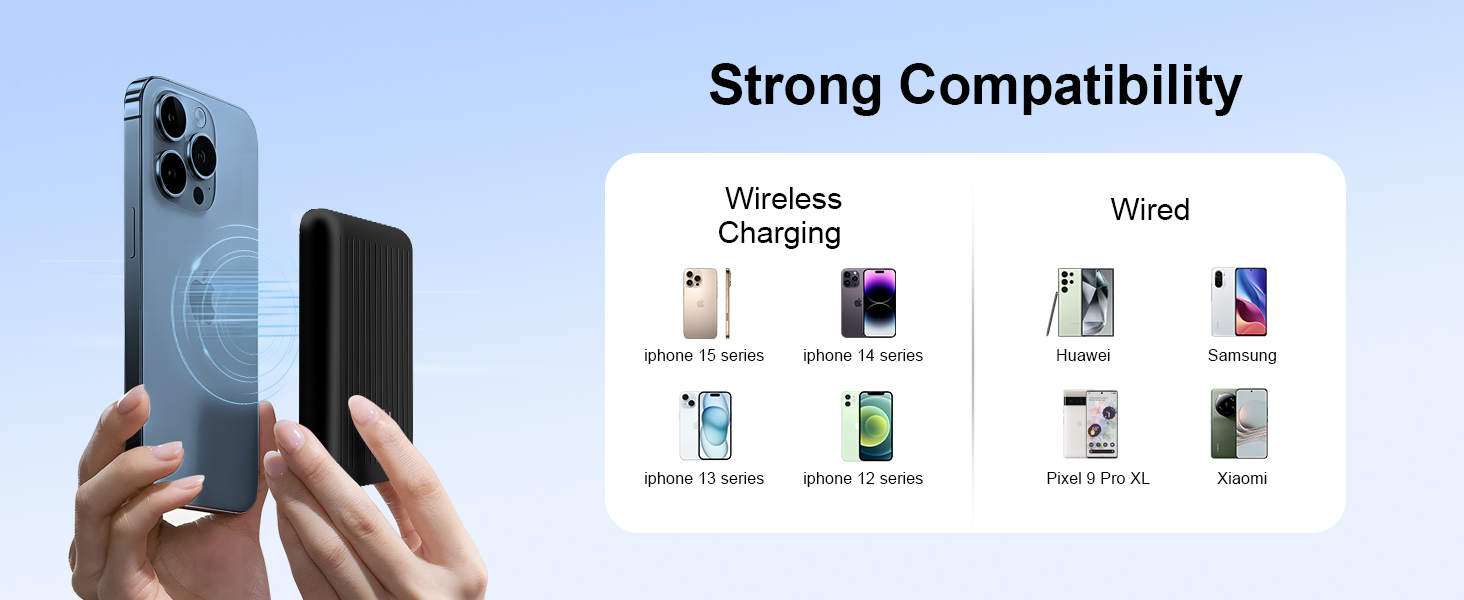
Image: An iPhone with the Miady portable charger magnetically attached to its back, demonstrating the "Snap and Go" wireless charging feature.
Wired Charging (USB-C Output)
The USB-C port can also be used to charge other devices with up to 12W output.
- Connect your device to the USB-C port on the power bank using a compatible USB-C cable.
- The power bank will automatically detect your device and begin charging.
- Press the on/off button once if charging does not start automatically.

Image: A visual representation of the two charging methods: 5W wireless charging and 12W wired charging via USB-C.
6. Indicator Lights
The Miady portable charger features five indicator lights to keep you informed about its status:
- White Lights (4): Each white light represents 25% of the battery's charge. For example, if one light is off, 25% of the battery has been used.
- Blue Light (1): A blue light indicates that wireless charging is currently in progress.

Image: A detailed view of the LED indicator lights on the Miady portable charger, showing the battery level indicators and the magnetic charging indicator.
7. Compatibility
The Miady Mini Portable Charger is designed for broad compatibility:
- Wireless Charging: Compatible with iPhone 12, 13, 14, 15, and 16 series, and other devices that support MagSafe or have a magnetic case.
- Wired Charging: The USB-C port can charge various devices including Huawei, Samsung, Pixel 9 Pro XL, and Xiaomi phones.
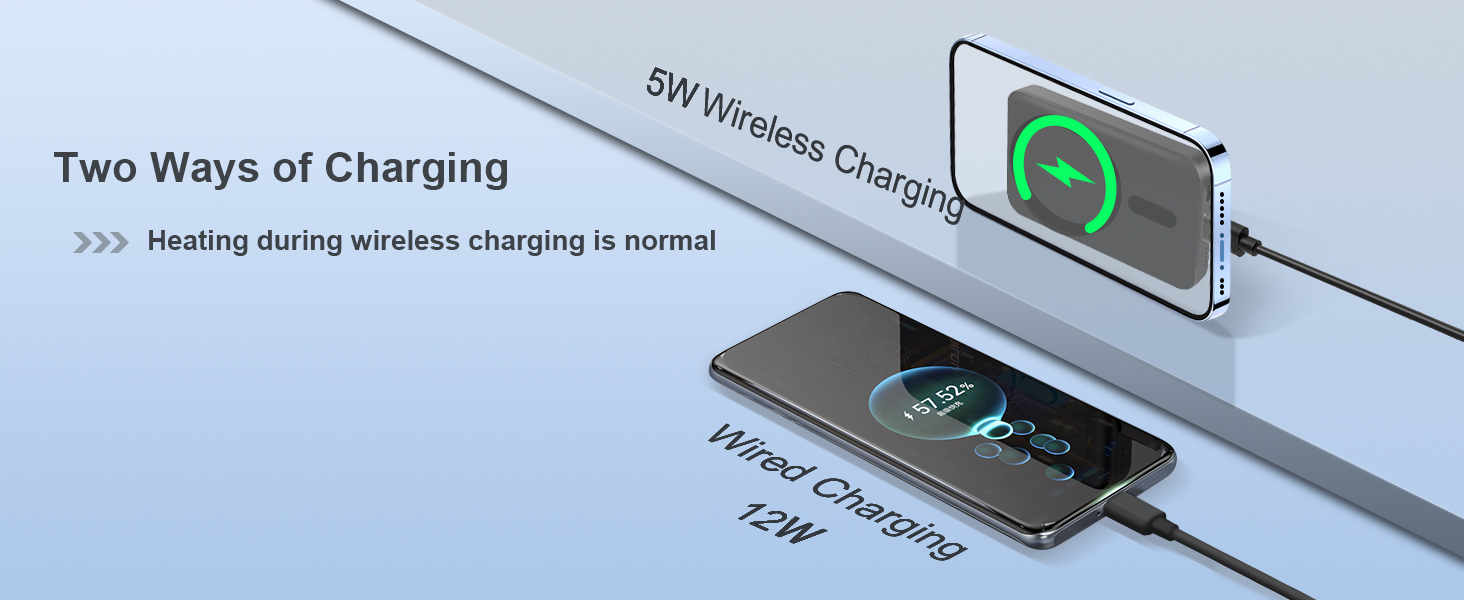
Image: A graphic showing the Miady portable charger's compatibility with different iPhone series for wireless charging and other smartphone brands for wired charging.
8. Important Tips and Safety Information
- Heat during Wireless Charging: It is normal for the charger and your phone to generate some heat during wireless charging.
- Magnetic Cases: For optimal magnetic attraction and charging efficiency, ensure your phone has MagSafe or is used with a compatible magnetic case. Non-original cases may cause excess heat.
- Phone Usage During Charging: It is recommended not to use your phone extensively while it is wirelessly charging, as this can generate more heat.
- Magnetic Attraction: If the magnetic attraction feels weak, wipe your phone and power bank surfaces to ensure they are clean and free of debris.
- Activating Charging: If the power bank is not charging, try pressing the on/off button once to activate it.
9. Maintenance
- Keep the charger away from water, fire, and high temperatures.
- Do not disassemble, crush, or puncture the charger.
- Clean the charger with a dry, soft cloth. Avoid using harsh chemicals.
- Store the charger in a cool, dry place when not in use.
10. Troubleshooting
- Charger not turning on: Ensure the power bank is sufficiently charged. Press the on/off button.
- Device not charging wirelessly:
- Verify your device is MagSafe-compatible or has a magnetic case.
- Ensure proper alignment between the phone and the charger.
- Remove any foreign objects between the phone and charger.
- Wipe surfaces clean to improve magnetic connection.
- Device not charging via USB-C:
- Ensure the USB-C cable is securely connected to both the power bank and your device.
- Try pressing the on/off button once.
- Test with a different USB-C cable if available.
11. Warranty and Support
Miady is committed to providing high-quality products and excellent customer service.
- After-sales Service: Enjoy 180 days of after-sales service.
- Customer Support: 24-hour customer support is available for any inquiries or assistance.
For further assistance, please visit the Miady Store on Amazon or contact our customer support team.
12. Official Product Videos
Watch these official videos from the seller for a visual guide on using your Miady Mini MagSafe-Compatible Portable Charger.
Video: "5000mAh for Magsafe Power Bank Slim" by xystong. This video demonstrates the slim design and magnetic attachment of the power bank.
Video: "Miady 5000mAh Magnetic Portable Charger" by Miady. A brief overview of the Miady 5000mAh Magnetic Portable Charger.