
Introduction
Thank you for choosing the VINGLI Floating Bed Frame. This manual provides essential information for the safe assembly, operation, maintenance, and troubleshooting of your new bed frame. Please read these instructions thoroughly before beginning assembly and retain them for future reference.
Safety Information
- Always follow assembly instructions carefully to prevent instability.
- Do not exceed the maximum weight limit of 900 lbs.
- Be cautious of the LED lights to prevent foot bumps, especially in low light conditions.
- Handle all components with care to avoid injury from sharp edges.
- Ensure all electrical connections for the charging station and LED lights are secure and away from moisture.
- Keep small parts away from children during assembly.
Package Contents
Before assembly, verify that all components are present and undamaged. If any parts are missing or damaged, please contact customer support.
- Metal Bed Frame Components
- Velvet Upholstered Headboard with Hidden Storage
- Integrated Charging Station (2 AC outlets, 1 USB port, 1 Type-C port)
- LED Light Strip with Remote Control
- MDF Panels for Headboard and Storage
- Metal Slats
- Assembly Hardware (bolts, screws, Allen wrench)
- Instruction Manual
Setup and Assembly Instructions
Assembly is designed to be straightforward with clear, step-by-step instructions and pre-drilled holes. Two people are recommended for easier assembly. No box spring is required for this bed frame.
- Unpack and Identify Parts: Lay out all components on a clean, soft surface to prevent scratches. Refer to the included parts list to identify each piece.
- Assemble the Main Frame: Connect the side rails and support beams using the provided hardware. Ensure all connections are secure but do not fully tighten bolts until the frame is fully assembled.
- Attach the Headboard: Secure the velvet upholstered headboard to the main frame. The headboard includes hidden storage compartments.
- Install the Charging Station: Mount the charging station into the designated slot on the headboard. Connect its power cable.
- Install LED Lights: Adhere the LED light strip to the underside of the bed frame or headboard as indicated in the detailed instructions. Connect the LED power cable.
- Insert Metal Slats: Place the metal slats across the frame, ensuring they are evenly spaced and secured.
- Final Tightening: Once all components are in place and aligned, fully tighten all bolts and screws.
- Mattress Placement: Place your mattress directly onto the slats. The integrated mattress holders will prevent it from slipping.

Image: Overall dimensions and weight capacity of the bed frame.
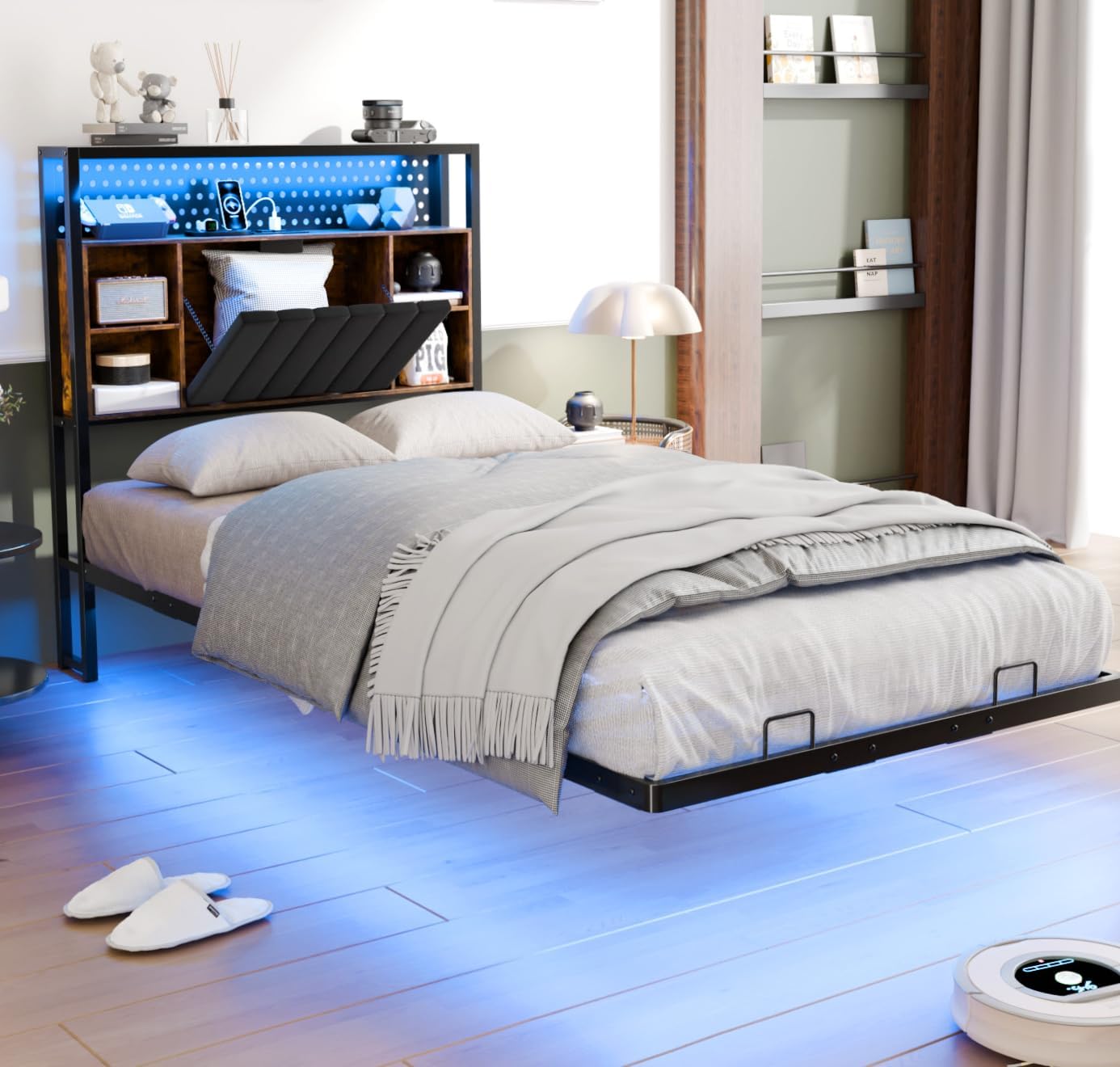
Image: Detail of the robust metal construction, including the center skeleton and dual triangular braces.
Video: Demonstrates the assembly process and features of the VINGLI Platform Bed with LED lights.
Operating Instructions
LED Lights
The integrated LED lights offer over 6000 colorful lighting options and various rhythm modes. Use the provided remote control to adjust colors, brightness, and lighting patterns. Ensure the LED light strip is securely connected to its power source.

Image: RGB LED lights illuminating the area under the bed, controlled by a remote.
Charging Station
The headboard features a convenient charging station with 2 standard AC outlets, 1 USB port, and 1 Type-C port. Simply plug your devices into the appropriate port for charging. Ensure the bed frame's main power cord is plugged into a wall outlet for the charging station to function.

Image: Close-up of the integrated charging station with AC, USB, and Type-C ports.
Maintenance
- Cleaning: For the metal frame, wipe with a damp cloth and mild detergent. For the velvet headboard, use a soft brush or vacuum attachment to remove dust. Spot clean with a damp cloth and mild upholstery cleaner if necessary.
- Hardware Check: Periodically check all bolts and screws to ensure they remain tight. Re-tighten as needed to maintain stability and prevent squeaking.
- Electrical Components: Ensure all power cords and connections for the LED lights and charging station are free from damage and securely plugged in.
Troubleshooting
| Problem | Possible Cause | Solution |
|---|---|---|
| LED lights not working | Loose connection, remote battery dead, defective LED strip. | Check all power connections to the LED strip. Replace remote control battery. If still not working, contact customer support. |
| Charging ports not working | Bed frame not plugged in, loose connection to charging station, defective port. | Ensure the bed frame's main power cord is securely plugged into a functional wall outlet. Check the connection of the charging station to the bed frame. Test with different devices/cables. |
| Bed frame is unstable or squeaks | Loose bolts, uneven floor, damaged frame component. | Re-tighten all bolts and screws on the frame. Ensure the bed is on a level surface. Inspect frame components for any damage; if found, contact customer support. |
| Mattress slips | Mattress not properly seated, mattress holders not engaged. | Ensure the mattress is centered and fully seated within the frame. Verify that the mattress holders are correctly installed and positioned to prevent movement. |
Specifications
| Feature | Detail |
|---|---|
| Model | B0DRV97637 |
| Size | Twin |
| Dimensions (L x W x H) | 81.3"L x 39"W x 38.6"H |
| Headboard Depth | 5.1 inches (hidden storage) |
| Under-Bed Clearance | 8.8 inches |
| Weight Capacity | 900 Pounds |
| Material | Metal, MDF, Velvet |
| Special Features | AC Charging, LED Lights, Type-C Port, USB Port, Velvet Storage Headboard |
| Assembly Required | Yes |
Warranty and Support
For warranty information, product support, or to report missing/damaged parts, please contact the seller, Bonnlo, directly through your purchase platform. You may also visit the official VINGLI store for additional product information and support resources: VINGLI Store.
