
1. Introduction
This manual provides detailed instructions for the HURRISE 4G 8MP HD Solar-Powered Outdoor Security Camera. This device is designed for outdoor surveillance, offering high-resolution video, 4G cellular connectivity, and sustainable solar power. Please read this manual thoroughly before installation and operation to ensure proper use and optimal performance.
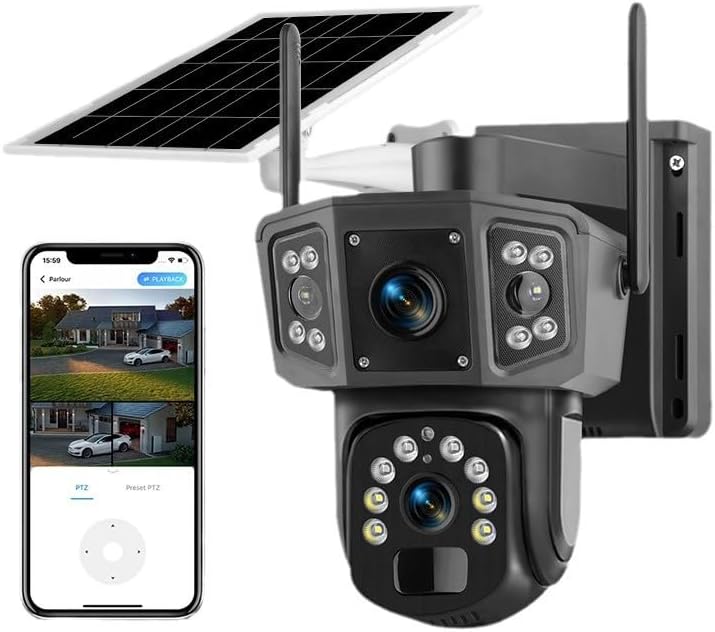
Figure 1.1: HURRISE 4G 8MP HD Solar-Powered Outdoor Security Camera with remote viewing interface.
2. Product Features
- 4G Connectivity & Solar Power: Operates independently without Wi-Fi or external power. Requires 4G network coverage for remote access. Features an 8000 mAh internal battery and an efficient solar panel for continuous operation.
- High-Resolution Imaging: Captures video at 8MP 4K HD resolution with H.265 compression for efficient data transfer and storage.
- Pan-Tilt-Zoom (PTZ) Functionality: Offers 355-degree horizontal rotation and 90-degree vertical tilt for comprehensive area coverage.
- Dual Lens & Multi-Screen Monitoring: Equipped with multiple lenses for wider coverage and supports dual-screen playback for simultaneous monitoring and recording.
- AI Human Detection & Real-time Alerts: Advanced AI detects human movement, triggering instant phone notifications with snapshots and audible alarms. Includes automatic cruise and preset point cruising functions for 24/7 recording.
- Two-Way Audio: Features a built-in waterproof microphone and speaker for remote communication.
- IP66 Weatherproof Rating: Designed to withstand various outdoor weather conditions.
- Cloud Storage: Supports cloud storage to protect recorded data, ensuring access even if the camera unit is compromised.

Figure 2.1: Overview of the 4K solar outdoor surveillance camera, showing multi-device support.

Figure 2.2: Camera highlighting IP66 weather resistance and 355° horizontal, 90° vertical panoramic coverage.
3. Package Contents
Verify that all items listed below are included in your package. If any items are missing or damaged, please contact customer support.
- HURRISE 4G 8MP HD Solar-Powered Outdoor Security Camera Unit
- Solar Panel (integrated or separate with cable)
- Mounting Screws
- Instruction Manual (this document)
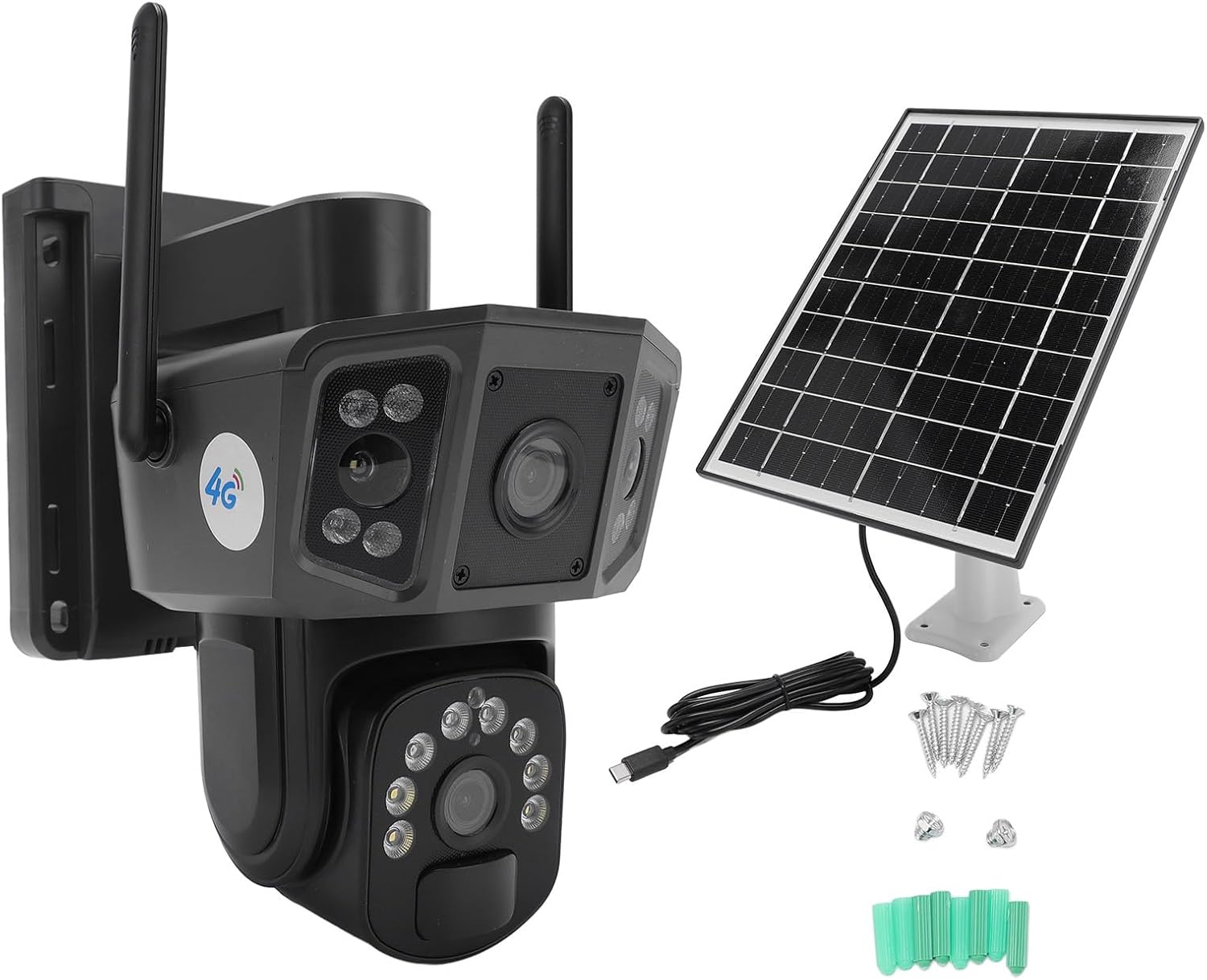
Figure 3.1: Camera unit, solar panel, USB cable, and mounting accessories.
4. Setup
4.1 Initial Charging
Although the camera is solar-powered, it is recommended to fully charge the internal battery using the provided USB cable before the first use. Connect the USB cable to the camera's charging port and a standard 5V USB power adapter (not included).
4.2 SIM Card Installation
This camera requires a 4G cellular SIM card for network connectivity. Locate the SIM card slot on the camera, insert a compatible 4G SIM card (ensure it is activated and has data plan) according to the diagram in the quick start guide or on the camera body. Ensure the SIM card is inserted correctly and securely.
4.3 App Download and Account Setup
- Scan the QR code provided in the quick start guide or search for the designated app (e.g., 'Ubox' or similar, refer to packaging) in your smartphone's app store (iOS or Android).
- Download and install the application.
- Register a new account or log in if you already have one.
- Follow the in-app instructions to add your camera device. This typically involves scanning a QR code on the camera or manually entering its ID.
4.4 Mounting the Camera
Choose an installation location that provides optimal solar exposure for the solar panel and a clear view of the area you wish to monitor. Ensure the location has stable 4G network coverage.
- Mark the drilling points on the wall or mounting surface using the camera's base or mounting bracket as a template.
- Drill holes and insert wall plugs if necessary.
- Secure the camera's mounting bracket using the provided screws.
- Attach the camera unit to the mounted bracket, ensuring it is firmly secured.
- Adjust the angle of the solar panel to maximize sunlight exposure throughout the day.

Figure 4.1: Camera mounted, illustrating the solar panel connection for continuous power.
5. Operating Instructions
5.1 Remote Viewing
Open the installed application on your smartphone. Select your camera from the device list to access the live video feed. You can view your property in real-time from any location with 4G network access.
5.2 PTZ Control
Within the live view interface of the app, use the on-screen controls to pan (horizontal rotation up to 355 degrees) and tilt (vertical rotation up to 90 degrees) the camera lens. This allows you to adjust the viewing angle remotely.

Figure 5.1: Illustration of dual lenses and the multi-screen monitoring feature within the app.
5.3 Two-Way Audio
To use the two-way audio feature, tap the microphone icon in the app's live view. Speak into your phone's microphone to transmit audio through the camera's speaker. Tap the speaker icon to listen to audio from the camera's location.

Figure 5.2: Example of using two-way audio to communicate with someone near the camera.
5.4 Motion Detection and Alerts
Configure motion detection settings within the app. When human movement is detected, the camera will send real-time notifications to your smartphone, including snapshots. Audible alarms can also be activated. The camera supports automatic tracking of detected subjects and can be set to cruise between preset points for continuous surveillance.

Figure 5.3: Visual representation of PIR human detection triggering an alert on a smartphone.
5.5 Night Vision Modes
The camera features intelligent night vision. It can operate in infrared (black and white) mode for standard low-light conditions. When human presence is detected, the camera can automatically switch to full-color night vision for enhanced detail.

Figure 5.4: Comparison of infrared and intelligent full-color night vision capabilities.
5.6 Recording and Playback
Recorded footage can be stored locally (if a microSD card is installed, not included) or in the cloud (subscription may be required). Access the playback feature in the app to review past recordings by date and time.
6. Maintenance
6.1 Solar Panel Care
To ensure optimal charging efficiency, regularly clean the surface of the solar panel to remove dust, dirt, leaves, or snow. A clean, soft cloth and water are usually sufficient. Avoid abrasive cleaners or tools that could scratch the panel.
6.2 Camera Cleaning
Periodically wipe the camera lens and body with a soft, damp cloth to remove any accumulated dirt. Do not use harsh chemicals or solvents. Ensure the camera's seals remain intact to maintain its IP66 weatherproof rating.
6.3 Battery Management
The integrated 8000 mAh battery is designed for long-term use with solar charging. Avoid fully discharging the battery frequently. If the camera is stored for an extended period, ensure it is charged periodically to maintain battery health.
7. Troubleshooting
- Blurry or Interrupted Images: A stable 4G network connection is crucial. Weak signals can lead to blurry or interrupted image transmission. Try adjusting the camera's distance from potential signal obstructions or relocating it to an area with better 4G coverage. Reconnect the camera to the app if necessary.
- Image Quality Issues: The camera's location and angle can affect image clarity. Ensure there are no physical obstructions blocking the lens. You can also adjust the video resolution settings within the mobile application to optimize image quality based on your network conditions.
- Camera Not Powering On: Ensure the internal battery has sufficient charge. If the solar panel is connected, verify it is receiving adequate sunlight. Try connecting the camera to a USB power source for an initial charge.
- No 4G Connection: Verify that the SIM card is correctly inserted, activated, and has an active data plan. Check the 4G signal strength in the camera's location via the app or by testing another 4G device in the same spot.
- App Connectivity Issues: Ensure your smartphone has a stable internet connection. Restart the app or your phone. If issues persist, try reinstalling the app and re-adding the camera.
8. Specifications
| Brand | HURRISE |
| Model Number | HURRISEnydtgh6k8i |
| Wireless Communication Technology | Cellular (4G) |
| Installation Type | Screw-in / Wall Mount |
| Material | Acrylonitrile Butadiene Styrene (ABS) |
| Item Dimensions (L x W x H) | 5.1 x 2.5 x 7.6 cm (2 x 1 x 3 inches) |
| Water Resistance Level | IP66 (Waterproof) |
| Special Features | PTZ Technology, AI Human Detection, Two-Way Audio, Solar Power |
| Batteries Required | No (Internal rechargeable battery included) |
| Video Capture Resolution | 8MP 4K HD (1024p listed in some specifications, refer to product for actual output) |
| Number of Items | 1 |
| Recommended Uses | Outdoor Security, Indoor Security |
9. Warranty and Support
For warranty information and customer support, please refer to the documentation provided with your purchase or contact the retailer/manufacturer directly. Keep your proof of purchase for warranty claims.
For technical assistance or further inquiries, please visit the HURRISE official website or contact their customer service department.