
weidilixiang K911 SE
K911 SE Drone User Manual
Model: K911 SE | Brand: weidilixiang
Introduction
This manual provides comprehensive instructions for the safe operation, maintenance, and troubleshooting of your K911 SE drone. Please read this manual thoroughly before operating the drone to ensure proper usage and to maximize your flying experience.
The K911 SE drone is an advanced quadcopter featuring a triple camera system with 4K Ultra HD capability and EIS stabilization. It offers a 1200m flight range with 5G HD map transmission, intelligent obstacle avoidance, optical flow hovering, and GPS return functions. Its brushless motors provide level 5 wind resistance, making it suitable for various environments. The foldable design enhances portability.
Package Contents
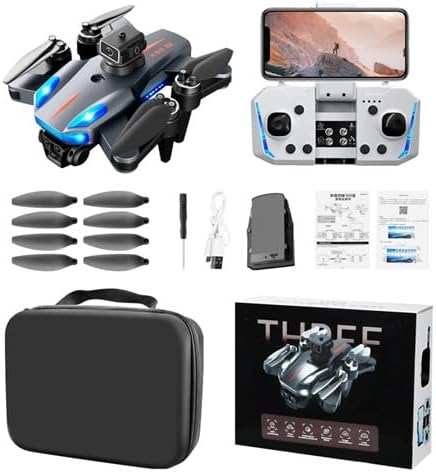
Image: The K911 SE drone, remote controller, spare propellers, charging cable, screwdriver, and user manuals are shown, all neatly packed in a carrying case, alongside the product box.
Before first use, please verify that all components are present in the package:
- K911 SE Drone
- Remote Controller
- Spare Propellers (set of 6)
- USB Charging Cable
- Screwdriver
- User Manuals
- Carrying Case
Setup
1. Unfolding the Drone
Gently unfold the drone arms until they lock into place. Ensure all four arms are fully extended and secure before proceeding.
2. Battery Installation and Charging
Insert the fully charged flight battery into the drone's battery compartment until it clicks. For charging, connect the battery to the USB charging cable and then to a 5V/2A USB power adapter (not included). The charging indicator will show the charging status.
3. Remote Controller Setup
Install 3 AA batteries (not included) into the remote controller. Extend the phone holder and securely mount your smartphone.
4. App Installation and Connection
Download the official K911 SE drone application from your smartphone's app store. Power on the drone and the remote controller. Connect your smartphone to the drone's Wi-Fi network (usually named "K911 SE_XXXX"). Open the app to establish a connection and view the live feed.
Operating Instructions
Flight Preparation
- Ensure the drone battery and remote controller batteries are fully charged.
- Choose an open area free from obstacles, people, and electromagnetic interference.
- Perform compass calibration as instructed in the app before each flight.
- Verify GPS signal strength for accurate positioning and return-to-home functions.
Basic Flight Controls
Familiarize yourself with the remote controller layout and functions. The left joystick typically controls altitude and yaw, while the right joystick controls forward/backward and left/right movement.
Advanced Flight Features

Image: An infographic displaying various features of the K911 SE drone, including 4K electric adjustment triple camera, 360° intelligent obstacle avoidance, GPS intelligent return, optical flow hovering, beauty shooting, EIS stabilized aerial photography, brushless power, HD image transmission, intelligent follow, waypoint flight, surround photography, 1.2km flight range, 20 minute range, MV production, LED night navigation lights, and gesture photography.
Intelligent Obstacle Avoidance
The drone is equipped with 360° intelligent obstacle avoidance sensors. These sensors detect obstacles in the flight path and automatically adjust the drone's trajectory to prevent collisions. Always maintain visual line of sight and do not rely solely on obstacle avoidance in complex environments.
GPS Return Functions

Image: A drone hovering with three callouts indicating "One click return", "Low power return", and "Over range return", illustrating the GPS return safeguarding flight features.
- One-Click Return: Press the Return-to-Home button on the remote controller or in the app to make the drone automatically return to its takeoff point.
- Low Power Return: If the battery level drops below a critical threshold, the drone will automatically initiate a return to home.
- Over-Range Return: If the drone loses connection with the remote controller or exceeds its operational range, it will automatically return to its takeoff point.
Waypoint Flight

Image: A drone flying over a mountainous landscape with a dotted line indicating a pre-drawn flight path on a map, demonstrating the waypoint flight feature where the drone follows a user-defined trajectory.
In the app, you can draw a desired flight path on the map. The drone will then automatically follow this trajectory, allowing for automated and precise flight routes without manual control.
Camera Operation

Image: A close-up of the K911 SE drone's triple camera system, highlighting the adjustable camera angles of 90° (remote control) and 120° (wide-angle lens).
The K911 SE features a triple camera setup with 4K resolution and EIS stabilization. The camera angle can be adjusted between 90° and 120° via the remote control or app for versatile shooting. Use the app to capture photos and videos, and to apply filters or beauty effects.

Image: Two side-by-side images demonstrating the "Add filter effect" and "Beauty shooting" features available in the drone's app for post-processing photos.
Brushless Power and Wind Resistance

Image: A close-up of the K911 SE drone's propeller and motor, emphasizing its brushless power and level 5 wind resistance, suitable for sea flight and aerial photography.
The drone's brushless motors provide enhanced durability and stable flight performance, offering level 5 wind resistance. This allows for more stable operation in moderate wind conditions and supports aerial photography over various terrains, including near water bodies.
Maintenance
- Propeller Inspection: Regularly check propellers for cracks, bends, or damage. Replace any damaged propellers immediately using the provided screwdriver and spare parts.
- Battery Care: Store batteries in a cool, dry place. Do not overcharge or over-discharge batteries. If storing for extended periods, charge them to approximately 50-60%.
- Cleaning: Use a soft, dry cloth to clean the drone body and camera lenses. Avoid using liquid cleaners that may damage electronic components.
- Storage: When not in use, fold the drone and store it in its carrying case to protect it from dust and physical damage.
Troubleshooting
| Problem | Possible Cause | Solution |
|---|---|---|
| Drone does not power on | Battery not installed correctly or discharged. | Ensure battery is fully charged and properly inserted. |
| No live video feed in app | Wi-Fi not connected or app issue. | Verify phone is connected to drone's Wi-Fi. Restart app and drone. |
| Drone drifts during flight | Improper calibration or strong wind. | Perform compass and gyroscope calibration. Fly in calmer conditions. |
| GPS return not working | Weak GPS signal or no GPS lock. | Ensure drone has acquired sufficient GPS satellites before takeoff. Fly in open areas. |
Specifications
| Feature | Detail |
|---|---|
| Brand | weidilixiang |
| Model Name | K911 SE |
| Special Feature | Foldable |
| Color | Black/Blue |
| Video Capture Resolution | 4K |
| Effective Still Resolution | 32 MP |
| Connectivity Technology | Wi-Fi |
| Included Components | Drone |
| Skill Level | Beginner |
| Item Weight | 450 Grams (15.9 ounces) |
| Remote Control Technology | 2.4GHz |
| Material | Plastic |
| Product Dimensions | 6.15"L x 6"W x 2"H |
| UPC | 635412538706 |
| Manufacturer | Vinci |
| Date First Available | December 28, 2024 |
Warranty and Support
For warranty information and technical support, please refer to the contact details provided on the product packaging or visit the official weidilixiang website. Keep your purchase receipt as proof of purchase for warranty claims.
For further assistance, you may contact customer support via:
- Email: support@weidilixiang.com
- Website: www.weidilixiang.com/support
Related documentsK911 SE

Ask a question about this manual
Ask about setup, troubleshooting, compatibility, parts, safety, or missing instructions. Manuals+ will review the question and use this page’s manual context to help answer it.