
1. Safety Instructions
To ensure safe operation and prevent injury, please read and understand all safety instructions before using the FYC JK0805L Walking Treadmill.
- Magnetic Safety Key: Always attach the magnetic safety key to your clothing before starting the treadmill. If the key is dislodged, the treadmill will immediately stop, preventing potential falls.
- Extended Handrails: Utilize the ergonomically designed extended handrails for a stable grip, especially important for users requiring additional balance support, such as seniors or individuals in recovery.
- Stable Surface: Place the treadmill on a flat, stable surface. Ensure adequate clear space around the treadmill for safe operation and emergency dismount.
- Footwear: Always wear appropriate athletic footwear while using the treadmill.
- Weight Capacity: Do not exceed the maximum user weight capacity of 300 lbs (136 kg).
- Children and Pets: Keep children and pets away from the treadmill during operation.
- Power Cord: Ensure the power cord is not pinched or damaged. Do not operate the treadmill if the power cord is compromised.
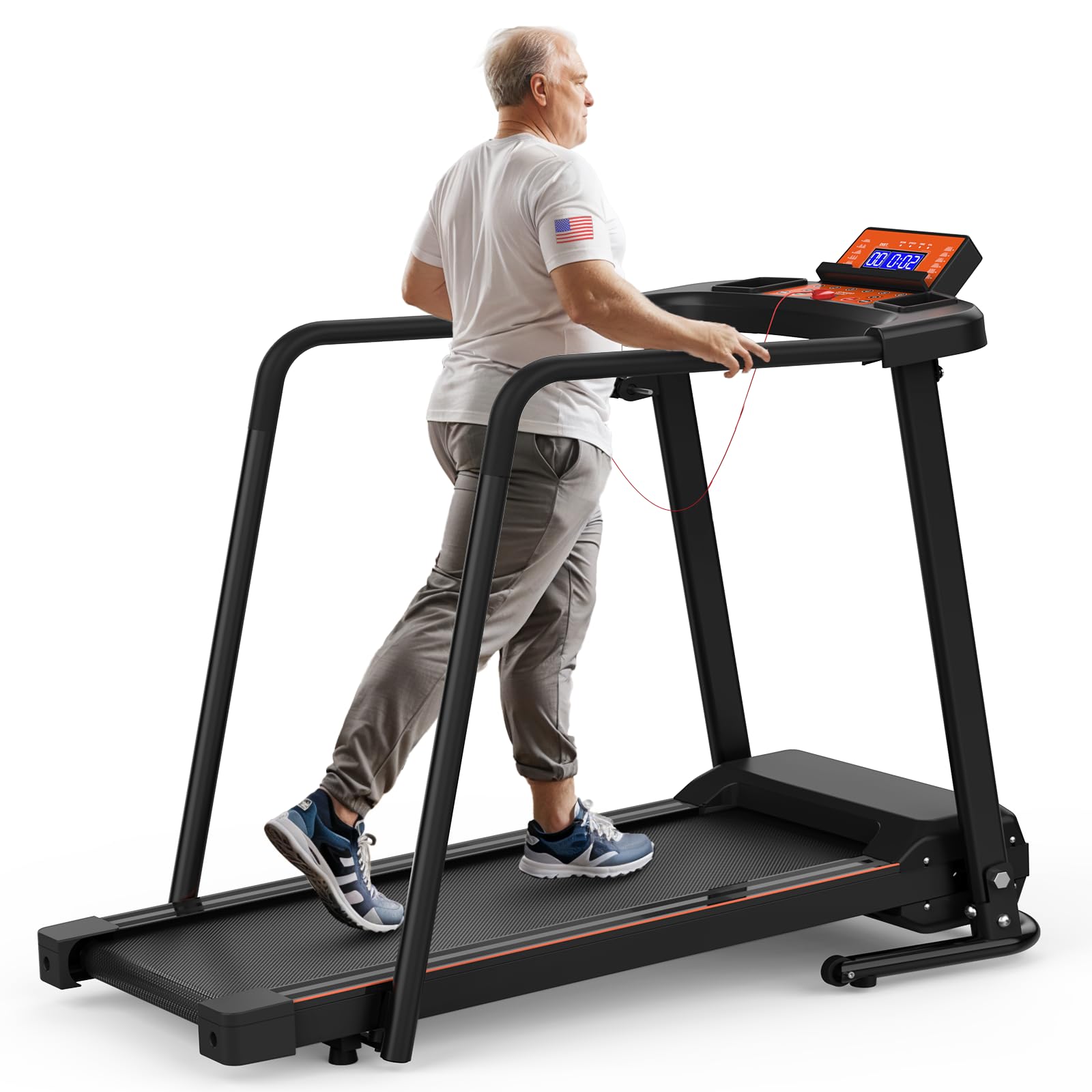
Figure 1.1: The magnetic safety key and enclosed handrails provide multi-security protection during use.
2. Setup
The FYC JK0805L Walking Treadmill is designed for straightforward assembly. Most components are pre-assembled, requiring minimal effort to prepare for use.
2.1 Unpacking and Component Check
Carefully remove all components from the packaging. Verify that all included parts are present:
- Treadmill base
- Motor housing
- Extended handrails (detachable)
- Power cord
- Magnetic safety key
- Remote control (for APP functionality)
- User manual (this document)
- Warranty documentation
2.2 Assembly Steps
- Place the treadmill base on a flat, stable surface.
- Attach the extended handrails to the designated slots on the treadmill frame. Ensure they are securely fastened. These handrails can be adjusted or removed based on user preference and space requirements.
- Connect the power cord to the treadmill and a suitable power outlet.
- Insert the magnetic safety key into its designated slot on the console. The treadmill will not operate without the safety key in place.

Figure 2.1: The treadmill fully assembled and ready for use, showing the extended handrails.
3. Operation
The FYC JK0805L Walking Treadmill offers a user-friendly interface and smart features for an enhanced exercise experience.
3.1 Console Overview
The multifunctional operating table features large, easy-to-read buttons and an LED display. It includes controls for speed, mode, start, and stop, along with a pulse sensor.

Figure 3.1: The operating console with clear controls and integrated pulse sensor.
3.2 Basic Operation
- Power On: Ensure the treadmill is plugged in and the safety key is in place. Press the 'START' button to begin.
- Adjusting Speed: Use the '+' and '-' buttons to adjust the speed from 0.5 to 6.0 MPH. Quick speed buttons (1, 2, 3, 4, 5, 6 MPH) are also available for convenience.
- Monitoring Progress: The LED display shows real-time data including Calories Burned, Distance, Speed, and Time.
- Pulse Measurement: Grip the pulse sensors on the handrails to measure your heart rate.
- Stopping the Treadmill: Press the 'STOP' button or pull the magnetic safety key to halt the treadmill.
3.3 Smart APP Control (Fitshow)
Enhance your workout with the exclusive "Fitshow" APP. Download the app to your smartphone or tablet and connect it to your treadmill for advanced features:
- Remote Control: Control treadmill functions directly from your device.
- Training Courses: Access 107 built-in training courses and customize exercise plans.
- Calorie Tracking: Record food calorie intake and receive scientific dietary suggestions.
- Virtual Running Tracks: Experience immersive running in 20 outdoor scenes and 62 virtual tracks.
- Performance Reports: Get real-time sports data and regular professional reports.

Figure 3.2: Connected smart features and personalized workout apps for an engaging experience.
3.4 Folding and Storage
The treadmill features a unique folding design and bottom wheels for easy storage and portability.
- Ensure the treadmill is stopped and powered off.
- Lift the running deck upwards until it locks into a vertical position. A latch on the side secures it.
- Utilize the integrated wheels at the base to easily roll the folded treadmill to your desired storage location.

Figure 3.3: The foldable design allows for space-saving storage and easy movement.
Video 3.1: Demonstration of the treadmill's safety features, console operation, and folding mechanism for storage.
4. Maintenance
Regular maintenance ensures the longevity and optimal performance of your FYC JK0805L Walking Treadmill.
- Cleaning: Wipe down the treadmill surfaces, including the console and handrails, with a damp cloth after each use to remove sweat and dust. Avoid using abrasive cleaners.
- Belt Lubrication: Periodically check the running belt for proper lubrication. Refer to the specific instructions in the full user manual for lubrication frequency and type of lubricant.
- Belt Tension and Alignment: Inspect the running belt for proper tension and alignment. Adjust as necessary according to the detailed instructions in the comprehensive user manual to prevent slipping or excessive wear.
- Component Tightening: Regularly check and tighten any loose bolts or screws, especially on the frame and handrails, to maintain stability and safety.

Figure 4.1: The multi-layer anti-slip and shock-absorbing running belt requires periodic inspection.
5. Troubleshooting
This section provides solutions to common issues you might encounter with your FYC JK0805L Walking Treadmill. For more complex problems, please contact customer support.
- Treadmill Not Starting:
- Ensure the power cord is securely plugged into both the treadmill and a working electrical outlet.
- Verify that the magnetic safety key is correctly placed in its slot on the console.
- Check if the main power switch (if present) is in the 'ON' position.
- Running Belt Slipping or Sticking:
- The running belt may require lubrication. Refer to the maintenance section for instructions.
- The belt tension might be incorrect. Adjust the belt tension according to the full user manual.
- Unusual Noises:
- Check for any loose components and tighten them as necessary.
- Ensure the treadmill is on a level surface.
- If the noise persists, discontinue use and contact customer support.
- Inaccurate Readings (Speed, Distance, Calories):
- Ensure the treadmill is properly calibrated (if applicable, refer to the full manual).
- For APP-related issues, ensure your device is correctly connected and the app is updated.
6. Specifications
| Model Number | JK0805L |
| Brand | FYC |
| Product Dimensions (L x W x H) | 130.05 x 60.96 x 108.2 cm (51.2 x 24 x 42.6 inches) |
| Item Weight | 27.99 kg (61.7 lbs) |
| Running Area | 41.3 x 14.2 inches |
| Maximum User Weight Capacity | 300 lbs (136 kg) |
| Motor Horsepower | 2.5 HP |
| Speed Range | 0.5 - 6.0 MPH |
| Display Type | LED |
| Displayed Metrics | Calories Burned, Distance, Speed, Time |
| Number of Programs | 12 |
| Frame Material | Alloy Steel |
| Power Source | Corded Electric |
| Special Features | Foldable, Portable, Shock Absorbent, Timer, Water Bottle Holder, Extended Handrails, APP Control |
| Color | Orange |

Figure 6.1: Key performance specifications of the treadmill, including motor power and speed range.

Figure 6.2: The dual shock absorption system provides effective joint protection.
7. Warranty and Support
FYC is committed to providing high-quality products and excellent customer service.
- Warranty: Enjoy free replacement of damaged parts within two years of purchase.
- Customer Service: Our professional customer service team is available 24/7 to assist with product usage issues or provide personalized suggestions.
- Contact: Refer to your warranty documentation or the FYC official website for contact details.


