
Product Overview
The Phanteks Glacier One 360M25 G2 AIO Liquid CPU Cooler is engineered to provide high-performance cooling for modern CPUs. This all-in-one liquid cooler features a robust design with M25 G2 fans that can be interconnected for simplified cable management. Its integrated RGB lighting and fan controls are managed through a single cable, ensuring a clean and organized system build. The cooler's large copper base and fin array are designed to efficiently dissipate heat from high-end processors, even under demanding workloads. Additionally, the design prioritizes clearance for motherboard and RAM components, and includes a mesh cap cover with an integrated fan to provide supplementary cooling to surrounding VRMs.

Figure 1: Phanteks Glacier One 360M25 G2 AIO Liquid CPU Cooler, showcasing the radiator, fans, and pump block.
Key Features:
- High-performance cooling solution designed for gamers and PC enthusiasts.
- Equipped with M25 G2 fans that can interconnect into a single frame for easier cable management.
- RGB lighting and fan control managed through a single cable for a cleaner setup.
- A large copper base and fin array ensures efficient cooling for high-end CPUs.
- Maximum clearance design for compatibility with motherboard and RAM components.
- Mesh AIO cap cover with integrated fan cools surrounding VRMs and other critical parts.
- Compatible with Intel LGA 1700, 1851, 1200, 115x, 2011, 2011-3, 2066 and AMD AM4, AM5, sTRX4, TR34, SP3, sWRX8 sockets.
Setup and Installation
Proper installation is crucial for optimal performance and longevity of your AIO liquid cooler. This section provides general guidance. Always refer to the detailed installation guide provided with your product packaging for specific, step-by-step instructions for your CPU socket type.
Compatibility:
The Glacier One 360M25 G2 is compatible with a wide range of CPU sockets, including:
- Intel Sockets: LGA 115x, 1200, 1700, 1851, 2011, 2011-3, 2066
- AMD Sockets: AM4, AM5, SP3, sTRX4, TR4, sWRX8
General Installation Steps:
- Prepare Motherboard: Install the appropriate backplate and standoffs for your CPU socket type.
- Mount Radiator and Fans: Secure the radiator to your PC case, typically at the top or front, ensuring adequate airflow. Attach the M25 G2 fans to the radiator. The daisy-chain design allows for easy connection of multiple fans.
- Apply Thermal Paste: Apply a small amount of thermal paste to the center of your CPU's integrated heat spreader (IHS).
- Install Pump Block: Carefully place the pump block onto the CPU, aligning it with the standoffs. Secure it with the provided mounting screws, tightening them in a cross pattern for even pressure.
- Connect Cables: Connect the pump power cable to the designated header on your motherboard (usually "CPU_FAN" or "AIO_PUMP"). Connect the fan and RGB cables. The M25 G2 fans and pump RGB are controlled via a single cable for a streamlined setup.

Figure 2: Illustration of the daisy-chained unified fan design, showing how fans connect together for simplified wiring.
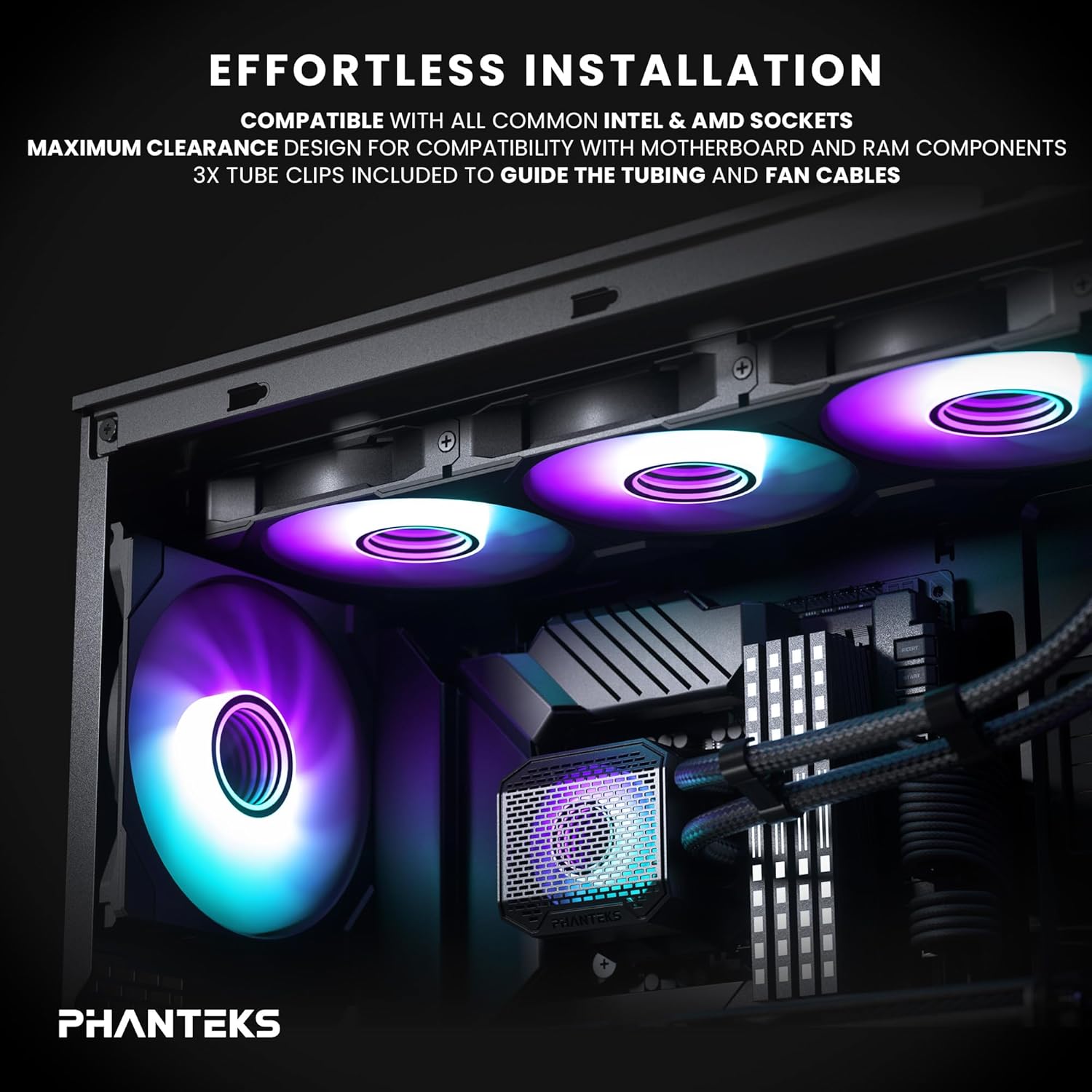
Figure 3: Depiction of the cooler installed in a PC case, highlighting maximum clearance and the use of tube clips for cable management.

Figure 4: Diagram illustrating the pump's cooling effect on the CPU and surrounding VRM components, emphasizing the integrated fan on the mesh AIO cap.
Ensure all connections are secure and tubing is not kinked. Utilize the included tube clips to guide tubing and fan cables for a tidy build.
Operating Instructions
Once installed, the Phanteks Glacier One 360M25 G2 AIO Liquid CPU Cooler operates automatically, regulating fan speeds and pump performance based on CPU temperature to maintain optimal cooling.
Fan and RGB Control:
- The M25 G2 fans and the pump's RGB lighting are controlled through a single integrated cable.
- For advanced control over fan curves and RGB lighting effects, connect the cooler to a compatible Phanteks D-RGB controller or your motherboard's D-RGB header (if supported).
- Utilize your motherboard's BIOS/UEFI settings or a compatible software utility (e.g., Phanteks software, motherboard manufacturer's software) to customize fan speeds and lighting profiles.

Figure 5: Close-up view of the M25-120 Gen2 fans, highlighting their integrated D-RGB lighting and infinity mirror hub design.
Maintenance
Regular maintenance helps ensure the long-term performance and efficiency of your liquid cooler.
- Dust Removal: Periodically clean the radiator fins and fan blades to prevent dust buildup, which can impede airflow and reduce cooling efficiency. Use compressed air or a soft brush.
- Check Tubing and Connections: Visually inspect the tubing and connections for any signs of wear, kinks, or leaks. While AIOs are sealed systems, a periodic check is recommended.
- Monitor Temperatures: Use monitoring software to keep an eye on your CPU temperatures. Significant increases in idle or load temperatures may indicate a need for further inspection or cleaning.
Do not attempt to open the sealed liquid loop or refill the coolant, as this will void the warranty and can damage the unit.
Troubleshooting
If you encounter issues with your Phanteks Glacier One 360M25 G2 AIO, consider the following common troubleshooting steps:
- High CPU Temperatures:
- Ensure the pump is running and connected to the correct motherboard header (e.g., CPU_FAN or AIO_PUMP).
- Verify that the pump block is securely mounted to the CPU with even pressure.
- Check if thermal paste was applied correctly and adequately.
- Ensure fans are spinning and oriented correctly for airflow (intake or exhaust, depending on case setup).
- Clean any dust buildup on the radiator fins and fans.
- Excessive Noise:
- Check fan speeds in BIOS/software. Adjust fan curves to reduce noise at lower temperatures.
- Ensure no cables are obstructing fan blades.
- Verify that the pump is not vibrating excessively.
- If a gurgling sound is heard, it might indicate air bubbles. Gently tilt your PC case to help move air bubbles to the radiator.
- RGB Lighting Issues:
- Confirm all RGB cables are securely connected to the controller or motherboard header.
- Check software settings for RGB control to ensure the correct lighting mode is selected.
- Ensure the D-RGB controller (if used) is powered correctly.
- No Power:
- Verify all power cables (pump, fans, RGB) are firmly connected to the motherboard and/or power supply.
- Check motherboard BIOS settings to ensure the CPU fan header is enabled and configured correctly.
If issues persist after attempting these steps, please refer to the Phanteks support website for further assistance.
Specifications
| Feature | Detail |
|---|---|
| Model Number | GO360M25G2 |
| Product Type | AIO Liquid CPU Cooler |
| Brand | Phanteks |
| Cooling Method | Water, Air |
| Compatible Devices | Desktop, Personal Computer, Gaming |
| Noise Level | 35.13 dB |
| Material | Aluminum (AL3003), Deionized Water and Propylene Glycol mix, Copper 1100, ABS plastic, CIIR rubber with black braided sleeves |
| UPC | 886523703242 |
| Number of Items | 1 |
| Package Dimensions | 18.11 x 8.5 x 5.59 inches |
| Item Weight | 1.42 Pounds |
| First Available Date | December 24, 2024 |
Warranty and Support
For detailed warranty information regarding your Phanteks Glacier One 360M25 G2 AIO Liquid CPU Cooler, please refer to the official Phanteks website or the warranty card included with your product.
If you require technical assistance, have questions about installation, or need to report an issue, please visit the official Phanteks support page:


