
Introduction
This manual provides detailed instructions for the safe operation and maintenance of your weidilixiang S160 4K HD Dual Camera Drone. The S160 drone features advanced capabilities including dual 4K HD cameras with EIS stabilization, an integrated screen remote control, optical flow hovering, and obstacle avoidance. Please read this manual thoroughly before operating your drone to ensure optimal performance and safety.
Key Features:
- ADVANCED CAMERA: Features 4K HD dual cameras with EIS (Electronic Image Stabilization) for crystal-clear aerial photography and smooth video recording.
- SMART CONTROLLER: Built-in screen remote controller eliminates need for phone connection, offering direct video feed and intuitive flight controls.
- FLIGHT FEATURES: Equipped with optical flow positioning, obstacle avoidance, and one-click takeoff/landing for stable and safe operation.
- BRUSHLESS MOTORS: Professional-grade brushless motor system provides efficient cooling, reduced noise, and extended flight performance.
- INTELLIGENT MODES: Supports multiple flight modes including trajectory flight, 3D tumbling, gesture control for photos/videos, and 360-degree rotation capabilities.
What's in the Box
Please verify that all components listed below are included in your package:
- S160 Drone
- Screen Remote Control
- Propellers (Spare set)
- Screwdriver
- USB Charging Cable
- Storage Case
- Battery (Quantity as per purchased version)
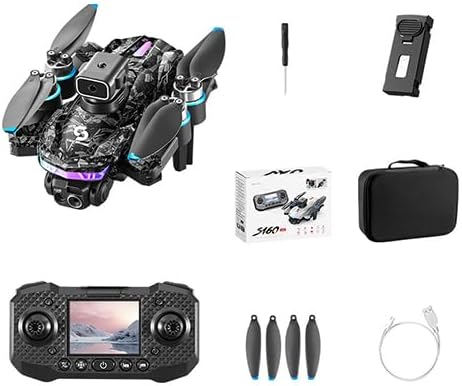
Image: All components included in the S160 Drone package.
Setup Guide
1. Battery Installation and Charging
The drone and remote control require charging before first use. Use the provided USB charging cable.
- Drone Battery: Insert the drone battery into the battery compartment on the rear of the drone until it clicks into place. Connect the charging cable to the battery and a USB power source. The indicator light will show charging status.
- Remote Control Battery: The remote control has a built-in rechargeable battery. Connect the USB charging cable to the remote control's charging port and a USB power source.
2. Propeller Installation
Ensure propellers are correctly installed on the corresponding motor arms. Each propeller is marked (A or B) and must match the motor arm's marking.
- Identify propellers marked 'A' and 'B'.
- Match 'A' propellers to 'A' motor arms and 'B' propellers to 'B' motor arms.
- Secure each propeller with the provided screws using the screwdriver. Ensure they are firmly attached but not overtightened.

Image: The S160 drone and its screen remote control.
Operating Instructions
1. Power On/Off
- Drone: Press and hold the power button on the drone until the indicator lights turn on.
- Remote Control: Press and hold the power button on the remote control until the screen illuminates.
2. Pairing the Drone and Remote Control
After powering on both devices, place the drone on a flat, level surface. Push the left joystick on the remote control up and then down. The drone's indicator lights will stop flashing and become solid, indicating successful pairing.
3. Takeoff and Landing
- One-Key Takeoff: After pairing, press the one-key takeoff/landing button on the remote control. The drone will automatically ascend to a stable hovering height.
- Manual Takeoff: After pairing, push both joysticks down and outwards simultaneously to unlock the motors. Slowly push the left joystick up to ascend.
- One-Key Landing: Press the one-key takeoff/landing button again. The drone will automatically descend and land.
- Manual Landing: Slowly pull the left joystick down to descend. Once landed, push both joysticks down and inwards to lock the motors.
4. Flight Controls
The S160 drone utilizes a standard control scheme:
- Left Joystick (Throttle/Yaw):
- Up/Down: Ascend/Descend
- Left/Right: Rotate Left/Right (Yaw)
- Right Joystick (Forward/Backward/Side-to-Side):
- Up/Down: Fly Forward/Backward
- Left/Right: Fly Left/Right (Strafe)
5. Advanced Flight Features
- Optical Flow Positioning: The drone uses optical flow sensors for stable hovering, especially indoors or at low altitudes.
- Obstacle Avoidance: The S160 is equipped with sensors to detect and avoid obstacles, enhancing flight safety.
- Trajectory Flight: Draw a path on the remote control's screen (if supported by the interface), and the drone will follow it.
- 3D Tumbling: Press the 3D tumbling button and move the right joystick in a desired direction to perform a flip. Ensure sufficient altitude.
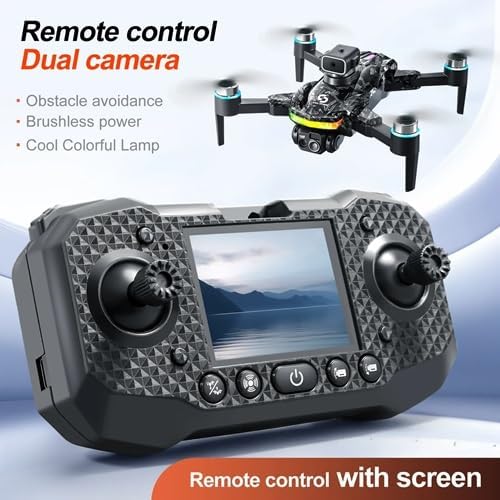
Image: Overview of S160 drone's powerful performance features.
6. Camera Operation
The S160 drone features dual 4K HD cameras with EIS for high-quality aerial photography and video.
- Taking Photos: Press the photo button on the remote control.
- Recording Videos: Press the video button on the remote control to start/stop recording.
- Gesture Control: Perform specific hand gestures (refer to remote control manual for details) to trigger photo or video capture.
- Multi-Zoom: Use the zoom function on the remote control to adjust the camera's field of view.

Image: The S160 drone's screen remote control.
Maintenance
Regular maintenance ensures the longevity and optimal performance of your S160 drone.
1. Cleaning
- Use a soft, dry cloth to clean the drone body, camera lenses, and sensors.
- Avoid using liquid cleaners or solvents that could damage electronic components.
2. Propeller Care
- Inspect propellers for cracks, bends, or damage before each flight. Replace any damaged propellers immediately using the provided spare parts.
- Ensure propellers are free from debris (grass, hair, etc.) that could impede rotation.
3. Battery Care
- Store batteries in a cool, dry place away from direct sunlight.
- Do not overcharge or over-discharge batteries. Disconnect the charger once charging is complete.
- If storing for extended periods, charge batteries to approximately 50% capacity.
4. Motor Inspection
Periodically check the brushless motors for any signs of wear or obstruction. Ensure they spin freely.
Troubleshooting
If you encounter issues with your S160 drone, refer to the following common problems and solutions:
| Problem | Possible Cause | Solution |
|---|---|---|
| Drone does not power on. | Low battery or battery not installed correctly. | Charge the drone battery fully. Ensure the battery is securely inserted. |
| Remote control does not power on. | Low battery. | Charge the remote control battery. |
| Drone does not pair with remote control. | Incorrect pairing procedure or interference. | Ensure both devices are powered on. Repeat the pairing procedure (joystick up/down). Move to an area with less interference. |
| Drone drifts during flight. | Uneven surface during calibration or strong wind. | Recalibrate the drone on a flat surface. Avoid flying in strong winds. |
| Poor camera image quality. | Dirty lens or insufficient lighting. | Clean the camera lens. Ensure adequate lighting conditions for photography/videography. |
| Propellers not spinning. | Motors locked or obstruction. | Ensure motors are unlocked (joysticks down and out). Check for any obstructions around the propellers. |
Specifications
| Feature | Detail |
|---|---|
| Brand | weidilixiang |
| Model Name | S160 |
| Special Feature | Foldable |
| Color | Upgraded screen control version black 1 battery |
| Video Capture Resolution | 4K |
| Effective Still Resolution | 32 MP |
| Connectivity Technology | Wi-Fi |
| Included Components | Drone |
| Skill Level | Beginner |
| Item Weight | 460 Grams (1.01 pounds) |
| Video Capture Format | MP4 |
| Remote Control Technology | 2.4ghz |
| Control Type | Remote Control |
| Material | Plastic |
| Wireless Communication Technology | RF |
| Product Dimensions | 6.15"L x 6"W x 2"H |
| Optical Sensor Technology | Optical Flow |
| UPC | 635412538683 |
| Manufacturer | Vinci |
| Date First Available | December 27, 2024 |
Warranty and Support
For warranty information and technical support, please refer to the contact details provided with your product packaging or visit the official weidilixiang website. Keep your purchase receipt as proof of purchase for any warranty claims.
If you require further assistance or have questions not covered in this manual, please contact weidilixiang customer service.