1. Introduction
Thank you for choosing the INKBIRD Professional Vacuum Sealer Machine. This manual provides essential information for the safe and efficient operation, maintenance, and troubleshooting of your new appliance. Please read this manual thoroughly before first use and keep it for future reference.

Image: The INKBIRD Professional Vacuum Sealer Machine, Model B0DRP114SK, shown with various food items, highlighting its versatility for food preservation.
2. Safety Instructions
- Read all instructions before using the appliance.
- Do not immerse the power cord, plug, or appliance in water or other liquids.
- Close supervision is necessary when the appliance is used by or near children.
- Unplug from outlet when not in use and before cleaning.
- Do not operate any appliance with a damaged cord or plug, or after the appliance malfunctions or has been damaged in any manner.
- Use the appliance only for its intended household use.
- Do not use outdoors.
- Always ensure the lid is properly closed and locked before operating.
- Avoid contact with moving parts.
3. Product Overview
3.1 Components
The INKBIRD Professional Vacuum Sealer Machine is designed for efficient food preservation. Key components include the control panel, sealing bar, vacuum chamber, and integrated roll storage with cutter.

Image: A top-down view of the INKBIRD Professional Vacuum Sealer Machine, showcasing its sleek design and control panel.
3.2 Control Panel and Modes
The machine features an intuitive control panel with various modes to suit different food types and sealing requirements.

Image: The control panel displaying six food modes: Dry, Moist, Liquid, Gentle, Normal, Pulse, Seal Only, and External Vacuum. This allows for precise sealing based on food consistency.
4. Setup
4.1 Unpacking and Contents
Carefully remove all components from the packaging. Verify that all items listed below are included:
- INKBIRD Vacuum Sealer Machine
- 5 x Vacuum Bags (20x30cm)
- 1 x Vacuum Roll (28x500cm)
- 1 x Air Suction Hose
- 1 x Replacement Foam Gasket
- 1 x User Manual
- 1 x Power Cord
- Self-adhesive labels

Image: A visual representation of all items included in the package: the vacuum sealer, various bags and rolls, an air suction hose, a replacement gasket, user manual, power cord, and labels.
4.2 Initial Placement and Power Connection
- Place the vacuum sealer on a flat, stable, and dry surface.
- Ensure there is enough space around the machine for proper ventilation.
- Plug the power cord into a suitable electrical outlet.
4.3 Using the Integrated Roll Storage and Cutter
The machine features a convenient storage compartment for vacuum sealer rolls and an integrated cutter to create custom-sized bags.
- Open the lid of the vacuum sealer.
- Place a vacuum sealer roll into the designated storage area. The machine can accommodate rolls up to 6 meters long and 30cm wide.
- Pull out the desired length of bag material.
- Use the integrated cutter to cut the bag to your preferred size.
- Seal one end of the cut bag using the 'Seal Only' function (refer to Operating Instructions).

Image: The vacuum sealer with its lid open, showing the integrated compartment for storing a vacuum roll and the sliding cutter mechanism for creating custom-sized bags.
5. Operating Instructions
5.1 Basic Vacuum Sealing (Dry Food)
- Place the food item into a vacuum sealer bag, leaving at least 7-10 cm of space between the food and the top edge of the bag.
- Ensure the open end of the bag is clean and dry.
- Place the open end of the bag into the vacuum chamber. Ensure it lies flat across the sealing bar.
- Close the lid of the vacuum sealer. The machine features an automatic locking mechanism for one-hand operation.
- Select the 'Dry' food mode on the control panel.
- Press the 'Vac&Seal' button. The machine will automatically remove air from the bag and then seal it.
- Once the process is complete, the indicator light will turn off. Open the lid and remove the sealed bag.

Image: A hand operating the INKBIRD Vacuum Sealer, demonstrating the automatic locking feature that allows for convenient one-hand sealing of food items like meat.
5.2 Using Different Modes
The INKBIRD vacuum sealer offers multiple modes for optimal preservation of various food types:
- Dry Mode: Ideal for solid, dry foods like nuts, cereals, and dried fruits.
- Moist Mode: Suitable for foods with some moisture, such as raw or marinated meats and vegetables.
- Liquid Mode: Designed for foods with significant liquid content, like soups or stews. Use with caution and ensure sufficient headspace.
- Gentle Mode: Reduces vacuum pressure for delicate foods that might be crushed under full vacuum.
- Normal Mode: Standard vacuum pressure for most food items.
- Pulse Mode: Allows manual control over the vacuum process. Press and hold to vacuum, release to stop, then press 'Seal' to seal. Useful for very delicate items or when precise vacuum control is needed.
- Seal Only: Seals bags without vacuuming. Useful for making bags from rolls or sealing delicate items after manual air removal.
- External Vacuum: Connect the included hose to the external vacuum port to vacuum seal canisters or wine stoppers.

Image: A detailed view of the INKBIRD Vacuum Sealer's control panel, illustrating the six distinct operating modes (Dry, Moist, Liquid, External Vacuum, Pulse, Seal Only) and examples of food types suitable for each mode.
5.3 Variable Settings
The machine allows adjustment of vacuum force and sealing time for optimal results.
- Vacuum Force Control: Choose between 'Gentle' or 'Normal' vacuum pressure depending on the food's fragility.
- Sealing Time Control: Adjust the sealing time from level 1 to 5 based on the bag's thickness. Level 3 is the default. Thicker bags may require a longer sealing time.
- Sealing Countdown: The LED screen displays a countdown during the sealing process.

Image: The control panel highlighting the variable settings for vacuum force (Gentle/Normal) and sealing time (levels 1-5), along with a digital countdown display for the sealing process.
6. Maintenance and Cleaning
6.1 Cleaning the Vacuum Chamber
The vacuum chamber is designed to be detachable for easy cleaning, preventing liquid buildup and ensuring hygiene.
- Ensure the appliance is unplugged before cleaning.
- Carefully detach the vacuum chamber component.
- Wash the detachable part with warm, soapy water. It can hold up to 300ml of liquid, reducing the need for frequent cleaning.
- Rinse thoroughly and dry completely before reattaching to the main unit.
- Wipe the exterior of the machine with a damp cloth. Do not use abrasive cleaners.
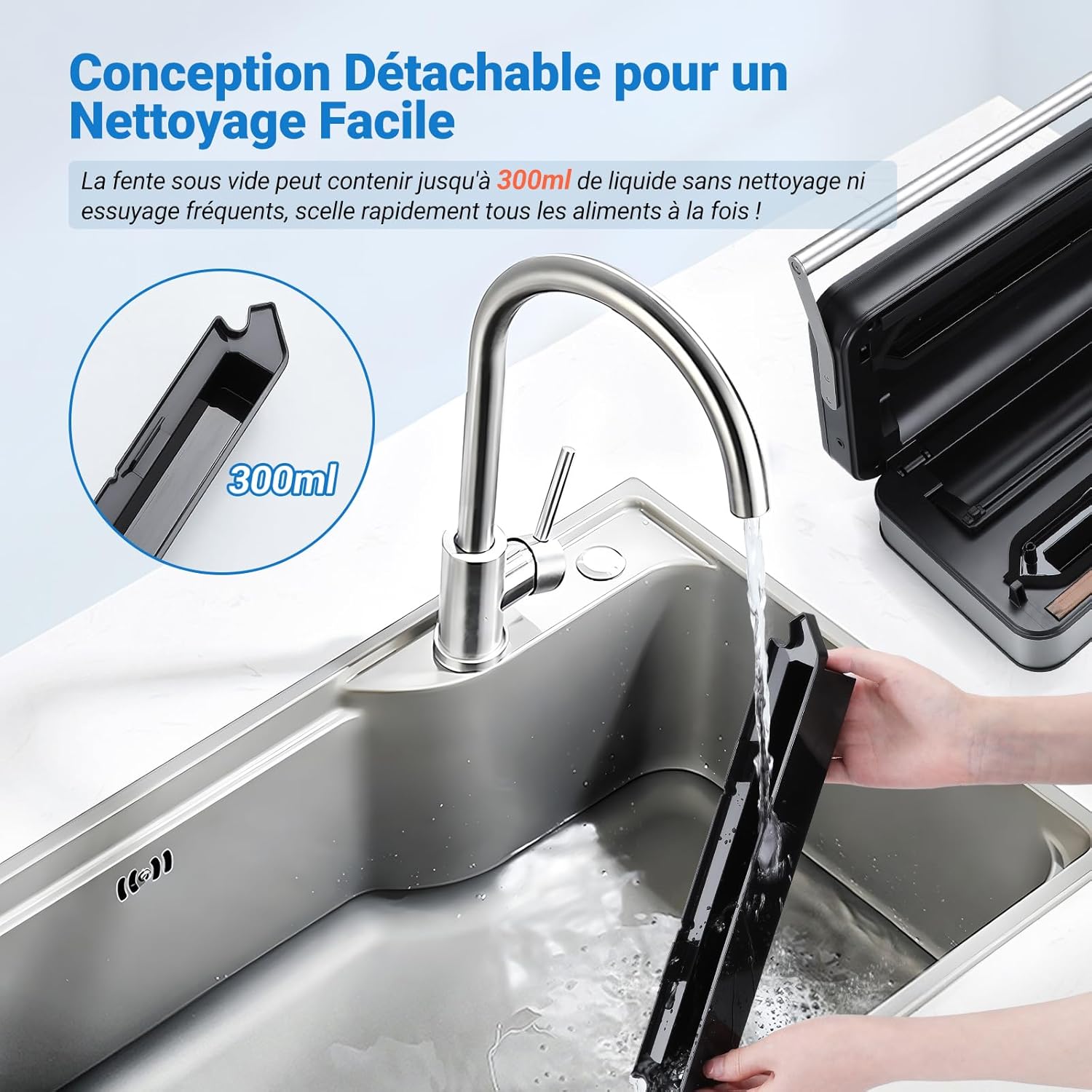
Image: The detachable vacuum slot of the INKBIRD Vacuum Sealer being cleaned under running water, illustrating its easy-to-clean design which can hold up to 300ml of liquid.
6.2 Replacing the Sealing Strip
The sealing strip is a wear-and-tear part. If seals become inconsistent, the strip may need replacement. A replacement foam gasket is included with your purchase.
- Ensure the machine is unplugged and cooled down.
- Carefully peel off the old sealing strip from the sealing bar.
- Clean the area where the strip was located.
- Align the new sealing strip and press it firmly into place along the sealing bar.
7. Troubleshooting
| Problem | Possible Cause | Solution |
|---|---|---|
| Machine does not turn on | No power supply | Check if the power cord is securely plugged into the outlet and the machine. Test the outlet with another appliance. |
| Machine vacuums but does not seal | Bag not positioned correctly; Sealing strip worn out; Sealing time too short | Ensure the bag opening is flat and within the vacuum chamber. Replace the sealing strip if worn. Increase the sealing time setting. |
| Machine does not vacuum properly | Lid not closed/locked; Bag opening not clean/dry; Foam gasket damaged; Bag has holes | Ensure the lid is fully closed and locked. Clean and dry the bag opening. Inspect and replace the foam gasket if damaged. Use a new bag. |
| Overheating protection activated | Continuous use for too long | Allow the machine to cool down for 15-30 minutes before resuming operation. The machine is designed for 24 hours of continuous work, but excessive rapid use might trigger protection. |
8. Specifications
| Feature | Specification |
|---|---|
| Brand | Inkbird |
| Model | B0DRP114SK |
| Color | Silver |
| Product Dimensions (L x W x H) | 39.6 x 24 x 11.5 cm |
| Item Weight | 3.68 Kilograms |
| Power Source | Corded Electric |
| Operating Mode | Manual (button-controlled) |
| Power | 160 Watts |
| Vacuum Speed | 20 L/min |
| Vacuum Pressure | 80 Kpa |
| Sealing Width | 5 mm |
| Max Sealing Length | 32 cm |
| Voltage | 110-120V / 220-240V (Universal) |
| Continuous Operation | Up to 24 hours |
9. Warranty and Support
INKBIRD products are manufactured to high-quality standards. For warranty information, technical support, or service inquiries, please refer to the contact information provided on the official INKBIRD website or your purchase documentation. Please retain your proof of purchase for warranty claims.


