
1. Important Safety Information
Please read all instructions carefully before installation and use. Retain this manual for future reference.
- Electrical Safety: Ensure the toilet is connected to a properly grounded electrical outlet. Do not immerse the unit in water. Disconnect power before cleaning or servicing.
- Water Supply: Ensure water supply is turned off during installation. Use only potable water.
- Installation: Professional installation by a qualified plumber and electrician is recommended to ensure proper function and safety.
- Cleaning: Use mild, non-abrasive cleaners. Avoid harsh chemicals that may damage surfaces.
- Children and Individuals with Reduced Capabilities: This appliance can be used by children aged 8 years and above and persons with reduced physical, sensory or mental capabilities or lack of experience and knowledge if they have been given supervision or instruction concerning use of the appliance in a safe way and understand the hazards involved. Children shall not play with the appliance. Cleaning and user maintenance shall not be made by children without supervision.
2. Package Contents
Verify that all components are present before beginning installation:
- CANEST Smart Toilet Unit (TC-300BK)
- Wireless Remote Control
- Sealing Flange
- Installation Cardboard Template
- User Manual (this document)
- Angle Valve
- Mounting Accessory Kit
3. Product Overview
The CANEST TC-300BK Smart Toilet integrates advanced features for enhanced hygiene and comfort.

Figure 3.1: Front view of the CANEST Smart Toilet TC-300BK. This image displays the sleek, one-piece design of the smart toilet, featuring a white ceramic body and a dark grey top panel with an integrated LED display. A remote control is mounted on the wall to the left.
Key Features:
- Heated Seat: Adjustable temperature settings for comfort.
- Bidet Functions: Rear wash, front wash, and oscillating cleanse with adjustable water temperature and pressure.
- Warm Air Dryer: Adjustable temperature for post-wash drying.
- Self-Cleaning Nozzle: Automatic cleaning of the bidet nozzle before and after each use.
- Foot Sensor: Activates lid opening or flushing for hands-free operation.
- Automatic Deodorization: Integrated system to maintain a fresh bathroom environment.
- Night Light: Soft LED illumination for nighttime visibility.
- Remote Control: Wireless control for all functions.
- Powerful Flush: 1.28 GPF pump-assisted flush with Jet Siphon technology.
- Soft Close Lid & Seat: Prevents slamming and reduces noise.
4. Setup and Installation
Installation of the CANEST Smart Toilet TC-300BK requires plumbing and electrical connections. It is strongly recommended that installation be performed by a qualified professional.
Pre-Installation Checks:
- Ensure a 12-inch rough-in measurement from the wall to the center of the drain pipe.
- Verify availability of a grounded electrical outlet (120V AC, 60Hz) within reach of the toilet's power cord.
- Confirm water supply line is accessible and can be shut off.

Figure 4.1: Dimensions of the CANEST Smart Toilet. This diagram illustrates the toilet's measurements: 28 inches deep, 16.7 inches wide, and 19.9 inches high from the floor to the top of the seat. It also indicates a 12-inch rough-in requirement.
Installation Steps (Summary - Refer to detailed guide in packaging):
- Prepare Area: Turn off water supply, remove old toilet, clean the flange area.
- Install Sealing Flange: Secure the new sealing flange to the floor drain.
- Position Toilet: Carefully place the toilet unit over the flange, aligning it correctly.
- Secure Toilet: Use the mounting accessory kit to firmly secure the toilet to the floor.
- Connect Water Supply: Connect the angle valve and water supply line to the toilet. Turn on water supply and check for leaks.
- Connect Power: Plug the toilet into the grounded electrical outlet.
- Test Functions: Perform initial flush and test bidet functions.
5. Operating Instructions
The CANEST Smart Toilet TC-300BK can be operated via the wireless remote control or the side shortcut key.

Figure 5.1: Remote Control and Shortcut Key for CANEST Smart Toilet. This image shows the layout of the wireless remote control with buttons for various functions like Stop, Rear Wash, Front Wash, Dryer, Nozzle Position, Water Pressure, Water Temp, Wind Temp, and Seat Temp. It also illustrates the side shortcut key for basic operations.
Remote Control Functions:
- Stop: Halts any active bidet or drying function.
- Rear Wash: Activates posterior cleansing.
- Front Wash (Female Wash): Activates feminine cleansing.
- Dryer: Activates warm air drying.
- Nozzle Position: Adjusts the bidet nozzle's position.
- Water Pressure: Adjusts the water spray intensity.
- Water Temp: Adjusts the water temperature for washing.
- Wind Temp: Adjusts the warm air dryer temperature.
- Seat Temp: Adjusts the heated seat temperature.
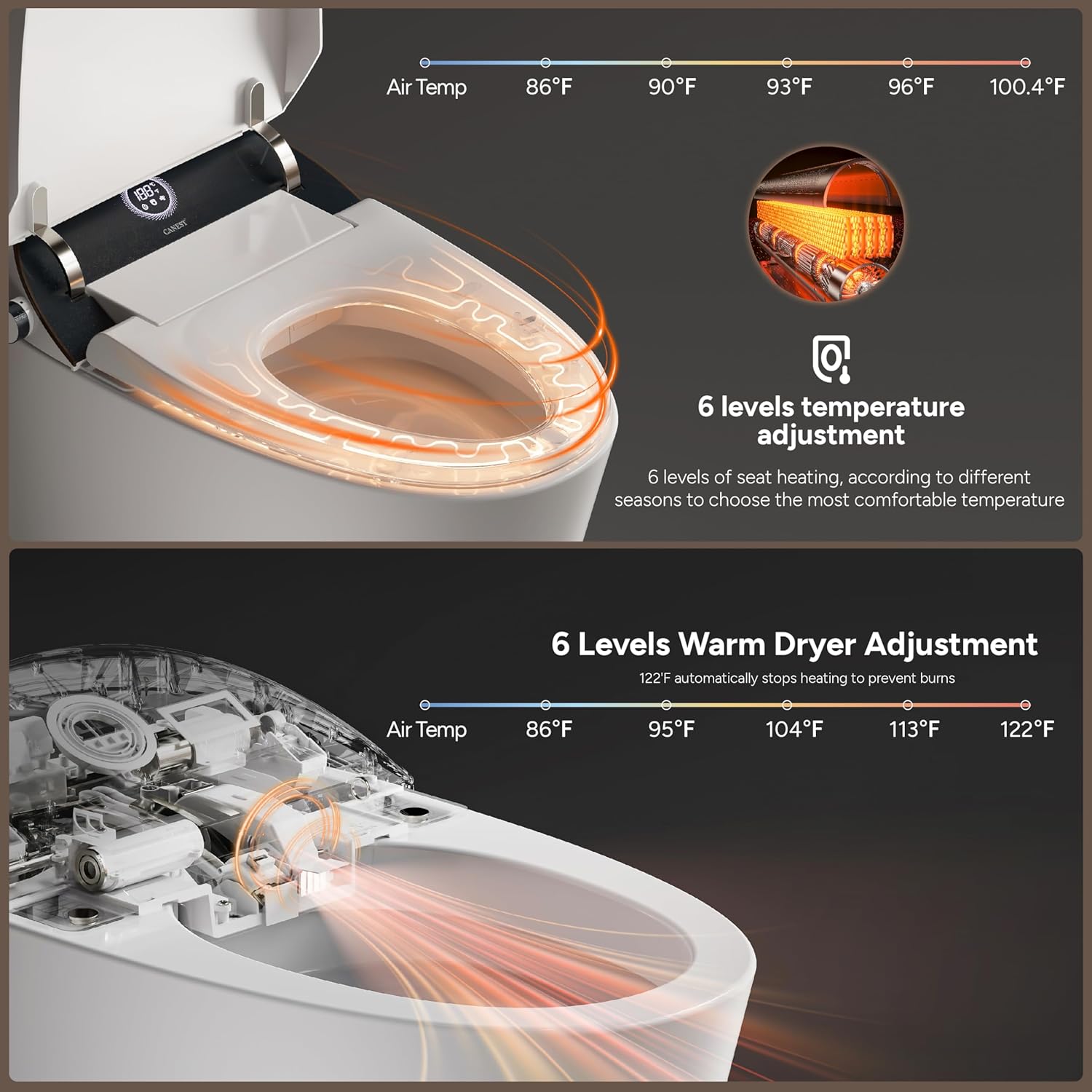
Figure 5.2: Heated Seat and Warm Dryer Temperature Adjustment. This image shows the six levels of temperature adjustment for both the heated seat (ranging from 86°F to 100.4°F) and the warm air dryer (ranging from 86°F to 122°F), indicating automatic shut-off at 122°F to prevent burns.
Bidet Cleaning Modes:

Figure 5.3: Multiple Cleaning Modes of the CANEST Smart Toilet. This image illustrates the various bidet functions: Rear Wash, Front Wash, Oscillating Cleanse, and Self-cleaning Nozzle. It also highlights the removable nozzle for easy maintenance and adjustable water temperature.
- Rear Wash: For posterior cleaning.
- Front Wash: For feminine hygiene.
- Oscillating Cleanse: The nozzle moves back and forth for a wider cleaning area.
- Self-cleaning Nozzle: The nozzle automatically cleans itself before and after use.
Other Automatic Functions:
- Foot Sensor: Gently tap your foot near the sensor at the base of the toilet to activate lid opening or flushing.
- Off-Seat Auto Flush: The toilet will automatically flush a small amount of water after you stand up.
- Night Light: The soft LED night light activates in low-light conditions for visibility.
- Automatic Deodorization: The system automatically activates to neutralize odors.
- Soft Close Lid & Seat: The lid and seat close slowly and quietly to prevent slamming.

Figure 5.4: Soft Close Lid and Seat. This image demonstrates the slow, controlled closing mechanism of the toilet lid and seat, highlighting the soft-close feature.
6. Maintenance and Cleaning
Regular cleaning and maintenance will ensure the longevity and optimal performance of your CANEST Smart Toilet.
General Cleaning:
- Exterior: Wipe the exterior surfaces with a soft, damp cloth and a mild, non-abrasive cleaner. Avoid spraying water directly onto electrical components.
- Seat: Clean the seat with a soft cloth and mild soap. Do not use harsh detergents or abrasive pads.
- Bowl: Use a standard toilet bowl cleaner and brush for the ceramic bowl.
Nozzle Cleaning:

Figure 6.1: Hygienic Nozzle Feature. This image highlights the self-cleaning mechanism of the bidet nozzle, showing it being effectively deep cleaned after each use to ensure hygiene.
- The bidet nozzle performs an automatic self-cleaning cycle before and after each use.
- For manual cleaning, gently pull out the nozzle and wipe it with a soft cloth and mild soap. Do not use excessive force.
- The nozzle is removable for thorough cleaning if necessary. Refer to the detailed manual for removal instructions.
Filter Maintenance:
- Periodically check the water inlet filter for debris. Clean or replace as needed to maintain optimal water flow.
7. Troubleshooting
If you encounter issues with your CANEST Smart Toilet, refer to the following common problems and solutions:
| Problem | Possible Cause | Solution |
|---|---|---|
| No power/LED display off | Power cord unplugged, circuit breaker tripped, power outage. | Check power connection, reset circuit breaker, verify power supply. |
| No water spray/weak spray | Water supply valve closed, water filter clogged, low water pressure. | Open water supply valve, clean water filter, check household water pressure. |
| Heated seat not working | Heated seat function off, temperature setting too low. | Activate heated seat via remote, increase temperature setting. |
| Toilet not flushing | Power outage, sensor obstruction, flush mechanism issue. | Check power. For power outages, use the built-in battery box for emergency flush. Clear any obstructions around sensors. If problem persists, contact support. |
| Remote control not responding | Batteries low/dead, remote out of range, signal obstruction. | Replace remote batteries, ensure remote is within range, remove obstructions. |
If the problem persists after attempting these solutions, please contact CANEST customer support.
8. Specifications
| Feature | Specification |
|---|---|
| Model Number | TC-300BK |
| Color | White |
| Product Dimensions (D x W x H) | 28" x 16.7" x 19.9" |
| Rough-in | 12 inches |
| Material | Ceramic (Toilet), Plastic (Seat) |
| Item Weight | 94.8 pounds (43.09 Kilograms) |
| Flush Volume | 1.28 Gallons Per Flush (GPF) |
| Flush Type | Pump-assisted, Jet Siphon |
| Installation Type | Floor Mounted |
| Power Supply | 120V AC, 60Hz (Standard US) |
| Included Components | Remote Control, Sealing Flange, Installation Cardboard, User Manual, Angle Valve, Mounting Accessory Kit |
9. Warranty and Support
For warranty information or technical assistance, please contact CANEST customer support. Details can typically be found on the CANEST official website or through your purchase documentation.
When contacting support, please have your model number (TC-300BK) and purchase date available.


