
1. Introduction
The SYLSTAR 2-in-1 LED Work Light (Model WL013) is a versatile and powerful lighting solution designed for various tasks, from automotive repair to workshop use. This manual provides essential information for the safe and effective operation of your device. Please read it thoroughly before use and retain it for future reference.

Image 1.1: The SYLSTAR 2-in-1 LED Work Light in use, illuminating an engine bay. The image shows the light split into two units, attached magnetically under the hood, providing bright illumination.
2. Safety Information
- Do not look directly into the LED light source when it is active, as this may cause eye damage.
- Keep the device away from extreme heat, open flames, and highly flammable materials.
- Do not immerse the device in water. While designed for damp environments, it is not fully waterproof.
- Do not attempt to disassemble, modify, or repair the device. Contact customer support for assistance.
- Use only the provided USB-C charging cable or a certified equivalent.
- Keep out of reach of children.
3. Package Contents
Please check the package contents upon receipt:
- 1x SYLSTAR 2-in-1 LED Work Light (Model WL013)
- 1x USB-C Charging Cable
- 1x User Manual
4. Product Features
The SYLSTAR WL013 LED Work Light offers a range of features for enhanced utility:
- Dual Lighting Functionality: Can be used as two independent portable lights or connected to form a single unit with up to 2400 lumens brightness.
- Sensor Control: An infrared sensor allows for hands-free operation (on/off) with a simple gesture.
- Multiple Brightness Modes: Features High, Low, and Flashing Red light modes to suit different needs.
- High Luminosity & Long Battery Life: Provides 2400 lumens and is equipped with a 4400mAh rechargeable battery, offering up to 4 hours of high brightness or 4.5 hours of low brightness.
- Magnetic Base & Concealed Hooks: Two powerful magnets on each end ensure stable attachment to metallic surfaces. Concealed 360° rotatable hooks allow for easy suspension.
- 360° Rotatable Body: The light body can rotate 360° to direct illumination precisely where needed.
- Durable Construction: Made from impact-resistant ABS material with an anti-slip coating for durability and grip.
- USB-C Charging: Convenient and fast charging via a USB-C port.
- Battery Level Indicators: Four power indicators show the remaining battery level.

Image 4.1: Illustration of the three light modes (High, Low, Red Strobe) and the USB-C charging port with battery indicators. The image also highlights the 2x 2200mAh rechargeable batteries.
5. Setup
5.1 Initial Charging
Before first use, fully charge the work light. Connect the provided USB-C cable to the charging port on the light and plug the other end into a compatible USB power adapter (not included). The battery indicators will illuminate during charging and show full when complete.
5.2 Assembling/Detaching the Lights
The SYLSTAR WL013 can be used as a single long light or two separate units. To detach, gently pull the two light sections apart at the central connection point. To reassemble, align the male and female connectors and push them together until they click securely.
5.3 Mounting Options
- Magnetic Attachment: Use the powerful magnets located at each end of the light to attach it securely to metallic surfaces, such as under a car hood or on a metal workbench.
- Hook Suspension: Extend the concealed hooks from the ends of the light. These hooks rotate 360°, allowing you to hang the light from various fixtures or non-metallic surfaces.

Image 5.1: Demonstrates the strong magnetic bases for attaching the light to metallic surfaces and the 360-degree swivel hooks for hanging, providing hands-free operation.
6. Operating Instructions
6.1 Power On/Off and Mode Selection
Press the power button once to turn the light on. Subsequent presses will cycle through the brightness modes: High Brightness > Low Brightness > Flashing Red > Off.
6.2 Activating Sensor Mode
To activate the sensor mode, press and hold the power button for approximately 2 seconds. The light will flash briefly to indicate that sensor mode is active. In sensor mode, you can turn the light on or off with a simple wave of your hand in front of the infrared sensor.
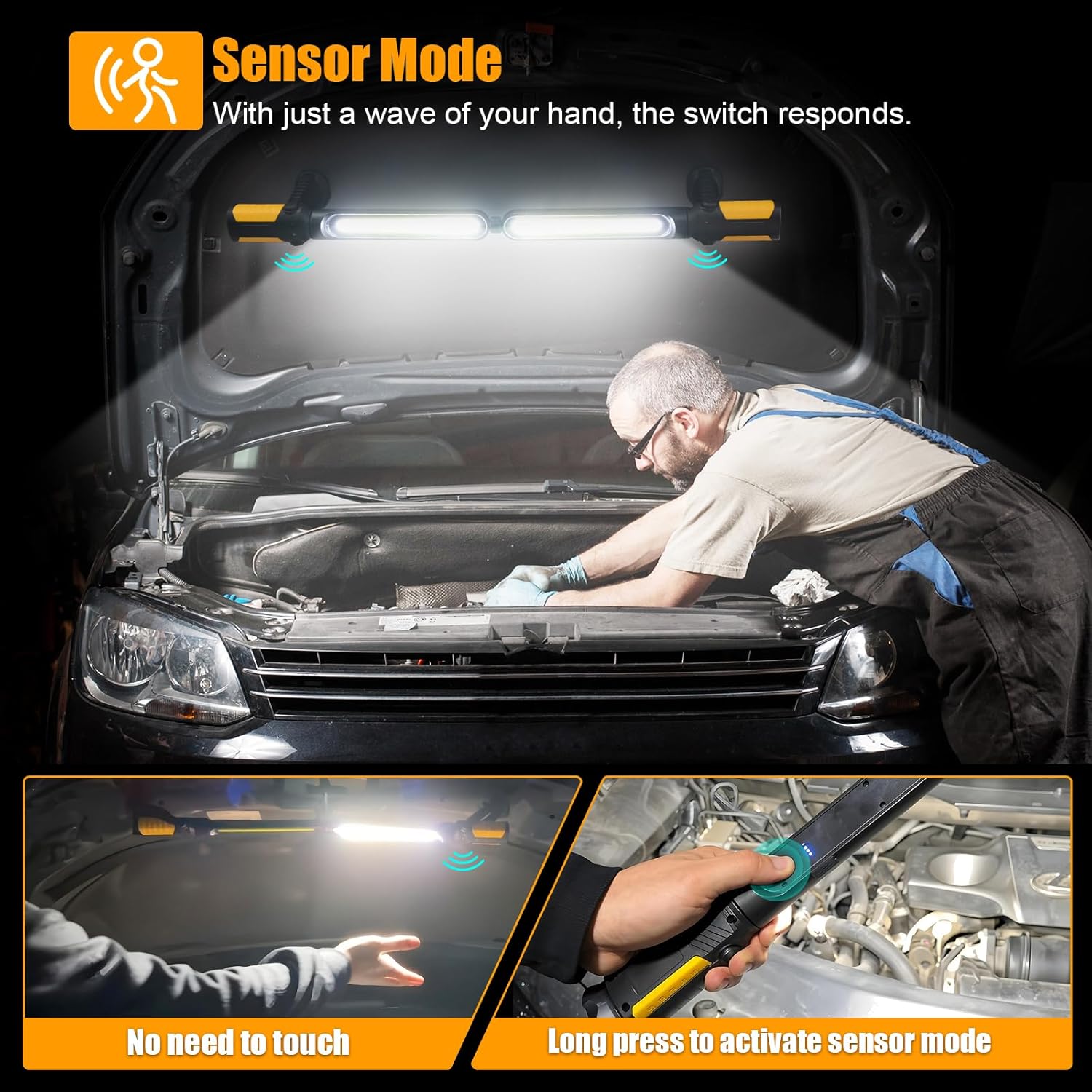
Image 6.1: Illustrates the sensor mode feature, showing a hand gesture to activate the light without physical contact, and the long press action on the button to enable sensor mode.
6.3 Adjusting Light Angle
The main body of the light can be rotated 360° at its central pivot point. Additionally, the bases at each end can be adjusted up to 300° and the light panels themselves up to 350°, allowing for precise directional lighting.

Image 6.2: Shows the multi-angle light adjustment, highlighting the 360° rotation of the main body and the 350° adjustment capability of the light panels at each end.
7. Charging
When the battery level is low, the battery indicators will show fewer illuminated segments. To charge, connect the USB-C cable to the charging port. The indicators will flash during charging and remain solid when fully charged. A full charge typically takes approximately 3-4 hours.
8. Maintenance
8.1 Cleaning
Wipe the device with a soft, damp cloth. Do not use abrasive cleaners or solvents, as these may damage the surface.
8.2 Storage
Store the work light in a cool, dry place away from direct sunlight and extreme temperatures. If storing for an extended period, charge the battery every 3-6 months to maintain battery health.
8.3 Battery Care
To prolong battery life, avoid fully discharging the battery frequently. Recharge the light when the battery indicators show a low level.
9. Troubleshooting
| Problem | Possible Cause | Solution |
|---|---|---|
| Light does not turn on. | Battery is depleted. | Charge the light using the USB-C cable. |
| Sensor mode not responding. | Sensor mode not activated or obstruction. | Long press the power button to activate sensor mode. Ensure no obstructions are blocking the sensor. |
| Light not charging. | Faulty cable or power adapter. | Try a different USB-C cable or power adapter. Ensure the cable is fully inserted. |
| Reduced brightness. | Low battery or selected low brightness mode. | Recharge the battery. Cycle through modes to ensure high brightness is selected. |
10. Specifications
| Feature | Detail |
|---|---|
| Brand | SYLSTAR |
| Model Number | WL013 |
| Dimensions (L x W x H) | 7.5 x 5 x 35 cm |
| Weight | 580 g |
| Battery | 1 CR5 (included), 4400mAh (2x 2200mAh) |
| Luminosity | 2400 lumens |
| Material | Plastic (ABS) |
| Color | Orange |
| Charging Port | USB-C |
| Light Source Type | Light Emitting Diode (LED) |
| Mounting Type | Hook mount, Magnetic base mount |
11. Warranty and Support
The SYLSTAR 2-in-1 LED Work Light (Model WL013) comes with a 12-month warranty from the date of purchase. This warranty covers manufacturing defects and material faults under normal use.
For any questions, concerns, or warranty claims, please contact SYLSTAR customer service. Our support team is available 24/7 to assist you.
Please refer to your purchase documentation or the SYLSTAR official website for specific contact details.